
The Invisible Enemy: Spotting Wireless Network Vulnerabilities
Why Wireless Network Threats Are a Growing Risk You Can't Afford to Ignore
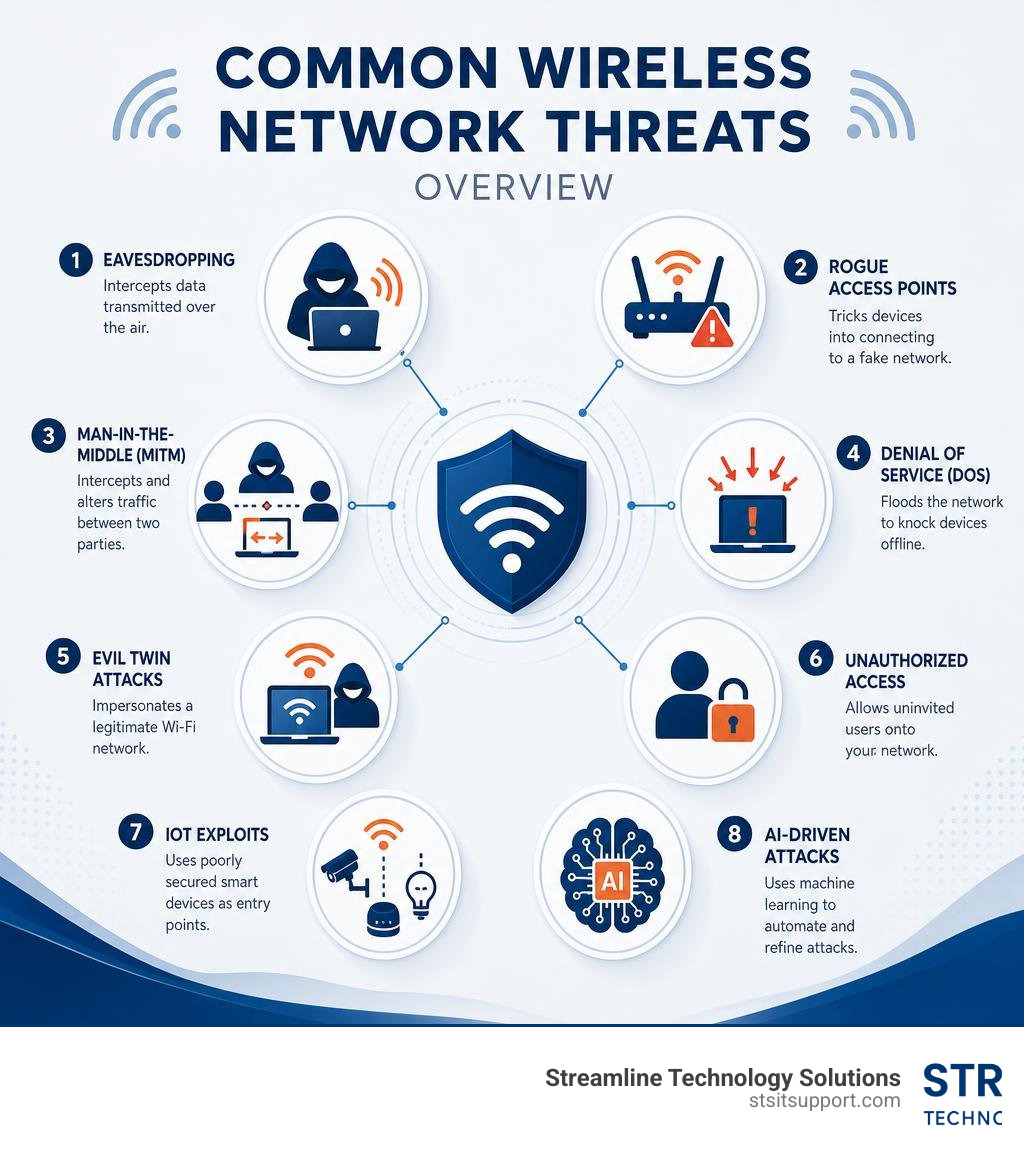
Wireless network threats are malicious attacks that exploit the open, radio-based nature of Wi-Fi to steal data, disrupt services, or gain unauthorized access to your systems. Here are the most common types:
Threat What It Does Eavesdropping Intercepts data transmitted over the air Rogue Access Points Tricks devices into connecting to a fake network Man-in-the-Middle (MitM) Intercepts and alters traffic between two parties Denial of Service (DoS) Floods the network to knock devices offline Evil Twin Attacks Impersonates a legitimate Wi-Fi network Unauthorized Access Allows uninvited users onto your network IoT Exploits Uses poorly secured smart devices as entry points AI-Driven Attacks Uses machine learning to automate and refine attacks
Unlike a wired network, a wireless signal doesn't stop at your office walls. A typical indoor access point broadcasts 150 to 300 feet in every direction — and up to 1,000 feet outdoors. That means anyone in your parking lot, the building next door, or even the street could be within range.
That's not a hypothetical risk. Two-thirds of small and medium-sized businesses reported a cyberattack in 2018, with the average cost coming in at nearly $3 million. And the threat landscape has only grown more complex since then.
Newer research published at the NDSS Symposium in 2026 revealed that even networks using WPA2 and WPA3 encryption — long considered the gold standard — can be compromised through a class of attacks called AirSnitch. Every single router and network tested was vulnerable to at least one attack variant. That's not a vendor problem. That's an industry-wide problem.
For small businesses in South Florida, this matters. A breach doesn't just cost money — it costs downtime, customer trust, and sometimes the business itself.
I'm Michael Gaigelas, and with over 20 years of hands-on experience in IT support, wireless networking, and managed security services, I've seen how wireless network threats can devastate businesses that assumed their Wi-Fi was "good enough." In this guide, I'll walk you through exactly what you're up against and what actually works to protect your network.
Understanding Modern Wireless Network Threats
To protect your business, we first have to understand how wireless communication operates. Unlike physical ethernet cables that contain data within copper or glass fibers, Wi-Fi broadcasts data openly through the air using electromagnetic waves on frequencies like 2.4 GHz, 5 GHz, and newer 6 GHz bands. This inherent lack of physical boundaries means that anyone with a wireless network interface card (NIC) and a basic antenna can capture those signals.
Traditional Wireless Network Threats and Eavesdropping
For decades, the standard playbook of wireless network security focused on preventing a few well-known attacks. Understanding these legacy threats is critical, as they still make up the baseline of what hackers attempt daily:
Passive Capturing and Eavesdropping: This is where an attacker simply sits within range of your network and sniffs airborne packets. If your data isn't strongly encrypted, they can easily read unencrypted emails, passwords, and sensitive files. This is particularly dangerous in multi-tenant commercial buildings where signals bleed through walls and floors.
Rogue Access Points: An employee might bring in a cheap home router and plug it into your office network to get better signal strength. This creates an unmanaged, backdoor entry point bypassing all your firewall configurations.
Evil Twin Attacks: Attackers set up a rogue access point with a stronger signal and the exact same name (SSID) as your legitimate network. Unsuspecting devices automatically connect to the stronger signal, allowing the attacker to intercept their traffic.
Denial of Service (DoS) and RF Jamming: By flooding the 2.4 GHz or 5 GHz frequency bands with noise or spamming deauthentication frames, attackers can disconnect every device on your network, halting your business operations instantly.
Many of these vulnerabilities are detailed in our guide on Security Threats in Network Security. If you're wondering how these traditional vulnerabilities apply to your current setup, you can learn more about how they are identified by reading about the Top Wireless Network Security Risks.
Emerging Wireless Network Threats in the Era of 5G and AI
As we navigate through June 2026, the threat landscape has evolved far beyond basic packet sniffing. Cybercriminals are now leveraging advanced tools to automate and scale their attacks:
AI-Driven Attacks: Bad actors now use machine learning algorithms to map wireless signals, automatically identify connected devices, and launch highly targeted brute-force attacks against WPA3 handshakes. AI can also analyze captured traffic to predict user behavior or automatically generate convincing phishing portals for evil twin setups.
5G Network Vulnerabilities: The integration of 5G and local Wi-Fi networks introduces new data interception risks. Attackers exploit signaling vulnerabilities between private 5G networks and enterprise Wi-Fi to execute cross-network attacks.
IoT Device Exploits: Smart thermostats, wireless security cameras, and connected office appliances are notorious for lax security. Once an attacker compromises a weak IoT device, they can use it as a launching pad to infiltrate your core business network.
These emerging vectors are changing how we look at security. For local business owners, partnering with a specialized managed IT and security provider is a critical step in keeping up with these fast-moving tactics.
The Failure of Client Isolation and the AirSnitch Bypass
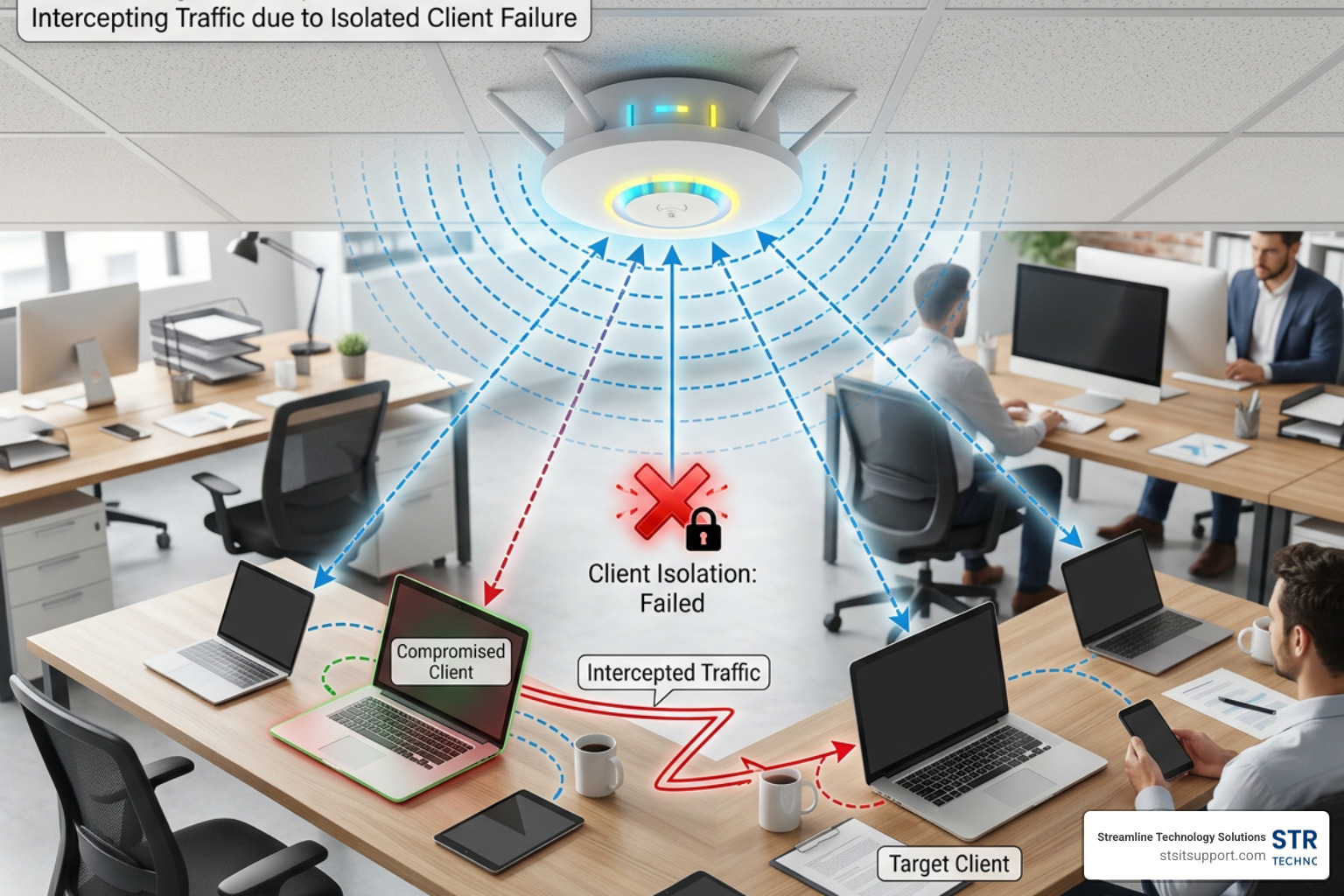
For years, network administrators relied on a feature called client isolation (sometimes known as AP isolation or guest network isolation) as a primary security boundary. The concept is simple: if you run a guest network or a public hotspot, client isolation prevents connected devices from talking to or seeing each other. It is supposed to ensure that even if a hacker connects to your guest Wi-Fi, they can't attack the device of the customer sitting next to them.
Unfortunately, groundbreaking research has shattered this assumption. A class of attacks called AirSnitch proved that client isolation is fundamentally broken across almost all modern wireless implementations.
How Client Isolation Works (and Why It Fails)
To understand why client isolation fails, we have to look at the underlying mechanics. When you connect to a secured Wi-Fi network (WPA2 or WPA3), your device establishes a unique encryption key with the access point called a Pairwise Temporal Key (PTK). This key encrypts your private unicast traffic.
However, the network also needs a way to send broadcast and multicast messages (like router advertisements or network discovery packets) to everyone simultaneously. For this, the access point distributes a shared key called the Group Temporal Key (GTK) and an Integrity Group Temporal Key (IGTK) to all connected clients.
Client isolation fails because of three architectural flaws:
Shared GTK/IGTK Keys: Because every device on the network shares the exact same group keys, any device can craft and encrypt broadcast or multicast packets that every other device will accept as legitimate.
Improper MAC and IP Binding: Access points and switches do not tightly bind a client's MAC address, IP address, and encryption keys together. This allows an attacker to spoof their identity across different layers of the network.
Lack of Standardization: Client isolation is not actually a standardized feature of the IEEE 802.11 Wi-Fi specification. It is a proprietary feature implemented differently by every hardware vendor, leading to massive gaps between how Layer 2 (switching) and Layer 3 (routing) isolation are enforced.
If you want to read the academic paper that exposed these flaws, check out AirSnitch: Demystifying and Breaking. For a practical look at how this impacts business design, our Network Security Services can help you redesign your network boundaries properly.
AirSnitch Attack Techniques: GTK Abuse and Gateway Bouncing
The AirSnitch framework uses these structural flaws to bypass client isolation entirely, allowing an attacker to perform traffic injection and establish bidirectional Man-in-the-Middle (MitM) positions.
The first major technique is GTK Abuse. Because an attacker possesses the shared group key (GTK), they can craft a unicast IP packet (such as a malicious web response or a spoofed DNS reply), wrap it inside a broadcast or multicast Wi-Fi frame, and encrypt it using the GTK. When the access point receives this frame, it broadcasts it to the entire network. The victim's device receives the packet, decrypts it using the shared GTK, and passes it up the protocol stack. The victim's operating system sees their own IP address in the destination field and processes the packet as if it came directly from the router, completely bypassing client isolation.
The second technique is Gateway Bouncing. If client isolation successfully blocks direct device-to-device communication at Layer 2, an attacker can simply send packets destined for another client directly to the default gateway (the router) at Layer 3. If the router's firewall is not explicitly configured to block client-to-client routing on the same subnet, the router will "bounce" the traffic back down to the target client.
To explore this attack architecture further, you can read the comprehensive analysis on AirSnitch: Cross-Layer Wi-Fi Client Isolation Bypass Enabling Bidirectional Man-in-the-Middle Attacks – Lab Space. Understanding how packets flow through these network boundaries is also why configuring a proper Proxy and the Firewall is so critical.
Interception and Port Stealing Across BSSIDs
While GTK abuse and gateway bouncing allow an attacker to inject traffic, full interception requires redirecting the victim's downlink and uplink traffic through the attacker's device. AirSnitch achieves this through Port Stealing and Broadcast Reflection.
In a port stealing attack, the attacker spoofs the victim's MAC address and transmits frames toward a different Basic Service Set Identifier (BSSID) or access point on the same network. This tricks the backend switches into updating their forwarding tables, directing all future traffic meant for the victim straight to the attacker.
Furthermore, because access points hosting multiple virtual networks (like a private staff SSID and a public guest SSID) often share the same underlying hardware, attackers can execute cross-BSSID attacks. An attacker sitting on a weakly secured guest network can spoof MAC addresses to intercept or inject traffic into the highly secure corporate network running on the exact same physical access point.
For a detailed technical breakdown of how these interception techniques operate, read the report on When Wi-Fi Encryption Fails: Protecting Your Enterprise from AirSnitch Attacks.
Protocol Vulnerabilities: From KRACK to SSID Confusion
The vulnerabilities in wireless networks aren't just limited to isolation features; they are baked directly into the core Wi-Fi protocols we use every single day.
Key Reinstallation Attacks (KRACK) and WPA2/WPA3 Flaws
In 2017, security researcher Mathy Vanhoef discovered KRACK (Key Reinstallation Attacks), which proved that the core WPA2 handshake could be broken. The attack targets the 4-way handshake used to establish session keys when a device connects to a network.
During the handshake, the access point sends encryption keys to the client. If the response is lost, the access point retransmits the key. KRACK works by intercepting and replaying these retransmissions. This tricks the client into reinstalling an already-in-use encryption key, resetting the key's transmit packet number (nonce) and receive packet number to zero.
Because cryptographic safety relies on nonces never being reused, this nonce reuse allows attackers to decrypt over-the-air traffic and inject malicious payloads. While WPA3 was designed to mitigate this, implementation flaws still leave many devices vulnerable.
Security Feature WPA2 (AES-CCMP) WPA3 (SAE) Key Exchange 4-Way Handshake (Vulnerable to offline dictionary attacks) Dragonfly Key Exchange (Resistant to offline dictionary attacks) Forward Secrecy No (Compromised password decrypts historical traffic) Yes (Compromised password cannot decrypt past traffic) Management Frames Optional / Rarely implemented Mandatory (Protected Management Frames - 802.11w) Mitigation against KRACK Vulnerable unless patched Built-in protection (if implemented correctly)
To review the original discovery details of this protocol flaw, you can visit the official resource on KRACK Attacks: Breaking WPA2.
SSID Confusion and Connection Redirection
Another major protocol vulnerability discovered recently is the SSID Confusion attack (CVE-2023-52424). Historically, we believed that because WPA2 and WPA3 authenticate the access point, a client could never be tricked into connecting to a rogue clone of a network.
However, researchers proved that the SSID (the network name) is not always cryptographically authenticated during the handshake. In an SSID confusion attack, a multi-channel MitM attacker rewrites the SSID in probe requests and association frames. They trick a client device into connecting to a different, less secure network (like a public hotspot or a legacy 2.4 GHz network) while displaying the name of the trusted corporate network on the user's screen.
This connection redirection can be used to bypass VPN auto-disable features (which turn off when connected to a "trusted" office SSID) or downgrade clients to networks where older attacks can be executed. You can read the academic paper on how this works at SSID Confusion: Making Wi-Fi Clients Connect to the Wrong Network.
Real-World Hardware Exposure and IoT Risks
These theoretical attacks are actively exposing networks in the real world. For example, Sophos recently issued a security advisory regarding AirSnitch vulnerabilities affecting their AP6 and APX series access points. These vulnerabilities allow attackers on the same SSID to bypass client isolation entirely. You can read the official advisory at Advisory: AirSnitch Vulnerabilities in Sophos AP6 and APX Series Access Points | Sophos.
Consumer-grade routers, open-source router firmware (like DD-WRT or OpenWrt), and enterprise-grade networks alike have all been shown to be vulnerable to at least one of these client isolation bypasses. This creates massive risks for IoT devices, which often lack the processing power to run local firewalls or modern encryption standards. You can read more about how physical and hardware-level risks overlap with digital threats in our guide on Physical Threats in Cyber Security.
For businesses looking to deploy hardware that is properly hardened against these risks, we recommend consulting with experienced IT support professionals to ensure your physical access points are securely configured from day one.
Mitigating Wireless Risks: CISA Guidelines and Advanced Defenses
With wireless network threats growing more sophisticated, how can South Florida businesses protect their data?
CISA Guidelines and Their Limitations
The Cybersecurity and Infrastructure Security Agency (CISA) provides a solid baseline for securing wireless infrastructure. Their core recommendations include:
Implementing Strong Encryption: Moving all networks to WPA3-Enterprise.
Deploying Intrusion Detection and Prevention Systems (IDPS): Monitoring the radio spectrum for rogue access points or deauthentication storms.
Regular Updates and Patches: Keeping all access point firmware and client operating systems updated.
Employee Training: Educating staff on the dangers of public Wi-Fi and evil twin networks.
You can read the full agency guidelines at Securing Enterprise Wireless Networks - CISA. However, while these guidelines are essential, they are often insufficient against advanced bypass techniques like AirSnitch. Because AirSnitch exploits fundamental protocol and architectural flaws in the 802.11 standard itself, simply updating firmware or using WPA3 will not fully protect you. A broader Cybersecurity Risk Assessment is required to identify where these gaps exist in your specific environment.
Advanced Defenses: VLANs, DHCP Snooping, and Zero Trust
To defend against advanced threats like AirSnitch and SSID confusion, we must adopt a Zero Trust posture—assuming that the wireless transport layer is inherently untrusted. Here are the advanced defenses we implement for our clients:
Strict VLAN Segmentation: Do not rely on virtual client isolation. Instead, assign isolated VLANs per user or per session, enforced at the wired switch level.
DHCP Snooping and IP Source Guard: Enable these features on your switches to prevent MAC address spoofing and port stealing attacks.
Unicast Reverse Path Forwarding (uRPF): Configure your routers to validate the source IP of all incoming packets, completely blocking gateway bouncing attacks.
Application-Layer Security: Enforce TLS encryption across all internal applications and implement certificate pinning on mobile apps so that even if traffic is intercepted, it cannot be read or modified.
Implementing these advanced controls requires a comprehensive Cyber Security Audit to map out your network traffic. Whether you run a standard office or a highly regulated environment, our team can help you implement these safeguards through our Local Cybersecurity Services Florida and specialized Law Firm Cybersecurity Services.
Frequently Asked Questions about Wireless Security
What is the most secure Wi-Fi encryption protocol available today?
WPA3 (specifically WPA3-Enterprise) is currently the most secure protocol. It utilizes the Dragonfly Key Exchange to protect against offline dictionary attacks and mandates the use of Protected Management Frames (802.11w) to prevent deauthentication attacks. However, it must be paired with wired-side protections (like DHCP snooping) to protect against cross-layer isolation bypasses.
Why does client isolation fail to prevent insider attacks?
Client isolation fails because it is not a standardized feature and relies on the assumption that clients cannot communicate if they are blocked at Layer 2. Attackers exploit shared group keys (GTK) to inject traffic or route packets through the default gateway (gateway bouncing) to bypass these blocks entirely.
How can organizations detect and prevent AirSnitch attacks?
To prevent AirSnitch, organizations must enforce strict VLAN segmentation per client, enable DHCP snooping and IP Source Guard on switches, and configure firewalls to block client-to-client routing on guest subnets. Continuous network monitoring should also be used to detect anomalies like MAC address duplication across different access points.
Conclusion
As we navigate the complex landscape of June 2026, wireless network threats are no longer just about stopping someone from freeloading on your office internet. With the emergence of advanced protocols flaws like AirSnitch and SSID confusion, the very mechanisms we trusted to keep our guest and corporate networks safe have been compromised.
At Streamline Technology Solutions, we believe that South Florida businesses deserve wireless networks that are built to withstand modern threats. We provide comprehensive IT services, VoIP, and hardware support to businesses in Coral Springs, Boca Raton, Fort Lauderdale, Deerfield Beach, and Pompano Beach.
We set ourselves apart with:
Transparent Pricing: No hidden fees, no surprise line items.
Fast Local Support: We are right here in South Florida, ready to deploy when you need us.
Direct Accountability: We own our results and work as a true extension of your team.
Don't leave your business's data exposed to the invisible threats floating through your office walls. Contact us at Streamline Technology Solutions today to schedule a comprehensive wireless security audit and ensure your business is truly protected.