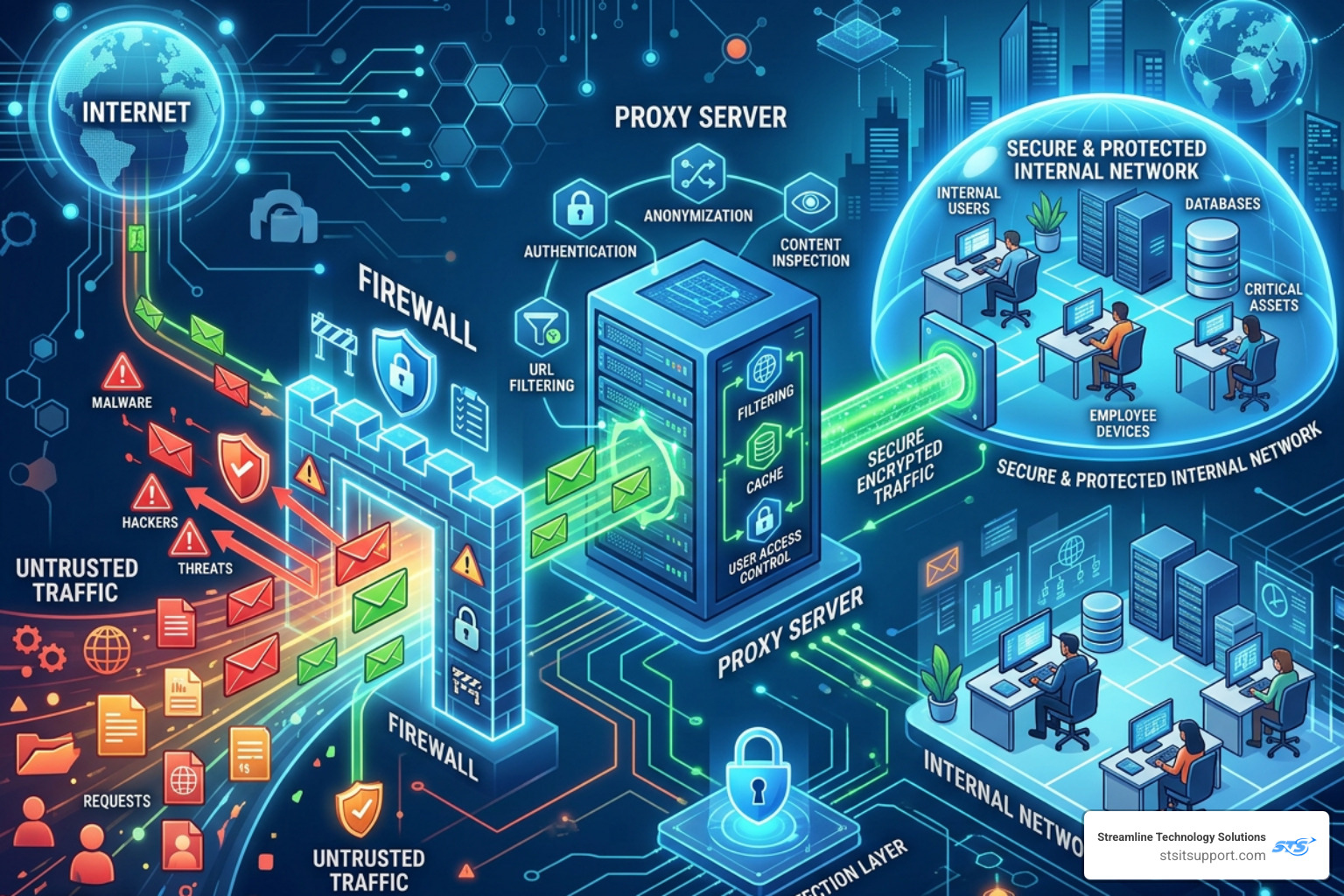
Why You Need Both a Proxy and the Firewall
Why Every Business Needs Both a Proxy and the Firewall
Proxy and the firewall are two of the most important layers in any network security setup — but they are not the same thing, and one cannot replace the other.
Here is a quick breakdown of what each one does:
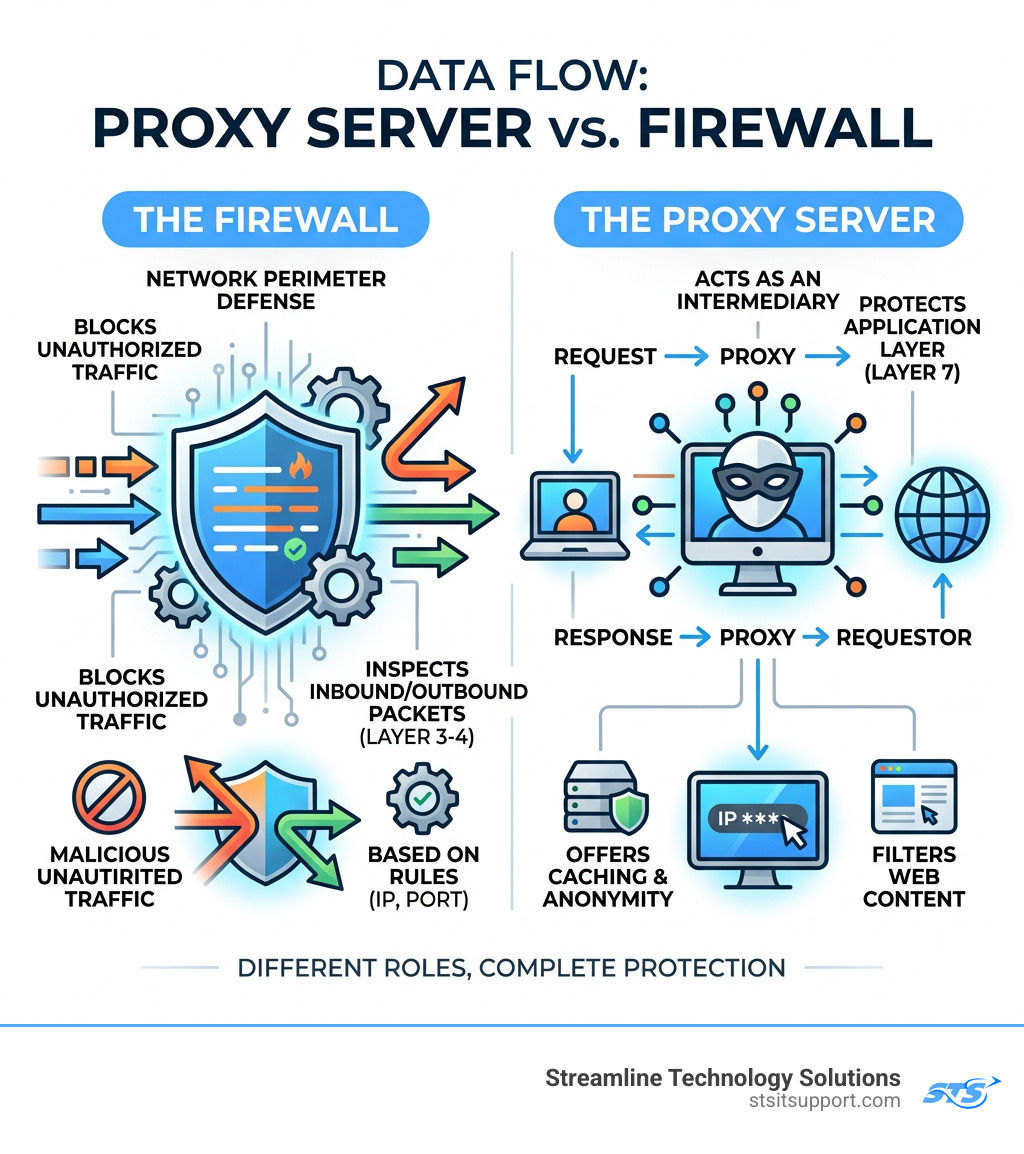
Proxy Server Firewall Main job Acts as a middleman between your device and the internet Blocks unauthorized traffic at the network boundary OSI layer Layer 7 (Application) Layers 3-4 (Network/Transport) Protects against Unwanted content, IP exposure, policy violations Malicious inbound traffic, unauthorized access Extra benefits Caching, anonymity, web filtering Port/protocol blocking, traffic logging Replaces the other? No No
Think of it this way: a firewall is your front door lock, and a proxy is the security desk inside the lobby. You need both.
Most small businesses run one or the other — and leave a real gap in their defenses. Cybercriminals know exactly where to look for those gaps.
I'm Michael Gaigelas, and with 20 years of hands-on experience in IT support, managed services, and network infrastructure, I've seen how businesses in South Florida get hit when proxy and the firewall aren't working together. In the sections ahead, I'll break down exactly how these two tools differ and why deploying both is the smarter move.
Understanding the Core Differences Between a Proxy and the Firewall
To the average user in Boca Raton or Fort Lauderdale, the internet just "works." But behind the scenes, a constant battle is being fought to keep data safe. To win that battle, we have to understand the specific roles of our two main defenders.
A firewall is essentially a gatekeeper. It sits at the edge of your network, inspecting every packet of data that tries to enter or leave. It uses a set of pre-programmed rules (often called an Access Control List or ACL) to decide if a packet is safe or if it should be tossed into the digital trash bin. Most firewalls focus on the "where" and "how"—where is this data coming from, and how is it trying to connect?
A proxy server, on the other hand, is an intermediary. When an employee in your Coral Springs office wants to visit a website, their computer doesn't talk to the website directly. Instead, it sends the request to the proxy. The proxy then goes out, fetches the website, checks it for anything fishy, and hands it back to the employee. Because the proxy makes the request on the user's behalf, the outside world never sees the user's actual IP address. This provides a layer of anonymity and privacy that a standard firewall doesn't offer.
Key Differences in a Nutshell:
Traffic Handling: Firewalls filter traffic; proxies mediate it.
Anonymity: Firewalls don't hide your identity; proxies do.
Content Knowledge: Traditional firewalls see packets; proxies see the actual content of the application (like the text on a webpage).
If you want to see how these defenses hold up in a real-world scenario, you can Request a Demo to visualize the difference between standard filtering and advanced mediation.
How a Proxy and the Firewall Operate at Different OSI Layers
In the IT world, we use the OSI (Open Systems Interconnection) model to describe how different technologies communicate. Understanding these layers is the "secret sauce" to knowing why you need both a proxy and the firewall.
Layer 3 (Network Layer): This is where traditional packet-filtering firewalls live. They look at IP addresses. It’s like a bouncer checking IDs at the door. If your name (IP) isn't on the list, you aren't getting in.
Layer 4 (Transport Layer): Firewalls also work here to check port numbers (like Port 80 for web traffic or Port 25 for email). This ensures that data is traveling through the right "pipes."
Layer 7 (Application Layer): This is the home of the proxy server. At this layer, the technology understands specific application protocols like HTTP, HTTPS, and FTP. While a Layer 3 firewall just sees a "packet," a Layer 7 proxy sees a "webpage request for Facebook."
By operating at Layer 7, a proxy can perform much more granular filtering. For example, it can allow your employees to use LinkedIn for business but block them from using the LinkedIn messaging feature to prevent data leaks. A standard firewall usually can't be that specific. For more deep-dive technical documents on these layers, check out our Resources page.
Primary Functions and Common Use Cases
Why do we bother setting up both in our Pompano Beach and Deerfield Beach client offices? Because they solve different problems.
Common Firewall Use Cases:
Inbound Protection: Blocking hackers from scanning your network for open ports.
Stateful Inspection: Keeping track of active connections to ensure that an incoming packet is actually a response to a request you sent out, rather than an uninvited "guest."
Network Segmentation: Dividing your office network so the guest Wi-Fi can't talk to your accounting server.
Common Proxy Use Cases:
Caching: The proxy saves copies of frequently visited websites. If ten people in your office visit the same news site, the proxy only downloads it once, saving bandwidth and making the internet feel faster.
Web Filtering: Blocking access to dangerous or inappropriate categories of websites (like gambling or known malware sites).
Geoblocking Bypass: Sometimes, a business needs to see how their site looks to a customer in another country. A proxy can make your request appear as if it’s coming from a different geographic location.
The Rise of the Proxy Firewall: Application-Layer Protection
As cyber threats evolved, the industry realized that simple packet filtering wasn't enough. Hackers started hiding malicious code inside seemingly "safe" packets. This led to the development of the proxy firewall (also known as an application-level gateway).
A proxy firewall is the most secure type of firewall available. Unlike a traditional firewall, it doesn't allow any direct connection between the internal network and the outside world. Instead, it creates two separate connections: one from the user to the proxy, and one from the proxy to the destination.
This "mirrored session" means the proxy firewall can inspect the entire data payload before it ever reaches your computer. If the data contains a hidden virus, the proxy catches it in its own isolated environment. It’s the digital equivalent of a high-security "man-trap" entrance where you have to pass through two sets of doors that never open at the same time.
To learn more about how this specific technology functions as a barrier, you can read the definition of What is a Proxy Firewall?.
How Proxy Firewalls Perform Deep Packet Inspection and TLS Interception
Deep Packet Inspection (DPI) is where things get really technical. In a standard setup, a firewall looks at the "header" of a packet (the envelope). DPI looks at the "letter" inside the envelope.
However, most web traffic today is encrypted (HTTPS/TLS). To a standard firewall, this looks like gibberish. A proxy firewall can perform TLS Interception. It acts as a "trusted man-in-the-middle." It decrypts the traffic, inspects the content for threats, re-encrypts it, and then sends it on its way.
This process involves:
SYN-ACK Handshake: The proxy intercepts the initial connection request and completes the handshake with the user itself, rather than passing it through.
Protocol Validation: Ensuring that the traffic claiming to be "web traffic" isn't actually a hidden command-and-control signal for a botnet.
Payload Analysis: Scanning the actual files being downloaded for signatures of known malware.
Types of Proxy Firewalls: Forward, Reverse, and Transparent
Not all proxies are configured the same way. Depending on your business needs in Ft. Lauderdale, we might implement one of these three:
Forward Proxy: This is the most common type for businesses. It sits in front of your employees and handles their requests to the internet. It’s great for egress filtering (controlling what leaves your network).
Reverse Proxy: This sits in front of your web servers. When a customer visits your website, they talk to the reverse proxy first. This is excellent for load balancing and protecting your actual servers from direct attacks.
Transparent Proxy: These are "invisible." The user doesn't have to configure anything on their computer; the network automatically routes traffic through the proxy. This is often used for forced content filtering in schools or large corporate environments.
Comparing Performance, Security, and Configuration Risks
We often get asked, "If a proxy firewall is so secure, why doesn't everyone use it for everything?" The answer usually comes down to the "Three Horsemen" of networking: Speed, Complexity, and Cost.
Advantages and Disadvantages of Each Layer
Traditional Firewalls:
Pros: Extremely fast (low latency), handles massive amounts of traffic, relatively easy to set up.
Cons: Can't see inside encrypted traffic easily, doesn't provide anonymity, blind to application-layer attacks.
Proxy Servers / Proxy Firewalls:
Pros: Unmatched security, hides internal network structure, provides detailed logging of user activity, saves bandwidth via caching.
Cons: Higher processing overhead (can slow down connections), more complex to manage, can be a "single point of failure" if not configured with redundancy.
Because a proxy has to terminate and recreate every connection, it requires more "brainpower" (CPU and RAM) than a standard firewall. For a small business with limited hardware, this can lead to a noticeable lag if the system isn't sized correctly. If you're experiencing slowness, our Support Center can help diagnose whether it's a configuration issue or a hardware bottleneck.
Security Risks of Misconfiguration
The only thing more dangerous than no security is bad security. A misconfigured proxy and the firewall setup can actually create new vulnerabilities.
Open Proxies: If your proxy is configured incorrectly, people from the outside might be able to use it to hide their own illegal activities, making it look like the traffic is coming from your business!
Rule Conflicts: If your firewall blocks Port 80 but your proxy is trying to use it, your internet will simply stop working.
Bypass Techniques: If you don't "force" traffic through the proxy, savvy employees (or malware) might just bypass it entirely by connecting directly to IP addresses, rendering your filtering useless.
Modern Architectures: NGFWs and Cloud Proxy Integration
The line between proxy and the firewall is blurring thanks to Next-Generation Firewalls (NGFWs). Modern appliances, like those we deploy for our South Florida clients, often combine both functions into a single box.
When to Deploy a Proxy and the Firewall Together
For most of our clients, we recommend a layered defense. You use a firewall to protect the perimeter from broad attacks and a proxy to manage the specific behavior of your users and applications. This is especially critical if you handle sensitive data (like medical records or credit card info) and need to comply with regulations like HIPAA or PCI-DSS.
In hybrid environments—where you have some servers in your office and some in the cloud—this layering becomes even more important. You need consistent security policies whether an employee is sitting in Boca Raton or working from a coffee shop in Pompano Beach.
Cloud Solutions and Managed Proxy Fleets
As businesses move to the cloud (AWS, Azure, Google Cloud), the way we handle proxies is changing. Managing a "fleet" of proxy servers manually is a headache. That’s why many are turning to managed solutions.
For example, the AWS Network Firewall proxy allows businesses to secure their cloud egress traffic (the data leaving their virtual servers) without having to patch and scale individual proxy instances themselves.
These cloud solutions offer:
Auto-scaling: The proxy grows as your traffic grows.
Centralized Inspection: You can see all your traffic across multiple "virtual offices" in one dashboard.
VPC Endpoints: Keeping your traffic within the private cloud network rather than sending it over the public internet.
Frequently Asked Questions about Proxy and the Firewall
Can a proxy server replace a traditional firewall?
No. While a proxy provides excellent application-level security and anonymity, it isn't designed to handle the high-speed packet filtering and network-level port blocking that a firewall excels at. Using only a proxy is like having a great receptionist but leaving the front door wide open. You need the firewall to stop the "smash and grab" attacks at the network level.
How do proxy firewalls handle different protocols like HTTP and SMTP?
Proxy firewalls are "protocol-aware." This means they have a specific "agent" for each type of traffic. An HTTP proxy understands web requests; an SMTP proxy understands email. This allows the proxy to look for protocol-specific threats—like an email with a malicious attachment or a webpage with a hidden script. If the traffic doesn't follow the "rules" of that protocol, the proxy rejects it.
Do these security layers significantly impact internet speed?
They can, but they shouldn't if they are configured correctly. A firewall adds almost zero noticeable delay. A proxy does add a tiny bit of latency because it has to "think" about each request. However, because proxies use caching, they often make the internet feel faster for users because they don't have to download the same data over and over again from the internet.
Conclusion
At the end of the day, securing your business isn't about finding one "magic bullet" tool. It’s about building layers. By using both a proxy and the firewall, you create a defense that protects you from the broad, automated attacks of the internet while also giving you granular control over what happens inside your four walls.
At Streamline Technology Solutions, we specialize in helping businesses across Coral Springs, Boca Raton, Fort Lauderdale, Deerfield Beach, and Pompano Beach navigate these complex choices. We believe in transparent pricing—no hidden fees, no "gotcha" contracts. Just fast, local support and direct accountability.
If you aren't sure if your current setup is truly protecting your network integrity, don't wait for a breach to find out. We’re here to help you streamline your IT and give you the peace of mind you deserve.
Visit us at https://stsitsupport.com to learn more about our managed security services and how we can protect your South Florida business.