Outsource Your IT Helpdesk Without Losing Your Mind
Is IT Helpdesk Outsourcing Right for Your Business?
IT helpdesk outsourcing means hiring an external provider to handle your company's technical support — instead of managing it in-house. Here's what you need to know at a glance:
Question Quick Answer What is it? An external team handles your IT tickets, troubleshooting, and user support Main benefit Up to 40% cost savings vs. in-house, plus 24/7 coverage Who is it for? Businesses of any size — especially SMBs without a full IT team Key risk Loss of control, data security, and communication gaps if you pick the wrong partner Support levels Tier 0 (self-service) through Tier 3 (advanced/disaster recovery) Typical results 30% faster incident resolution, 90%+ first-contact resolution rates
If your IT support feels like a game of phone tag — slow responses, surprise bills, and no one who actually knows your systems — you're not alone. Many South Florida small businesses are stuck in that cycle. The promise of outsourcing your IT helpdesk sounds great on paper: lower costs, faster response times, round-the-clock coverage. But handing over something as critical as your IT support to an outside team can feel like a real leap of faith.
This guide walks you through exactly what to expect, what to watch out for, and how to make the right call for your business.
I'm Michael Gaigelas, and I've spent 20 years working hands-on with IT support, managed services, cloud infrastructure, and business technology — including helping companies navigate IT helpdesk outsourcing decisions that actually stick. Whether you're considering your first outsourced support arrangement or rethinking a setup that isn't working, the sections below will give you a clear, practical framework to move forward.
What is IT Help Desk Outsourcing vs. In-House Support?
When you manage your IT in-house, you are responsible for the entire operation: recruiting, hiring, training, and retaining technical staff, as well as paying for licensing, ticketing software, and hardware. If an employee's computer crashes at 8:00 PM on a Friday, your internal IT person is either working overtime or the employee is out of luck until Monday morning.

In contrast, it helpdesk outsourcing transfers these operational responsibilities to a specialized partner. Instead of relying on one or two generalists in your office, you gain access to an entire team of certified professionals who monitor, manage, and resolve issues around the clock. By delegating these tasks, your internal team can stop fighting daily fires and focus on high-impact projects that drive business growth.
To understand how this looks in practice, it helps to review the broader scope of IT Support Desk services. Rather than just answering phones, a modern outsourced partner integrates directly with your business operations.
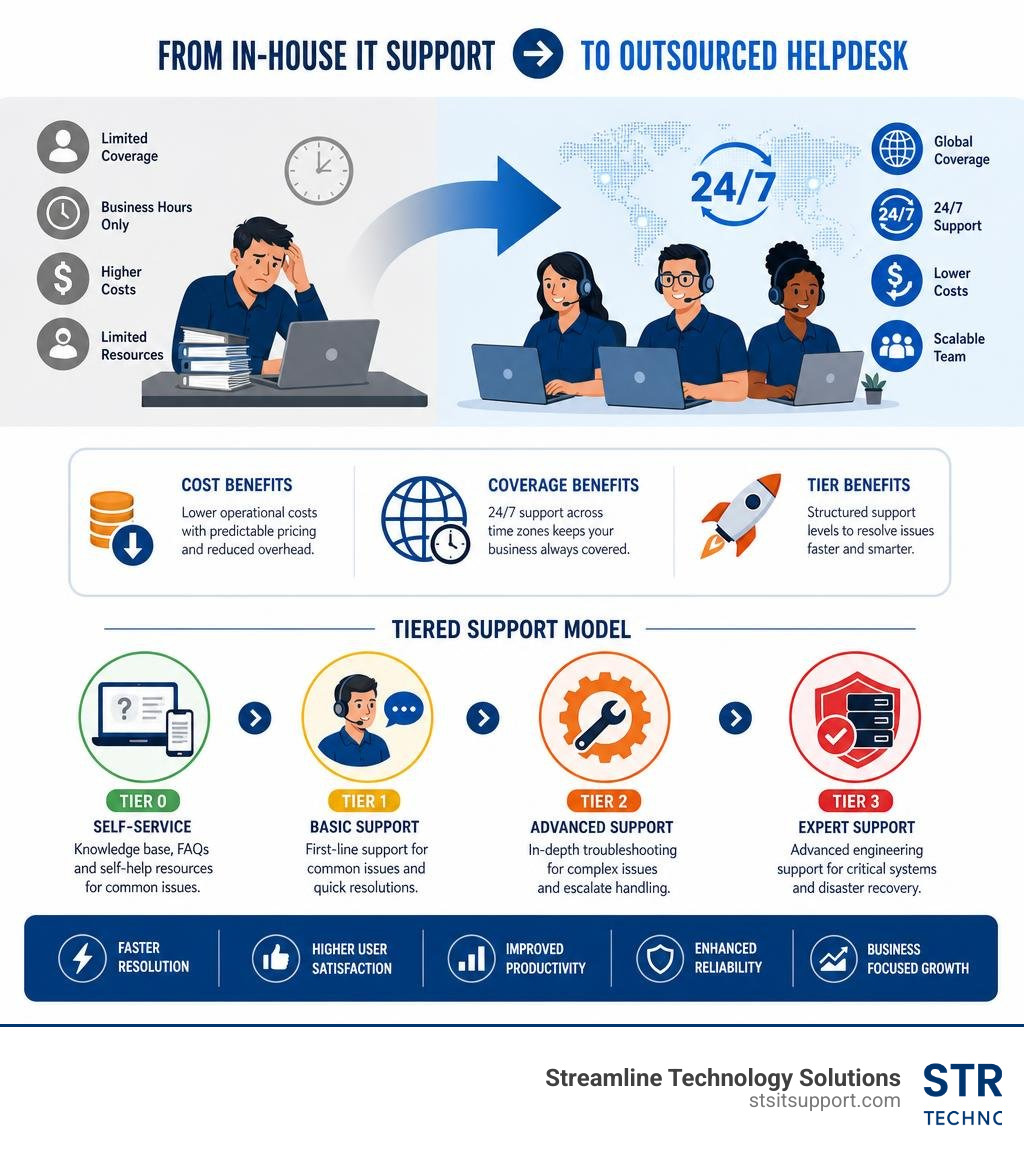
Feature In-House IT Support Outsourced Help Desk Model Availability Typically business hours (9 AM - 5 PM) 24/7/365 coverage options Cost Structure High fixed costs (salaries, benefits, tools) Predictable monthly fee or session-based Scalability Slow; requires hiring and onboarding Instant; scales up or down based on demand Skill Range Limited to the knowledge of hired staff Broad access to L1, L2, and L3 specialists Tooling & Software Business must purchase and maintain Included in the provider's service stack
How IT Helpdesk Outsourcing Differs from In-House Teams
The operational differences go far beyond simple cost structures. An in-house team is often constrained by resource efficiency. When ticket volumes spike—due to a software update or a new security protocol—internal staff quickly become overwhelmed. This leads to backlogs, missed SLAs, and highly frustrated employees.
With an outsourced model, the provider utilizes economies of scale. They employ dedicated triage coordinators and automated systems to route tickets instantly to the correct technician. If you want to dive deeper into how these ticketing environments are structured, read our guide on the IT Help Desk. Outsourced providers use standardized workflows to ensure no ticket falls through the cracks, allowing local businesses to enjoy enterprise-grade infrastructure without the enterprise price tag.
Defining the IT Helpdesk Support Model
An outsourced helpdesk operates on a structured, multi-step workflow designed for speed and accuracy:
Incident Logging: Users submit tickets via phone, email, live chat, or a dedicated self-service portal.
Triage and Categorization: The system or a triage agent evaluates the ticket's severity and assigns it to the appropriate tier.
Remote Troubleshooting: Certified engineers securely access the user's system to diagnose and resolve the issue remotely.
Escalation Workflow: If a complex issue cannot be resolved at the initial level, it undergoes a "warm handoff" to senior engineers with fully documented notes, so the user never has to repeat their problem.
To learn more about how these workflows keep businesses running smoothly, explore our comprehensive breakdown of IT Helpdesk Support.
Evaluating IT Helpdesk Outsourcing: Benefits and Risks
Every business decision involves trade-offs. To determine if outsourcing is the right move for your organization, you must weigh the substantial financial and operational advantages against the potential risks. For a broader look at how external support fits into your business planning, check out our resource on IT Support for Businesses.
Financial and Operational Benefits
The most immediate impact of it helpdesk outsourcing is on your bottom line. Building an internal helpdesk requires significant capital. Between salaries, benefits, office space, continuous training, and software licenses, the costs accumulate rapidly.
Up to 40% Cost Reduction: Outsourcing reduces these capital expenses to a predictable monthly operating cost. By leveraging shared-staff models and advanced automation, providers deliver superior support at a fraction of the cost of maintaining an equivalent in-house team.
30% Faster Incident Resolution: Specialized helpdesk providers live and breathe ticket resolution. With dedicated QA teams, structured playbooks, and continuous training, they resolve issues roughly 30% faster than typical in-house generalists. You can learn more about how speed impacts your operations in our article on IT Support Response Time.
68% Increase in Resolved Tickets: By utilizing optimized workflows and advanced diagnostic tools, businesses partnering with professional helpdesks often see a massive jump in their overall ticket resolution capacity.
Reclaimed Engineering Capacity: When internal IT staff are freed from basic tasks like password resets and printer troubleshooting, they can reclaim up to 30% of their workweek to focus on strategic, revenue-generating projects.
Potential Risks and Mitigation Strategies
While the benefits are clear, outsourcing is not without its challenges. Understanding these risks allows you to proactively mitigate them.
Data Security and Privacy: Sharing access with an external vendor can raise security concerns. Mitigation: Ensure your partner utilizes multi-factor authentication (MFA), role-based access control, and encrypted remote-control tools.
Loss of Control: Some business owners worry that outsourcing means losing visibility into their IT environment. Mitigation: Partner with a provider that operates directly inside a transparent ticketing system, giving you real-time dashboards and weekly reports.
Cultural and Communication Gaps: Offshored call centers often lead to frustrating communication barriers and rigid, script-only troubleshooting. Mitigation: Work with a local partner that understands your market.
If you are based in South Florida, choosing local support with direct accountability is key. Working with a provider that has a physical presence in areas like Coral Springs, Boca Raton, Fort Lauderdale, Deerfield Beach, and Pompano Beach ensures you get rapid response times and technicians who can be onsite when remote troubleshooting isn't enough.
Understanding Support Tiers (Tier 0 to Tier 3) and SLAs
A professional outsourced helpdesk does not treat all technical issues equally. To ensure efficiency and rapid resolution, support is organized into distinct tiers, governed by strict Service Level Agreements (SLAs).

This structured approach ensures that simple requests are handled instantly, while complex engineering issues are routed to highly specialized experts. To see how these tiers fit into a broader service catalog, read about IT Service Desk Services.
Tier 0 and Tier 1: Self-Service and Basic Troubleshooting
Tier 0 (Self-Service): This tier empowers users to resolve common, repetitive issues on their own. It includes interactive knowledge bases, automated password reset portals, and proactive system notifications.
Tier 1 (Basic Support): This is your first line of human contact. Tier 1 agents handle standard software installations, user access management, basic email configurations, and connectivity troubleshooting. Top-tier providers achieve a 90%+ first-contact resolution (FCR) rate at this level, resolving basic tickets within minutes.
Tier 2 and Tier 3: Advanced Technical Support
Tier 2 (In-Depth Technical Support): When an issue requires deeper investigation—such as complex Active Directory troubleshooting, VPN configuration errors, or localized server hiccups—it is escalated to Tier 2. These are experienced engineers who perform structured troubleshooting across multiple operating systems.
Tier 3 (Advanced Systems & Engineering): This tier handles critical, high-impact issues. Tier 3 support covers code-level troubleshooting, database optimization, cloud infrastructure failures, and disaster recovery execution.
To prevent user frustration, reputable helpdesks use warm handoffs. This means a Tier 1 agent will transition the user to a Tier 2 or Tier 3 engineer with all diagnostic notes fully documented, ensuring the user never has to repeat their issue from scratch.
How to Choose the Right IT Help Desk Outsourcing Partner
Selecting an IT partner is one of the most critical operational decisions you will make. The wrong partner can increase your management overhead, while the right partner seamlessly integrates into your team. When vetting Managed IT Support Companies, you must look beyond the sales pitch and analyze their security, tools, and local presence.
Security and Compliance Standards to Look For
Your helpdesk partner will have administrative access to your systems, making their security standards just as important as your own. Look for a partner that holds or adheres to the following frameworks:
SOC 2 Type II: Verifies that the provider has strict, audited controls in place to protect your data over time.
ISO 27001: The gold standard for global information security management systems.
HIPAA Compliance: Essential if you operate in or serve the healthcare sector in South Florida.
PCI DSS Level 1: Required if your helpdesk handles systems that process financial or credit card data.
Additionally, verify that the provider enforces internal security best practices, such as mandatory background checks for all technicians, multi-factor authentication (MFA) on all remote access tools, and full data encryption both in transit and at rest. For a widely recognized baseline on cybersecurity risk management, the NIST Cybersecurity Framework is a useful reference when evaluating how mature a provider's security program is.
How AI and Tool Integration Enhance IT Helpdesk Outsourcing
In 2026, automation is no longer optional; it is a core driver of helpdesk efficiency. Modern providers leverage hyperautomation to streamline ticket resolution:
AI-Powered Helpdesk Automation: Advanced AI engines can automatically resolve up to 75% of routine tickets, such as password resets and standard software access. This increases overall team capacity by 5x without requiring additional headcount.
PSA and CRM Integration: Your provider should integrate directly with your existing tools - whether you use Jira, Freshservice, Zendesk, or ServiceNow. This ensures that workflows remain unified and transparent.
For a deeper dive into the software that powers these operations, check out our guide on the IT Helpdesk Ticketing System.
Best Practices for a Successful Outsourcing Partnership
A successful outsourcing relationship is built on clear communication, thorough documentation, and mutual accountability. It should never feel like a "black box" where tickets go in and you have no idea how they are resolved.
To set your partnership up for success, focus on these three phases:
Structured Onboarding: Do not rush the transition. A proper onboarding phase takes a few weeks, allowing the provider to study your environment, build custom documentation, and establish clear standard operating procedures (SOPs).
Continuous Knowledge Transfer: As your business grows and your software stack evolves, keep your helpdesk updated. A dedicated Quality Assurance (QA) team should regularly update your knowledge base.
Flexible Agreements: Avoid rigid, multi-year lock-ins that penalize you for changing business needs. To learn more about the benefits of flexible partnerships, read our guide on IT Support Without Contracts.
Establishing Clear KPIs and Communication Channels
To maintain high service quality, you must continuously track performance. Your provider should give you access to real-time dashboards and hold regular sync meetings to review key helpdesk metrics:
Customer Satisfaction (CSAT): Target a CSAT score of 95% or higher.
First Contact Resolution (FCR): The percentage of tickets resolved during the very first interaction (aim for 70-80%+).
First Response Time (FRT): How quickly a live technician acknowledges and begins working on a ticket (e.g., under 15 minutes for critical issues).
Mean Time to Resolution (MTTR): The average time it takes to fully resolve an incident from submission to close.
Frequently Asked Questions about IT Helpdesk Outsourcing
Is IT help desk outsourcing suitable for small businesses?
Yes, it is highly beneficial for small and medium-sized enterprises (SMEs). Most small businesses do not have the budget to hire a round-the-clock IT team with specialized L1, L2, and L3 skills. Outsourcing gives SMEs access to enterprise-grade tools, 24/7 coverage, and certified technicians for a predictable monthly fee, allowing them to scale quickly without the burden of hiring overhead.
Can we outsource help desk support while keeping some tasks in-house?
Absolutely. This is known as a co-managed IT support model. In this setup, your internal IT manager or small team handles strategic planning, proprietary software, and onsite projects, while the outsourced partner manages routine Tier 1 and Tier 2 tickets, after-hours support, and basic troubleshooting. It provides the perfect balance of internal control and external capacity.
How do outsourced help desk providers handle cybersecurity threats?
Reputable outsourced helpdesks build security into every workflow. They utilize proactive monitoring tools to identify potential threats—such as malware or unauthorized login attempts—before they cause downtime. If a security incident occurs, they follow documented containment protocols and work closely with your internal team or local resources. For issues requiring physical intervention, learn more about how Onsite IT Support coordinates with remote security teams to secure your office.
Conclusion
Outsourcing your IT helpdesk doesn't have to be a stressful transition. When done correctly, it helpdesk outsourcing streamlines your operations, lowers your overhead by up to 40%, and frees your team to focus on what they do best: growing your business.
At Streamline Technology Solutions, we provide fast, local IT support, VoIP, and hardware to businesses across South Florida—including Coral Springs, Boca Raton, Fort Lauderdale, Deerfield Beach, and Pompano Beach. We believe in direct accountability, transparent pricing with zero hidden fees, and support that actually feels like an extension of your own team.
Ready to leave the IT headaches behind? Get started with Streamline Technology Solutions today and let us build a reliable, secure support model tailored to your business.

How Can We Help?
Call us at (954) 368-0648 or fill out the form below.
Featured Posts
Outsource Your IT Helpdesk Without Losing Your Mind
Is IT Helpdesk Outsourcing Right for Your Business?
IT helpdesk outsourcing means hiring an external provider to handle your company's technical support — instead of managing it in-house. Here's what you need to know at a glance:
Question Quick Answer What is it? An external team handles your IT tickets, troubleshooting, and user support Main benefit Up to 40% cost savings vs. in-house, plus 24/7 coverage Who is it for? Businesses of any size — especially SMBs without a full IT team Key risk Loss of control, data security, and communication gaps if you pick the wrong partner Support levels Tier 0 (self-service) through Tier 3 (advanced/disaster recovery) Typical results 30% faster incident resolution, 90%+ first-contact resolution rates
If your IT support feels like a game of phone tag — slow responses, surprise bills, and no one who actually knows your systems — you're not alone. Many South Florida small businesses are stuck in that cycle. The promise of outsourcing your IT helpdesk sounds great on paper: lower costs, faster response times, round-the-clock coverage. But handing over something as critical as your IT support to an outside team can feel like a real leap of faith.
This guide walks you through exactly what to expect, what to watch out for, and how to make the right call for your business.
I'm Michael Gaigelas, and I've spent 20 years working hands-on with IT support, managed services, cloud infrastructure, and business technology — including helping companies navigate IT helpdesk outsourcing decisions that actually stick. Whether you're considering your first outsourced support arrangement or rethinking a setup that isn't working, the sections below will give you a clear, practical framework to move forward.
What is IT Help Desk Outsourcing vs. In-House Support?
When you manage your IT in-house, you are responsible for the entire operation: recruiting, hiring, training, and retaining technical staff, as well as paying for licensing, ticketing software, and hardware. If an employee's computer crashes at 8:00 PM on a Friday, your internal IT person is either working overtime or the employee is out of luck until Monday morning.
In contrast, it helpdesk outsourcing transfers these operational responsibilities to a specialized partner. Instead of relying on one or two generalists in your office, you gain access to an entire team of certified professionals who monitor, manage, and resolve issues around the clock. By delegating these tasks, your internal team can stop fighting daily fires and focus on high-impact projects that drive business growth.
To understand how this looks in practice, it helps to review the broader scope of IT Support Desk services. Rather than just answering phones, a modern outsourced partner integrates directly with your business operations.
Feature In-House IT Support Outsourced Help Desk Model Availability Typically business hours (9 AM - 5 PM) 24/7/365 coverage options Cost Structure High fixed costs (salaries, benefits, tools) Predictable monthly fee or session-based Scalability Slow; requires hiring and onboarding Instant; scales up or down based on demand Skill Range Limited to the knowledge of hired staff Broad access to L1, L2, and L3 specialists Tooling & Software Business must purchase and maintain Included in the provider's service stack
How IT Helpdesk Outsourcing Differs from In-House Teams
The operational differences go far beyond simple cost structures. An in-house team is often constrained by resource efficiency. When ticket volumes spike—due to a software update or a new security protocol—internal staff quickly become overwhelmed. This leads to backlogs, missed SLAs, and highly frustrated employees.
With an outsourced model, the provider utilizes economies of scale. They employ dedicated triage coordinators and automated systems to route tickets instantly to the correct technician. If you want to dive deeper into how these ticketing environments are structured, read our guide on the IT Help Desk. Outsourced providers use standardized workflows to ensure no ticket falls through the cracks, allowing local businesses to enjoy enterprise-grade infrastructure without the enterprise price tag.
Defining the IT Helpdesk Support Model
An outsourced helpdesk operates on a structured, multi-step workflow designed for speed and accuracy:
Incident Logging: Users submit tickets via phone, email, live chat, or a dedicated self-service portal.
Triage and Categorization: The system or a triage agent evaluates the ticket's severity and assigns it to the appropriate tier.
Remote Troubleshooting: Certified engineers securely access the user's system to diagnose and resolve the issue remotely.
Escalation Workflow: If a complex issue cannot be resolved at the initial level, it undergoes a "warm handoff" to senior engineers with fully documented notes, so the user never has to repeat their problem.
To learn more about how these workflows keep businesses running smoothly, explore our comprehensive breakdown of IT Helpdesk Support.
Evaluating IT Helpdesk Outsourcing: Benefits and Risks
Every business decision involves trade-offs. To determine if outsourcing is the right move for your organization, you must weigh the substantial financial and operational advantages against the potential risks. For a broader look at how external support fits into your business planning, check out our resource on IT Support for Businesses.
Financial and Operational Benefits
The most immediate impact of it helpdesk outsourcing is on your bottom line. Building an internal helpdesk requires significant capital. Between salaries, benefits, office space, continuous training, and software licenses, the costs accumulate rapidly.
Up to 40% Cost Reduction: Outsourcing reduces these capital expenses to a predictable monthly operating cost. By leveraging shared-staff models and advanced automation, providers deliver superior support at a fraction of the cost of maintaining an equivalent in-house team.
30% Faster Incident Resolution: Specialized helpdesk providers live and breathe ticket resolution. With dedicated QA teams, structured playbooks, and continuous training, they resolve issues roughly 30% faster than typical in-house generalists. You can learn more about how speed impacts your operations in our article on IT Support Response Time.
68% Increase in Resolved Tickets: By utilizing optimized workflows and advanced diagnostic tools, businesses partnering with professional helpdesks often see a massive jump in their overall ticket resolution capacity.
Reclaimed Engineering Capacity: When internal IT staff are freed from basic tasks like password resets and printer troubleshooting, they can reclaim up to 30% of their workweek to focus on strategic, revenue-generating projects.
Potential Risks and Mitigation Strategies
While the benefits are clear, outsourcing is not without its challenges. Understanding these risks allows you to proactively mitigate them.
Data Security and Privacy: Sharing access with an external vendor can raise security concerns. Mitigation: Ensure your partner utilizes multi-factor authentication (MFA), role-based access control, and encrypted remote-control tools.
Loss of Control: Some business owners worry that outsourcing means losing visibility into their IT environment. Mitigation: Partner with a provider that operates directly inside a transparent ticketing system, giving you real-time dashboards and weekly reports.
Cultural and Communication Gaps: Offshored call centers often lead to frustrating communication barriers and rigid, script-only troubleshooting. Mitigation: Work with a local partner that understands your market.
If you are based in South Florida, choosing local support with direct accountability is key. Working with a provider that has a physical presence in areas like Coral Springs, Boca Raton, Fort Lauderdale, Deerfield Beach, and Pompano Beach ensures you get rapid response times and technicians who can be onsite when remote troubleshooting isn't enough.
Understanding Support Tiers (Tier 0 to Tier 3) and SLAs
A professional outsourced helpdesk does not treat all technical issues equally. To ensure efficiency and rapid resolution, support is organized into distinct tiers, governed by strict Service Level Agreements (SLAs).
This structured approach ensures that simple requests are handled instantly, while complex engineering issues are routed to highly specialized experts. To see how these tiers fit into a broader service catalog, read about IT Service Desk Services.
Tier 0 and Tier 1: Self-Service and Basic Troubleshooting
Tier 0 (Self-Service): This tier empowers users to resolve common, repetitive issues on their own. It includes interactive knowledge bases, automated password reset portals, and proactive system notifications.
Tier 1 (Basic Support): This is your first line of human contact. Tier 1 agents handle standard software installations, user access management, basic email configurations, and connectivity troubleshooting. Top-tier providers achieve a 90%+ first-contact resolution (FCR) rate at this level, resolving basic tickets within minutes.
Tier 2 and Tier 3: Advanced Technical Support
Tier 2 (In-Depth Technical Support): When an issue requires deeper investigation—such as complex Active Directory troubleshooting, VPN configuration errors, or localized server hiccups—it is escalated to Tier 2. These are experienced engineers who perform structured troubleshooting across multiple operating systems.
Tier 3 (Advanced Systems & Engineering): This tier handles critical, high-impact issues. Tier 3 support covers code-level troubleshooting, database optimization, cloud infrastructure failures, and disaster recovery execution.
To prevent user frustration, reputable helpdesks use warm handoffs. This means a Tier 1 agent will transition the user to a Tier 2 or Tier 3 engineer with all diagnostic notes fully documented, ensuring the user never has to repeat their issue from scratch.
How to Choose the Right IT Help Desk Outsourcing Partner
Selecting an IT partner is one of the most critical operational decisions you will make. The wrong partner can increase your management overhead, while the right partner seamlessly integrates into your team. When vetting Managed IT Support Companies, you must look beyond the sales pitch and analyze their security, tools, and local presence.
Security and Compliance Standards to Look For
Your helpdesk partner will have administrative access to your systems, making their security standards just as important as your own. Look for a partner that holds or adheres to the following frameworks:
SOC 2 Type II: Verifies that the provider has strict, audited controls in place to protect your data over time.
ISO 27001: The gold standard for global information security management systems.
HIPAA Compliance: Essential if you operate in or serve the healthcare sector in South Florida.
PCI DSS Level 1: Required if your helpdesk handles systems that process financial or credit card data.
Additionally, verify that the provider enforces internal security best practices, such as mandatory background checks for all technicians, multi-factor authentication (MFA) on all remote access tools, and full data encryption both in transit and at rest. For a widely recognized baseline on cybersecurity risk management, the NIST Cybersecurity Framework is a useful reference when evaluating how mature a provider's security program is.
How AI and Tool Integration Enhance IT Helpdesk Outsourcing
In 2026, automation is no longer optional; it is a core driver of helpdesk efficiency. Modern providers leverage hyperautomation to streamline ticket resolution:
AI-Powered Helpdesk Automation: Advanced AI engines can automatically resolve up to 75% of routine tickets, such as password resets and standard software access. This increases overall team capacity by 5x without requiring additional headcount.
PSA and CRM Integration: Your provider should integrate directly with your existing tools - whether you use Jira, Freshservice, Zendesk, or ServiceNow. This ensures that workflows remain unified and transparent.
For a deeper dive into the software that powers these operations, check out our guide on the IT Helpdesk Ticketing System.
Best Practices for a Successful Outsourcing Partnership
A successful outsourcing relationship is built on clear communication, thorough documentation, and mutual accountability. It should never feel like a "black box" where tickets go in and you have no idea how they are resolved.
To set your partnership up for success, focus on these three phases:
Structured Onboarding: Do not rush the transition. A proper onboarding phase takes a few weeks, allowing the provider to study your environment, build custom documentation, and establish clear standard operating procedures (SOPs).
Continuous Knowledge Transfer: As your business grows and your software stack evolves, keep your helpdesk updated. A dedicated Quality Assurance (QA) team should regularly update your knowledge base.
Flexible Agreements: Avoid rigid, multi-year lock-ins that penalize you for changing business needs. To learn more about the benefits of flexible partnerships, read our guide on IT Support Without Contracts.
Establishing Clear KPIs and Communication Channels
To maintain high service quality, you must continuously track performance. Your provider should give you access to real-time dashboards and hold regular sync meetings to review key helpdesk metrics:
Customer Satisfaction (CSAT): Target a CSAT score of 95% or higher.
First Contact Resolution (FCR): The percentage of tickets resolved during the very first interaction (aim for 70-80%+).
First Response Time (FRT): How quickly a live technician acknowledges and begins working on a ticket (e.g., under 15 minutes for critical issues).
Mean Time to Resolution (MTTR): The average time it takes to fully resolve an incident from submission to close.
Frequently Asked Questions about IT Helpdesk Outsourcing
Is IT help desk outsourcing suitable for small businesses?
Yes, it is highly beneficial for small and medium-sized enterprises (SMEs). Most small businesses do not have the budget to hire a round-the-clock IT team with specialized L1, L2, and L3 skills. Outsourcing gives SMEs access to enterprise-grade tools, 24/7 coverage, and certified technicians for a predictable monthly fee, allowing them to scale quickly without the burden of hiring overhead.
Can we outsource help desk support while keeping some tasks in-house?
Absolutely. This is known as a co-managed IT support model. In this setup, your internal IT manager or small team handles strategic planning, proprietary software, and onsite projects, while the outsourced partner manages routine Tier 1 and Tier 2 tickets, after-hours support, and basic troubleshooting. It provides the perfect balance of internal control and external capacity.
How do outsourced help desk providers handle cybersecurity threats?
Reputable outsourced helpdesks build security into every workflow. They utilize proactive monitoring tools to identify potential threats—such as malware or unauthorized login attempts—before they cause downtime. If a security incident occurs, they follow documented containment protocols and work closely with your internal team or local resources. For issues requiring physical intervention, learn more about how Onsite IT Support coordinates with remote security teams to secure your office.
Conclusion
Outsourcing your IT helpdesk doesn't have to be a stressful transition. When done correctly, it helpdesk outsourcing streamlines your operations, lowers your overhead by up to 40%, and frees your team to focus on what they do best: growing your business.
At Streamline Technology Solutions, we provide fast, local IT support, VoIP, and hardware to businesses across South Florida—including Coral Springs, Boca Raton, Fort Lauderdale, Deerfield Beach, and Pompano Beach. We believe in direct accountability, transparent pricing with zero hidden fees, and support that actually feels like an extension of your own team.
Ready to leave the IT headaches behind? Get started with Streamline Technology Solutions today and let us build a reliable, secure support model tailored to your business.