
Stop the Ticket Chaos with These Top IT Helpdesk Platforms
Why Your Business Needs an IT Helpdesk Ticketing System
An IT helpdesk ticketing system is software that captures, tracks, and resolves every support request your team receives — from the moment someone reports a problem to the moment it's fixed.
Here are the top IT helpdesk platforms to consider in 2026:
Platform Best For Free Plan? osTicket Self-hosted teams on zero budget Yes (open-source) Zoho Desk Small teams needing email ticketing Yes (up to 3 agents) Freshdesk Budget-conscious teams getting started Yes (up to 2 agents) Freshservice IT helpdesk and asset management Trial only ServiceDesk Plus Enterprise ITIL-aligned service management Trial only HelpSpot On-premise control and compliance Trial only Jira Service Management Technical teams and developers Yes (up to 3 agents) Tikit Microsoft Teams-native IT support Trial only
Think about this: three support agents sharing a Gmail inbox, and the same customer email sitting unanswered for four days because nobody knew who owned it. That's the problem a ticketing system solves.
Without a structured system, support requests fall through the cracks. A billing question from a high-value account gets buried under password resets. Your team wastes time chasing emails instead of fixing problems.
The numbers back this up. Teams using ticketing systems see up to a 40% reduction in resolution time and a 50% drop in overlooked requests compared to email-only workflows.
I'm Michael Gaigelas, and with 20 years of hands-on experience in IT support and managed services, I've seen how the right IT helpdesk ticketing system can transform a chaotic support operation into a smooth, accountable workflow. In this guide, I'll cut through the noise and show you exactly which platforms are worth your time in 2026.
Understanding the Core of an IT Helpdesk Ticketing System
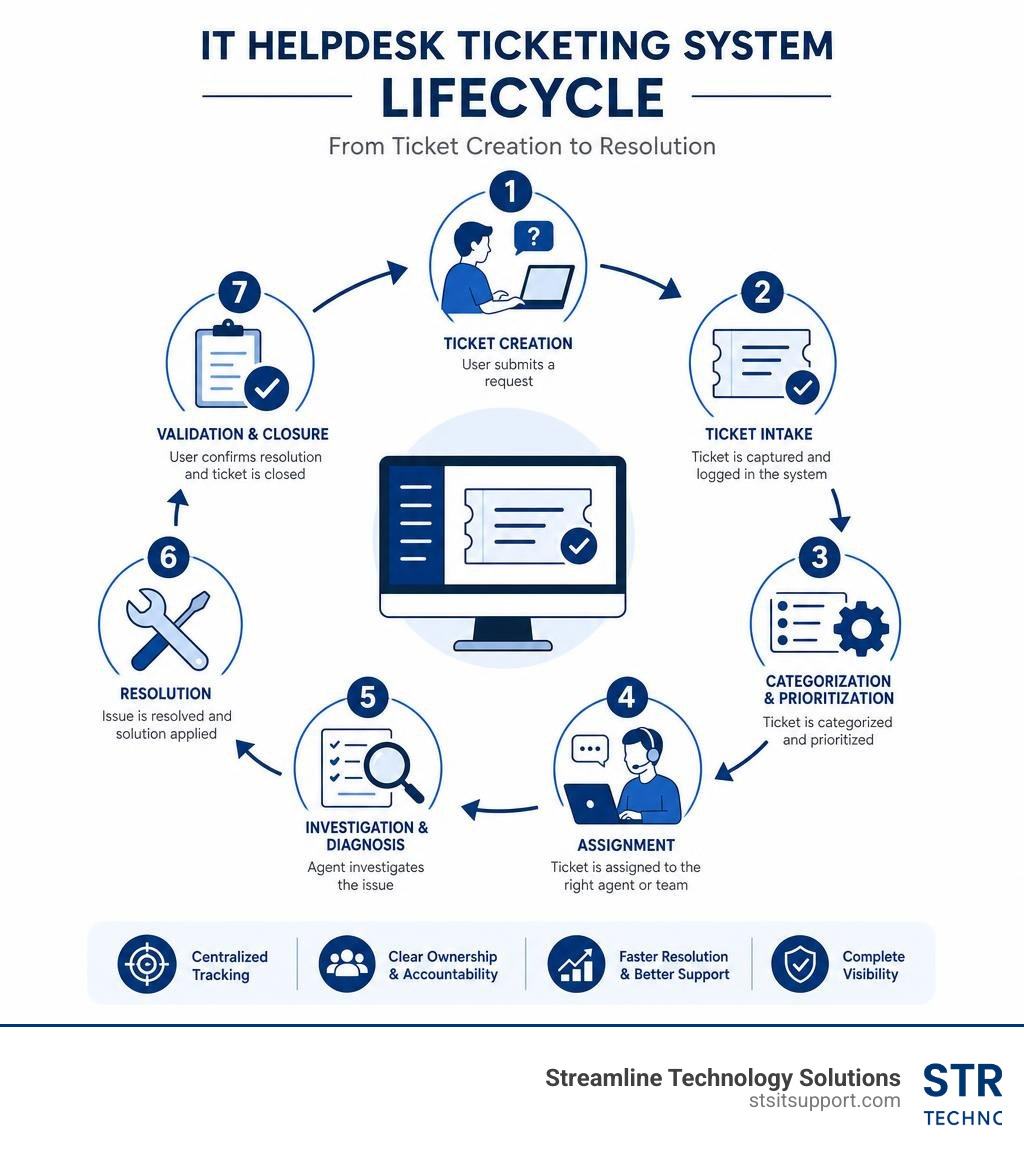
At its heart, an it helpdesk ticketing system is a centralized communication hub. Whenever an employee or a client encounters an IT issue—whether it is a crashed server, a broken printer, or a forgotten password—they submit a request. The ticketing software immediately converts this request into a standardized document called a "ticket."
This ticket serves as a single, immutable record of the issue. It captures critical information: who reported it, when it happened, what equipment was involved, and its overall urgency. In modern operations, these requests come from a variety of sources, including emails, direct phone calls, integrated monitoring tools, or walk-ups.
Once a ticket is generated, the system routes it to the appropriate team or technician based on predefined rules. For example, a network alert might automatically go to the senior infrastructure team, while a password reset request lands in the queue of a tier-1 support agent. Throughout this process, agents can Create Tickets using standardized templates, attach error logs, and associate the ticket with specific physical or virtual assets.
This structured workflow ensures that every issue is tracked from creation to ultimate resolution. It completely eliminates the "black hole" effect of email inboxes, where requests are easily forgotten or double-handled by confused technicians. For businesses striving to maintain order, implementing a dedicated IT Help Desk system is the single most effective way to establish accountability and provide a clear history of your technical environment.
Key Features and Benefits of Modern Ticketing Software
Modern ticketing systems do far more than just log complaints. They come packed with features designed to maximize the efficiency of your internal technical staff while keeping end-users happy.

When evaluating platforms, look for these foundational features:
Service Level Agreement (SLA) Management: SLAs define how quickly your team must respond to and resolve issues based on priority. The software monitors these deadlines in real-time, automatically escalating tickets or alerting managers if a breach is about to occur. This is crucial for maintaining a fast IT Support Response Time and keeping business operations running smoothly.
Automation Rules and Triggers: Repetitive tasks eat up valuable technician hours. Smart ticketing systems use rule-based engines to automatically assign tickets, send status updates to users, and close out resolved issues without human intervention.
Self-Service Portals and Knowledge Bases: Many common IT inquiries can be resolved without an agent's help. By integrating a self-service knowledge base, you can deflect up to 40% of incoming tickets, allowing users to find step-by-step guides for password resets or VPN setups on their own.
Collision Detection: This feature prevents multiple agents from working on or replying to the same ticket simultaneously, saving time and avoiding confusing duplicate communications.
The benefits of these features are clear. Organizations utilizing automated workflows report an average 25% to 30% improvement in first-contact resolution rates. Furthermore, implementing helpdesk ticketing software can lead to an average 35% reduction in overall support costs within the very first year.
Comparing Free vs. Paid Solutions for Growing IT Teams
For small businesses and growing IT teams, the decision to choose a free ticketing system versus a paid platform often comes down to budget and complexity.
Free tiers and open-source platforms are excellent starting points. They allow small teams to move away from shared email inboxes without any upfront software costs. However, these free options almost always come with strict limitations. You may face caps on the number of support agents, restricted access to advanced automation, lack of SLA monitoring, and minimal reporting tools.
Paid solutions, on the other hand, unlock full scalability. They offer deep integrations with network monitoring tools, comprehensive asset management, advanced AI capabilities, and robust security compliance (such as SOC 2 or HIPAA).
To help you visualize the differences, here is how free and paid models stack up:
Feature Free Ticketing Systems Paid Ticketing Systems Agent Limits Typically restricted to 1–3 agents Unlimited (scaled per seat or outcome) Automation Basic routing and canned replies Complex multi-stage workflows and AI routing SLA Tracking Rarely included or highly limited Real-time tracking, alerts, and escalations Asset Management None or manual entry only Direct integration with Active Directory, Intune, etc. Reporting Basic summaries Custom dashboards, Power BI, and scheduled delivery Support Community forums or self-service Dedicated 24/7 vendor support
If your team is small and your needs are straightforward, starting with a Free IT Ticket processing workflow can help you establish structure. But as your operations grow, upgrading to a paid solution becomes necessary to avoid operational bottlenecks.
Top IT Helpdesk Platforms to Consider in 2026
Choosing the right tool requires understanding how different platforms align with your team's size, technical expertise, and preferred deployment method. Below is an in-depth look at the top ticketing platforms available in 2026.
Open-Source and Free IT Helpdesk Ticketing System Options
osTicket: With over 5 million users and 15,000 businesses utilizing it worldwide, osTicket remains one of the most popular open-source ticketing platforms. It seamlessly routes inquiries from email, web forms, and APIs into a single interface. Its robust ticket filters automatically assign tickets to the correct departments, and it offers a highly customizable customer support portal.
Znuny: This is a highly flexible, open-source ticket management system built for helpdesks and ITSM. Znuny allows organizations to unify multiple communication channels—including email, phone, web portals, and monitoring alerts—into a single, cohesive ticket history. It is highly customizable and offers layered security with granular permissions, making it perfect for teams that want absolute control over their data.
django-helpdesk: For development-focused teams already working within the Django ecosystem, django-helpdesk/django-helpdesk is a lightweight, open-source ticket tracker. It is designed specifically for internal helpdesk management. While it can run on SQLite for quick testing, deploying it with PostgreSQL or MySQL is recommended to leverage its full search capabilities.
Premium and Enterprise IT Helpdesk Ticketing System Solutions
ServiceDesk Plus: Developed by ManageEngine, this is an AI-driven, ITIL-aligned service management platform built for enterprises. It features 14 ITIL-certified practices, including incident, problem, and change management. ServiceDesk Plus stands out for its enterprise service management (ESM) capabilities, allowing non-IT departments like HR and Facilities to run their own independent, secure service desk instances.
HelpSpot: If your business requires strict data sovereignty and compliance, HelpSpot is a powerful choice. It offers a fully supported on-premise version that runs on your own servers, alongside its cloud offering. Key features include "Live Lookup" (which pulls real-time user and device data directly from Active Directory or SQL databases) and batch operations that allow you to update hundreds of tickets at once.
HelpDesk: For teams seeking a modern, intuitive, and collaborative interface, HelpDesk® - The Best Help Desk Service & Ticketing Software simplifies complex B2B workflows. It offers shared inboxes, automated ticket assignment, and seamless collaboration tools that help agents resolve customer inquiries rapidly and transparently.
How to Choose the Right System for Your Business
Selecting the ideal helpdesk platform requires looking beyond the feature list and evaluating how the software fits into your day-to-day operations and budget.
First, consider the pricing model. Many platforms charge "per-seat," which can punish businesses as they grow or cross-train staff. Others use "per-outcome" or "per-resolution" pricing, where you pay based on the volume of tickets resolved rather than your employee headcount. Make sure to calculate the total cost of ownership, including hidden costs like AI add-on fees.
Second, look at integrations. Your ticketing system should not exist in a vacuum. It must connect with your existing tools, such as your CRM, email servers, and collaboration platforms like Microsoft Teams. For instance, if your business relies heavily on voice communications, integrating your helpdesk with a modern cloud VoIP system ensures that customer calls are automatically logged as tickets, preserving the context of every conversation.
Finally, consider the human element. If you are managing your own internal support, you need to ensure your technicians have the tools and training to succeed. Whether you are looking to partner with a local managed service provider or tracking Help Desk Jobs, Employment in Pompano Beach, FL | Indeed to hire in-house talent, the underlying software platform must support rapid onboarding.
Understanding How Businesses Ensure Fast Reliable IT Support Response Times ultimately comes down to having both the right tool and the right operational framework in place.
Frequently Asked Questions about IT Helpdesks
What is the difference between a CRM and a ticketing system?
While both tools manage interactions, they serve entirely different purposes. A CRM (Customer Relationship Management) system is sales- and marketing-oriented, designed to track customer relationships, sales pipelines, and business opportunities. A ticketing system is operational and support-oriented, focused on tracking, prioritizing, and resolving specific technical issues or service requests.
When should a team upgrade from a free ticketing system to a paid plan?
You should consider upgrading when your team expands beyond 2 or 3 agents, when you begin missing critical response deadlines due to a lack of SLA tracking, or when you find yourself manually routing tickets because the free tool lacks advanced automation. If your business requires strict compliance (such as HIPAA or SOC 2) or deep integration with Active Directory, a paid plan is usually necessary.
How do AI features improve helpdesk efficiency?
AI improves helpdesks by instantly analyzing incoming requests to categorize and route them to the right team. It can deflect common questions by suggesting relevant knowledge base articles to users before they submit a ticket. For agents, AI can summarize long ticket histories and draft recommended responses, significantly reducing resolution times.
Conclusion
An IT helpdesk ticketing system is not just an administrative tool—it is the backbone of a reliable, high-performing business. By bringing structure, automation, and clear accountability to your technical support, the right platform eliminates ticket chaos and keeps your team focused on growth.
At Streamline Technology Solutions, we understand that managing complex software and resolving daily IT issues can overwhelm internal teams. We provide comprehensive IT Service Desk Services and a fully managed IT Support Desk to businesses throughout South Florida, including Coral Springs, Boca Raton, Fort Lauderdale, Ft. Lauderdale, Deerfield Beach, and Pompano Beach.
With our fast local support, direct accountability, and transparent pricing with absolutely no hidden fees, we ensure your technology works for you, not against you.
Ready to put an end to the ticket chaos? Contact us today at https://stsitsupport.com to build a fast, reliable support system tailored to your business.