How to Get IT Help Desk Support Fast
Why Your IT Help Desk Is the Backbone of Business Productivity
An IT help desk is a centralized support system that receives, tracks, and resolves technical issues for employees or customers — keeping your business running without interruption.
Here's what an IT help desk does at a glance:
Function What It Means for You Receives support requests Via phone, email, chat, or online portal Logs and tracks issues Every request becomes a ticket with a status Routes to the right technician Based on issue type and urgency Resolves and closes tickets With full documentation and follow-up Reports on performance Resolution times, backlogs, satisfaction scores
When something breaks — a password stops working, a network goes down, software won't load — your team loses time. Every minute of downtime has a real cost. A structured IT help desk cuts that time dramatically. Organizations using modern help desk tools have reported up to 90% faster ticket resolution and 77% decreases in average resolution time.
For small businesses in South Florida, the stakes are even higher. Without a reliable, local point of contact, issues pile up, frustration builds, and productivity takes the hit.
I'm Michael Gaigelas, and with 20 years of hands-on experience in IT help desk support, managed services, cloud servers, and business technology, I've seen what separates an IT support setup that holds businesses back from one that genuinely moves them forward. Let's break down exactly how to get the fast, reliable support your business deserves.
What is an IT Help Desk and How Does It Work?
At its core, an IT help desk serves as a Single Point of Contact (SPC) for all technology-related headaches. Whether you are dealing with a printer that has suddenly decided to speak a foreign language or a critical server outage that has halted your entire sales floor, the help desk is where the rescue mission begins.
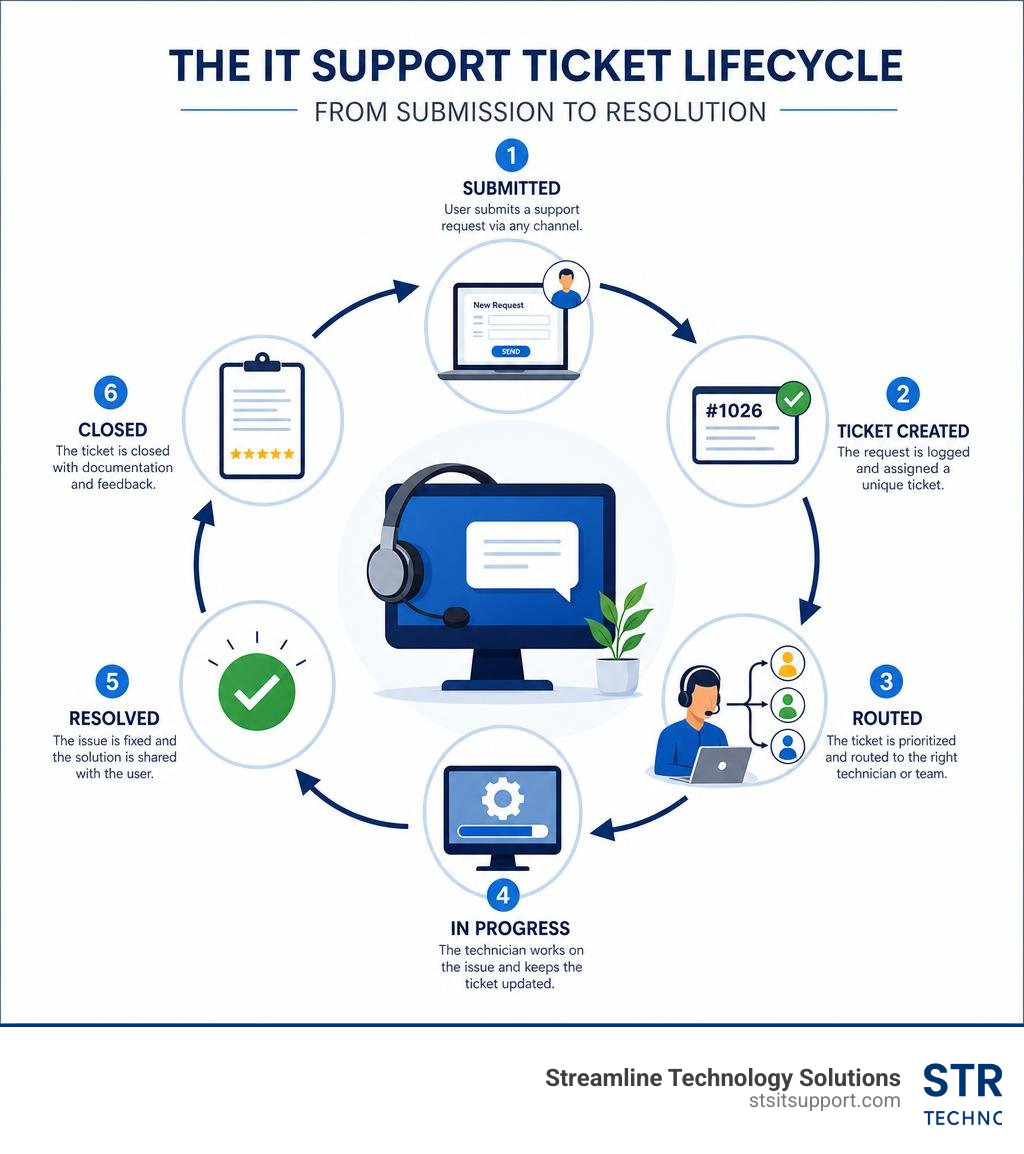
When an employee runs into an issue, they submit a request through one of several channels—such as email, phone, a web portal, or a chat application. This request is instantly converted into a "ticket." The ticketing system acts as a digital paper trail, capturing the exact time of the request, the user's details, the device being used, and a description of the problem.
For businesses looking to transition from chaotic email chains to an organized system, you can learn more about setting up an IT support desk to bring immediate structure to your operations. Once a ticket is logged, the help desk software manages its lifecycle from open to resolved, ensuring nothing slips through the cracks.

How Modern Ticketing Systems Route Requests
In the old days, a help desk agent had to manually read every incoming email, guess who should fix it, and forward it along. Today, modern ticketing systems use intelligent automation to handle the heavy lifting.
Automated Categorization and Tagging: The moment a ticket enters the queue, the system analyzes the text to determine the category (e.g., "Network," "Hardware," "Software Access"). It tags the ticket automatically, which helps organize the queue. In fact, benchmark data shows that prioritizing and tagging allows teams to handle over 100 tickets within four hours.
Intelligent Prioritization: Not all tickets are created equal. A password reset is important, but a broken firewall is an emergency. Modern systems assess the impact and urgency to assign a priority level automatically.
Collision Detection: Have you ever had two IT technicians accidentally work on the same issue at the same time? Collision detection prevents this by showing real-time indicators when another agent is viewing or replying to a ticket.
Full Audit Trail: Every action taken on a ticket—from the initial routing to internal notes and final resolution—is recorded. This ensures total visibility and accountability, which is essential for security audits and continuous improvement.
The Role of AI in Accelerating Support
Artificial Intelligence is no longer a futuristic concept; it is actively transforming how we deliver IT support. By baking AI directly into the ticket queue, support teams can work smarter and resolve issues at lightning speed.
One of the biggest breakthroughs is ticket deflection. AI-powered self-service portals can analyze a user’s query as they type it and instantly suggest relevant knowledge base articles. This simple step can deflect up to 66% of common, repetitive tickets, allowing users to solve their own problems without waiting for a human agent.
When a ticket does reach an agent, AI assists behind the scenes. It can detect the user’s emotion (flagging frustrated users for immediate escalation), summarize long email threads into a few concise bullet points, and suggest accurate replies. These AI-driven automations have helped organizations achieve a 77% decrease in average resolution time and maintain a staggering 98% average employee satisfaction score.
Key Features and Benefits of Modern Support Solutions
If you are evaluating IT help desk solutions, it is easy to get overwhelmed by the sheer number of features available. However, a truly effective solution focuses on features that eliminate "busywork" and streamline communication.
Service Level Agreement (SLA) Engine: This ensures that tickets are responded to and resolved within agreed-upon timeframes. If a high-priority ticket is ignored, the SLA engine automatically escalates it to a manager.
Time Tracking: Knowing how much time is spent on specific issues helps identify systemic problems. If your team spends 15 hours a week troubleshooting a single legacy application, it might be time to replace that software.
Multi-Channel Support: Employees should be able to get help where they are most comfortable—whether that is via a web portal, email, live chat, or a phone call.
Centralized Knowledge Base: A repository of articles, guides, and troubleshooting steps that empowers both users (for self-service) and agents (for faster resolutions).
To help you decide which path is right for your business, here is a direct comparison of features and outcomes between building an in-house help desk and outsourcing to a managed provider:
Feature / Metric In-House IT Help Desk Outsourced IT Help Desk (Managed) Coverage Hours Typically 8 AM - 5 PM (Mon-Fri) 24/7/365 available via global models Tool Costs High (Licensing, hosting, maintenance) Included in the service fee Response Times Variable depending on internal workload Guaranteed by strict SLA response times Scalability Slow (Requires hiring and training) Rapid (Instantly scale up or down) Expertise Range Limited to the skills of hired staff Access to a broad team of certified engineers Average ROI Slow to realize due to high overhead 356% ROI often achieved in under 6 months
Essential Security and Compliance Features
In 2026, an IT help desk is a prime target for cybercriminals. Because help desk agents have the power to reset passwords and grant access to sensitive systems, security must be built into the foundation of the platform.
First, SAML Single Sign-On (SSO) is critical. It ensures that your IT staff can securely log in using your primary identity provider (like Microsoft Entra ID or Okta), reducing password fatigue and allowing you to instantly revoke access if an agent leaves.
Second, permission groups are vital for maintaining data privacy. For example, your HR department might use the help desk tool to manage onboarding requests containing sensitive personal data. Permission groups ensure that general desktop support technicians cannot view those private HR tickets.
Finally, compliance standards require robust data handling. Any modern help desk tool must feature 256-bit SSL encryption for data in transit, strict adherence to privacy regulations like GDPR, anti-spam protection, and comprehensive audit logs that track every single system change.
If you are local to South Florida and looking to build a career in this vital field, you can explore local career opportunities in IT support to see what skills local employers are seeking.
Understanding IT Help Desk Support Tiers
When you contact an IT help desk, your request doesn't just go into a single, massive bucket where everyone tries to solve everything. To keep operations running smoothly, professional IT support is organized into structured tiers. This escalation framework ensures that simple issues are resolved instantly, while highly complex engineering problems get the specialized attention they require.
The Structure of IT Help Desk Support Tiers
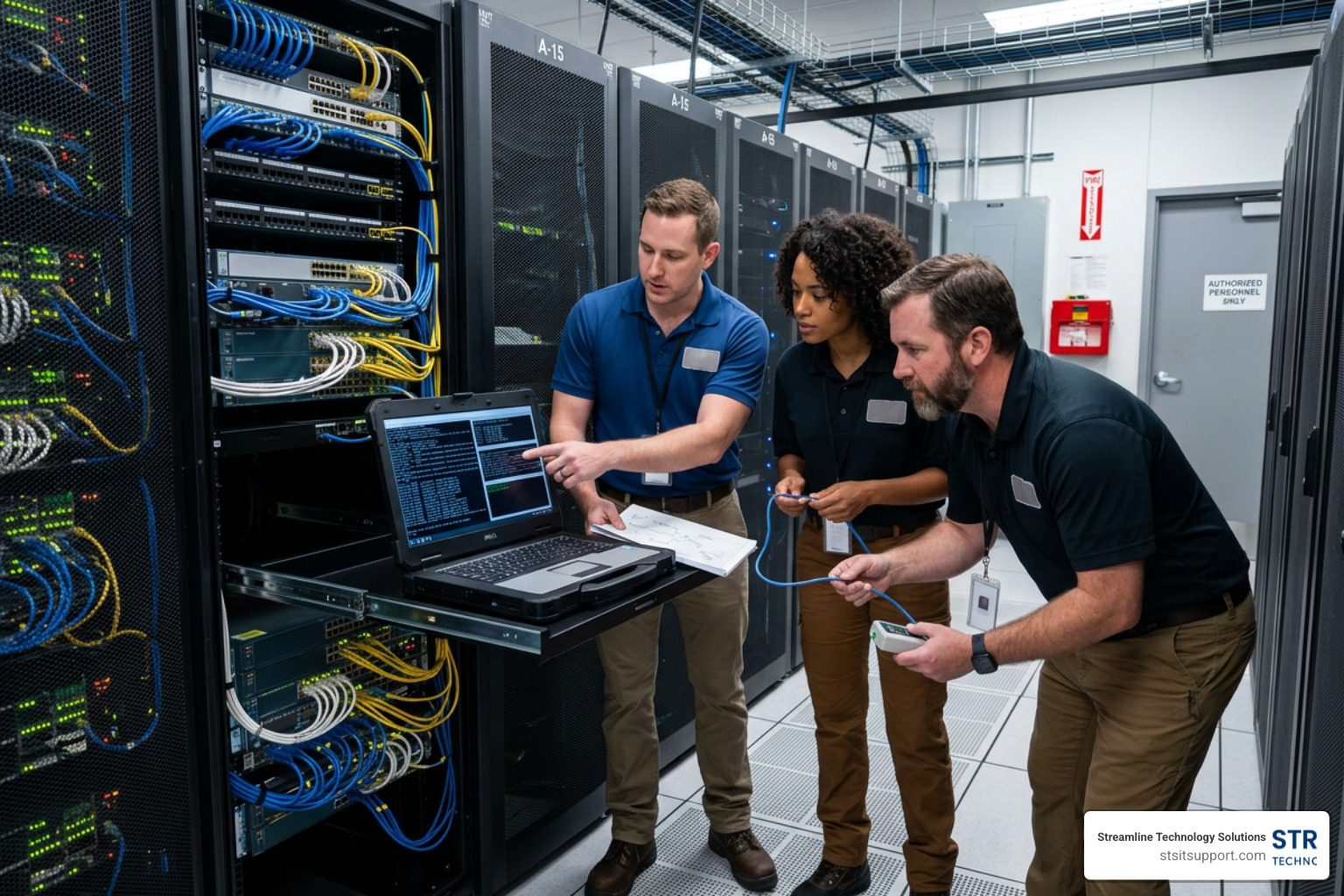
A standard, high-performing IT support structure is divided into several key roles:
Dispatch: The air traffic controller of the help desk. The dispatcher performs the initial triage, verifies the user's information, assesses the urgency, and routes the ticket to the correct tier.
Tier 1 (L1) Basic Support: This is your first line of defense. L1 technicians handle everyday, common issues. Think password resets, basic software installations, mapping network drives, and troubleshooting email sync issues.
Tier 2 (L2) Advanced Troubleshooting: If an issue cannot be resolved by L1, it escalates to L2. These technicians handle deeper technical problems, such as operating system failures, complex software configuration standards, active directory modifications, and workstation hardware diagnostics.
Tier 3 (L3) Expert Engineering: The highest level of support. L3 consists of senior network administrators and systems engineers. They handle critical infrastructure issues, server failures, firewall configurations, cloud environment disruptions, and advanced cybersecurity incidents.
Technical Account Manager (TAM): A dedicated resource who looks at your IT environment holistically, ensuring long-term alignment with your business goals and overseeing the overall quality of your support.
If you are experiencing a technical hiccup right now and want to see how this process works firsthand, you can discover how to submit a free IT ticket to experience structured resolution in action.
How Tiered Support Reduces Business Downtime
Without tiered support, highly paid senior engineers end up spending their days resetting passwords, while junior technicians get stuck trying to resolve complex network outages. This mismatch leads to massive bottlenecks and extended downtime.
A tiered structure ensures that simple tickets are knocked out rapidly at the L1 level, keeping the queue clear. In fact, top-tier managed service providers achieve an 85.5% first contact resolution (FCR) rate for L1 tickets.
When a major issue does strike, the escalation framework ensures it bypasses the queue and goes straight to L3 experts immediately. This structured approach dramatically reduces the Mean Time to Resolution (MTTR). To understand what you should expect from a provider, you can understand standard IT support response times and how they protect your business from prolonged outages.
Outsourcing vs. In-House: Choosing the Right Model
Deciding whether to hire an internal IT person or outsource your support is a major strategic decision. While having an "IT guy" down the hall sounds convenient, the reality of managing modern technology makes an in-house model incredibly difficult and expensive for small and mid-sized businesses.
An in-house technician has limited hours (usually 9 AM to 5 PM) and gets sick, goes on vacation, or eventually moves on to another job. When they are away, your support stops. Furthermore, a single person cannot possibly be an expert in cybersecurity, cloud migrations, VoIP systems, hardware procurement, and daily desktop support all at once.
Outsourcing to a managed provider solves these challenges. It gives you access to a fully staffed team of certified engineers 24/7/365. Many global providers utilize a follow-the-sun model, passing support tickets across time zones so that overnight issues are resolved before your team even logs in the next morning.
Additionally, outsourcing allows for massive tool consolidation. Instead of purchasing expensive ticketing software, monitoring agents, and security tools yourself, these are bundled into your service. This efficiency is why businesses frequently see a 356% ROI in under six months and cut their overall IT costs by up to 60% annually. To explore how this applies to smaller operations, you can read about IT support services for small business.
How to Choose the Right IT Help Desk Solution
If you are ready to partner with an IT provider or select a new help desk platform, you need to look past the marketing buzzwords. Here is what truly matters:
Transparent Pricing Models: Avoid providers that charge by the hour (which incentivizes them to take longer to fix your problems) or have complex, hidden fees. Look for a flat monthly fee per user or per device. This makes your IT budgeting predictable and keeps the provider accountable.
Integration Options: Your help desk shouldn't live on an island. It must integrate seamlessly with your existing tools—such as Active Directory, email platforms, communication channels, and asset management databases.
Local Familiarity and Standards: If you operate a business in South Florida, look for a partner who understands the local landscape, local infrastructure challenges (like hurricane readiness and power stability), and regional standards. You can check public sector IT standards in South Florida to see the high level of compliance and organization required by local government entities like the City of Coral Springs.
For businesses in Palm Beach and Broward counties, partnering with a local expert who understands your specific geographic needs is invaluable. Whether you need a managed IT help desk in Boca Raton, hands-on IT support and solutions in Fort Lauderdale, or comprehensive managed help desk services in South Florida, choosing a partner with local offices ensures fast, on-site response times when remote troubleshooting isn't enough. If you want to see what the local job market looks like for these professionals, you can browse help desk jobs and employment in Pompano Beach, FL.
Frequently Asked Questions about IT Help Desk Services
Navigating IT support can come with a lot of jargon. Here are clear answers to the questions we hear most often from business owners in South Florida.
What is the difference between an IT help desk and a service desk?
While these terms are often used interchangeably, they actually have different scopes under ITIL (Information Technology Infrastructure Library) standards:
IT Help Desk: This is highly tactical. Its primary focus is on incident management—fixing things when they break. If a user can’t print or has a virus, the help desk jumps in to restore normal operations as quickly as possible.
IT Service Desk: This is broader and more strategic. It handles the entire lifecycle of IT service delivery. In addition to fixing broken technology, it manages service requests (like provisioning a new laptop), change management, asset tracking, and long-term IT planning.
Can an IT help desk support remote employees?
Absolutely. In fact, a modern help desk is specifically designed to support distributed workforces.
Using secure remote-access tools, technicians can securely connect to an employee’s device anywhere in the world to troubleshoot software errors, configure VPN connectivity, and update security patches. Support teams also provide multi-platform support across Windows, macOS, iOS, and Android to ensure all endpoints remain secure and productive. To learn more about how physical and remote support work together, you can learn about onsite IT support options.
What are the typical pricing models for IT support?
When partnering with an IT support provider, you will generally run into three pricing models:
Flat Monthly Rate (Per-User or Per-Device): This is the most popular and predictable model. You pay a set fee per employee or per computer each month, covering unlimited remote and on-site support.
Per-Ticket Pricing: You pay a fixed fee for every support ticket submitted. While this can seem cost-effective for very quiet environments, it can lead to unpredictable monthly bills if a major issue occurs.
Hourly / Break-Fix: You pay only when you call for help. This model often results in slow response times, high hourly rates, and a lack of proactive maintenance.
If you want to avoid getting locked into long-term commitments that don't fit your business, you can find flexible IT support without contracts to keep your options open and your provider on their toes.
Conclusion
At the end of the day, an IT help desk shouldn't feel like a black hole where your support requests go to be forgotten. It should be a streamlined, highly responsive system that keeps your business moving forward.
At Streamline Technology Solutions, we provide comprehensive IT support, modern VoIP systems, and reliable hardware tailored specifically for businesses across South Florida—including Coral Springs, Boca Raton, Fort Lauderdale, Deerfield Beach, and Pompano Beach.
We do things differently. We believe in transparent pricing without hidden fees, fast local support, and direct accountability. When you call us, you get a real, local technician who understands your business and is ready to resolve your issue immediately.
Don't let slow response times and recurring technical headaches drain your team's productivity. Get started with Streamline Technology Solutions today and experience how seamless, reliable IT support can be.