Service Desk vs Help Desk: The Showdown You Didn't Know You Needed
Why IT Service Desk Services Are the Backbone of Business Technology
IT service desk services are the structured, centralized support systems that manage everything from fixing a broken login to coordinating company-wide software updates — all while keeping your business running.
Here's a quick breakdown of what they cover:
Function What It Means for Your Business Incident Management Fast resolution of outages, errors, and tech failures Service Requests Handling software installs, access, and onboarding Change Management Safe rollout of updates and new systems Knowledge Management Self-service resources that reduce repeat tickets SLA Tracking Measurable commitments to response and resolution times 24/7 Availability Support whenever issues happen — not just business hours
If you've ever called your IT provider and heard nothing back for hours — or gotten a surprise invoice you didn't expect — you already know the frustration of poor IT support. But here's something most people don't realize: there's a big difference between a basic help desk and a true IT service desk, and that gap can cost your business real time and money.
Across the industry, the terminology alone creates confusion. According to HDI research, 41% of help desks and service desks go by a completely different name — which makes it even harder to know what you're actually getting when you sign up for IT support.
That's what this guide is here to clear up.
I'm Michael Gaigelas, and I've spent 20 years working hands-on with IT service desk services, managed IT, cloud infrastructure, VoIP, and business technology solutions for companies just like yours. In this guide, I'll break down exactly what a service desk does, how it differs from a basic help desk, and how to choose the right model for your South Florida business.
Defining the Core Differences: Help Desk vs. IT Service Desk Services
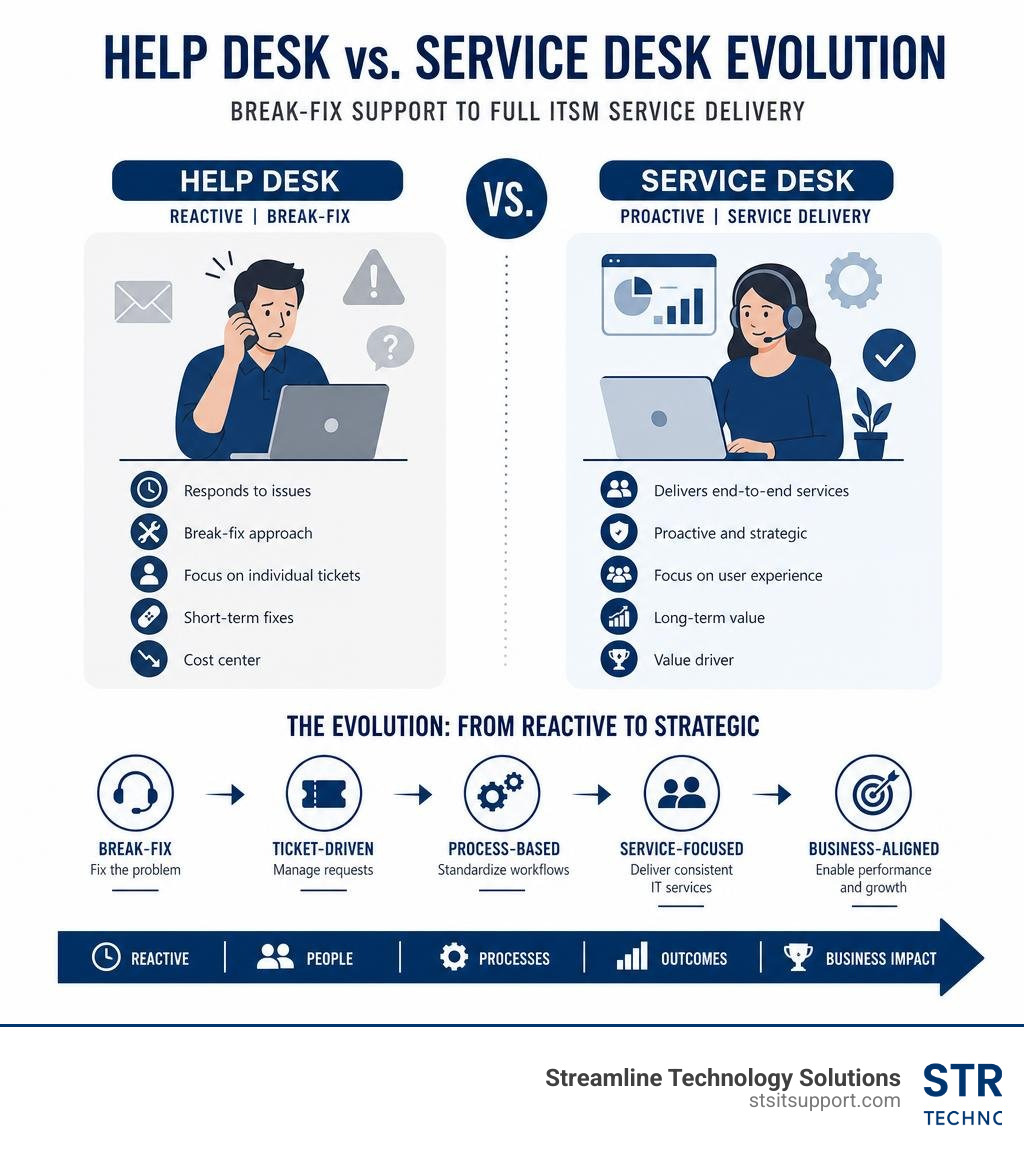
To understand why your business might be struggling with persistent technology glitches, we first have to look at how IT support is structured. Many business owners use the terms "help desk" and "service desk" interchangeably, but in IT Service Management (ITSM), they represent two entirely different philosophies.
To put it simply: a help desk is designed to fix things when they break, while an IT service desk is designed to keep things from breaking in the first place while aligning your technology with your overall business goals.
Here is a side-by-side comparison to help clarify the differences:
Capability / Feature Traditional Help Desk Modern IT Service Desk Primary Focus Tactical (reactive "break-fix" support) Strategic (proactive service delivery) Operational Scope Resolving individual user issues Managing end-to-end IT service lifecycles Framework Alignment Standalone troubleshooting Structured ITIL & ITSM alignment Single Point of Contact (SPOC) Often limited or decentralized Yes, a centralized hub for all user requests Goal Minimize downtime for a single user Maximize productivity and continuity for the whole business Integration Limited to basic ticketing tools Integrated with CMDB, asset, and change management
The Help Desk: Tactical "Break-Fix" Support
A traditional help desk is fundamentally reactive. When an employee’s email stops syncing, their printer jams, or a password needs to be reset, they contact the help desk. The technician's goal is simple: resolve the immediate issue as quickly as possible and close the ticket.
While this is incredibly important, a help desk operates in a silo. It doesn’t look at why the email server keeps crashing every Tuesday, nor does it plan how to transition your team to a more secure cloud environment. It is tactical, focused on the present moment, and limited in scope.
The IT Service Desk: Strategic Service Delivery
An IT service desk, on the other hand, is built on the ITIL (Information Technology Infrastructure Library) framework. It acts as a comprehensive Single Point of Contact (SPOC) between your business operations and your technology ecosystem.
When you leverage professional it service desk services, you aren't just getting a team of technicians waiting for the phone to ring. You are partnering with a strategic engine that manages:
ITSM Alignment: Managing IT as an end-to-end service that directly supports employee productivity and business growth.
Proactive Strategy: Using data and trend analysis to spot underlying system issues before they cause widespread downtime.
Universal Communication: Serving as the central hub for everything from daily troubleshooting to major technology rollouts.
If you are trying to scale your operations in South Florida, relying solely on a reactive help desk can leave you vulnerable to unexpected bottlenecks. Transitioning to a structured IT Support Desk model ensures your technology actively supports your growth rather than holding you back.
Core Functions and Modernization of a Modern Service Desk
The modern service desk has undergone a massive evolution. In 2026, leading organizations no longer tolerate slow, manual support processes. Modern it service desk services leverage advanced technologies to deliver faster, smarter, and more reliable support.
At the heart of this modernization are several core functions:
Proactive Monitoring: Rather than waiting for you to report an outage, advanced system management tools monitor your infrastructure 24/7. This allows technicians to detect and resolve potential hardware failures, network anomalies, or storage bottlenecks before your team even notices a slowdown.
Self-Service Portals & Knowledge Management: Providing users with an intuitive portal where they can find answers to common questions. By maintaining a robust knowledge base, organizations can drastically reduce ticket volume. In fact, industry data shows that a single well-written knowledge base article can deflect over 250 tickets per month by allowing users to solve basic issues on their own.
AI Chatbots & Intelligent Ticket Routing: Modern service desks utilize AI-driven algorithms to instantly categorize, prioritize, and route incoming tickets to the correct specialist. This eliminates manual triage delays, ensuring that critical issues get immediate attention.
The "Shift-Left" Strategy: This approach focuses on moving issue resolution as close to the end-user as possible. By empowering Level 1 technicians with better tools and documentation—and enabling end-users with self-service options—businesses experience faster resolution times, lower support costs, and a significantly smaller backlog for high-level engineers.
By focusing on these modern capabilities, businesses can drastically improve their operational efficiency. If you want to dive deeper into how modern IT departments maintain peak performance, read our guide on How Businesses Ensure Fast Reliable IT Support Response Times.
Incident and Request Management in IT Service Desk Services
Two of the most critical daily functions of a service desk are Incident Management and Request Management. While they sound similar, they require completely different workflows:
Incident Management: This is all about restoring normal service operations as quickly as possible following an unplanned interruption. Whether it’s a localized software glitch or a major network outage, the service desk logs, categorizes, and prioritizes the incident based on its urgency and business impact.
Request Management: This handles routine, scheduled needs, such as provisioning a new laptop, granting access to a specific folder, or setting up a new employee's account. These are managed through a standardized service catalog, which keeps expectations clear and processes streamlined.
Both functions rely heavily on strict Service Level Agreements (SLAs) that define exactly how quickly the team must respond and resolve issues. Managing these expectations is crucial for maintaining business momentum, which is why understanding IT Support Response Time is key to evaluating any IT partner.
Strategic ITSM Alignment and Change Control
A mature service desk doesn't just manage daily tickets; it also oversees the broader health of your IT environment through strategic ITSM processes:
Change Management (or Change Control): Every time a business updates its operating systems, migrates to a new cloud platform, or modifies its network configuration, there is a risk of disruption. Change management ensures that all updates are thoroughly tested, documented, approved, and scheduled during low-impact hours to minimize risk.
Asset Management: Keeping track of every piece of hardware, software license, and cloud subscription across your business. This helps control costs, supports compliance audits, and ensures systems are upgraded before they become security hazards.
Problem Management & Root Cause Analysis (RCA): When the same incident happens repeatedly, problem management steps in. Instead of just applying another quick fix, engineers conduct a deep-dive root cause analysis to eliminate the underlying issue permanently.
Key Benefits and Models of Service Desk Outsourcing
Managing an in-house service desk is a massive undertaking. It requires hiring certified staff, purchasing expensive ticketing and monitoring tools, and managing shifts to cover nights, weekends, and holidays. For many businesses in South Florida, outsourcing these operations to a dedicated provider is the most practical and cost-effective way to secure enterprise-grade support.

When you explore outsourcing, you will encounter several different service models designed to fit different business structures:
Leveraged Support (Shared Model): Your users are supported by a shared pool of highly trained technicians. This model is incredibly cost-effective and is ideal for small to mid-sized businesses that need dependable support without the price tag of dedicated personnel.
Dedicated Support: You have a team of technicians assigned exclusively to your business. This is perfect for larger enterprises with complex, highly customized environments that require deep, specialized knowledge of their internal systems.
Co-Managed IT: Your internal IT director or small in-house team partners with an external service desk. The external provider handles routine daily tickets, password resets, and Level 1 support, freeing up your internal team to focus on strategic, high-value projects.
No matter which model you choose, a professional provider will guide you through a structured onboarding timeline (typically taking 2-4 weeks) to document your systems, build your knowledge base, and ensure a seamless transition without disrupting your daily operations. To learn more about how these models fit into a broader business strategy, check out our article on IT Support for Businesses.
Why Businesses Outsource IT Service Desk Services
The decision to outsource your IT support goes far beyond simply saving money. It directly impacts your business’s resilience, security, and day-to-day productivity:
True 24/7/365 Coverage: Technology issues don't respect the 9-to-5 workday. Outsourcing ensures that whether an employee is working late on a proposal in Fort Lauderdale or trying to connect to the VPN from a hotel room at midnight, expert help is always just a phone call or click away.
Substantial Cost Reductions: Hiring, training, and retaining certified IT professionals is expensive. Outsourcing converts unpredictable capital expenses and payroll costs into a predictable, fixed monthly fee.
Rapid Scalability: As your business grows, your IT needs grow with it. An outsourced service desk allows you to scale support capacity up or down instantly without the headaches of recruiting and onboarding new staff.
Uninterrupted Business Continuity: From natural disasters like South Florida hurricanes to sudden cyber threats, an outsourced partner ensures your support infrastructure remains online and accessible from secure, redundant environments.
For growing local companies, choosing outsourced support is often the catalyst for sustained growth. Discover how these services can be tailored to your specific size and industry by reading about IT Support Services for Small Business.
Choosing the Right Service Model: Fully Outsourced, Co-Managed, or Hybrid
When selecting a provider, you need to understand how they structure their support tiers. A high-performing service desk typically operates with a clear hierarchical structure:
Dispatch: The entry point where incoming requests are logged, categorized, and assigned to the right tier.
Tier 1 (L1) Support: Handles basic troubleshooting, password resets, software installations, and standard service requests.
Tier 2 (L2) Support: Addresses more complex issues requiring advanced operating system, network, or application troubleshooting.
Tier 3 (L3) Support: Composed of senior engineers and architects who handle major infrastructure, virtualization, cloud, and security incidents.
Technical Account Manager (TAM): A dedicated strategic advisor who regularly reviews your IT roadmap, monitors SLA compliance, and ensures your technology aligns with your long-term business goals.
When looking for a partner in our region, it helps to work with a team that understands the local landscape. If you are evaluating your options, you can read more about what to look for in our guides on Managed IT Support Companies and Managed IT Support Broward.
For businesses operating in specific South Florida municipalities, local expertise is invaluable. Having local boots on the ground is essential whether your business is based in Coral Springs, Boca Raton, Fort Lauderdale, or Pompano Beach. Similarly, if your business is based in neighboring areas, you can leverage municipal resources such as the INFORMATION TECHNOLOGY SERVICES | Deerfield Beach, FL portal to keep your operations running smoothly.
Frequently Asked Questions About IT Support
Navigating IT support can feel like learning a whole new language. To help you cut through the jargon, we've compiled answers to the most common questions businesses ask when evaluating their IT support options.
What is the difference between a help desk and a service desk?
While a help desk focuses on providing quick, tactical solutions for immediate "break-fix" issues (like a password reset or a jammed printer), a service desk is a highly strategic, centralized hub. Built on the ITIL framework, a service desk manages the entire lifecycle of your IT services. It handles proactive monitoring, change management, asset tracking, and strategic planning to align your technology with your business goals.
What are the most important KPIs for measuring service desk success?
To ensure your IT support is delivering real value, you should track several key performance indicators (KPIs):
First Contact Resolution (FCR): The percentage of tickets resolved during the very first interaction. High-performing desks aim for an FCR rate of 85% or higher.
SLA Adherence: How consistently the team meets agreed-upon response and resolution times (industry leaders maintain 90%+ SLA adherence).
Customer Satisfaction (CSAT): Direct feedback from your employees regarding their support experience (look for a consistent rating of 95% or higher).
Average Resolution Time: The total time it takes from when a ticket is opened until it is fully resolved.
How does a service desk ensure data security and compliance?
A modern service desk acts as a primary line of defense for your business data. It enforces strict access controls, manages user permissions, and ensures all security patches are applied systematically. Additionally, premier service desks adhere to rigorous compliance standards, such as maintaining SOC 2 compliance, conducting regular IT governance audits, and providing ongoing cybersecurity education to users to prevent phishing and social engineering attacks.
Conclusion

At the end of the day, your business shouldn't have to suffer through endless IT headaches, slow response times, or confusing jargon. Technology should be an asset that propels your business forward, not a daily source of frustration.
At Streamline Technology Solutions, we do things differently. We provide comprehensive IT support, cloud services, advanced VoIP solutions, and hardware management tailored specifically for businesses across South Florida.
We don't believe in locking our clients into rigid, long-term contracts or surprising them with hidden fees. Instead, we built our reputation on three simple pillars:
Transparent Pricing: You always know exactly what you are paying for, with zero hidden fees or surprise upcharges.
Fast Local Support: Our certified technicians are based right here in South Florida, ready to provide rapid remote assistance or step through your front door when you need onsite help.
Direct Accountability: We take ownership of your technology ecosystem so you can focus on running your business.
Whether you are looking to upgrade your current support, secure your remote workforce, or transition to a highly responsive, modern service desk model, we are here to help.
Explore our Affordable IT Support Packages to find the perfect fit for your budget, learn more about our commitment to Direct IT Accountability Florida, or visit https://stsitsupport.com today to claim your Free IT Ticket and experience the difference of truly reliable local support.