Blog
Home / Blog

The Ultimate Checklist for Onsite IT Support Services
Why Your Business Can't Afford to Get Onsite IT Support Wrong
An onsite IT support service puts a qualified technician physically at your location to handle the IT problems that remote tools simply cannot fix — think failed hardware, dead network switches, or a server room running dangerously hot.
Here is a quick snapshot of what you need to know:
Question Quick Answer What is it? In-person technical assistance at your business location What does it cover? Hardware, networking, cabling, security, and software setup When do you need it? When remote support cannot resolve a physical issue Who provides it? Managed Service Providers (MSPs) or dedicated field technicians How is it priced? Per visit, monthly retainer, or per-user flat rate What is a good response time? 2-hour, 4-hour, or next-business-day SLA tiers
Three out of four small businesses experience IT disruptions that directly hurt productivity. Yet many owners only discover how inadequate their IT support is after a costly outage — when a remote helpdesk agent cannot fix a downed router over a video call.
This guide gives you a practical, no-fluff checklist to evaluate, choose, and onboard an onsite IT support provider with confidence — before the next crisis hits.
I'm Michael Gaigelas, and with 20 years of hands-on experience delivering onsite IT support services across managed IT, cloud servers, VoIP, networking, and telecommunications, I've seen what separates providers that protect your business from those that cost you more in downtime than they save. That experience is the foundation of everything covered in this guide.
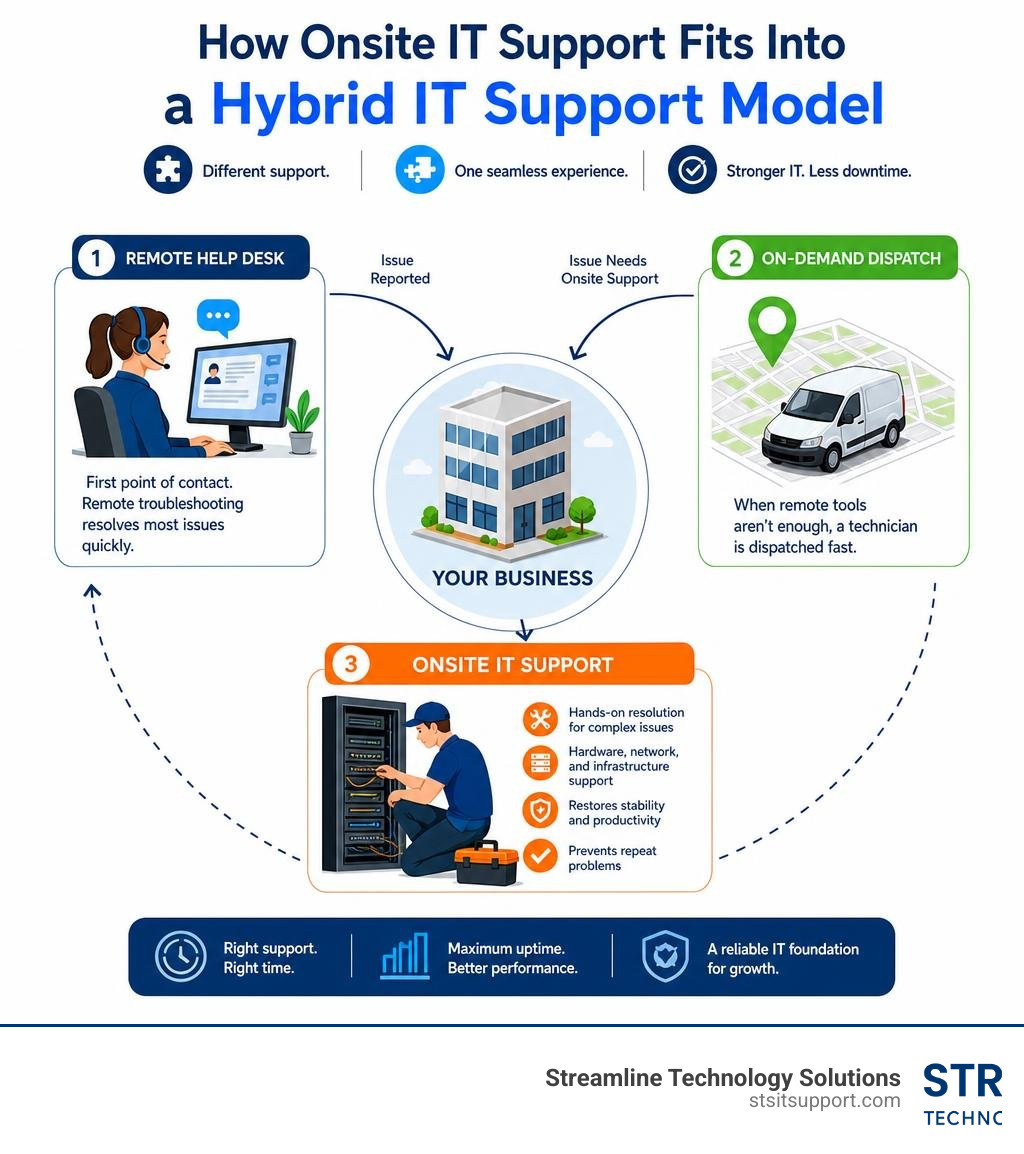
Evaluating Your Options: Remote vs. Onsite IT Support Service
To build a resilient technology strategy, you must first understand where virtual troubleshooting ends and physical intervention begins. Many businesses make the mistake of choosing a remote-only support model because it seems cheaper upfront. However, when physical infrastructure fails, a lack of hands-on support can lead to prolonged, incredibly expensive downtime.
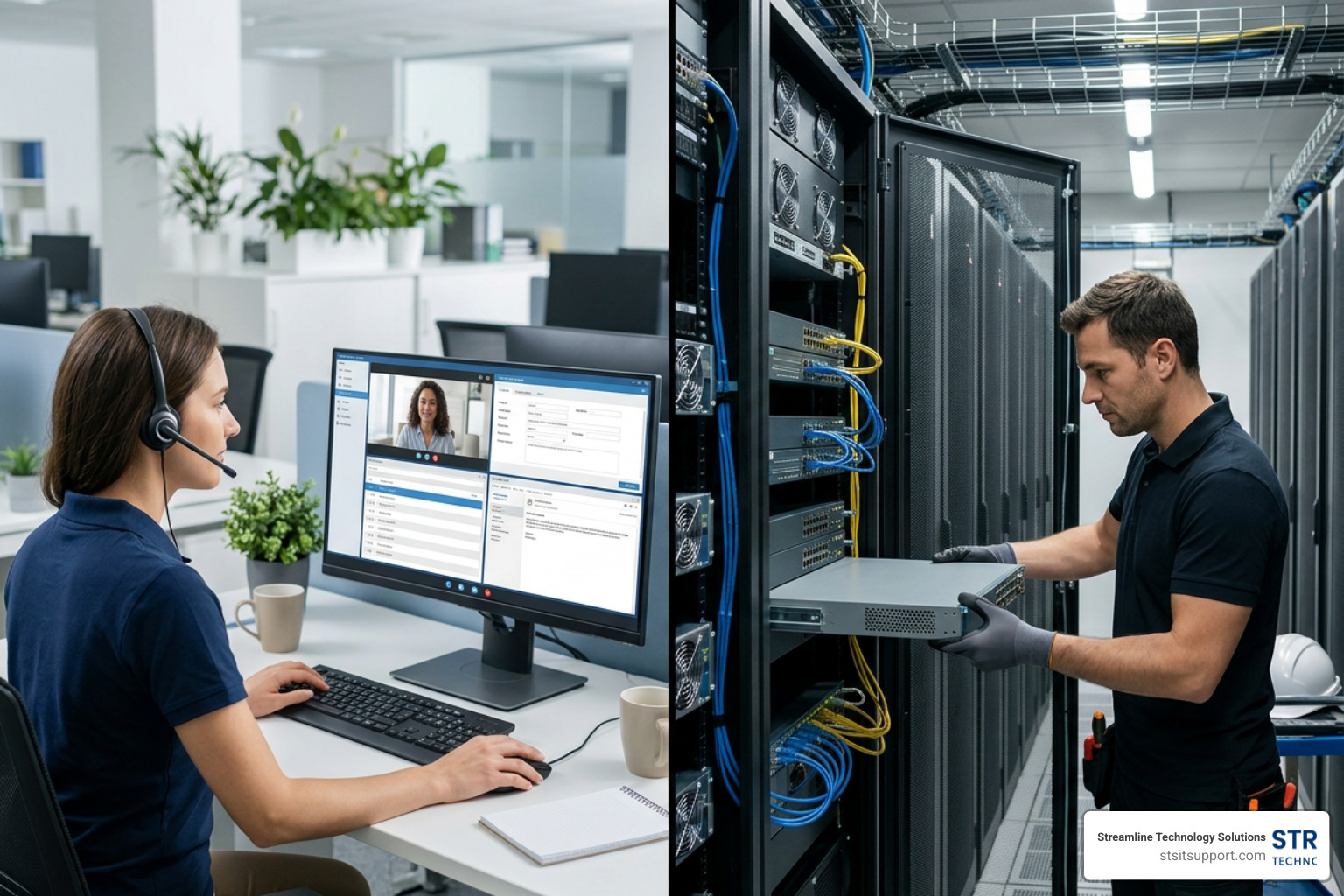
Remote IT support is highly efficient for software-related issues. If an employee forgets a password, runs into a Microsoft 365 configuration glitch, or needs help setting up a secure VPN connection, a remote technician can quickly log in via secure remote access tools to resolve the issue. This keeps your day-to-day operations moving without the delay of waiting for an engineer to arrive.
However, remote technicians are bound by the limits of software. They cannot physically replace a failed hard drive in your server, run low-voltage voice and data cabling through your office walls, or plug in a backup router when your primary gateway suffers a hardware failure.
To help you visualize how these two support systems balance each other, here is a breakdown of how they compare across key operational areas:
Operational Metric Remote IT Support Onsite IT Support Primary Scope Software glitches, password resets, virtual configurations, and cloud management. Physical hardware repairs, cabling, server rack builds, and hands-on troubleshooting. Resolution Speed Immediate virtual connection (often within 15 minutes). Dependent on dispatch times and SLA tier (e.g., 2-hour, 4-hour, next-business-day). Physical Limitations Cannot resolve power outages, broken components, or physical cabling faults. Full physical access to resolve all hardware, network, and environmental issues. Primary Benefit Fast, low-overhead resolution for common user and software issues. Absolute resolution of complex physical infrastructure failures and hands-on setups.
Integrating both models is the gold standard for modern business technology. When you pair a fast IT Helpdesk Support with a reliable Onsite IT Support workflow, you get the best of both worlds: rapid virtual assistance for minor hiccups and dependable, local engineers for physical infrastructure needs.
When to Choose an Onsite IT Support Service Over Remote Help
Knowing when to escalate an issue from a remote helpdesk ticket to an onsite dispatch is key to keeping your business running. If your team is experiencing a complete office internet outage, a remote helpdesk agent cannot virtually connect to your router to see what is wrong. You need an engineer on the ground to inspect the physical lines, check the status lights on the modem, and run hardware diagnostics.
Consider an onsite IT support service non-negotiable in the following scenarios:
Total Network Outages: When your switches, firewalls, or routers fail physically and cut off all external communication.
Physical Hardware Failures: When a local server hard drive crashes, a power supply blows, or an employee's workstation refuses to power on.
Office Moves and Relocations: When you need to physically tear down, move, and rebuild server racks, mount wireless access points, and route structured cabling.
In-Person Training and Complex Deployments: When your team is transitioning to entirely new hardware or VoIP systems and benefits from hands-on guidance to reduce friction.
In these critical moments, your business relies on a guaranteed IT Support Response Time. Having a local partner who can physically arrive at your office quickly is the difference between a minor disruption and a lost day of revenue. For a deeper dive into how to secure these guarantees, read our guide on How Businesses Ensure Fast Reliable IT Support Response Times.
Key Deliverables of a Professional Onsite IT Support Service
A professional onsite technician does not just show up to plug in cables; they provide a comprehensive suite of physical and structural IT services that keep your business secure and optimized.
When you hire a specialized provider, their key deliverables should include:
Hardware Installation & Repair: From unboxing and configuring new workstations to racking and stacking enterprise-grade servers. This also includes secure decommissioning and disposal of old physical assets.
Network Setup & Troubleshooting: Designing and implementing robust physical networks, organizing messy server closets with custom rack fabrication, and executing clean voice and data cable management.
Physical Security & Compliance Audits: Ensuring that server rooms are physically locked and monitored, checking that backup drives are stored securely, and verifying that your physical setup complies with industry-specific regulations.
Whether you are expanding your office space or executing major IT Projects, having certified field engineers handle the physical layer of your technology ensures that your systems are built for long-term stability and performance.
The Business Case: Benefits and Delivery Models of Onsite IT
Outsourcing your physical technical needs to a dedicated provider is a strategic business decision that directly impacts your bottom line. Relying solely on virtual support or expecting non-technical staff to troubleshoot physical hardware leads to prolonged downtime, security vulnerabilities, and massive frustration.
By investing in structured IT Support for Businesses, you establish a foundation of operational efficiency. Our goal is always to move away from reactive "break-fix" cycles and move toward proactive prevention.
When a certified technician regularly visits your office to perform routine hardware checks, inspect server room cooling systems, and audit physical connections, they catch minor issues before they turn into full-blown emergencies. This proactive approach is particularly vital for smaller organizations that cannot afford to lose hours of productivity; customized IT Support Services for Small Business ensure that your physical infrastructure is as secure and reliable as that of any enterprise.
Delivery Models: Scheduled Visits, On-Demand Dispatch, and Dedicated Engineers
Every business has unique operational rhythms and budget constraints. To accommodate these differences, onsite IT services are typically delivered through three primary models:
Scheduled Visits (Proactive Rounding): A dedicated engineer visits your location on a set schedule (e.g., weekly or monthly) to perform preventative maintenance, address non-urgent user issues, and consult on upcoming technology needs. This model is highly effective for maintaining consistent system health and building a strong, personal relationship between your staff and your IT partner.
On-Demand Dispatch: When an unexpected physical failure occurs, a technician is dispatched to your location based on your agreed-upon service-level agreement (SLA). This is your safety net for emergencies like a dead firewall or a total internet outage.
Dedicated Onsite Engineer: For larger organizations with complex infrastructures, a full-time technician is permanently stationed at your office to provide immediate, hands-on support every single day.
For most growing companies, a hybrid model is the most cost-effective and efficient solution. This approach combines a centralized remote helpdesk for lightning-fast software support with scheduled onsite visits and on-demand emergency dispatch. To learn how to structure this hybrid approach for your business, consult our comprehensive Managed IT Support Guide 2026.
In-House vs. Outsourced IT Support: Cost and Operational Challenges
When business leaders realize they need physical IT support, they face a classic dilemma: Do we hire an in-house IT person, or do we outsource to a managed service provider (MSP)?
While having a full-time IT employee sitting down the hall sounds convenient, it often introduces significant operational and financial challenges. Smaller in-house teams frequently suffer from severe skill gaps; a single generalist cannot possibly hold expert-level certifications in cyber security, cloud architecture, VoIP systems, and physical network engineering all at once.
Furthermore, managing an internal IT department introduces substantial administrative overhead, requiring leadership to spend valuable time recruiting, training, and managing technical staff instead of focusing on growing the business.
The Hidden Costs of an Internal IT Team
The true cost of hiring an in-house IT professional goes far beyond their base salary. When you add up the hidden expenses, maintaining an internal IT department becomes a major financial burden for small and mid-sized businesses:
Payroll Taxes & Benefits: Health insurance, retirement contributions, and payroll taxes typically add 20% to 30% on top of an employee's base salary.
Management & Training Overhead: Technology changes rapidly. To keep an in-house technician effective, you must fund ongoing certifications, training courses, and specialized IT management software tools.
The Cost of Underutilization: Unless you run a highly complex, multi-site operation, a full-time technician will rarely be 100% utilized. You end up paying a premium for idle time, yet you still face single-point-of-failure risks when that employee goes on vacation, falls ill, or leaves the company.
To avoid these unpredictable expenses and long-term hiring commitments, many local businesses opt for flexible IT Support Without Contracts, allowing them to scale their physical and remote technical support up or down as their actual business needs change.
How Outsourcing to an MSP Solves the Resource Gap
By partnering with one of the leading Managed IT Support Companies, you immediately eliminate these resource constraints. Outsourcing grants your business instant access to an entire team of certified professionals holding specialized credentials (such as CompTIA A+, Network+, CCNA, and Microsoft certifications) for a fraction of the cost of a single full-time hire.
Furthermore, outsourcing converts unpredictable IT expenses into predictable, flat-rate monthly operating costs. With our Affordable IT Support Packages, you get comprehensive coverage that includes proactive monitoring, remote helpdesk, and dedicated onsite hours—giving you complete peace of mind without hidden fees.
If you are ready to find a reliable, local technology partner to protect your business, start by searching for Managed IT Services Providers Near Me to see how outsourced IT can transform your operations.
The Onsite IT Support Checklist: Selecting and Onboarding a Provider
Choosing an onsite IT partner is a critical decision that directly impacts your business continuity. To ensure you select a provider that offers direct accountability and fast local support, follow this structured evaluation checklist:
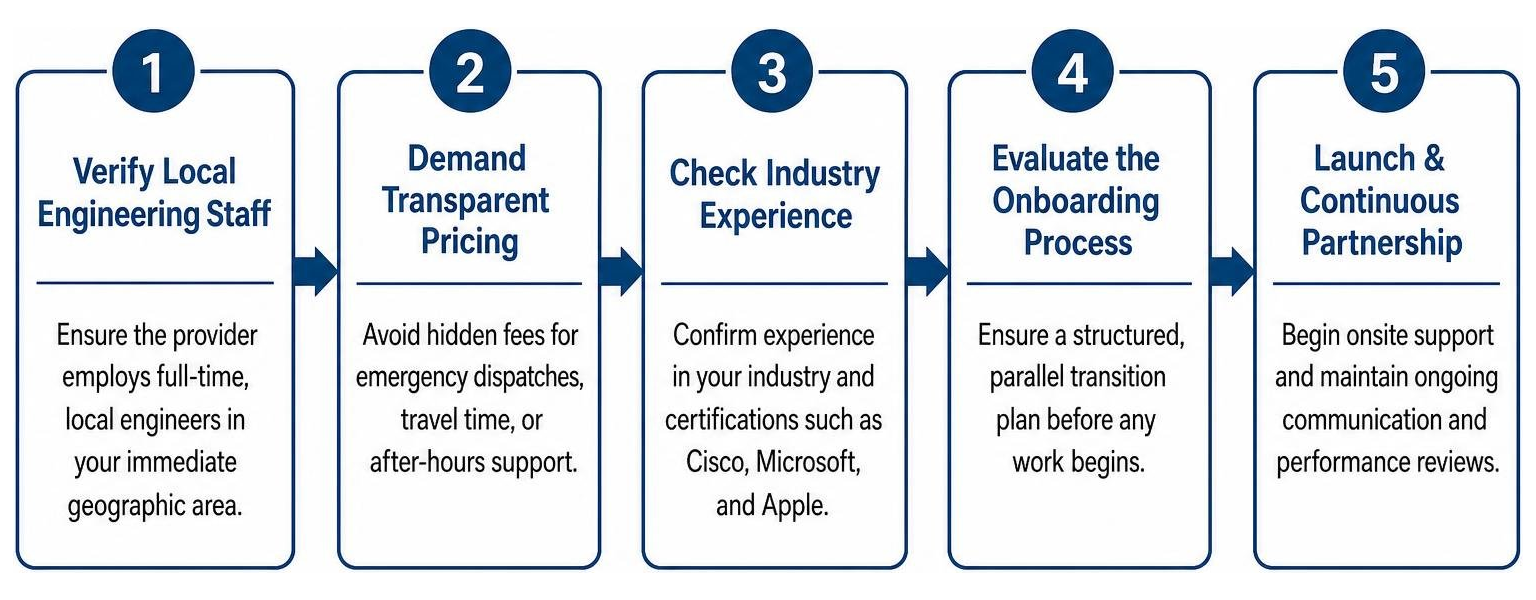
Verify Local Engineering Staff: Ensure the provider employs full-time, local engineers in your immediate geographic area rather than relying on unvetted third-party contractors or distant dispatch networks.
Demand Transparent Pricing: Avoid providers that use complex, a-la-carte pricing structures or hide extra fees for emergency dispatches, travel time, or after-hours support.
Check Industry Experience: Confirm that their technicians have direct experience supporting businesses in your specific industry and hold recognized certifications (such as Cisco, Microsoft, and Apple).
Evaluate the Onboarding Process: A professional provider should never just start fixing things on day one without a structured, parallel transition plan.
By focusing on these core criteria, you can confidently partner with a provider of Local IT Support that behaves as a true extension of your team. If your business operates in Broward, Palm Beach, or Miami-Dade counties, securing reliable IT Services South Florida is the first step toward building a bulletproof technology foundation.
What to Look for in a Service-Level Agreement (SLA)
Your Service-Level Agreement (SLA) is the legally binding document that defines exactly how your IT partner will perform during an emergency. It should outline clear, unambiguous metrics for both remote and onsite response times.
When reviewing an SLA, look for:
Tiered Response Times: Clear definitions for issue severity. For example, a "Priority 1" (business-down) emergency should trigger an immediate remote response and a guaranteed 2-hour onsite dispatch, while a "Priority 3" (minor user issue) might have a next-business-day resolution window.
Clear Escalation Paths: A documented process showing exactly how a ticket moves from a Tier 1 helpdesk agent to a senior onsite systems engineer if it cannot be resolved virtually.
Direct Accountability: Penalties or credits if the provider consistently fails to meet their agreed-upon response and resolution times.
At Streamline Technology Solutions, we believe in Direct IT Accountability Florida. We don't hide behind complex legal jargon or script-reading gatekeepers; we provide clear, direct access to the senior engineers who can solve your problems fast.
The 30-Day Parallel Onboarding Process
A chaotic transition to a new IT provider can cause more downtime than the technical issues you are trying to solve. That is why we utilize a highly structured, 30-day parallel onboarding process to completely eliminate user-facing disruptions:
Phase 1: Comprehensive IT Assessment (Days 1–7): We perform a deep-dive audit of your entire physical and virtual infrastructure, identifying hardware vulnerabilities, security gaps, and undocumented systems.
Phase 2: Complete Documentation & Runbooks (Days 8–15): We map out your entire network, document physical cabling layouts, catalog all software licenses, and create a centralized, secure knowledge base.
Phase 3: Parallel Transition (Days 16–30): We deploy our monitoring and security tools alongside your legacy systems, ensuring everything is fully operational and stable before the final cutover.
This meticulous approach ensures a seamless transition. If you are looking to upgrade your business technology in Broward County, our structured Managed IT Services Fort Lauderdale transition plan is designed to bring your operations under control without a single minute of unexpected downtime.
Geographic Considerations for South Florida Businesses
In South Florida, geographic proximity isn't just a matter of convenience — it is an operational necessity. When a critical hardware failure strikes, you cannot afford to wait for a technician to battle heavy traffic on I-95 or the Turnpike from three counties away.
That is why we focus heavily on providing fast, highly responsive Managed IT Support Broward and localized Broward County IT Services. Having our engineers stationed locally allows us to bypass regional transit bottlenecks and arrive at your office in Fort Lauderdale or Boca Raton when every minute of downtime is costing you money.
Local Support in Coral Springs and Deerfield Beach
For businesses operating in North Broward, having an IT partner with local roots in Coral Springs and Deerfield Beach is incredibly valuable. If your office in Coral Springs experiences a total network switch failure, our engineers can be dispatched and arrive at your location in minutes.
We understand the local business landscape and coordinate directly with local utilities and physical infrastructure providers to resolve issues fast. Having dedicated local expertise in these areas ensures your systems remain secure, optimized, and fully operational without the delays of long-distance dispatch.
Serving Pompano Beach and Miami Metro Areas
As you move east toward Pompano Beach and south into the bustling Miami metro areas, the complexity of business infrastructure grows. Warehouse spaces, shipping facilities, and corporate offices in these economic hubs require heavy physical IT support, from complex network cabling to extensive hardware setups and secure wireless deployments.
To help local businesses navigate these demanding environments, we provide comprehensive, localized engineering tailored to the unique needs of each facility. For organizations with multi-site operations spanning the entire region, our comprehensive Miami Managed IT Services and unified South Florida IT Services ensure that all your branch offices receive the same high standard of hands-on technical care.
Frequently Asked Questions about Onsite IT Support
What is the typical response time for an onsite IT emergency?
For critical, "business-down" emergencies, professional providers typically offer a 2-hour to 4-hour onsite response guarantee within their SLA tiers. Minor, non-emergency requests are usually scheduled for next-business-day or routine weekly visits.
To ensure your critical tickets are never ignored or delayed by automated routing, look for a provider that routes urgent issues directly to senior engineers via a highly responsive IT Help Desk.
Can onsite IT support help with compliance audits like HIPAA or PCI?
Yes, physical security is a major, often overlooked component of data protection compliance. An onsite IT technician can perform physical security audits of your server room access controls, verify that local backup drives are encrypted and locked away, and ensure your workstation screens and network cabling are physically secure from unauthorized viewing or tampering. For reference, the U.S. Department of Health and Human Services provides an overview of the HIPAA Security Rule, including administrative, physical, and technical safeguards.
Integrating these physical checks with your daily IT Support Desk operations is essential for passing rigorous compliance audits.
Is it possible to combine onsite support with remote helpdesk services?
Absolutely. In fact, a hybrid model is the industry best practice.
By combining a fast, remote helpdesk for daily software issues with scheduled onsite visits and on-demand emergency dispatch, your business gets maximum operational flexibility and cost efficiency. If your business is located in Broward County, our hybrid IT Services Fort Lauderdale model is designed to provide this exact balance of rapid virtual help and dependable, hands-on engineering.
Conclusion
At Streamline Technology Solutions, we believe that technology should empower your business, not slow it down. We provide South Florida businesses with a comprehensive suite of IT services, VoIP systems, and hardware procurement, all backed by our core promise: transparent pricing without hidden fees, fast local support, and direct accountability.
If you are tired of waiting hours for remote helpdesk agents who cannot resolve your physical network issues, or if you are frustrated by unpredictable IT bills with surprise charges, we are here to help.
Let's get your business technology running smoothly, securely, and predictably. To learn more about how we can support your team, read About Us or visit our main page at https://stsitsupport.com.
Ready to experience the difference that direct accountability and fast local support can make? Head over to our Appointment Calendar or Schedule Appointment to book your free, no-obligation technical assessment today.

How Can We Help?
Call us at (954) 787-3288 or fill out the form below.
Featured Posts
The Ultimate Checklist for Onsite IT Support Services
Why Your Business Can't Afford to Get Onsite IT Support Wrong
An onsite IT support service puts a qualified technician physically at your location to handle the IT problems that remote tools simply cannot fix — think failed hardware, dead network switches, or a server room running dangerously hot.
Here is a quick snapshot of what you need to know:
Question Quick Answer What is it? In-person technical assistance at your business location What does it cover? Hardware, networking, cabling, security, and software setup When do you need it? When remote support cannot resolve a physical issue Who provides it? Managed Service Providers (MSPs) or dedicated field technicians How is it priced? Per visit, monthly retainer, or per-user flat rate What is a good response time? 2-hour, 4-hour, or next-business-day SLA tiers
Three out of four small businesses experience IT disruptions that directly hurt productivity. Yet many owners only discover how inadequate their IT support is after a costly outage — when a remote helpdesk agent cannot fix a downed router over a video call.
This guide gives you a practical, no-fluff checklist to evaluate, choose, and onboard an onsite IT support provider with confidence — before the next crisis hits.
I'm Michael Gaigelas, and with 20 years of hands-on experience delivering onsite IT support services across managed IT, cloud servers, VoIP, networking, and telecommunications, I've seen what separates providers that protect your business from those that cost you more in downtime than they save. That experience is the foundation of everything covered in this guide.
Evaluating Your Options: Remote vs. Onsite IT Support Service
To build a resilient technology strategy, you must first understand where virtual troubleshooting ends and physical intervention begins. Many businesses make the mistake of choosing a remote-only support model because it seems cheaper upfront. However, when physical infrastructure fails, a lack of hands-on support can lead to prolonged, incredibly expensive downtime.
Remote IT support is highly efficient for software-related issues. If an employee forgets a password, runs into a Microsoft 365 configuration glitch, or needs help setting up a secure VPN connection, a remote technician can quickly log in via secure remote access tools to resolve the issue. This keeps your day-to-day operations moving without the delay of waiting for an engineer to arrive.
However, remote technicians are bound by the limits of software. They cannot physically replace a failed hard drive in your server, run low-voltage voice and data cabling through your office walls, or plug in a backup router when your primary gateway suffers a hardware failure.
To help you visualize how these two support systems balance each other, here is a breakdown of how they compare across key operational areas:
Operational Metric Remote IT Support Onsite IT Support Primary Scope Software glitches, password resets, virtual configurations, and cloud management. Physical hardware repairs, cabling, server rack builds, and hands-on troubleshooting. Resolution Speed Immediate virtual connection (often within 15 minutes). Dependent on dispatch times and SLA tier (e.g., 2-hour, 4-hour, next-business-day). Physical Limitations Cannot resolve power outages, broken components, or physical cabling faults. Full physical access to resolve all hardware, network, and environmental issues. Primary Benefit Fast, low-overhead resolution for common user and software issues. Absolute resolution of complex physical infrastructure failures and hands-on setups.
Integrating both models is the gold standard for modern business technology. When you pair a fast IT Helpdesk Support with a reliable Onsite IT Support workflow, you get the best of both worlds: rapid virtual assistance for minor hiccups and dependable, local engineers for physical infrastructure needs.
When to Choose an Onsite IT Support Service Over Remote Help
Knowing when to escalate an issue from a remote helpdesk ticket to an onsite dispatch is key to keeping your business running. If your team is experiencing a complete office internet outage, a remote helpdesk agent cannot virtually connect to your router to see what is wrong. You need an engineer on the ground to inspect the physical lines, check the status lights on the modem, and run hardware diagnostics.
Consider an onsite IT support service non-negotiable in the following scenarios:
Total Network Outages: When your switches, firewalls, or routers fail physically and cut off all external communication.
Physical Hardware Failures: When a local server hard drive crashes, a power supply blows, or an employee's workstation refuses to power on.
Office Moves and Relocations: When you need to physically tear down, move, and rebuild server racks, mount wireless access points, and route structured cabling.
In-Person Training and Complex Deployments: When your team is transitioning to entirely new hardware or VoIP systems and benefits from hands-on guidance to reduce friction.
In these critical moments, your business relies on a guaranteed IT Support Response Time. Having a local partner who can physically arrive at your office quickly is the difference between a minor disruption and a lost day of revenue. For a deeper dive into how to secure these guarantees, read our guide on How Businesses Ensure Fast Reliable IT Support Response Times.
Key Deliverables of a Professional Onsite IT Support Service
A professional onsite technician does not just show up to plug in cables; they provide a comprehensive suite of physical and structural IT services that keep your business secure and optimized.
When you hire a specialized provider, their key deliverables should include:
Hardware Installation & Repair: From unboxing and configuring new workstations to racking and stacking enterprise-grade servers. This also includes secure decommissioning and disposal of old physical assets.
Network Setup & Troubleshooting: Designing and implementing robust physical networks, organizing messy server closets with custom rack fabrication, and executing clean voice and data cable management.
Physical Security & Compliance Audits: Ensuring that server rooms are physically locked and monitored, checking that backup drives are stored securely, and verifying that your physical setup complies with industry-specific regulations.
Whether you are expanding your office space or executing major IT Projects, having certified field engineers handle the physical layer of your technology ensures that your systems are built for long-term stability and performance.
The Business Case: Benefits and Delivery Models of Onsite IT
Outsourcing your physical technical needs to a dedicated provider is a strategic business decision that directly impacts your bottom line. Relying solely on virtual support or expecting non-technical staff to troubleshoot physical hardware leads to prolonged downtime, security vulnerabilities, and massive frustration.
By investing in structured IT Support for Businesses, you establish a foundation of operational efficiency. Our goal is always to move away from reactive "break-fix" cycles and move toward proactive prevention.
When a certified technician regularly visits your office to perform routine hardware checks, inspect server room cooling systems, and audit physical connections, they catch minor issues before they turn into full-blown emergencies. This proactive approach is particularly vital for smaller organizations that cannot afford to lose hours of productivity; customized IT Support Services for Small Business ensure that your physical infrastructure is as secure and reliable as that of any enterprise.
Delivery Models: Scheduled Visits, On-Demand Dispatch, and Dedicated Engineers
Every business has unique operational rhythms and budget constraints. To accommodate these differences, onsite IT services are typically delivered through three primary models:
Scheduled Visits (Proactive Rounding): A dedicated engineer visits your location on a set schedule (e.g., weekly or monthly) to perform preventative maintenance, address non-urgent user issues, and consult on upcoming technology needs. This model is highly effective for maintaining consistent system health and building a strong, personal relationship between your staff and your IT partner.
On-Demand Dispatch: When an unexpected physical failure occurs, a technician is dispatched to your location based on your agreed-upon service-level agreement (SLA). This is your safety net for emergencies like a dead firewall or a total internet outage.
Dedicated Onsite Engineer: For larger organizations with complex infrastructures, a full-time technician is permanently stationed at your office to provide immediate, hands-on support every single day.
For most growing companies, a hybrid model is the most cost-effective and efficient solution. This approach combines a centralized remote helpdesk for lightning-fast software support with scheduled onsite visits and on-demand emergency dispatch. To learn how to structure this hybrid approach for your business, consult our comprehensive Managed IT Support Guide 2026.
In-House vs. Outsourced IT Support: Cost and Operational Challenges
When business leaders realize they need physical IT support, they face a classic dilemma: Do we hire an in-house IT person, or do we outsource to a managed service provider (MSP)?
While having a full-time IT employee sitting down the hall sounds convenient, it often introduces significant operational and financial challenges. Smaller in-house teams frequently suffer from severe skill gaps; a single generalist cannot possibly hold expert-level certifications in cyber security, cloud architecture, VoIP systems, and physical network engineering all at once.
Furthermore, managing an internal IT department introduces substantial administrative overhead, requiring leadership to spend valuable time recruiting, training, and managing technical staff instead of focusing on growing the business.
The Hidden Costs of an Internal IT Team
The true cost of hiring an in-house IT professional goes far beyond their base salary. When you add up the hidden expenses, maintaining an internal IT department becomes a major financial burden for small and mid-sized businesses:
Payroll Taxes & Benefits: Health insurance, retirement contributions, and payroll taxes typically add 20% to 30% on top of an employee's base salary.
Management & Training Overhead: Technology changes rapidly. To keep an in-house technician effective, you must fund ongoing certifications, training courses, and specialized IT management software tools.
The Cost of Underutilization: Unless you run a highly complex, multi-site operation, a full-time technician will rarely be 100% utilized. You end up paying a premium for idle time, yet you still face single-point-of-failure risks when that employee goes on vacation, falls ill, or leaves the company.
To avoid these unpredictable expenses and long-term hiring commitments, many local businesses opt for flexible IT Support Without Contracts, allowing them to scale their physical and remote technical support up or down as their actual business needs change.
How Outsourcing to an MSP Solves the Resource Gap
By partnering with one of the leading Managed IT Support Companies, you immediately eliminate these resource constraints. Outsourcing grants your business instant access to an entire team of certified professionals holding specialized credentials (such as CompTIA A+, Network+, CCNA, and Microsoft certifications) for a fraction of the cost of a single full-time hire.
Furthermore, outsourcing converts unpredictable IT expenses into predictable, flat-rate monthly operating costs. With our Affordable IT Support Packages, you get comprehensive coverage that includes proactive monitoring, remote helpdesk, and dedicated onsite hours—giving you complete peace of mind without hidden fees.
If you are ready to find a reliable, local technology partner to protect your business, start by searching for Managed IT Services Providers Near Me to see how outsourced IT can transform your operations.
The Onsite IT Support Checklist: Selecting and Onboarding a Provider
Choosing an onsite IT partner is a critical decision that directly impacts your business continuity. To ensure you select a provider that offers direct accountability and fast local support, follow this structured evaluation checklist:
Verify Local Engineering Staff: Ensure the provider employs full-time, local engineers in your immediate geographic area rather than relying on unvetted third-party contractors or distant dispatch networks.
Demand Transparent Pricing: Avoid providers that use complex, a-la-carte pricing structures or hide extra fees for emergency dispatches, travel time, or after-hours support.
Check Industry Experience: Confirm that their technicians have direct experience supporting businesses in your specific industry and hold recognized certifications (such as Cisco, Microsoft, and Apple).
Evaluate the Onboarding Process: A professional provider should never just start fixing things on day one without a structured, parallel transition plan.
By focusing on these core criteria, you can confidently partner with a provider of Local IT Support that behaves as a true extension of your team. If your business operates in Broward, Palm Beach, or Miami-Dade counties, securing reliable IT Services South Florida is the first step toward building a bulletproof technology foundation.
What to Look for in a Service-Level Agreement (SLA)
Your Service-Level Agreement (SLA) is the legally binding document that defines exactly how your IT partner will perform during an emergency. It should outline clear, unambiguous metrics for both remote and onsite response times.
When reviewing an SLA, look for:
Tiered Response Times: Clear definitions for issue severity. For example, a "Priority 1" (business-down) emergency should trigger an immediate remote response and a guaranteed 2-hour onsite dispatch, while a "Priority 3" (minor user issue) might have a next-business-day resolution window.
Clear Escalation Paths: A documented process showing exactly how a ticket moves from a Tier 1 helpdesk agent to a senior onsite systems engineer if it cannot be resolved virtually.
Direct Accountability: Penalties or credits if the provider consistently fails to meet their agreed-upon response and resolution times.
At Streamline Technology Solutions, we believe in Direct IT Accountability Florida. We don't hide behind complex legal jargon or script-reading gatekeepers; we provide clear, direct access to the senior engineers who can solve your problems fast.
The 30-Day Parallel Onboarding Process
A chaotic transition to a new IT provider can cause more downtime than the technical issues you are trying to solve. That is why we utilize a highly structured, 30-day parallel onboarding process to completely eliminate user-facing disruptions:
Phase 1: Comprehensive IT Assessment (Days 1–7): We perform a deep-dive audit of your entire physical and virtual infrastructure, identifying hardware vulnerabilities, security gaps, and undocumented systems.
Phase 2: Complete Documentation & Runbooks (Days 8–15): We map out your entire network, document physical cabling layouts, catalog all software licenses, and create a centralized, secure knowledge base.
Phase 3: Parallel Transition (Days 16–30): We deploy our monitoring and security tools alongside your legacy systems, ensuring everything is fully operational and stable before the final cutover.
This meticulous approach ensures a seamless transition. If you are looking to upgrade your business technology in Broward County, our structured Managed IT Services Fort Lauderdale transition plan is designed to bring your operations under control without a single minute of unexpected downtime.
Geographic Considerations for South Florida Businesses
In South Florida, geographic proximity isn't just a matter of convenience — it is an operational necessity. When a critical hardware failure strikes, you cannot afford to wait for a technician to battle heavy traffic on I-95 or the Turnpike from three counties away.
That is why we focus heavily on providing fast, highly responsive Managed IT Support Broward and localized Broward County IT Services. Having our engineers stationed locally allows us to bypass regional transit bottlenecks and arrive at your office in Fort Lauderdale or Boca Raton when every minute of downtime is costing you money.
Local Support in Coral Springs and Deerfield Beach
For businesses operating in North Broward, having an IT partner with local roots in Coral Springs and Deerfield Beach is incredibly valuable. If your office in Coral Springs experiences a total network switch failure, our engineers can be dispatched and arrive at your location in minutes.
We understand the local business landscape and coordinate directly with local utilities and physical infrastructure providers to resolve issues fast. Having dedicated local expertise in these areas ensures your systems remain secure, optimized, and fully operational without the delays of long-distance dispatch.
Serving Pompano Beach and Miami Metro Areas
As you move east toward Pompano Beach and south into the bustling Miami metro areas, the complexity of business infrastructure grows. Warehouse spaces, shipping facilities, and corporate offices in these economic hubs require heavy physical IT support, from complex network cabling to extensive hardware setups and secure wireless deployments.
To help local businesses navigate these demanding environments, we provide comprehensive, localized engineering tailored to the unique needs of each facility. For organizations with multi-site operations spanning the entire region, our comprehensive Miami Managed IT Services and unified South Florida IT Services ensure that all your branch offices receive the same high standard of hands-on technical care.
Frequently Asked Questions about Onsite IT Support
What is the typical response time for an onsite IT emergency?
For critical, "business-down" emergencies, professional providers typically offer a 2-hour to 4-hour onsite response guarantee within their SLA tiers. Minor, non-emergency requests are usually scheduled for next-business-day or routine weekly visits.
To ensure your critical tickets are never ignored or delayed by automated routing, look for a provider that routes urgent issues directly to senior engineers via a highly responsive IT Help Desk.
Can onsite IT support help with compliance audits like HIPAA or PCI?
Yes, physical security is a major, often overlooked component of data protection compliance. An onsite IT technician can perform physical security audits of your server room access controls, verify that local backup drives are encrypted and locked away, and ensure your workstation screens and network cabling are physically secure from unauthorized viewing or tampering. For reference, the U.S. Department of Health and Human Services provides an overview of the HIPAA Security Rule, including administrative, physical, and technical safeguards.
Integrating these physical checks with your daily IT Support Desk operations is essential for passing rigorous compliance audits.
Is it possible to combine onsite support with remote helpdesk services?
Absolutely. In fact, a hybrid model is the industry best practice.
By combining a fast, remote helpdesk for daily software issues with scheduled onsite visits and on-demand emergency dispatch, your business gets maximum operational flexibility and cost efficiency. If your business is located in Broward County, our hybrid IT Services Fort Lauderdale model is designed to provide this exact balance of rapid virtual help and dependable, hands-on engineering.
Conclusion
At Streamline Technology Solutions, we believe that technology should empower your business, not slow it down. We provide South Florida businesses with a comprehensive suite of IT services, VoIP systems, and hardware procurement, all backed by our core promise: transparent pricing without hidden fees, fast local support, and direct accountability.
If you are tired of waiting hours for remote helpdesk agents who cannot resolve your physical network issues, or if you are frustrated by unpredictable IT bills with surprise charges, we are here to help.
Let's get your business technology running smoothly, securely, and predictably. To learn more about how we can support your team, read About Us or visit our main page at https://stsitsupport.com.
Ready to experience the difference that direct accountability and fast local support can make? Head over to our Appointment Calendar or Schedule Appointment to book your free, no-obligation technical assessment today.