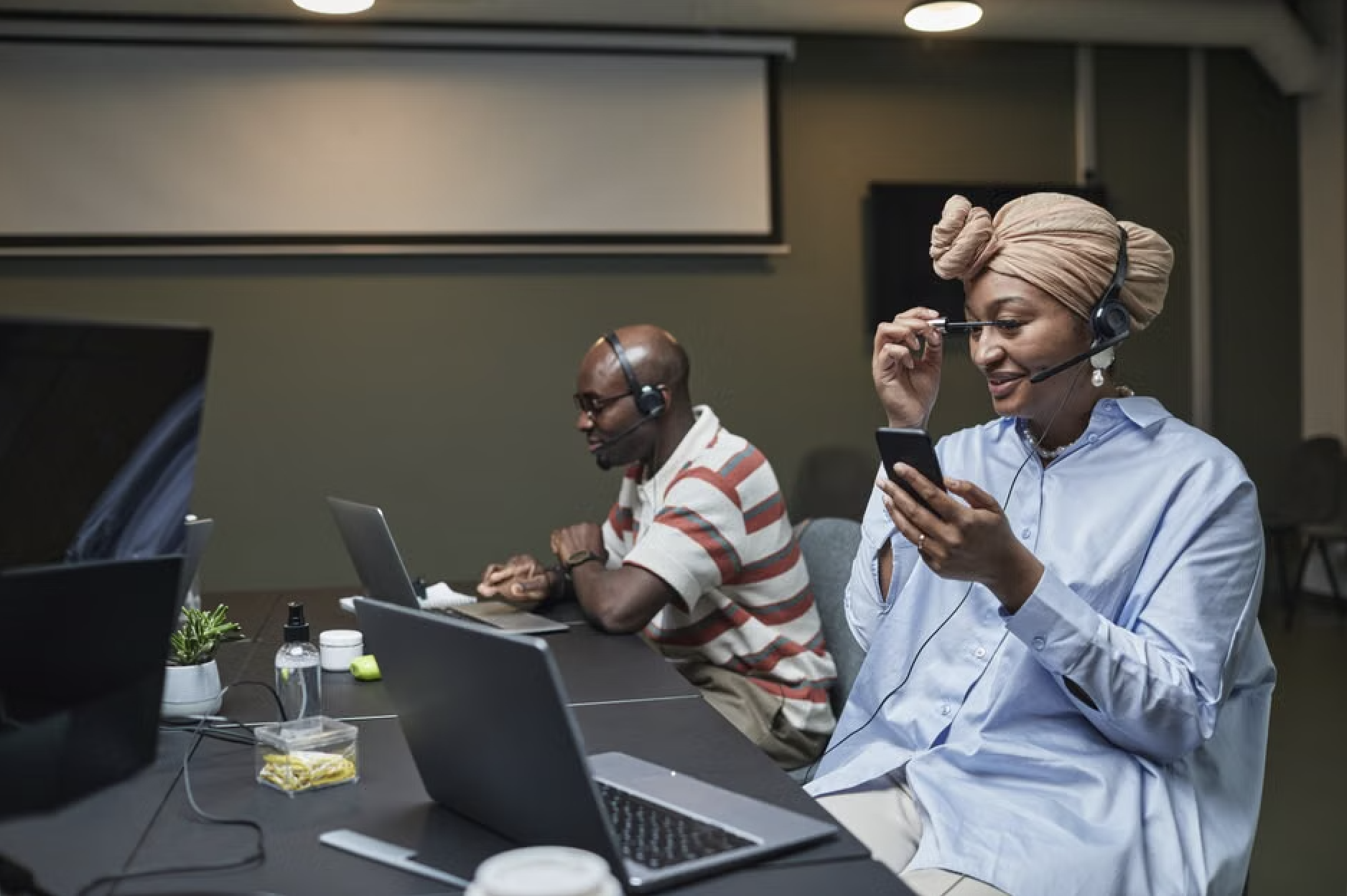
The Beginner's Guide to IT Support and Helpdesk Roles
What Is IT Helpdesk Support (And Why It Matters for Your Business)
IT helpdesk support is the first line of defense when technology breaks down at work. Here's a quick overview:
What It Does How It Helps Logs and tracks technical issues Nothing falls through the cracks Resolves common problems fast Less downtime for your team Escalates complex issues Right problem goes to the right expert Supports remote and on-site users Help wherever your team works Monitors performance with SLAs Accountability you can measure
When your computer crashes, your email stops working, or your team can't log in — someone needs to fix it fast. That's exactly what IT helpdesk support is for.
It's the centralized system businesses use to receive, track, and resolve technical problems. Think of it as the 911 for your office technology.
And it's a big deal. There are currently over 47,000 IT help desk job listings in the U.S., with a median salary of $53,000 for technicians — reflecting just how critical this function is across every industry.
Whether you're a small business owner trying to keep operations running, or you're evaluating support options for your team, understanding how helpdesk support works is the first step toward fewer disruptions and more reliable technology.
I'm Michael Gaigelas, and I've spent over 20 years working in IT helpdesk support, managed services, cloud infrastructure, and business technology. In this guide, I'll break down everything you need to know — in plain language, no jargon required.
Understanding IT Helpdesk Support vs. General IT Support
In the tech world, terms get thrown around interchangeably. You might hear someone say "IT support" when they really mean "helpdesk," or vice versa. While they are closely related, they serve different operational purposes.
At its core, it helpdesk support is tactical and reactive. It is built to keep the daily engines of your business running by managing immediate technical issues. When a local employee in Fort Lauderdale can't connect to the secure Wi-Fi, or a remote worker in Coral Springs gets locked out of their email, they reach out to the helpdesk.
Helpdesk teams focus on:
Incident Management: Restoring normal service operations as quickly as possible following an unexpected disruption.
Service Requests: Handling routine user requests, such as setting up a new user account, resetting a password, or granting access to a shared folder.
Troubleshooting: Running diagnostics on software glitches, operating system bugs, and minor hardware malfunctions.
Learn more about the IT support desk to understand how these day-to-day operations keep businesses stable.
Defining the Core Functions of IT Helpdesk Support
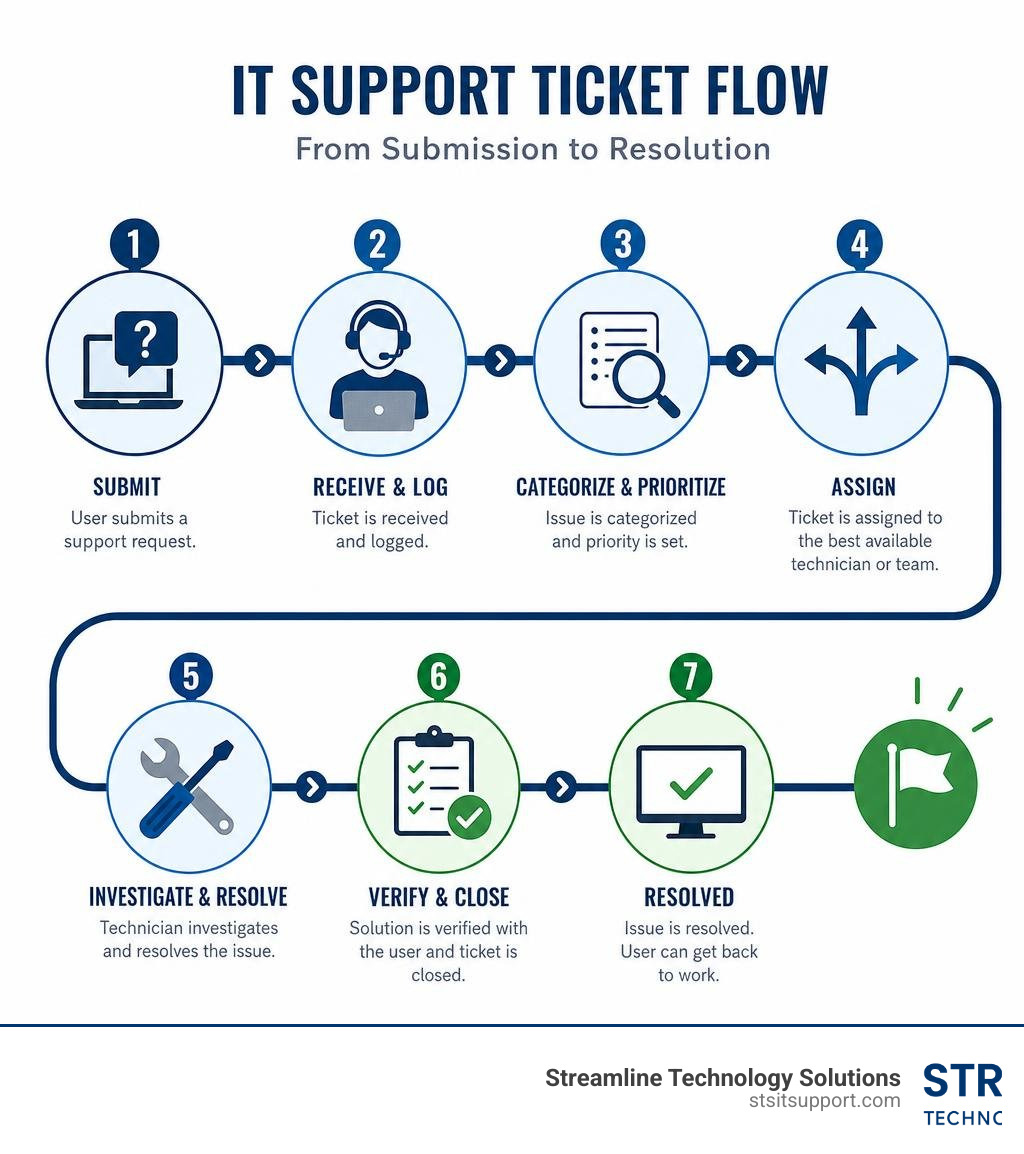
To understand the day-to-day operations of an it helpdesk support team, look at what happens behind the scenes. The entire system is built around a centralized ticketing system. When an issue is reported via phone, email, or a web portal, it is automatically converted into a digital ticket. This ticket acts as an official record, documenting the problem, its priority level, and every step taken to resolve it.
Some of the most common core functions handled by the helpdesk include:
End-User Assistance: Guiding employees through software features, setting up mobile devices, and configuring local printers.
Access Management: Resetting forgotten passwords, unlocking user accounts, and managing multi-factor authentication (MFA) tokens.
Basic Troubleshooting: Fixing configuration issues in productivity suites like Microsoft 365, resolving local network dropouts, and updating out-of-date drivers.
By centralizing these daily micro-tasks, the helpdesk acts as a single point of contact, ensuring that employees always know exactly who to contact when technology acts up. For a deeper dive into these fundamentals, you can explore IT help desk fundamentals.
How General IT Support Differs
If the helpdesk is the emergency room, general IT support is the wellness clinic and the architectural firm combined. General IT support takes a broader, more strategic view of your business's technology environment. It isn't just about fixing what is currently broken; it is about planning, building, and securing the infrastructure that prevents problems from happening in the first place.
General IT support encompasses:
Infrastructure Management: Monitoring and maintaining physical servers, virtualization layers, cloud environments, and core network backbones.
Network Architecture: Designing and implementing secure local area networks (LANs), wide area networks (WANs), and virtual private networks (VPNs) to connect multiple office locations, such as linking a main office in Boca Raton to a branch in Pompano Beach.
Hardware Procurement: Evaluating, purchasing, and configuring high-quality workstations, firewalls, switches, and business VoIP phone systems.
By separating daily user issues from long-term infrastructure health, businesses can maintain stable environments while scaling their operations. To see how these strategies fit together, read about IT support for businesses.
The Tiered Structure of IT Help Desk Support (L1, L2, and L3)
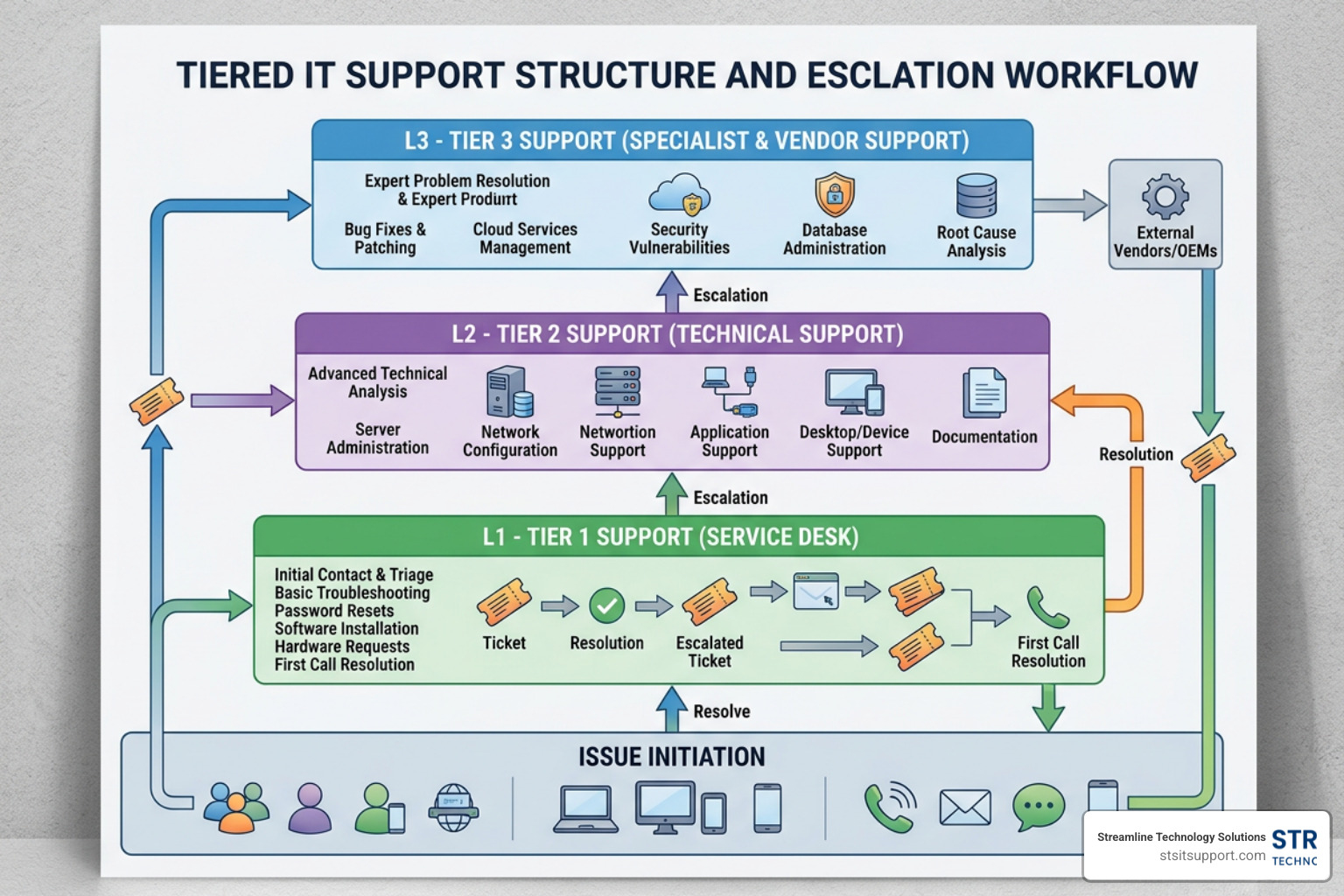
To handle a high volume of technical requests efficiently, modern IT organizations organize their support teams into a tiered structure. This model ensures that routine problems are resolved quickly by frontline staff, while complex engineering challenges are escalated to highly specialized professionals.
Organizing support into Tier 1 (L1), Tier 2 (L2), and Tier 3 (L3) prevents senior engineers from getting bogged down by password resets, and keeps frontline technicians from getting overwhelmed by complex network outages.
Tier 1 (L1) Support: The Frontline of IT Helpdesk Support
Tier 1 is the face of it helpdesk support. These are the technicians who answer the phone calls, reply to incoming emails, and triage tickets as they enter the system. Their primary goal is first-contact resolution—solving the problem on the spot whenever possible.
L1 technicians handle:
Ticket Triage and Categorization: Reviewing incoming requests, determining their severity, and assigning appropriate priority levels.
Basic Troubleshooting: Resolving straightforward issues like password resets, browser cache cleanups, basic software installations, and printer mapping.
User Account Management: Creating new email profiles, modifying basic group memberships, and verifying active directory settings.
If an L1 technician cannot resolve an issue within a set timeframe (usually 15 to 30 minutes), they document their findings and escalate the ticket to Tier 2. To learn more about how these tickets are managed, check out our IT helpdesk ticketing system guide.
Tier 2 (L2) Support: Advanced Troubleshooting
When an issue requires deeper technical investigation or physical intervention, Tier 2 steps in. L2 technicians possess advanced training and a broader understanding of operating systems, hardware configurations, and network settings.
L2 support responsibilities include:
Advanced Software Configuration: Troubleshooting complex database connections, registry edits, and application compatibility issues.
Remote Desktop & On-Site Assistance: Taking secure remote control of user systems to perform deep-dive diagnostics, or traveling on-site to troubleshoot physical equipment.
Hardware Diagnostics: Identifying failing hard drives, bad RAM, or faulty motherboards, and coordinating physical repairs or replacements.
In South Florida, having access to local, hands-on technical experts is crucial when remote tools aren't enough. You can learn more about these physical dispatch services by reading about onsite IT support options.
Tier 3 (L3) Support: Expert-Level Engineering
Tier 3 is the highest level of technical support within an IT organization. These are the senior systems engineers, network architects, and cybersecurity specialists. They rarely interact directly with end-users unless a highly complex, critical issue requires their direct expertise.
L3 engineers focus on:
Network and Server Administration: Resolving major network outages, routing failures, and server crashes that impact the entire company.
Database and Cloud Security: Troubleshooting cloud tenant permissions, virtual machine configurations, and advanced firewall rules.
Root Cause Analysis: Investigating recurring technical anomalies to identify underlying system bugs, and developing permanent workarounds or patches to feed back down to L1 and L2 teams.
Key Features and Benefits of Modern Help Desk Solutions
Modern helpdesk solutions have evolved far beyond simple email inboxes. Today, they leverage sophisticated software to automate workflows, streamline communications, and provide business owners with complete visibility into their IT operations.
Feature Cloud-Based Help Desk On-Premise Help Desk Deployment Hosted in the cloud, instant setup Installed locally on physical servers Maintenance Handled by vendor, automatic updates Handled by internal IT, manual patches Accessibility Accessible from anywhere with internet Requires VPN or local office network access Pricing Predictable monthly subscription per user High upfront licensing and hardware costs Customization High through APIs and built-in integrations Maximum control over local source code
Improving Response Times and User Satisfaction
The ultimate goal of any it helpdesk support team is to keep users happy and productive. This is achieved by maintaining strict Service Level Agreements (SLAs) and focusing on key performance indicators.
Using helpdesk automation, businesses can achieve a 35% decrease in ticket resolution time, saving an average of 8 minutes per ticket. By automating routine tasks like ticket routing and initial triage, a single cohesive team can easily manage nearly 2,000 tickets monthly.
Furthermore, enterprise-grade helpdesk services consistently achieve an 85.5%+ first contact resolution rate, meaning the vast majority of user issues are resolved on the very first call or chat.
To understand how high-performing teams maintain these standards, read about how businesses ensure fast reliable IT support response times and review our breakdown of IT support response time metrics.
Integrating with ITSM and Cybersecurity Strategies
An effective helpdesk does not operate in a vacuum. It should be fully integrated into your broader IT Service Management (ITSM) and cybersecurity frameworks. By aligning helpdesk workflows with industry-standard ITIL processes, businesses ensure that every change, incident, and system request is documented and authorized.
From a security standpoint, the helpdesk is a critical control point. Technicians enforce strict identity verification before resetting passwords, manage access controls to sensitive business folders, and monitor endpoint alerts to isolate infected devices before malware can spread across the corporate network.
To see how municipal and enterprise organizations structure these frameworks, you can review the approach taken by the Information Technology - City of Coral Springs.
In-House vs. Outsourced IT Help Desk Services
One of the biggest decisions a business owner has to make is whether to build an internal IT team or outsource support to a managed service provider.
Building an in-house helpdesk requires significant capital. You have to recruit, train, and retain certified technicians, purchase expensive ticketing software, and pay for ongoing employee benefits. For many small to mid-sized businesses in Deerfield Beach or Fort Lauderdale, this simply isn't cost-effective.
Outsourcing your helpdesk support offers several key advantages:
Predictable Costs: You pay a flat, transparent monthly fee, eliminating unexpected spikes in IT spending.
24/7/365 Availability: Technology doesn't only break between 9 AM and 5 PM. Outsourced models can provide around-the-clock coverage.
Scalability: As your business grows, you can instantly scale your support capacity up or down without worrying about hiring or layoffs.

To explore these options further, read about IT support services for small business and discover how you can get flexible assistance through IT support without contracts.
Comparing Popular Help Desk Platforms in 2026
If you are looking at the software platforms driving helpdesk operations in 2026, several industry leaders stand out:
Jira Service Management: Known as an excellent choice for unified ITSM, fast workflows, and highly scalable business support. It adapts beautifully to existing team workflows.
Zendesk: The go-to platform for organizations prioritizing omnichannel capabilities, allowing seamless transitions between email, live chat, phone, and social media support.
Freshservice: An easy-to-adopt ITSM platform that offers clean, intuitive interfaces and excellent asset management capabilities.
Zoho Desk: A highly functional and affordable option designed specifically for growing businesses that need robust ticket tracking without enterprise price tags.
Each of these systems supports advanced API integrations, allowing your helpdesk software to communicate directly with your network monitoring tools, CRM, and communication platforms like Slack or Microsoft Teams. For more information on how these platforms are integrated into daily operations, see our guide on IT service desk services.
Frequently Asked Questions about IT Helpdesk Support
What certifications are preferred for help desk technicians?
When hiring or evaluating helpdesk technicians, several industry-standard certifications indicate a strong foundation of technical knowledge:
CompTIA A+: The industry standard for establishing a career in IT, covering hardware, operating systems, and basic networking.
CompTIA Network+: Validates the technical skills needed to securely establish, maintain, and troubleshoot essential business networks.
ITIL Foundation: Demonstrates a solid understanding of the IT Service Management (ITSM) framework and best practices.
There is high demand for these skilled professionals locally. For instance, you can find over Help Desk jobs in Boca Raton - LinkedIn listing these exact credentials as preferred requirements. Similar opportunities are widely available across Broward County, as shown by the active listings for 128 Help Desk It jobs in Fort Lauderdale - LinkedIn and various Help Desk jobs in Pompano Beach - LinkedIn.
How does automation reduce ticket resolution times?
Automation removes human friction from the support lifecycle. Instead of waiting for a manual dispatcher to read an email, categorize it, and assign it to a technician, automated workflows handle this instantly.
For example, if a user submits a ticket with the word "password" in the subject line, the system can instantly send a secure password-reset link or assign the ticket directly to the L1 queue with high priority. Automation also triggers canned responses for common issues, schedules follow-ups, and alerts managers if a ticket is close to violating an SLA.
What performance metrics should companies track?
To ensure your IT support team is delivering value, you should track these three essential metrics:
First Contact Resolution (FCR): The percentage of tickets resolved during the user's initial interaction with support. High FCR rates correlate strongly with high user satisfaction.
Average Handle Time (AHT): The average duration of a support interaction from the moment the ticket is opened to the moment it is marked as resolved.
Customer Satisfaction Score (CSAT): Direct feedback gathered from short surveys sent to users immediately after their ticket is closed.
Conclusion
At the end of the day, it helpdesk support is about keeping your business running smoothly. When your technology works, your team can focus on what they do best—serving your customers and growing your business.
At Streamline Technology Solutions, we provide comprehensive IT support, VoIP systems, and hardware procurement tailored specifically for South Florida businesses. Whether your offices are located in Coral Springs, Boca Raton, Fort Lauderdale, Deerfield Beach, or Pompano Beach, we deliver fast, reliable, and local support.
We believe in doing business differently. That means:
Transparent Pricing: Flat monthly rates with absolutely no hidden fees or surprise charges.
Fast Local Support: Real, highly trained technicians based right here in South Florida who can be on-site when you need them.
Direct Accountability: No finger-pointing or endless escalation loops. We take ownership of your technology from day one.
Ready to eliminate IT headaches and bring stability to your business technology? Contact Streamline Technology Solutions for reliable IT support today, and let’s discuss how we can support your team.

How Can We Help?
Call us at (954) 368-0648 or fill out the form below.
Featured Posts
The Beginner's Guide to IT Support and Helpdesk Roles
What Is IT Helpdesk Support (And Why It Matters for Your Business)
IT helpdesk support is the first line of defense when technology breaks down at work. Here's a quick overview:
What It Does How It Helps Logs and tracks technical issues Nothing falls through the cracks Resolves common problems fast Less downtime for your team Escalates complex issues Right problem goes to the right expert Supports remote and on-site users Help wherever your team works Monitors performance with SLAs Accountability you can measure
When your computer crashes, your email stops working, or your team can't log in — someone needs to fix it fast. That's exactly what IT helpdesk support is for.
It's the centralized system businesses use to receive, track, and resolve technical problems. Think of it as the 911 for your office technology.
And it's a big deal. There are currently over 47,000 IT help desk job listings in the U.S., with a median salary of $53,000 for technicians — reflecting just how critical this function is across every industry.
Whether you're a small business owner trying to keep operations running, or you're evaluating support options for your team, understanding how helpdesk support works is the first step toward fewer disruptions and more reliable technology.
I'm Michael Gaigelas, and I've spent over 20 years working in IT helpdesk support, managed services, cloud infrastructure, and business technology. In this guide, I'll break down everything you need to know — in plain language, no jargon required.
Understanding IT Helpdesk Support vs. General IT Support
In the tech world, terms get thrown around interchangeably. You might hear someone say "IT support" when they really mean "helpdesk," or vice versa. While they are closely related, they serve different operational purposes.
At its core, it helpdesk support is tactical and reactive. It is built to keep the daily engines of your business running by managing immediate technical issues. When a local employee in Fort Lauderdale can't connect to the secure Wi-Fi, or a remote worker in Coral Springs gets locked out of their email, they reach out to the helpdesk.
Helpdesk teams focus on:
Incident Management: Restoring normal service operations as quickly as possible following an unexpected disruption.
Service Requests: Handling routine user requests, such as setting up a new user account, resetting a password, or granting access to a shared folder.
Troubleshooting: Running diagnostics on software glitches, operating system bugs, and minor hardware malfunctions.
Learn more about the IT support desk to understand how these day-to-day operations keep businesses stable.
Defining the Core Functions of IT Helpdesk Support
To understand the day-to-day operations of an it helpdesk support team, look at what happens behind the scenes. The entire system is built around a centralized ticketing system. When an issue is reported via phone, email, or a web portal, it is automatically converted into a digital ticket. This ticket acts as an official record, documenting the problem, its priority level, and every step taken to resolve it.
Some of the most common core functions handled by the helpdesk include:
End-User Assistance: Guiding employees through software features, setting up mobile devices, and configuring local printers.
Access Management: Resetting forgotten passwords, unlocking user accounts, and managing multi-factor authentication (MFA) tokens.
Basic Troubleshooting: Fixing configuration issues in productivity suites like Microsoft 365, resolving local network dropouts, and updating out-of-date drivers.
By centralizing these daily micro-tasks, the helpdesk acts as a single point of contact, ensuring that employees always know exactly who to contact when technology acts up. For a deeper dive into these fundamentals, you can explore IT help desk fundamentals.
How General IT Support Differs
If the helpdesk is the emergency room, general IT support is the wellness clinic and the architectural firm combined. General IT support takes a broader, more strategic view of your business's technology environment. It isn't just about fixing what is currently broken; it is about planning, building, and securing the infrastructure that prevents problems from happening in the first place.
General IT support encompasses:
Infrastructure Management: Monitoring and maintaining physical servers, virtualization layers, cloud environments, and core network backbones.
Network Architecture: Designing and implementing secure local area networks (LANs), wide area networks (WANs), and virtual private networks (VPNs) to connect multiple office locations, such as linking a main office in Boca Raton to a branch in Pompano Beach.
Hardware Procurement: Evaluating, purchasing, and configuring high-quality workstations, firewalls, switches, and business VoIP phone systems.
By separating daily user issues from long-term infrastructure health, businesses can maintain stable environments while scaling their operations. To see how these strategies fit together, read about IT support for businesses.
The Tiered Structure of IT Help Desk Support (L1, L2, and L3)
To handle a high volume of technical requests efficiently, modern IT organizations organize their support teams into a tiered structure. This model ensures that routine problems are resolved quickly by frontline staff, while complex engineering challenges are escalated to highly specialized professionals.
Organizing support into Tier 1 (L1), Tier 2 (L2), and Tier 3 (L3) prevents senior engineers from getting bogged down by password resets, and keeps frontline technicians from getting overwhelmed by complex network outages.
Tier 1 (L1) Support: The Frontline of IT Helpdesk Support
Tier 1 is the face of it helpdesk support. These are the technicians who answer the phone calls, reply to incoming emails, and triage tickets as they enter the system. Their primary goal is first-contact resolution—solving the problem on the spot whenever possible.
L1 technicians handle:
Ticket Triage and Categorization: Reviewing incoming requests, determining their severity, and assigning appropriate priority levels.
Basic Troubleshooting: Resolving straightforward issues like password resets, browser cache cleanups, basic software installations, and printer mapping.
User Account Management: Creating new email profiles, modifying basic group memberships, and verifying active directory settings.
If an L1 technician cannot resolve an issue within a set timeframe (usually 15 to 30 minutes), they document their findings and escalate the ticket to Tier 2. To learn more about how these tickets are managed, check out our IT helpdesk ticketing system guide.
Tier 2 (L2) Support: Advanced Troubleshooting
When an issue requires deeper technical investigation or physical intervention, Tier 2 steps in. L2 technicians possess advanced training and a broader understanding of operating systems, hardware configurations, and network settings.
L2 support responsibilities include:
Advanced Software Configuration: Troubleshooting complex database connections, registry edits, and application compatibility issues.
Remote Desktop & On-Site Assistance: Taking secure remote control of user systems to perform deep-dive diagnostics, or traveling on-site to troubleshoot physical equipment.
Hardware Diagnostics: Identifying failing hard drives, bad RAM, or faulty motherboards, and coordinating physical repairs or replacements.
In South Florida, having access to local, hands-on technical experts is crucial when remote tools aren't enough. You can learn more about these physical dispatch services by reading about onsite IT support options.
Tier 3 (L3) Support: Expert-Level Engineering
Tier 3 is the highest level of technical support within an IT organization. These are the senior systems engineers, network architects, and cybersecurity specialists. They rarely interact directly with end-users unless a highly complex, critical issue requires their direct expertise.
L3 engineers focus on:
Network and Server Administration: Resolving major network outages, routing failures, and server crashes that impact the entire company.
Database and Cloud Security: Troubleshooting cloud tenant permissions, virtual machine configurations, and advanced firewall rules.
Root Cause Analysis: Investigating recurring technical anomalies to identify underlying system bugs, and developing permanent workarounds or patches to feed back down to L1 and L2 teams.
Key Features and Benefits of Modern Help Desk Solutions
Modern helpdesk solutions have evolved far beyond simple email inboxes. Today, they leverage sophisticated software to automate workflows, streamline communications, and provide business owners with complete visibility into their IT operations.
Feature Cloud-Based Help Desk On-Premise Help Desk Deployment Hosted in the cloud, instant setup Installed locally on physical servers Maintenance Handled by vendor, automatic updates Handled by internal IT, manual patches Accessibility Accessible from anywhere with internet Requires VPN or local office network access Pricing Predictable monthly subscription per user High upfront licensing and hardware costs Customization High through APIs and built-in integrations Maximum control over local source code
Improving Response Times and User Satisfaction
The ultimate goal of any it helpdesk support team is to keep users happy and productive. This is achieved by maintaining strict Service Level Agreements (SLAs) and focusing on key performance indicators.
Using helpdesk automation, businesses can achieve a 35% decrease in ticket resolution time, saving an average of 8 minutes per ticket. By automating routine tasks like ticket routing and initial triage, a single cohesive team can easily manage nearly 2,000 tickets monthly.
Furthermore, enterprise-grade helpdesk services consistently achieve an 85.5%+ first contact resolution rate, meaning the vast majority of user issues are resolved on the very first call or chat.
To understand how high-performing teams maintain these standards, read about how businesses ensure fast reliable IT support response times and review our breakdown of IT support response time metrics.
Integrating with ITSM and Cybersecurity Strategies
An effective helpdesk does not operate in a vacuum. It should be fully integrated into your broader IT Service Management (ITSM) and cybersecurity frameworks. By aligning helpdesk workflows with industry-standard ITIL processes, businesses ensure that every change, incident, and system request is documented and authorized.
From a security standpoint, the helpdesk is a critical control point. Technicians enforce strict identity verification before resetting passwords, manage access controls to sensitive business folders, and monitor endpoint alerts to isolate infected devices before malware can spread across the corporate network.
To see how municipal and enterprise organizations structure these frameworks, you can review the approach taken by the Information Technology - City of Coral Springs.
In-House vs. Outsourced IT Help Desk Services
One of the biggest decisions a business owner has to make is whether to build an internal IT team or outsource support to a managed service provider.
Building an in-house helpdesk requires significant capital. You have to recruit, train, and retain certified technicians, purchase expensive ticketing software, and pay for ongoing employee benefits. For many small to mid-sized businesses in Deerfield Beach or Fort Lauderdale, this simply isn't cost-effective.
Outsourcing your helpdesk support offers several key advantages:
Predictable Costs: You pay a flat, transparent monthly fee, eliminating unexpected spikes in IT spending.
24/7/365 Availability: Technology doesn't only break between 9 AM and 5 PM. Outsourced models can provide around-the-clock coverage.
Scalability: As your business grows, you can instantly scale your support capacity up or down without worrying about hiring or layoffs.
To explore these options further, read about IT support services for small business and discover how you can get flexible assistance through IT support without contracts.
Comparing Popular Help Desk Platforms in 2026
If you are looking at the software platforms driving helpdesk operations in 2026, several industry leaders stand out:
Jira Service Management: Known as an excellent choice for unified ITSM, fast workflows, and highly scalable business support. It adapts beautifully to existing team workflows.
Zendesk: The go-to platform for organizations prioritizing omnichannel capabilities, allowing seamless transitions between email, live chat, phone, and social media support.
Freshservice: An easy-to-adopt ITSM platform that offers clean, intuitive interfaces and excellent asset management capabilities.
Zoho Desk: A highly functional and affordable option designed specifically for growing businesses that need robust ticket tracking without enterprise price tags.
Each of these systems supports advanced API integrations, allowing your helpdesk software to communicate directly with your network monitoring tools, CRM, and communication platforms like Slack or Microsoft Teams. For more information on how these platforms are integrated into daily operations, see our guide on IT service desk services.
Frequently Asked Questions about IT Helpdesk Support
What certifications are preferred for help desk technicians?
When hiring or evaluating helpdesk technicians, several industry-standard certifications indicate a strong foundation of technical knowledge:
CompTIA A+: The industry standard for establishing a career in IT, covering hardware, operating systems, and basic networking.
CompTIA Network+: Validates the technical skills needed to securely establish, maintain, and troubleshoot essential business networks.
ITIL Foundation: Demonstrates a solid understanding of the IT Service Management (ITSM) framework and best practices.
There is high demand for these skilled professionals locally. For instance, you can find over Help Desk jobs in Boca Raton - LinkedIn listing these exact credentials as preferred requirements. Similar opportunities are widely available across Broward County, as shown by the active listings for 128 Help Desk It jobs in Fort Lauderdale - LinkedIn and various Help Desk jobs in Pompano Beach - LinkedIn.
How does automation reduce ticket resolution times?
Automation removes human friction from the support lifecycle. Instead of waiting for a manual dispatcher to read an email, categorize it, and assign it to a technician, automated workflows handle this instantly.
For example, if a user submits a ticket with the word "password" in the subject line, the system can instantly send a secure password-reset link or assign the ticket directly to the L1 queue with high priority. Automation also triggers canned responses for common issues, schedules follow-ups, and alerts managers if a ticket is close to violating an SLA.
What performance metrics should companies track?
To ensure your IT support team is delivering value, you should track these three essential metrics:
First Contact Resolution (FCR): The percentage of tickets resolved during the user's initial interaction with support. High FCR rates correlate strongly with high user satisfaction.
Average Handle Time (AHT): The average duration of a support interaction from the moment the ticket is opened to the moment it is marked as resolved.
Customer Satisfaction Score (CSAT): Direct feedback gathered from short surveys sent to users immediately after their ticket is closed.
Conclusion
At the end of the day, it helpdesk support is about keeping your business running smoothly. When your technology works, your team can focus on what they do best—serving your customers and growing your business.
At Streamline Technology Solutions, we provide comprehensive IT support, VoIP systems, and hardware procurement tailored specifically for South Florida businesses. Whether your offices are located in Coral Springs, Boca Raton, Fort Lauderdale, Deerfield Beach, or Pompano Beach, we deliver fast, reliable, and local support.
We believe in doing business differently. That means:
Transparent Pricing: Flat monthly rates with absolutely no hidden fees or surprise charges.
Fast Local Support: Real, highly trained technicians based right here in South Florida who can be on-site when you need them.
Direct Accountability: No finger-pointing or endless escalation loops. We take ownership of your technology from day one.
Ready to eliminate IT headaches and bring stability to your business technology? Contact Streamline Technology Solutions for reliable IT support today, and let’s discuss how we can support your team.