How to Succeed in IT Helpdesk Remote Support Roles
Why IT Helpdesk Remote Support Is Reshaping Modern IT Careers
IT helpdesk remote support is one of the fastest-growing roles in the technology industry — and for good reason. It lets skilled technicians resolve software issues, connectivity problems, and user errors without ever leaving their desk.
Quick answer: What is IT helpdesk remote support?
IT professionals connect to a user's device over the internet
They troubleshoot and fix issues in real time using screen sharing, remote control, or unattended access tools
No on-site visit is needed for most common problems
Support can be delivered from anywhere — home, office, or across the globe
Organizations benefit from faster response times, lower costs, and broader coverage
Today, there are over 741 remote help desk technician jobs listed in the United States alone, with new openings posted daily. Businesses of all sizes — from small South Florida companies to large enterprises — rely on remote support teams to keep their operations running smoothly.
The demand is real. And so is the opportunity.
I'm Michael Gaigelas, and with 20 years of hands-on experience in IT support, managed services, cloud servers, and telecommunications, I've worked directly in and around IT helpdesk remote support across dozens of business environments. This guide will walk you through everything you need to succeed in this space.
What is IT Helpdesk Remote Support?
At its core, it helpdesk remote support refers to the practice of diagnosing, troubleshooting, and resolving technical issues from a distance. Instead of a technician physically walking over to an employee's desk or driving to a client's office, they leverage specialized software to bridge the gap.
This model relies on secure, internet-based connections to establish a bridge between the support technician and the end-user's device. Through this connection, technicians can view the user’s screen, control their mouse and keyboard, transfer files, run diagnostics, and apply software patches in real time.
While remote support is incredibly efficient, it does not completely replace the need for physical IT handling. To understand how these two models coexist, let’s look at how they differ across key operational areas.
Operational Area Remote IT Support Traditional On-Site IT Support Primary Use Cases Software glitches, password resets, configuration changes, updates, and driver issues. Hardware failures, physical network cabling, device provisioning, and local infrastructure setup. Response & Resolution Time Near-instantaneous. Sessions can start within seconds of a user submitting a ticket. Subject to travel times, traffic, and technician availability. Cost Efficiency Highly cost-effective; eliminates travel expenses and maximizes technician productivity. Higher cost due to travel time, vehicle maintenance, and lower technician utilization rates. User Interruption Minimal. Many background tasks can be performed without interrupting the user's workflow. Higher. Technicians must physically occupy the user's workspace to diagnose and repair. Geographic Reach Unlimited. Technicians can support users anywhere globally with an internet connection. Strictly limited to a specific local driving radius.
While remote support handles the vast majority of daily tickets, complex physical hardware issues still require a hands-on touch. Learn more about onsite IT support to see how local intervention complements a remote-first strategy.
The Evolution of IT Helpdesk Remote Support Roles
The remote helpdesk role has undergone a massive transformation over the last decade. Historically, helpdesk teams operated out of centralized, physical call centers. Technicians sat side-by-side, answering phone calls and guiding users through complex command-line prompts blindly.
With the rapid acceleration of cloud computing, SaaS platforms, and widespread digital transformation, the modern service desk has evolved. Today, helpdesk professionals are highly mobile, often working from their own homes or distributed offices while supporting a completely remote or hybrid workforce.
This shift has created a boom in the local job market. For instance, those looking for employment can find numerous IT helpdesk jobs in Fort Lauderdale and surrounding South Florida areas that offer hybrid or fully remote schedules. As businesses move away from rigid, on-premise servers toward flexible cloud infrastructure, the demand for technicians who excel at virtual troubleshooting has skyrocketed. Modern remote technicians are no longer just "call takers"—they are critical operators managing complex virtual environments, cloud identities, and sophisticated endpoint management tools.
To meet these changing demands, organizations are turning to comprehensive IT support desk services to keep their teams connected and secure.
Key Benefits for Organizations and End Users
Transitioning to or optimizing a remote-first helpdesk model delivers massive returns for both businesses and their employees. By eliminating the friction of physical distance, organizations can streamline their operations while dramatically improving the end-user experience.
Here are the primary benefits backed by industry data:
Substantial Cost Savings: By resolving issues remotely, companies eliminate the travel costs, vehicle overhead, and lost productivity associated with dispatching physical technicians.
Higher First-Call Resolution (FCR): With immediate access to diagnostic tools and screen sharing, more than 25% of organizations report an increase in first-call resolutions.
Boosted Customer Satisfaction (CSAT): Users hate waiting. Because remote support cuts out travel time, over 25% of companies have seen their CSAT scores rise as a direct result of faster service.
Reduced Incident Handling Time: With direct remote control, technicians can get straight to the root of a problem without relying on the user to describe error messages. This has allowed organizations to reduce incident handling times by 20% or more.
24/7 Scalability: Remote support tools allow teams to hand off tickets across different time zones, making round-the-clock coverage achievable without burning out local staff.
These efficiencies allow businesses to scale without their IT costs growing at the same rate. This is why investing in modern IT support for businesses has become a foundational strategy for growth.
Essential Skills and Tools for Remote IT Support Success
To thrive in an it helpdesk remote support role, a technician needs a balanced mix of technical prowess and exceptional interpersonal skills. Working remotely means you cannot rely on body language or physical gestures to reassure an anxious user. You must build trust entirely through your voice, your written chat, and your swift technical actions.

First and foremost, active listening is the ultimate superpower for a remote technician. When a user says, "My internet is broken," they might mean their browser crashed, their VPN disconnected, or their local router lost power. A great technician listens carefully, asks targeted clarifying questions, and avoids technical jargon that might alienate the user.
Secondly, structured problem-solving is critical. Because you aren't physically sitting at the machine, you must follow a logical, step-by-step diagnostic methodology:
Isolate the symptom (e.g., is the issue happening in one application, across the OS, or on the local network?).
Identify recent changes (e.g., did the user install a new update, change a password, or plug in a new peripheral?).
Test hypotheses systematically, starting with the least invasive solutions first.
By combining these soft skills with structured troubleshooting, you can consistently deliver exceptional service. To explore these methodologies further, check out our guide on IT helpdesk best practices.
Essential Tools for IT Helpdesk Remote Support
A remote technician is only as good as their toolkit. To resolve complex issues quickly, helpdesk teams rely on feature-rich remote support software. When evaluating or utilizing these platforms, look for these core features:
Unattended Access: This allows technicians to securely connect to and manage devices even when the end-user is away from their desk. It is perfect for performing after-hours maintenance, pushing software updates, or rebooting servers without interrupting daily operations.
Real-Time Screen Sharing and Control: The bread and butter of remote support. Technicians can view the user's screen in real time, take control of the mouse and keyboard, and guide the user through complex workflows.
Two-Way Chat and VoIP: Built-in communication channels allow technicians to chat with the user directly inside the support session, keeping all communication centralized and documented.
Secure File Transfer: The ability to quickly and securely copy diagnostic scripts, log files, or software installers back and forth between the technician's machine and the remote endpoint.
Session Recording: Recording remote sessions is invaluable for compliance, security auditing, and training purposes. It provides an indisputable record of exactly what changes were made during a support call.
For organizations leveraging modern cloud-based device management, deploying remote help tools through platforms like Microsoft Intune is a highly secure way to integrate these capabilities directly into your existing ecosystem.
Supported Platforms and Device Management
Modern business environments are highly diverse. On any given day, a remote helpdesk technician might be asked to troubleshoot a Windows laptop, configure an iPad, update a Linux server, or assist a user on a Mac. Therefore, leading remote support tools must offer robust cross-platform compatibility.
A truly effective remote support solution must seamlessly span:
Desktop Operating Systems: Comprehensive support for Windows, macOS, and various Linux distributions.
Mobile Devices: Remote screen-viewing and control capabilities for iOS and Android devices, which is essential for supporting a mobile workforce.
Unattended and Headless Systems: The ability to connect to servers, point-of-sale (POS) systems, digital signage, and IoT devices that do not have a traditional monitor or user present.
For enterprise environments, utilizing official resources like the Microsoft Remote Help documentation helps ensure your mobile and desktop management strategies align with industry best practices. By standardizing your tools, you can deploy unified IT helpdesk support solutions that protect and support every device on your network.
Security, Compliance, and Access Control
Because remote support tools grant deep, administrative access to endpoints, they are prime targets for malicious actors. A single compromised remote support credential can give an attacker the keys to an entire corporate network. Therefore, security cannot be an afterthought—it must be baked into every layer of your remote support operations.

To protect your organization and your users, any remote support platform you use must employ industry-standard security protocols:
End-to-End Encryption: All data transmitted during a remote session—including screen video, keystrokes, and file transfers—must be encrypted using robust protocols like TLS 1.2 and AES 256-bit encryption.
Multi-Factor Authentication (MFA): Technicians must be required to authenticate using MFA before they can initiate any remote connection. This prevents unauthorized access even if a technician’s password is leaked.
Connection Origin Detection: Security tools should monitor where connection requests are coming from, alerting administrators to any anomalous login attempts or sessions initiated from unexpected geographic locations.
Implementing these guardrails is essential for maintaining a strong defensive posture. For a complete look at securing modern business technology, read our comprehensive Managed IT support guide for 2026.
Role-Based Access Controls (RBAC)
To prevent internal misuse and limit potential damage from a compromised account, remote support platforms must enforce the principle of least privilege. This is achieved through robust Role-Based Access Controls (RBAC).
Under an RBAC framework, technicians are only granted the specific permissions they need to perform their daily duties. For example:
Tier 1 Technicians might only have permission to view screens, chat with users, and run basic diagnostic commands.
Tier 2 and Tier 3 Technicians can be granted elevated permissions, such as the ability to transfer files, run administrative scripts, or initiate unattended access.
Helpdesk Administrators retain full control over configuration settings, user provisioning, and security policies.
Additionally, integrating credential vaulting into your remote support workflow allows technicians to elevate their privileges on a remote machine without ever seeing or knowing the local administrator password. This keeps sensitive credentials secure and ensures that all administrative actions are tied back to a specific, authenticated ticketing session within your IT helpdesk ticketing systems.
Meeting Compliance Standards Remotely
For businesses operating in highly regulated industries—such as healthcare, finance, or legal services—remote support tools must comply with strict federal and international data privacy laws.
When choosing or configuring a remote helpdesk tool, ensure it supports compliance across these key frameworks:
HIPAA (Healthcare): Requires strict controls over access to Protected Health Information (PHI). Remote tools must ensure that sessions are fully encrypted, no PHI is cached on technician devices, and detailed audit logs are kept.
GDPR (Data Privacy): Mandates that users have control over their personal data. Remote tools must obtain explicit user consent before sharing screens or transferring files, and must provide options to purge session data upon request.
FIPS 140-2 Validation: A government security standard that validates the cryptographic modules used in the software. This is highly critical for businesses supporting federal clients or public sector contracts.
Comprehensive Audit Logging: The platform must automatically log every remote session, including the names of the helper and sharer, session duration, files transferred, and any elevated actions taken. These logs are vital for forensic analysis and compliance audits.
Adhering to these standards protects your clients from data breaches and shields your business from costly compliance penalties. This is a core focus when delivering secure IT support services for small businesses.
Best Practices for Deploying and Managing Remote Support at Scale
Deploying remote support tools across a growing business requires careful planning. You cannot simply ask hundreds of employees to manually download and install support clients one by one. To scale efficiently, IT administrators must automate the deployment and management process.
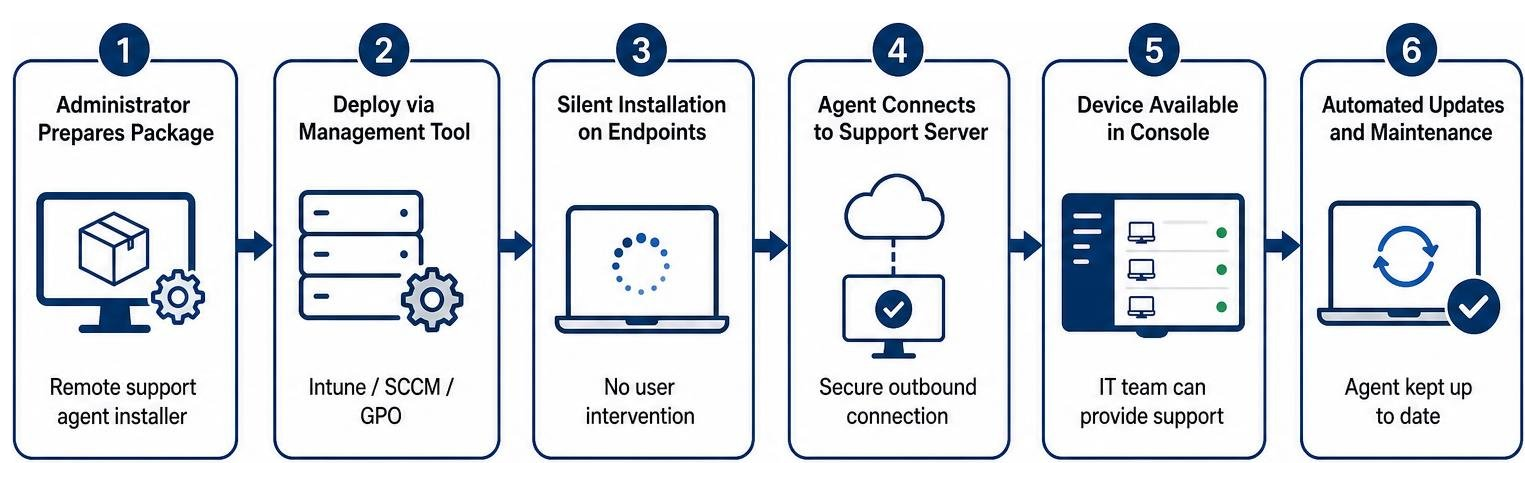
To achieve a seamless, enterprise-wide rollout, follow these deployment best practices:
Utilize Bulk Deployment and Silent Installs: Leverage central endpoint management tools like Microsoft Intune, SCCM, or Group Policy Objects (GPO) to silently push lightweight remote support agents to all corporate devices. This ensures that every laptop and workstation is immediately reachable by the helpdesk without requiring user intervention.
Establish Clear Windows Firewall Rules: Ensure your network security policies allow traffic through the specific ports required by your remote support software (such as port 443 for secure HTTPS connections).
Automate Software Updates: Keep your remote support agents updated automatically. Vulnerabilities in outdated remote access tools are frequently exploited by hackers, so automated patch management is a must.
By automating these processes, you reduce manual overhead and ensure your support infrastructure is always ready to respond. To learn more about optimizing your support operations, explore how businesses ensure fast reliable IT support response times.
Staff Training and User Communication
The technical deployment of a remote support tool is only half the battle; the human element is just as important. If your employees do not understand how remote support works, they may resist using it or, worse, fall victim to social engineering scams.
Technician Onboarding: Train your helpdesk staff not only on how to use the remote software, but also on proper customer service etiquette. Technicians should always explain what they are doing before taking control of a screen and keep the user informed throughout the session.
Clear User Communication: Educate your employees on what to expect. Let them know that legitimate IT staff will always request permission before connecting, and that they will never ask for personal passwords over chat or phone.
Enforce Explicit User Consent: Configure your remote tools to require the end-user to click "Accept" or "Allow" before a technician can view their screen or control their device. This builds trust and ensures transparency.
By fostering open communication and setting clear expectations, you can dramatically improve your IT support response times and overall user adoption.
Integrating Remote Tools with ITSM Platforms
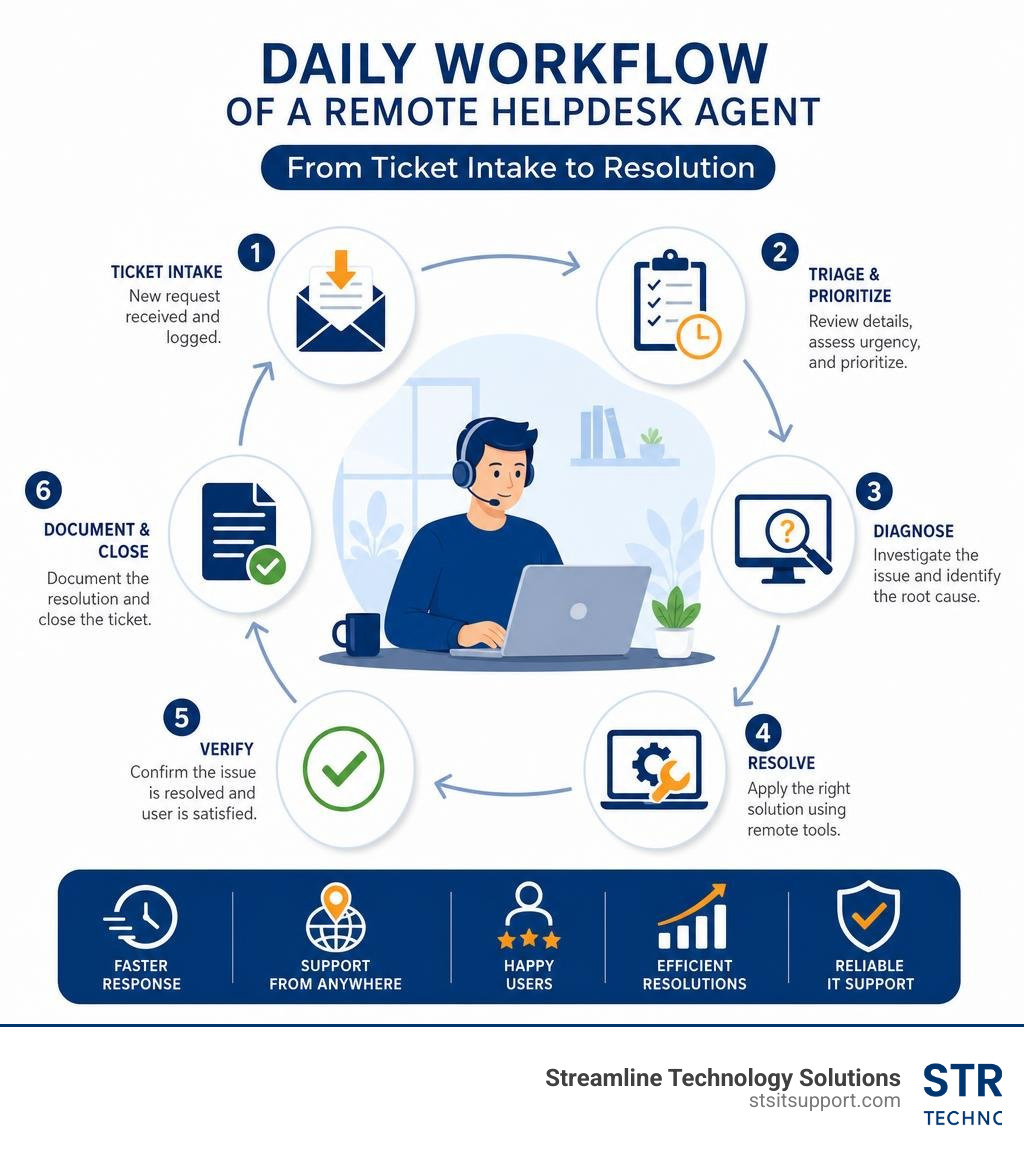
To maximize efficiency, your remote support software should not operate in a vacuum. It should be deeply integrated with your existing IT Service Management (ITSM) and ticketing platforms.
Integrating these systems creates a highly streamlined workflow:
A user submits a support ticket through your ITSM platform (such as Jira or ServiceNow).
The technician opens the ticket and clicks a single button to generate a secure remote support session link.
The link is automatically sent to the user via email or chat.
Once the session concludes, the remote software automatically attaches the session logs, chat transcripts, and any system diagnostics directly to the original ticket.
This level of automation eliminates manual documentation, ensures accurate record-keeping, and helps your team maintain strict compliance. If your internal team is stretched thin, leveraging IT helpdesk outsourcing can help you rapidly implement these integrated workflows without the heavy lifting.
Frequently Asked Questions about Remote IT Support
What qualifications are needed for remote IT help desk jobs?
While a formal degree in Computer Science is always beneficial, it is rarely a strict requirement for entry-level remote helpdesk roles. Instead, hiring managers look for a combination of hands-on experience, strong communication skills, and relevant industry certifications.
Highly valued certifications include CompTIA A+, Network+, Security+, and Microsoft Certified: Modern Desktop Administrator Associate. If you are looking to start or advance your career in South Florida, keeping an eye on helpdesk jobs in Deerfield Beach and surrounding cities is a great way to find local employers looking for these specific qualifications.
How do remote helpdesk tools integrate with existing security systems?
Modern remote helpdesk tools integrate directly with enterprise security platforms to maintain a unified defense. They utilize Single Sign-On (SSO) and integration with identity providers like Microsoft Entra ID to ensure only authorized IT personnel can log in.
Additionally, organizations can enforce Conditional Access policies, which require technicians to meet specific security criteria—such as logging in from a corporate-managed device or completing multi-factor authentication (MFA)—before a remote session is allowed to start. This level of integration is standard when setting up secure, affordable IT support packages for growing businesses.
What is the difference between attended and unattended remote access?
Attended Access (also known as on-demand support) requires an end-user to be present at the device to accept the connection request and authorize the technician to take control. This is typically used for daily helpdesk troubleshooting.
Unattended Access allows authorized technicians to connect to a remote device without any user intervention. This is ideal for system administrators performing after-hours maintenance, pushing silent software updates, or executing a remote reboot.
Having access to both capabilities is essential for delivering comprehensive support, especially when managing systems under flexible IT support without contracts.
Conclusion
Succeeding in an it helpdesk remote support role requires a continuous commitment to learning. Technology evolves rapidly, and the tools, platforms, and security threats you manage today will look different tomorrow. By mastering both the technical diagnostic tools and the soft skills of active listening and clear communication, you can build a highly rewarding, future-proof career in IT.
For businesses in South Florida—including Coral Springs, Boca Raton, Fort Lauderdale, Deerfield Beach, and Pompano Beach—having a highly skilled, reliable remote support team is essential to keeping operations secure and productive.
At Streamline Technology Solutions, we provide fast, local IT services, VoIP, and hardware with transparent pricing, no hidden fees, and direct accountability. Whether you are looking to optimize your business's IT infrastructure or want to learn more about our support models, we are here to help. Contact Streamline Technology Solutions today to get started.