How to Build an IT Helpdesk That Actually Works
Why IT Helpdesk Best Practices Make or Break Your Business Operations
IT helpdesk best practices are the difference between a support team that keeps your business running and one that quietly costs you time, money, and employee morale every single day.
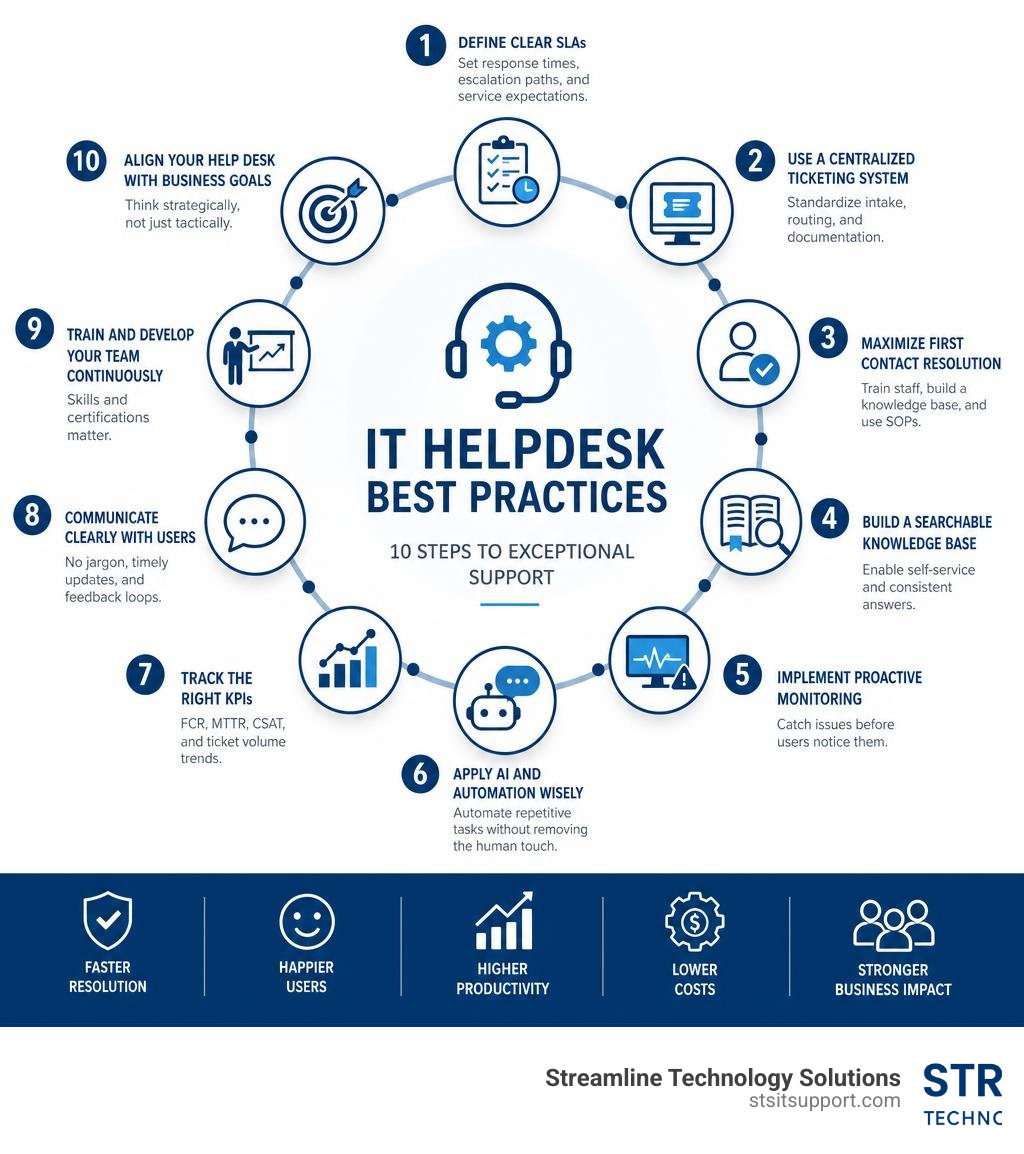
Here are the core best practices at a glance:
Define clear SLAs - Set response times, escalation paths, and service expectations in writing
Use a centralized ticketing system - Standardize intake, routing, and documentation
Maximize First Contact Resolution (FCR) - Train staff, build a knowledge base, use SOPs
Build a searchable knowledge base - Enable self-service and consistent answers
Implement proactive monitoring - Catch issues before users notice them
Apply AI and automation wisely - Automate repetitive tasks without removing the human touch
Track the right KPIs - FCR, MTTR, CSAT, and ticket volume trends
Communicate clearly with users - No jargon, timely updates, feedback loops
Train and develop your team continuously - Skills and certifications matter
Align your help desk with business goals - Think strategically, not just tactically
Most businesses don't fail at IT support because of bad technology. They fail because of inconsistent processes, unclear expectations, and a reactive mindset that puts out fires instead of preventing them.
The numbers tell the story. 58% of IT teams spend five or more hours per week on repetitive requests. That's time burned on password resets and routine tasks instead of solving real problems. And when manual work piles up, people leave — 90% of IT teams say repetitive manual tasks contribute to low morale and attrition.
For small business owners in South Florida, this isn't abstract. Every hour your team waits on a ticket is an hour they're not serving customers, closing deals, or moving the business forward.
The good news? A well-run helpdesk isn't complicated. It just requires the right structure — and the willingness to stick to it.
I'm Michael Gaigelas, and with over 20 years of hands-on experience in IT support, managed services, and business technology, I've seen how applying the right IT helpdesk best practices transforms a struggling support operation into a reliable business asset. In this guide, I'll walk you through exactly what works.
Traditional Help Desk vs. Strategic Service Desk
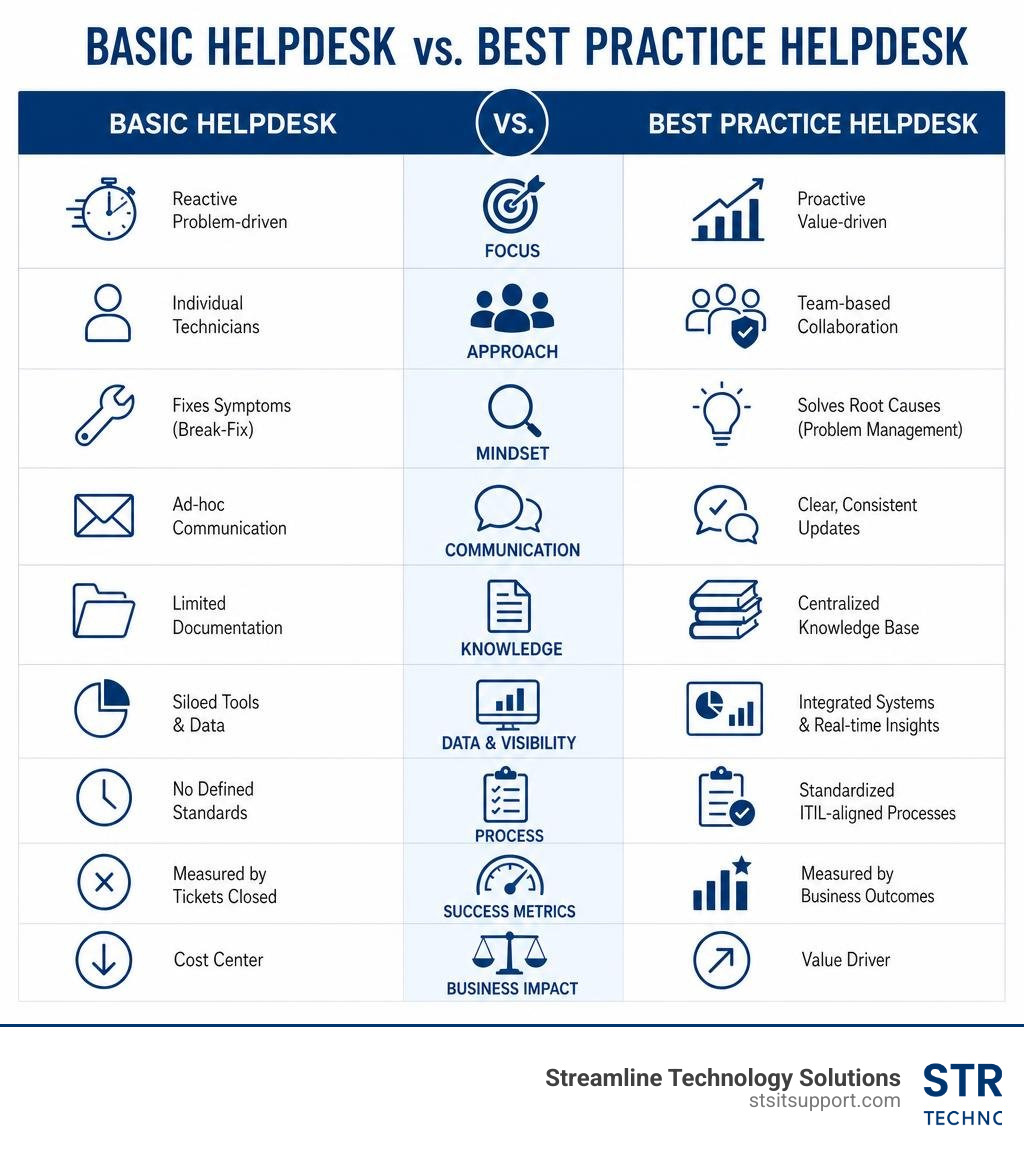
To build a support system that drives real value, we must first clear up a common point of confusion: the difference between a traditional help desk and a strategic service desk. While people often use these terms interchangeably, they represent two entirely different approaches to managing business technology.

A traditional help desk is tactical. It is built to resolve immediate technical problems — the classic "break-fix" model. When an email server goes down in Fort Lauderdale, or a printer stops working in Boca Raton, the user calls the help desk, and a technician fixes it. It is inherently reactive, focusing on the speed of individual ticket resolutions rather than the root cause of the issue.
A strategic service desk, however, is aligned with the ITIL (Information Technology Infrastructure Library) framework. It looks at the bigger picture. It doesn't just ask, "How do we fix this laptop?" It asks, "How does our device deployment process impact onboarding speed and business productivity?" A service desk manages the entire lifecycle of IT services, integrating incident management with problem management, change enablement, and asset tracking.
By shifting to IT Service Desk Services, your business moves from a state of constant firefighting to a structured system where technology actively supports your growth.
Shifting from Reactive Break-Fix to Strategic Value
Moving from a reactive break-fix model to a strategic service desk requires a shift in how we measure success. Instead of celebrating how many fires we put out, we should focus on how many fires we prevented from starting in the first place.
According to the Global Best Practice Standard for Service Desk, a mature service desk aligns its operational targets directly with business outcomes. For example, rather than simply measuring ticket closing times, we look at system availability, employee downtime, and how quickly new hires in Pompano Beach or Deerfield Beach can get online and start working.
By implementing strategic service management, we turn the support desk into an innovation driver. Instead of being viewed as a cost center, the service desk becomes a trusted partner that helps leadership make informed decisions about software renewals, hardware lifecycles, and security risks.
Core IT Helpdesk Best Practices for Operational Excellence
Operational excellence is not an accident. It is the result of process discipline, clear guidelines, and consistent execution. When support teams operate without a structured framework, they waste hours on repetitive tasks, lose track of critical issues, and leave users frustrated.
To establish true process discipline, we must focus on the fundamentals: clear service-level agreements, centralized ticket tracking, and continuous measurement. Let's look at how we can implement these core pillars of a high-performing IT Help Desk.
Establishing Clear SLAs and Service Catalogs
You cannot meet expectations that have never been defined. One of the most common causes of friction between IT teams and employees is a lack of clarity around response times. A user who submits a password reset request might expect an answer in five minutes, while the IT team — buried under a major network outage — might view it as a low priority to be handled by the end of the day.
The solution is to establish clear Service-Level Agreements (SLAs) and publish a comprehensive service catalog.
Service-Level Agreements (SLAs): These define exactly how quickly the IT team must respond to and resolve different types of issues based on their business impact. For example, a critical system outage (Severity 1) might require an IT Support Response Time of under 15 minutes, while a routine software installation request (Severity 4) might have a 24-hour window.
The Service Catalog: This is an easy-to-use menu that outlines exactly what services the IT department provides, how to request them, and what the expected timelines are. It removes the guesswork for non-technical staff and helps set realistic expectations from day one.
By defining these boundaries, you ensure your team always knows which issues to tackle first, protecting your business from costly operational delays.
Implementing a Centralized IT Helpdesk Ticketing System
If your employees are requesting IT support through a mix of emails, phone calls, text messages, and casual chats in the hallway, your support system is fundamentally broken. Without a single source of truth, tickets will be forgotten, critical issues will slip through the cracks, and you will have zero visibility into your team's performance.
A centralized IT Helpdesk Ticketing System is the foundation of any modern support operation. A powerful ticketing platform allows you to:
Standardize Intake: Capture all necessary information upfront — such as the affected system, business impact, urgency, and screenshots — so technicians don't have to waste time chasing down basic details.
Automate Routing: Automatically assign tickets to the right technician or department based on pre-defined categories (e.g., routing network issues directly to your network engineering team).
Enforce Accountability: Track every ticket from creation to closure, ensuring that no request is left abandoned and that all communication is documented in a single, searchable thread.
Tracking KPIs to Drive Continuous Improvement
You cannot improve what you do not measure. To run a successful helpdesk, we must look past basic ticket counts and focus on the key performance indicators (KPIs) that reveal the true health of our IT operations.
When we analyze how businesses ensure fast, reliable support, we look at several critical metrics:
First Contact Resolution (FCR): The percentage of tickets resolved during the very first interaction, without requiring a follow-up or escalation.
Mean Time to Resolution (MTTR): The average time it takes to fully resolve an incident from the moment it is opened.
Customer Satisfaction (CSAT): Direct feedback from users, collected via short, automated surveys sent immediately after a ticket is closed.
Ticket Volume Trends: Tracking recurring patterns to identify underlying infrastructure weaknesses, such as a sudden spike in VPN issues that could point to a failing firewall.
By reviewing these metrics on a weekly and monthly basis, we can identify training gaps, optimize our workflows, and make data-driven decisions that continuously improve How Businesses Ensure Fast Reliable IT Support Response Times.
Optimizing the User Experience and Resolution Speeds
At its core, an IT helpdesk is a customer service department that happens to deal with technology. Your users don't care about the complex backend configurations; they care about how quickly and painlessly they can get back to work.

To deliver an exceptional user experience, we must design our processes around user-centricity, clear communication, and fast resolution speeds. This is where an optimized IT Support Desk truly shines.
Maximizing First Contact Resolution (FCR) in IT Helpdesk Best Practices
There is a direct correlation between how quickly a ticket is resolved and how satisfied the user is. Every time a ticket is transferred, escalated, or put on hold, the cost of resolution increases, and user satisfaction drops. Maximizing First Contact Resolution (FCR) is one of the most effective ways to improve helpdesk efficiency.
To raise your FCR rates, we recommend focusing on three key areas:
Comprehensive Technician Training: Ensure your Tier 1 support agents have the technical skills and decision-making authority to resolve common issues on the spot, rather than acting as mere "ticket takers" who pass everything to Tier 2.
Standardized SOPs: Build reliable step-by-step procedures for common workflows. By Building Reliable IT Helpdesk SOPs, you give your technicians a clear roadmap for troubleshooting, reducing guesswork and ensuring consistent service quality.
Diagnostic Tools: Equip your team with remote monitoring and diagnostic software that allows them to quickly pull device specifications, network status, and error logs during the initial call.
Building a Searchable Knowledge Base and Self-Service Portals
The most efficient ticket is the one that never has to be created in the first place. Research shows that 72% of customers prefer to use self-service support rather than contacting a technician for basic issues.
By building an intuitive, searchable knowledge base, you empower your employees to solve simple problems on their own. A successful self-service strategy includes:
A User-Facing Knowledge Portal: Fill this with easy-to-read, step-by-step FAQs, troubleshooting guides, and video walkthroughs for common tasks like setting up an email account on a phone or connecting to the office Wi-Fi.
An Internal Knowledge Base: Create a separate, technical repository where support agents can document complex resolutions, known workarounds, and system configurations to share knowledge across the entire IT team.
Integrated Search: Ensure your ticketing system automatically suggests relevant knowledge base articles to users as they are typing out their support requests, helping them self-resolve before submitting a ticket.
User-Centric Communication and Feedback Loops
Technical expertise means very little if your team cannot communicate effectively with non-technical users. When technicians respond with dense IT jargon or leave users in the dark for days, trust breaks down.
We emphasize a "user-first" communication style. This means:
Using Plain Language: Explain technical issues and solutions in simple, everyday terms. Instead of saying, "We are experiencing a DHCP lease exhaustion event on the local subnet," simply say, "The office network ran out of temporary connections, and we are resetting it now."
Proactive Status Updates: Never make a user ask for an update. If an issue is taking longer than 30 minutes to resolve, send automated status updates at regular intervals to let them know we are actively working on it.
Active Listening and Feedback: Send a brief, one-question survey immediately after a ticket is closed to measure CSAT. If a user leaves a negative review, have a team leader call them directly to find out what went wrong and how we can prevent it from happening again.
Leveraging Automation, AI, and Proactive Monitoring
In 2026, relying solely on human effort to manage a busy IT helpdesk is no longer viable. The sheer volume of modern business technology requires us to work smarter. By integrating automated workflows, artificial intelligence, and proactive monitoring tools, we can eliminate repetitive tasks, resolve issues faster, and stop problems before they impact your operations.

Applying AI and Automation Responsibly in IT Helpdesk Best Practices
Artificial intelligence is a powerful tool for improving helpdesk efficiency, but only when implemented with a solid foundation of process discipline. When applied correctly, AI and automation can completely transform your daily workflow.
Intelligent Ticket Classification: AI tools can analyze incoming emails or portal requests, automatically categorize the issue, and assign the correct priority level based on natural language processing.
Automating Routine Requests: Repetitive tasks like password resets, software provisioning, and employee onboarding workflows can be fully automated. This frees your IT staff from the manual tasks that drive low morale, allowing them to focus on complex, high-value projects.
Smart Prioritization: Rather than handling tickets on a first-come, first-served basis, automated systems can prioritize requests based on business impact — ensuring that a payroll specialist locked out of the system right before a deadline is automatically moved to the front of the queue.
By balancing advanced automation with human expertise, you get the best of both worlds: lightning-fast resolutions for simple tasks, and dedicated, personalized support for complex issues.
Proactive Monitoring and Cross-Team Integration
The ultimate goal of a strategic service desk is to move from reactive troubleshooting to proactive prevention. Instead of waiting for a user in Coral Springs to report that their internet is down, we use proactive monitoring tools to track your network's health in real time.
Early Warning Systems: We set up threshold alerts to monitor system load, disk space, and network latency. If a server in Boca Raton begins to run out of memory, our system automatically generates a ticket and alerts a technician before the server crashes and disrupts your employees.
Cross-Team Integration: Integrating your helpdesk with other IT teams — such as your network infrastructure, cybersecurity, and DevOps groups — ensures faster resolution times. When a security alert is triggered, the system can automatically create a high-priority ticket, pull relevant device logs, and escalate it to your security team with full context.
Selecting and Implementing the Right ITSM Platform
To support these best practices at scale, you need a robust IT Service Management (ITSM) platform. However, choosing the right tool can be overwhelming. Many organizations make the mistake of buying expensive, enterprise-grade software that is too complex for their actual needs, leading to low adoption rates and wasted budgets.
When selecting an ITSM platform, we look for solutions that align with ITIL Help Desk Best Practices while remaining easy for both technicians and end-users to navigate. Key features to look for include:
No-Code Workflow Automation: The ability to easily build and modify automated routing and approval workflows without needing a software developer.
Integrated Asset Management (ITAM): Combining asset tracking with your ticketing system so technicians can instantly see a user's device history, warranty status, and installed software directly inside the ticket.
Scalability: A platform that can grow alongside your business, allowing you to add new users, locations, and integrations as your operations expand across South Florida.
Frequently Asked Questions about IT Helpdesk Operations
What is the difference between a help desk and a service desk?
A traditional help desk is tactical and reactive, focusing primarily on resolving immediate "break-fix" issues for individual users. A strategic service desk is broader in scope, aligning with the ITIL framework to manage the entire lifecycle of IT services. It integrates incident management with proactive problem-solving, change enablement, and business goals to drive long-term organizational value.
How do you improve First Contact Resolution (FCR) rates?
Improving FCR rates requires a combination of technician training, robust tools, and standardized processes. You can achieve this by documenting clear, step-by-step SOPs for common issues, giving Tier 1 agents the authority to make decisions, and utilizing remote diagnostic tools so technicians can quickly identify and fix problems during the initial contact.
What are the most critical KPIs for measuring help desk success?
The most critical KPIs to track are Customer Satisfaction (CSAT) scores, Mean Time to Resolution (MTTR), First Contact Resolution (FCR) rates, and overall ticket volume trends. Tracking these metrics helps you identify recurring system weaknesses, measure team efficiency, and ensure your support operations are continuously improving.
Conclusion
Building an IT helpdesk that actually works isn't about buying the most expensive software or hiring an army of technicians. It is about establishing clear processes, setting realistic expectations, and committing to continuous improvement. By implementing these IT helpdesk best practices, you can protect your daily operations, eliminate employee frustration, and turn your technology support from a daily headache into a strategic advantage.
For many growing businesses in South Florida, building and managing an internal, high-performing service desk is simply too costly and time-consuming. That is where we can help.
At Streamline Technology Solutions, we provide reliable, fast IT Helpdesk Outsourcing designed specifically for businesses in Coral Springs, Boca Raton, Fort Lauderdale, Deerfield Beach, and Pompano Beach. We believe in direct accountability, transparent pricing without hidden fees, and delivering fast Local IT Support when you need it most.
Whether you need remote troubleshooting or rapid Onsite IT Support to resolve a complex hardware issue, our team of experienced local professionals is ready to help.
Ready to take your business technology to the next level? Optimize your IT operations with Streamline Technology Solutions today and experience the difference that professional, hassle-free IT support can make.