How to Choose the Best Cloud Storage for Your Growing Company
Why Cloud Based Storage for Business Is Now a Core Decision for Growing Companies
Choosing the right cloud based storage for business is one of the most important technology decisions a growing company can make right now. The market backs this up: the global cloud storage industry is projected to grow from $132 billion in 2024 to $665 billion by 2032 — a clear sign that businesses everywhere are making the shift.
Here are the best cloud storage options for businesses in 2026, at a glance:
Provider Best For Starting Price Google Workspace Team collaboration $7/user/month Microsoft OneDrive Microsoft 365 integration $5/user/month Dropbox Business File sync and sharing $15/user/month Box Enterprise security $15/user/month AWS S3 Scalability and dev workloads $0.023/GB/month IDrive Business Small business value From $99.50/year Proton Drive Privacy-first storage From $5.99/user/month
Most small businesses spend between $50 and $500 per month on cloud storage, depending on team size and storage needs.
The pressure to choose well is real. Remote work is now standard — 70% of people globally work remotely at least once a week. At the same time, 58% of cyberattacks target small businesses, and the 2024 FBI Internet Crime Report found businesses lost $16.6 billion to cybercrime in a single year. The storage solution you pick affects your team's productivity, your data's safety, and your bottom line.
This guide cuts through the noise so you can make a confident, informed decision — without overpaying or locking yourself into the wrong platform.
I'm Michael Gaigelas, and with over 20 years of hands-on experience in IT support, cloud servers, and managed services, I've helped countless South Florida businesses navigate the shift to cloud based storage for business — from evaluating vendors to full migrations. In the sections below, I'll walk you through exactly what to look for so you can choose with confidence.
What is Cloud Based Storage for Business?
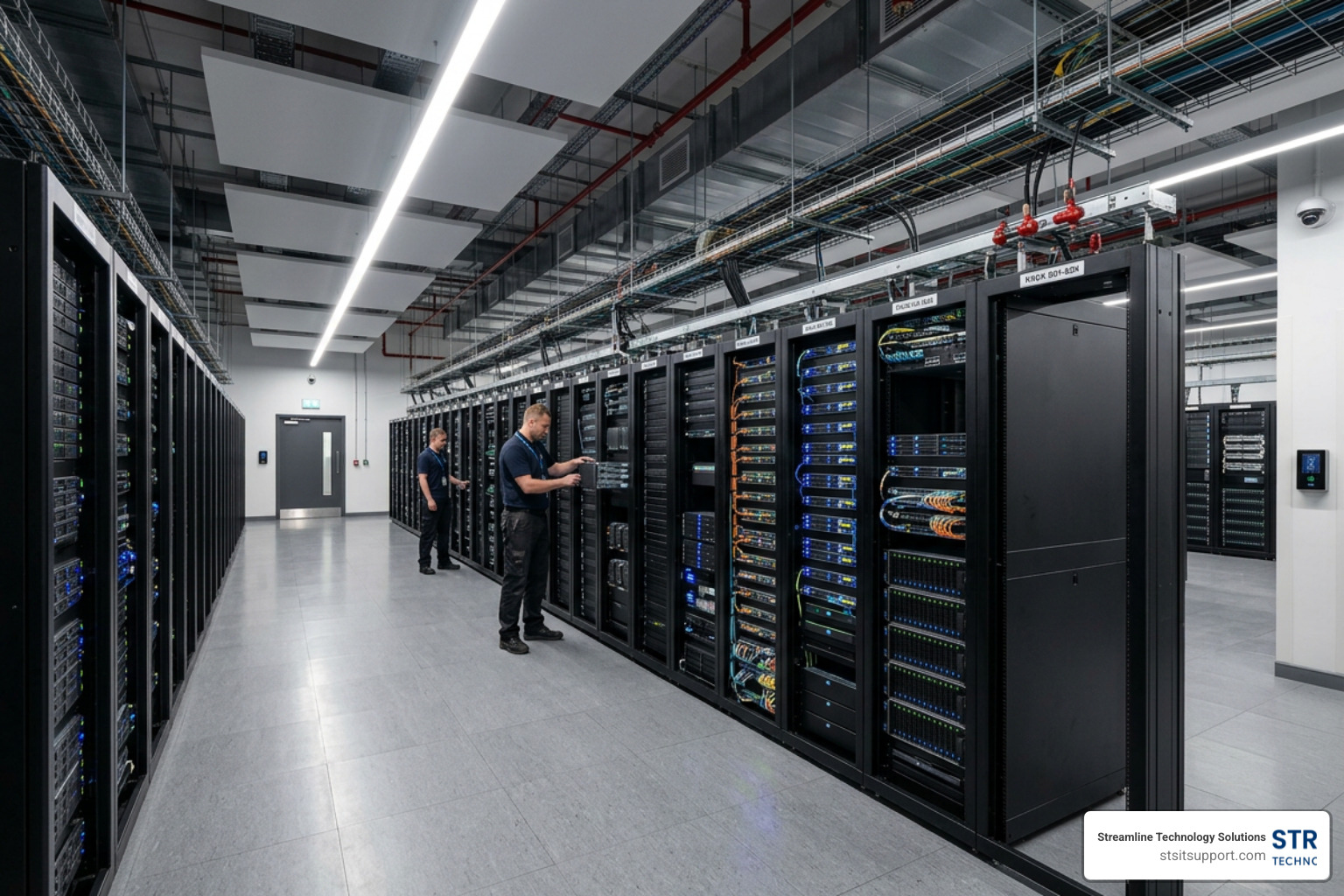
To put it simply, cloud based storage for business is a service that allows your company to securely save, manage, and access files and digital assets over the internet instead of relying on physical hard drives or local servers. Rather than maintaining a loud, dusty server closet in your office that slowly eats up electricity, your data is housed in highly secure, enterprise-grade data centers managed by professional providers.
When you transition your data to the cloud, you are moving away from traditional physical limitations and stepping into modern Cloud Solutions. However, moving to the cloud doesn't mean you hand over all responsibility to a third party.
Every major provider operates under what is called the shared responsibility model. In this model:
The Provider is responsible for the physical security of the data centers, hardware infrastructure, power redundancy, and basic platform availability.
Your Business is responsible for securing the data itself. This means managing user permissions, enforcing strong password policies, enabling multi-factor authentication (MFA), and ensuring your files are classified correctly.
Understanding this division is crucial because it highlights why simply "buying cloud storage" isn't enough; you also need a strategy to manage it. This is especially true given that back in 2022, 90% of all data generated by organizations was unstructured (think PDFs, emails, videos, and chat logs). Managing this massive volume of unstructured data requires a modern, organized cloud ecosystem rather than a cluttered digital dumping ground.
Cloud Storage vs. Traditional On-Premises Infrastructure
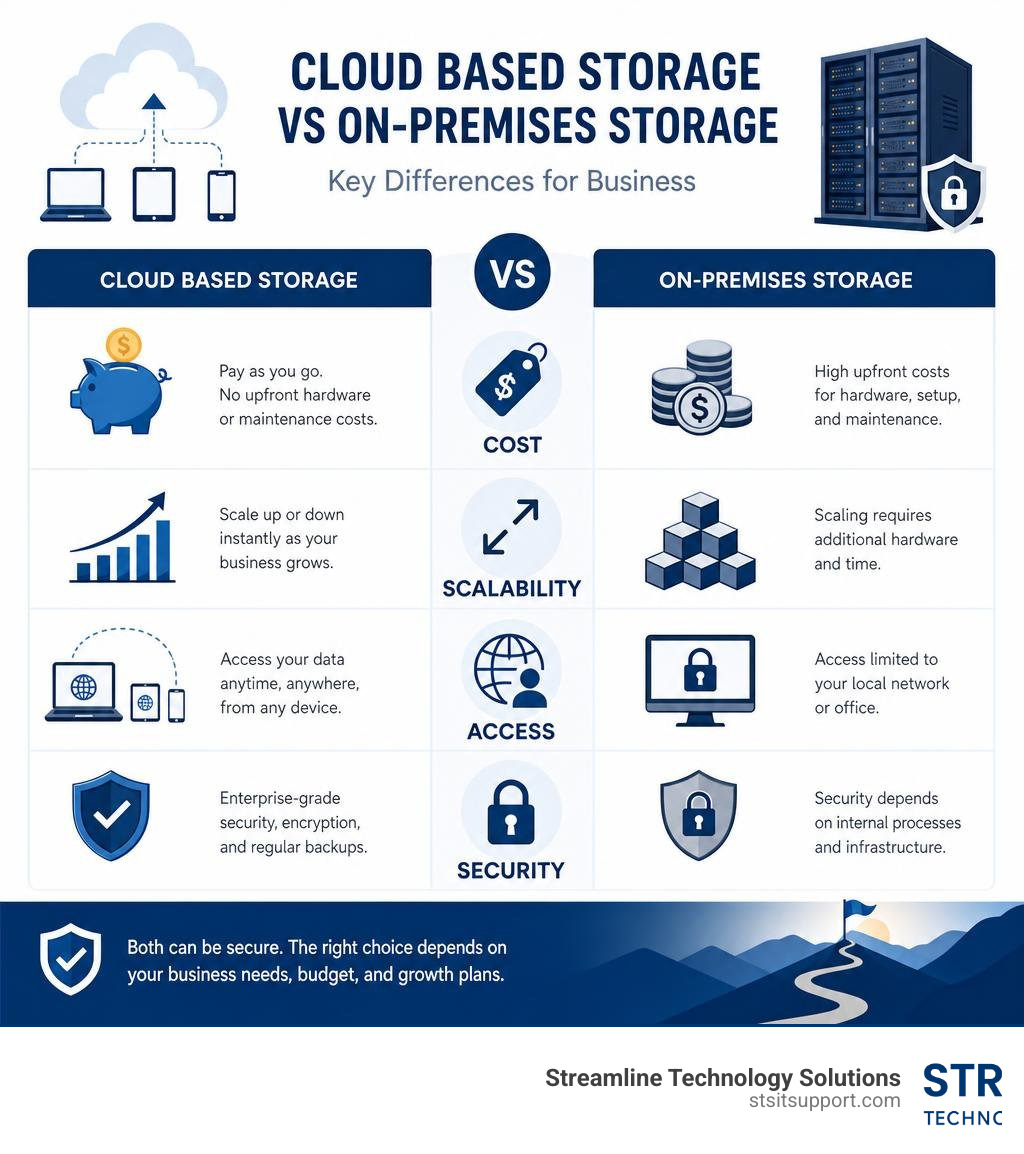
For decades, the standard way to run a business was to buy a physical server, hire an IT technician to set it up, and place it in a dedicated room. While this gave businesses a sense of physical control, it also introduced massive headaches.
Let’s break down how traditional local hardware stacks up against modern cloud storage:
Capital Expenditure (CapEx) vs. Operational Expenditure (OpEx): On-premises systems require massive upfront capital investments. You have to buy the servers, backup drives, cooling equipment, and licenses. Cloud storage, on the other hand, operates on a predictable, subscription-based OpEx model. You only pay for what you use, freeing up cash flow to grow your business.
Operational Agility: If your local server runs out of space, you have to order new hard drives, wait for shipping, shut down the system, install them, and reconfigure your network. With cloud storage, scaling up your capacity takes literally three clicks and about thirty seconds.
Hardware Maintenance: Local servers degrade over time. They require routine firmware updates, physical dustings, and eventual replacement every 3 to 5 years. In the cloud, the provider manages all underlying hardware maintenance and updates seamlessly behind the scenes.
Data Redundancy: If a pipe bursts in your office or a lightning storm hits, a local server is highly vulnerable. Cloud storage providers mirror your data across multiple geographically separated data centers, ensuring that even if an entire region loses power, your files remain completely safe and accessible.
Future Trends in Enterprise Storage
The cloud storage landscape is evolving rapidly to meet new business demands. If you are choosing a provider in 2026, you should keep these major trends in mind:
Artificial Intelligence (AI) Integration: Cloud storage is no longer just a passive digital filing cabinet. Platforms now integrate built-in AI tools (such as Microsoft Copilot or Box AI) to help you instantly summarize long documents, search through images using natural language, and automate repetitive workflows.
Multi-Cloud Strategies: To avoid vendor lock-in and optimize costs, 89% of enterprises now utilize a multi-cloud strategy. This means they might use one provider for daily office collaboration and another for long-term archiving.
Edge Computing: For businesses requiring ultra-low latency, edge computing brings data storage closer to where it is actually being used, reducing the time it takes to retrieve critical files.
Quantum-Resistant Security: As quantum computing advances, standard encryption methods will eventually become vulnerable. Forward-thinking cloud providers are already beginning to implement quantum-resistant encryption standards to future-proof business data.
Data Sovereignty and Localization: With strict privacy regulations expanding globally, businesses must ensure their cloud storage providers can guarantee exactly which geographic region their data is stored in to remain compliant with local laws.
Key Benefits of Cloud Storage for Growing Teams

As your company grows, keeping everyone on the same page becomes exponentially harder. If your team is still emailing file attachments back and forth or waiting until they get back to the office to access local network drives, your productivity is taking a major hit. Implementing a centralized Cloud Data Storage strategy solves these bottlenecks while offering enterprise-grade protection.
Enhancing Remote Collaboration and Productivity
With 70% of the global workforce working remotely at least once a week, collaboration tools are no longer optional. Cloud storage serves as the digital workspace that brings your team together, regardless of physical location.
Real-Time Co-Authoring: Instead of saving multiple versions of a spreadsheet (e.g., "ProjectBudgetv2FINALupdated_Mike.xlsx"), platforms like Google Workspace and Microsoft OneDrive: AI-Powered File Storage & Collaboration Solution | Microsoft 365 allow multiple team members to edit the exact same document simultaneously. You can see edits occur live, chat within the document, and assign tasks on the fly.
Seamless File Sharing: Say goodbye to file size limits. Instead of clogging up email inboxes with massive attachments, cloud storage allows you to generate secure, password-protected sharing links with custom expiration dates.
Version History and Recovery: We’ve all experienced the panic of accidentally deleting a crucial paragraph or saving over an important file. Cloud storage keeps a detailed version history (often up to 180 days or more), allowing you to restore any previous version of a document with a single click.
Offline Access and Mobile Sync: Modern cloud storage apps allow you to mark specific files for offline use. You can edit a proposal during a flight, and the system will automatically sync your changes the moment your device reconnects to the internet.
Robust Backup and Disaster Recovery
Your data is the lifeblood of your business. If a disaster strikes — whether it's a ransomware attack, a hardware failure, or a South Florida hurricane hitting our local communities in Fort Lauderdale, Boca Raton, or Pompano Beach — you cannot afford prolonged downtime.
Relying solely on physical on-site backups is a massive risk. True business continuity requires a comprehensive Disaster Recovery as a Service solution that leverages the cloud to automate backups and keep your data mirrored in real-time.
Automated, Continuous Backups: Instead of relying on employees to manually back up their work at the end of the day, cloud storage solutions run silently in the background, copying new and modified files to the cloud instantly.
Ransomware Protection via Immutability: Ransomware works by infiltrating your network and encrypting your files so you can't access them. Many top-tier cloud storage providers offer "immutable storage" options, meaning once a backup is written, it cannot be altered or deleted by ransomware, giving you a clean restore point.
Geographical Data Mirroring: If your physical office in Deerfield Beach or Coral Springs experiences a localized disaster, having your data mirrored in off-site cloud data centers ensures your team can keep working from anywhere with an internet connection.
Types of Cloud Storage Solutions
Not all cloud storage is created equal. Depending on your business operations, you will likely need a combination of different storage architectures. To understand how to structure your cloud environment, it helps to look at Cloud IaaS PaaS SaaS models and how they handle data.
Here is a quick comparison of the three primary types of cloud storage architectures:
Storage Type Best For Data Structure Key Benefit File Storage Daily office work, shared team folders Hierarchical (Folders & Subfolders) Highly intuitive and user-friendly Block Storage Databases, Virtual Machines (VMs) Split into independent blocks Ultra-fast performance and low latency Object Storage Archiving, backups, massive media files Flat space with metadata tags Low-cost and virtually infinite scaling
File Storage
File storage is the most familiar type of storage for the average user. It organizes data in a hierarchical structure of drives, folders, subfolders, and individual files.
If your business is looking to replace a physical Network Attached Storage (NAS) device in your office so that your employees can easily browse, open, and organize documents, file storage is what you need. It is designed specifically for user-facing collaboration and shared team folders.
Block Storage
Block storage takes a file and breaks it down into individual, equal-sized blocks of data, each with its own unique address. These blocks are stored across the storage system where it is most efficient, without any hierarchical structure.
Because block storage is incredibly fast and offers ultra-low latency, it is the preferred choice for running databases, hosting virtual machines, and powering heavy transactional applications. It is managed directly by operating systems rather than end-users.
Object Storage
Object storage treats data as discrete units called "objects." Each object contains the actual data, a unique identifier, and highly customizable metadata tags. Object storage operates in a flat address space, completely eliminating folders.
This architecture is ideal for managing massive volumes of unstructured data, long-term backups, and media archives. Because you can customize the metadata tags to describe exactly what is inside each object, it is highly searchable and incredibly cost-effective to scale to petabytes of data.
How to Choose the Right Provider
Choosing from the sea of Cloud Service Providers can feel overwhelming. To make the right choice for your company, you must evaluate vendors based on security, compliance, performance, and total cost of ownership.
Security and Compliance in Cloud Based Storage for Business
In an era of rampant cybercrime, security must be your absolute top priority. When evaluating providers, look for these non-negotiable security features:
End-to-End Encryption (E2EE): This ensures that your files are encrypted before they ever leave your device, remain encrypted while in transit across the internet, and stay encrypted while stored on the provider's servers.
Zero-Knowledge Privacy: Some highly secure providers, such as Cloud storage for business | Proton for Business (detailed in their launch announcement Secure file sharing, document editor, and cloud storage for business | Proton ) or pCloud Business – Secure Cloud Storage for Teams , operate on a zero-knowledge model. This means only you hold the decryption keys — not even the cloud provider's employees can access your files.
Multi-Factor Authentication (MFA): Your cloud storage is only as secure as the credentials used to access it. Ensure your provider allows you to enforce MFA across your entire team.
Regulatory Compliance: If your business handles sensitive information, you must choose a provider that complies with relevant regulations. For example, healthcare companies require HIPAA compliance, while businesses handling European client data must adhere to GDPR. Platforms like Secure, AI-Powered Content Management, Workflow & Collaboration specialize in meeting these strict compliance frameworks.
Evaluating Costs of Cloud Based Storage for Business
While it's tempting to simply pick the cheapest plan, you must look at the total cost of ownership (TCO) to avoid unexpected bills.
User Licenses vs. Flat Storage: Some providers charge a flat monthly fee for a set amount of storage, while others charge per user license. If you have a large team that only stores a small amount of data, a flat-rate plan might be more cost-effective.
Egress Fees: Some infrastructure providers (like AWS) charge "egress fees" when you download data out of their cloud. If your business regularly transfers massive video or CAD files, these fees can quickly add up. Consider alternatives like Cloud Backup and Storage solutions for home and business - IDrive® , which offers hot object storage with zero egress fees.
Storage Limits and Overages: Always check what happens when you exceed your plan's storage limit. Look for a provider that allows you to scale your capacity seamlessly without hitches or massive financial penalties.
Frequently Asked Questions about Business Cloud Storage
What is the difference between cloud storage and cloud backup?
While they sound similar, they serve completely different purposes:
Cloud storage is designed for active, daily file management and real-time collaboration. It is where your team works, edits, and shares files on a regular basis.
Cloud backup is designed for disaster recovery. It automatically creates secure, historical copies of your entire system (including operating systems and applications) and stores them safely offsite so you can restore your business operations if a major cyberattack or hardware failure occurs.
How much does cloud storage typically cost for a small business?
For a small business with 5 to 10 employees, you can typically expect to spend between $15 and $25 per user monthly for a comprehensive cloud storage and collaboration suite (like Microsoft 365 or Google Workspace). This generally translates to a total monthly budget of $50 to $500, depending on your specific storage tiers and advanced security requirements.
Can cloud storage integrate with our existing CRM and ERP systems?
Yes! Modern business cloud storage solutions offer robust API integrations. This allows you to connect your storage directly to major CRM and ERP systems (like Salesforce, HubSpot, or NetSuite), enabling seamless workflow automation and automatic document synchronization across your entire business ecosystem.
Conclusion
Migrating to cloud based storage for business is a powerful step toward securing your data, boosting your team's productivity, and setting your company up for long-term growth. However, making the transition smoothly requires careful planning, proper security configurations, and direct accountability.
At Streamline Technology Solutions, we provide reliable IT support, VoIP, and hardware solutions tailored specifically for South Florida businesses throughout Coral Springs, Boca Raton, Fort Lauderdale, Deerfield Beach, and Pompano Beach. We believe in fast local support, transparent pricing with absolutely no hidden fees, and taking direct responsibility for your technology.
Ready to secure your business data and optimize your team's workflow? Get Started with Streamline Technology Solutions today for a personalized cloud storage consultation.