The Ultimate Guide to Cloud Solutions
Why Cloud Solutions Are Transforming the Way Businesses Operate
Cloud solutions give businesses internet-based access to computing power, storage, and software — without needing to own or manage physical hardware.
Here's a quick overview of what cloud solutions are and how they work:
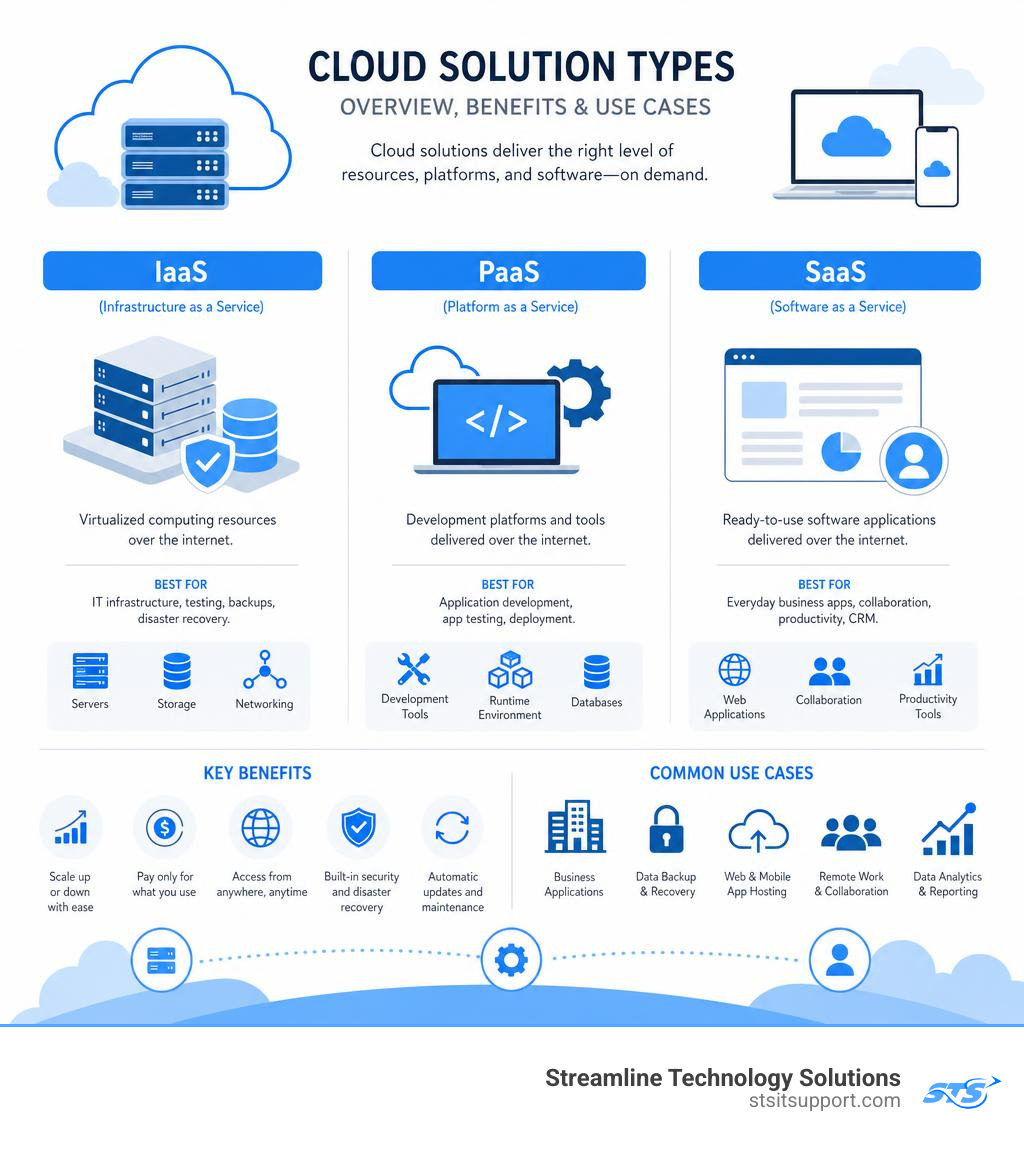
Type What It Provides Common Examples IaaS (Infrastructure as a Service) Virtual servers, storage, networking AWS, Google Compute Engine PaaS (Platform as a Service) Development environments and tools Red Hat OpenShift, Google App Engine SaaS (Software as a Service) Ready-to-use software over the internet Salesforce, Microsoft 365, Dropbox
Key benefits at a glance:
Scale resources up or down as your business grows
Pay only for what you use — no large upfront hardware costs
Access your data and tools from anywhere
Built-in disaster recovery and security features
Automatic software updates handled by the provider
For South Florida small businesses, this means less time dealing with IT headaches and more time focused on growth.
The shift away from traditional on-premises servers has been one of the biggest changes in business technology over the last decade. Companies of every size — from solo entrepreneurs to global enterprises — now rely on cloud infrastructure to stay competitive, cut costs, and keep their teams connected.
My name is Michael Gaigelas, and with over 20 years of hands-on experience in IT support, servers, and cloud solutions, I've helped countless South Florida businesses make this transition smoothly and confidently. In this guide, I'll walk you through everything you need to know to make the right cloud decisions for your business.
What Are Cloud Solutions and How Do They Work?
To truly grasp how cloud solutions can revolutionize your business operations, it helps to look at what they replaced: traditional on-premises IT infrastructure.
In a traditional on-premises setup, your company owns and maintains physical hardware. This means buying expensive physical servers, housing them in a dedicated server room or closet, keeping them cool with heavy-duty air conditioning, and hiring an in-house IT team to perform manual maintenance, configure backups, and replace failing hard drives. If your business grows and you need more storage, you have to purchase, ship, and install more physical hard drives.
Cloud computing completely turns this model on its head through a technology called virtualization. Virtualization uses software to divide a single physical server into multiple isolated virtual machines (VMs). These virtual machines act exactly like independent physical computers, but they run on shared hardware managed in massive, secure data centers.
Instead of buying physical hardware, businesses rent these virtualized resources over the internet. This concept is called resource pooling. Cloud providers group massive amounts of computing power, RAM, and storage together and dynamically allocate them to users as needed. When your business experiences a spike in traffic, the cloud platform automatically routes more resources to your applications. When the spike ends, those resources are released back into the pool. This dynamic resource allocation is the foundation of modern cloud flexibility.
By shifting to the cloud, organizations achieve massive hardware reduction. You no longer need a dedicated server closet in your office buzzing and generating heat. Instead, your files, databases, and software live in secure, enterprise-grade facilities managed by professional Cloud Service Providers.
A prime example of this global scale is Cloud Computing Services - Amazon Web Services (AWS). The AWS Cloud spans an incredible 123 Availability Zones within 39 Geographic Regions worldwide, with active plans to expand even further. This massive global network ensures that your data is always close to your users and safely backed up across multiple physical locations.
Whether you are seeking cloud solutions in Fort Lauderdale or looking for a trusted partner to manage your infrastructure, understanding this core shift from physical to virtual is the first step toward modernization.
Comparing Types of Cloud Solutions: IaaS, PaaS, and SaaS
Not all cloud solutions are built the same way. Depending on your business model, development needs, and internal IT capabilities, you will interact with the cloud across three primary service models: Infrastructure as a Service (IaaS), Platform as a Service (PaaS), and Software as a Service (SaaS).
The fundamental difference between these models comes down to control and management: how much of the underlying technology stack is managed by the vendor, and how much is managed by you.
To help visualize this, let's look at how responsibilities shift across these three models:
Component Traditional On-Premises IaaS (Infrastructure as a Service) PaaS (Platform as a Service) SaaS (Software as a Service) Applications Managed by You Managed by You Managed by You Managed by Vendor Data Managed by You Managed by You Managed by You Managed by Vendor Runtime / OS Managed by You Managed by You Managed by Vendor Managed by Vendor Virtualization Managed by You Managed by Vendor Managed by Vendor Managed by Vendor Servers / Storage Managed by You Managed by Vendor Managed by Vendor Managed by Vendor Networking Managed by You Managed by Vendor Managed by Vendor Managed by Vendor
For a deeper dive into how these responsibilities break down for your team, check out our detailed breakdown of Cloud IaaS PaaS SaaS.
1. Infrastructure as a Service (IaaS)
IaaS provides the raw building blocks of cloud computing. With IaaS, you rent virtualized hardware over the internet — specifically virtual servers, storage space, and networking configurations. You have total infrastructure control, meaning you choose the operating system (like Windows Server or Linux), install your own software, and configure the firewalls.
Best Use Cases: Hosting custom business databases, running complex legacy software, or setting up virtual testing labs.
Examples: Amazon EC2, Google Compute Engine.
2. Platform as a Service (PaaS)
PaaS takes away the hassle of managing operating systems, middleware, and runtime environments. The cloud provider delivers a complete, pre-configured environment designed specifically for building, testing, and deploying custom applications. This allows software developers to write code without worrying about server maintenance or software updates.
Best Use Cases: Custom web application development, API creation, and mobile app backends.
Examples: Red Hat OpenShift, Firebase | Google's Mobile and Web App Development Platform.
3. Software as a Service (SaaS)
SaaS is the most common cloud model for everyday business operations. Instead of buying software on a disc or downloading it to a local hard drive, you access a fully functional application directly through your web browser. The vendor handles all hosting, security, updates, and maintenance.
Best Use Cases: Core business operations, customer relationship management, and team collaboration.
Examples: Microsoft 365, Google Workspace, Salesforce, and Dropbox.
Public, Private, and Hybrid Cloud Deployments
Beyond the service models (IaaS, PaaS, SaaS), you must also choose how your cloud infrastructure is physically deployed. There are three primary deployment models:
Public Cloud
In a public cloud deployment, all infrastructure is owned and operated by a third-party provider (like Amazon, Google, or IBM) and shared with other organizations (often called "tenants") over the public internet. This model offers the highest level of scalability and the lowest overhead costs.
Private Cloud
A private cloud consists of cloud infrastructure dedicated solely to your business. It can be physically located in your on-premises data center or hosted by a third-party service provider. This model offers maximum control and security but requires a significantly higher upfront investment.
Hybrid Cloud and Multicloud
A hybrid design combines public and private cloud environments, allowing data and applications to be shared between them. This is incredibly useful for companies that want the cost efficiency of the public cloud for everyday tasks, but must keep highly sensitive financial or customer data on a secure, private server.
Taking it a step further, many modern enterprises adopt a multicloud strategy, using services from multiple public cloud vendors (like combining AWS and Google Cloud) to avoid vendor lock-in and leverage the unique strengths of each platform.
When designing a hybrid or multicloud environment, choosing an enterprise platform like Cloud Solutions | IBM can help you securely run workloads wherever they perform best. IBM's open architecture, built on Red Hat OpenShift, allows businesses to seamlessly manage applications across on-premises, private, and public cloud environments while maintaining strict compliance.
Key Benefits of Adopting Cloud Infrastructure

Making the move to the cloud isn't just about keeping up with tech trends; it's a strategic business move that delivers immediate, measurable advantages.
Unparalleled Cost Efficiency: One of the most compelling reasons to adopt cloud solutions is the shift from capital expenses (CapEx) to operational expenses (OpEx). Instead of spending thousands of dollars upfront on physical servers, switches, and cooling units, you pay a predictable monthly fee. This pay-as-you-go model means you only pay for the exact computing power and storage you use.
Seamless Scalability: In the physical world, scaling up means buying more hardware. In the cloud, scaling is instantaneous. If your business experiences a seasonal rush, you can scale your resources up with a few clicks. Once the rush is over, you can scale back down to avoid paying for idle capacity.
Automatic Updates and Maintenance: Keeping software up to date is a full-time job. With cloud services, the provider handles all security patches, software updates, and hardware maintenance in the background. Your team always has access to the latest features and security updates without a single minute of downtime.
Global Reach and Accessibility: Cloud solutions break down geographical barriers. Because your applications run in the cloud, your employees can securely access their files, communication tools, and databases from anywhere in the world with an internet connection.
Robust Backup and Disaster Recovery: Hardware failures, power outages, and natural disasters (which we know all too well in South Florida!) can paralyze a business relying on on-premises servers. Cloud solutions offer built-in redundancy, automatically replicating your data across multiple geographically isolated data centers. If a disaster strikes your local office, your team can work remotely without losing a single file. For comprehensive protection, implementing Disaster Recovery as a Service ensures your business stays online no matter what.
How Startups and SMBs Leverage Cloud Solutions for Growth
For startups and small-to-medium-sized businesses (SMBs) in South Florida, the cloud is the ultimate equalizer. In the past, only massive corporations could afford high-performance databases, advanced analytics, and global communication networks. Today, a startup operating out of a garage in Coral Springs or a growing agency in Boca Raton can access the exact same enterprise-grade tools as a Fortune 500 company.
Cloud solutions provide incredible market agility. Startups can launch new products, test software configurations, and scale their operations in hours rather than months. If a new campaign goes viral, the underlying cloud servers automatically expand to handle the traffic.
By minimizing upfront capital expenditure, small businesses can keep their cash flow healthy. Money that would have been locked up in server hardware can instead be spent on marketing, product development, and hiring top local talent.
To make the most of these tools, partnering with a local expert who understands your market is key. Discovering tailored IT Support Services for Small Business can help you implement, manage, and optimize these cloud tools to fuel your local growth.
Advanced Capabilities: AI, Security, and Modern Infrastructure

The cloud has evolved far beyond simple storage and virtual hosting. In 2026, cloud platforms serve as the primary engine driving advanced technologies like artificial intelligence (AI), machine learning (ML), and deep data analytics.
Modern businesses are leveraging cloud-based AI to automate customer service, build predictive models, and extract insights from massive datasets. For example, AI and Cloud Computing Services | Google Cloud provides an incredibly powerful environment for building generative AI applications. Through platforms like Gemini Enterprise and the Vertex AI suite, businesses can deploy intelligent agentic AI systems — autonomous software agents capable of executing complex workflows, reasoning through problems, and interacting with customers in real-time.
Additionally, using Cloud Computing, Hosting Services, and APIs | Google Cloud allows businesses to run advanced stream analytics and geospatial data analysis, turning raw data into actionable business intelligence in seconds.
Infrastructure as Code and Automation
As cloud environments grow larger and more complex, managing them manually through a web console becomes slow and prone to human error. To solve this, modern IT teams use Infrastructure as Code (IaC).
IaC allows you to write code to define, deploy, and manage your entire cloud infrastructure. Instead of manually clicking buttons to create a virtual server, you write a simple configuration file. This file can be tested, version-controlled, and deployed automatically, ensuring that your environments are identical every single time.
A leading tool in this space is Pulumi Cloud | Pulumi. Pulumi allows developers to use familiar programming languages (like Python, TypeScript, or Go) to define their infrastructure.
Key benefits of automating your cloud with platforms like Pulumi include:
Declarative Configuration: You describe the desired state of your infrastructure, and the platform automatically configures the cloud to match it.
Centralized Secrets Management: Keep sensitive passwords, API keys, and database credentials securely encrypted and isolated from your main code.
Automated Policy Enforcement: Automatically scan your infrastructure code to ensure it meets company security and compliance guidelines before it is deployed.
Remote Deployments: Trigger automated deployments directly from your team's code repository, reducing manual deployment times by up to 50%.
Best Practices for Cloud Migration and Modernization
Migrating your business to the cloud can feel like a daunting task, but following a structured roadmap ensures a smooth transition with minimal disruption to your daily operations.
[Assessment Phase] ──> [Strategy & Planning] ──> [Data Migration] ──> [Optimization & Security]
The Assessment Phase: Before moving a single file, catalog your existing IT setup. Identify which applications are ready to move directly to the cloud, which need to be updated, and which should remain on-premises for now.
Choose Your Migration Strategy:
Rehosting (Lift and Shift): Moving your applications directly to cloud virtual machines without making any changes to the code. This is the fastest migration method.
Replatforming: Making minor optimizations to your applications to take advantage of cloud features without changing the core architecture.
Refactoring (Modernization): Rewriting parts of your software to run as cloud-native applications, often using containers or serverless technology for maximum efficiency.
Secure Data Transfer: Plan your data migration carefully. For large databases, schedule the transfer during off-peak hours to avoid slowing down your business operations.
Security and Compliance: Ensure your new cloud environment is configured to meet your industry's regulatory standards (such as HIPAA for healthcare or PCI-DSS for retail). Implement strict access controls, multi-factor authentication (MFA), and end-to-end data encryption.
Frequently Asked Questions about Cloud Computing
What is the difference between cloud solutions and on-premises infrastructure?
On-premises infrastructure requires you to purchase, host, and maintain physical hardware inside your office. Cloud solutions allow you to rent virtualized computing resources over the internet on a pay-as-you-go basis. Shifting to the cloud eliminates upfront capital expenses, removes hardware maintenance headaches, and provides instant scalability.
How do cloud solutions ensure data security and compliance?
Top-tier cloud providers invest billions of dollars in state-of-the-art physical and digital security. They protect your data using advanced encryption (both while it is moving over the internet and while it is stored on their servers), strict identity and access management (IAM), and continuous monitoring. Additionally, cloud platforms are regularly audited to ensure they comply with major regulatory frameworks like SOC 2, HIPAA, and GDPR.
What are the emerging trends in cloud computing for 2026?
The biggest trends in 2026 include the widespread adoption of agentic AI (autonomous AI agents that handle complex business workflows), a major shift toward hybrid and multicloud strategies to avoid vendor lock-in, and the rise of sovereign cloud environments designed to keep data strictly within specific geographic boundaries to meet local privacy laws.
Conclusion: Partner with South Florida's Trusted Cloud Experts
Navigating cloud solutions can feel overwhelming, but you don't have to go it alone. Whether your business is located in Coral Springs, Boca Raton, Fort Lauderdale, Deerfield Beach, or Pompano Beach, having a local partner makes all the difference.
At Streamline Technology Solutions, we specialize in helping South Florida businesses migrate to the cloud, secure their data, and modernize their IT infrastructure. We set ourselves apart from the competition by offering:
Transparent Pricing: No hidden fees, surprise charges, or confusing contracts. You always know exactly what you are paying for.
Fast, Local Support: We are right here in Broward and Palm Beach counties. When you need help, our local technicians are ready to assist you immediately.
Direct Accountability: We take ownership of your IT environment, giving you peace of mind so you can focus on running your business.
Ready to see how the cloud can transform your business?
To learn more about how we support local businesses across the region, explore our Managed IT Support Broward services.
Take the first step toward a faster, more secure, and highly scalable business today. Get started with Streamline Technology Solutions and schedule your custom cloud consultation!