How to Choose the Best Disaster Recovery Service Providers
When Disaster Strikes, Will Your Business Survive?
Disaster Recovery as a Service (DRaaS) is a cloud-based solution where a third-party provider replicates your critical IT systems and data offsite, so your business can recover quickly after a cyberattack, hardware failure, or natural disaster.
Here's what you need to know at a glance:
What Details What it does Replicates your systems to the cloud and enables fast failover if your primary systems go down Who manages it A third-party provider — fully managed, assisted, or self-service Key metrics RTO (how fast you recover) and RPO (how much data you can afford to lose) Main threats it covers Ransomware, hardware failure, natural disasters, human error Cost of not having it The average data breach cost $4.45 million in 2023 — up 15% in three years, according to the IBM Cost of a Data Breach Report
The reality is stark. Downtime is expensive. Ransomware is relentless. And for South Florida businesses, hurricanes add a very real physical threat on top of digital ones.
Yet 72% of organizations are still unprepared for a disaster recovery event. That's not a technology problem — it's a planning problem.
I'm Michael Gaigelas, and with 20 years of experience in IT support, cloud servers, and managed IT services, I've helped businesses build disaster recovery as a service strategies that actually work when it counts. In this guide, I'll walk you through everything you need to choose the right provider and protect your business.
Understanding Disaster Recovery as a Service (DRaaS)

At its core, disaster recovery as a service is about more than just having a "copy" of your files. It is a comprehensive, cloud-native strategy designed to ensure business continuity. While traditional disaster recovery often required businesses to build and maintain their own secondary data centers—complete with duplicate hardware and expensive cooling systems—DRaaS shifts that burden to a third-party provider.
The market for these services is exploding, and for good reason. In 2022, the DRaaS market was valued at approximately USD 11.5 billion, and it was projected to grow by 22% this past year, according to industry research. This growth is driven by the increasing frequency of cyber threats and the rising cost of downtime. Consider this: the average cost of a data breach in 2023 reached USD 4.45 million. For a small to mid-sized business in Fort Lauderdale or Boca Raton, an expense of that magnitude isn't just a setback; it's a potential business-ender.
By leveraging a third-party provider, you gain access to enterprise-grade failover capabilities. This means if your primary server room in Pompano Beach floods or gets hit by ransomware, your entire IT environment can be "spun up" in a secure cloud environment almost instantly. You can find more about how we structure these protections in our Resources section.
Key Components of a Disaster Recovery as a Service Solution
A robust DRaaS solution isn't a single piece of software; it’s an ecosystem of technologies working in harmony. Here are the "must-haves" for any provider you consider:
Replication Technology: This is the engine that constantly sends data from your primary site to the cloud. Whether it is continuous data replication for near-instant updates or periodic snapshots, this ensures your cloud version is current.
Cloud Infrastructure: The provider must have a secure, scalable landing zone. This is the virtual space where your servers will live and run during an emergency.
Recovery Playbooks (Runbooks): Technology alone won't save you if no one knows who is supposed to flip the switch. A playbook is a documented, step-by-step guide on how the recovery process will execute.
Automated Orchestration: In a crisis, manual processes lead to human error. Automated tools handle the heavy lifting of reconfiguring IP addresses and launching virtual machines in the correct order.
Point-in-Time Recovery: This is critical for ransomware. If your systems were encrypted at 10:00 AM, you need to be able to roll back to the state they were in at 9:59 AM.
Recovery Objectives: RTO and RPO Explained
If you take away nothing else from this guide, remember these two acronyms. They are the yardsticks by which you measure your disaster recovery success.
Recovery Time Objective (RTO): This is the "How fast?" metric. It represents the maximum amount of time your business can afford to be offline before the damage becomes unacceptable. For some, an RTO might be four hours; for a medical clinic in Coral Springs, it might be 15 minutes.
Recovery Point Objective (RPO): This is the "How much data?" metric. It refers to the maximum amount of data loss your business can tolerate, measured in time. If you back up once every 24 hours and your system crashes at the end of the day, your RPO is 24 hours. Modern DRaaS solutions often aim for RPOs of mere seconds or minutes.
How DRaaS Works: Replication, Failover, and Failback
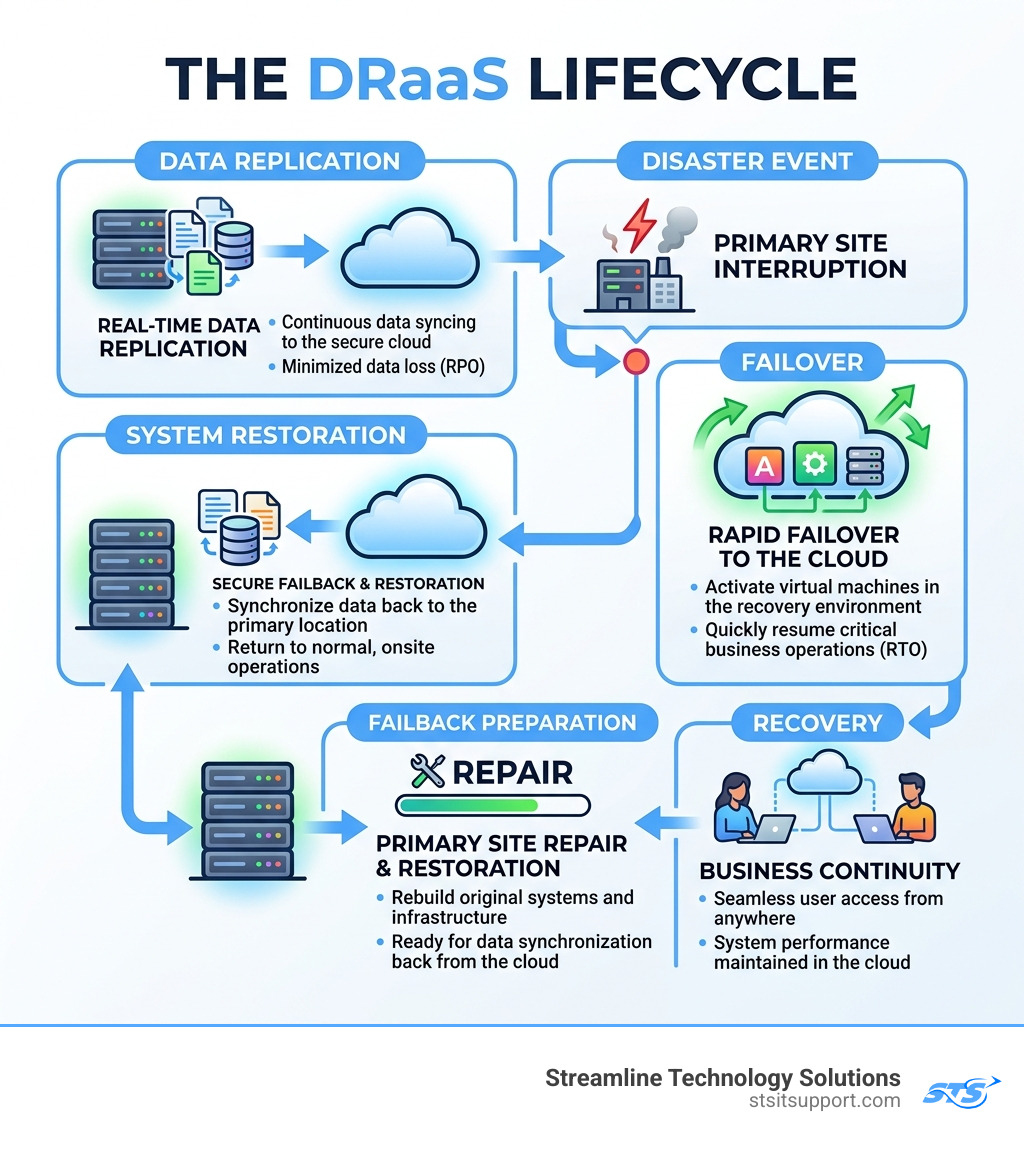
The magic of disaster recovery as a service happens in three distinct phases. Understanding these will help you evaluate if a provider's technical process is sound.
Replication: Your data and applications are continuously copied from your local servers (or your primary cloud) to a staging area in the provider’s cloud. This staging area uses affordable storage and minimal compute power to keep your ongoing costs low.
Failover: When a disaster occurs—whether it’s a hardware failure in Deerfield Beach or a massive power outage—you "failover" to the secondary site. The provider launches your recovery instances, turning that stored data into live, functioning servers. Your employees can then log in and work as if they were in the office.
Failback: Once the primary site is repaired and secure, you don't just "turn off" the cloud. You must synchronize the data generated while you were in the cloud back to your local systems. This "failback" ensures no work is lost during the transition.
We often integrate these workflows into our IT Projects to ensure that when we upgrade a client's infrastructure, their recovery plan evolves with them.
Comparing DRaaS Types and Alternatives
Not all DRaaS is created equal. Depending on your internal IT expertise, you may want a provider to do everything, or you may just want the tools to do it yourself.
Feature Self-Service DRaaS Assisted DRaaS Managed DRaaS Management Your internal team Shared responsibility Provider handles everything Expert Support Minimal Available on request 24/7 proactive monitoring Cost Model Lowest (OpEx) Mid-range Higher (White-glove) Best For Large firms with IT staff Mid-sized companies SMBs with no internal IT Testing You run it Provider helps Provider guarantees success
Managed vs. Self-Service Disaster Recovery as a Service
For most South Florida businesses, Managed DRaaS is the gold standard. Why? Because when a hurricane is bearing down on Fort Lauderdale, your internal IT person might be busy protecting their own home. A managed provider offers "white-glove" service, meaning they take direct accountability for the failover.
Managed services include 24/7 monitoring and professional "hands-on" support during a disaster. This removes the internal management burden and ensures that your recovery isn't dependent on a single employee's availability. If you ever run into trouble or have questions about which model fits your current setup, our Support Center is always available to help.
DRaaS vs. Backup as a Service (BaaS)
Many people confuse these two, but the difference is vital. Backup as a Service (BaaS) is like having a spare tire in your trunk. It's great to have, but if your engine explodes, the tire doesn't help you get home. BaaS stores your data offsite, but if your server dies, you have to buy a new server, install the OS, and then wait hours or days to download and restore the data.
DRaaS is like having a second car waiting for you at the next exit. If the first one breaks down, you just hop in the second one and keep driving. DRaaS allows you to run your entire business in the cloud while you fix the underlying problem.
Key Benefits and Use Cases for Modern Businesses
Why are 74% of organizations planning to leverage DRaaS specifically for ransomware recovery by 2026? Because it works. Here are the primary use cases we see in our local South Florida community:
Ransomware Recovery: If a hacker locks your files, you don't pay the ransom. You simply roll back to a "clean" point-in-time replica in the cloud and resume operations.
Natural Disasters: In locations like Boca Raton and Pompano Beach, hurricanes and floods are real threats. DRaaS provides geographic redundancy, meaning your data is stored far away from the storm's path.
Hardware Failure: Even the best servers eventually die. DRaaS ensures that a fried motherboard doesn't result in three days of lost productivity.
Human Error: We all make mistakes. Whether it's an accidental deletion or a botched software update, DRaaS allows for a quick "undo" button.
Compliance: Many industries (like healthcare and finance) are required by law (HIPAA, PCI-DSS) to have a documented and tested disaster recovery plan.
Choosing and Implementing a Disaster Recovery as a Service Strategy
Choosing a provider is a major decision. At Streamline Technology Solutions, we believe in transparent pricing without hidden fees. When you look at other vendors, be sure to ask about "egress fees"—some providers charge you a fortune just to get your own data back during a recovery.
When evaluating a provider, look for these indicators of quality:
Testing Success Rates: Some industry leaders guarantee a 100% success rate for client DR testing. If a provider doesn't want to test the plan, it isn't a plan—it's a wish.
Direct Accountability: You want a local partner who understands the South Florida landscape and can provide fast, local support.
Business Impact Analysis (BIA): A good provider will help you perform a BIA to identify which parts of your business are truly "mission-critical."
Implementing Your Disaster Recovery as a Service Strategy
Once you've chosen a partner, the implementation phase begins. This isn't a "set it and forget it" process.
Asset Inventory: Create a prioritized list of every server, application, and database in your environment.
Runbook Development: Work with your provider to document exactly who does what during a disaster.
Quarterly Testing: We recommend testing your DR plan at least quarterly. This includes "tabletop exercises" (talking through the plan) and actual partial failovers to ensure the technology works as expected.
Role Assignment: Assign specific roles, such as an incident reporter and a third-party liaison, so there is no confusion when stress levels are high.
Frequently Asked Questions about DRaaS
What is the difference between DRaaS and BaaS?
BaaS (Backup as a Service) only stores your data. To use it, you must restore that data to a functioning server, which can take days. DRaaS (Disaster Recovery as a Service) replicates your entire environment, allowing you to run your applications in the cloud almost immediately during an outage.
How often should a disaster recovery plan be tested?
At a minimum, you should review your plan twice a year and conduct a full technical test at least once a year. However, for businesses in high-risk areas or those with strict compliance needs, quarterly testing is the best practice to ensure RTOs can actually be met.
Can DRaaS protect against ransomware attacks?
Yes, it is one of the most effective defenses. By using "immutable" backups and point-in-time recovery, you can restart your business using a version of your data from just minutes before the infection occurred, effectively bypassing the attacker's encryption.
Conclusion
In the modern business world, being "offline" isn't just an inconvenience—it's a reputation killer and a financial drain. Whether it's a summer hurricane in Fort Lauderdale or a sophisticated ransomware attack hitting your office in Coral Springs, you need a plan that works the first time, every time.
At Streamline Technology Solutions, we pride ourselves on providing South Florida businesses with the IT support and disaster recovery strategies they need to stay resilient. We offer transparent pricing, fast local support, and the direct accountability you expect from a local partner.
Don't wait for the storm to start before you check your roof. Secure your business with expert disaster recovery today and ensure that no matter what happens, your business keeps moving forward.