The Lawyer's Guide to Not Getting Sued by Their Own Technology
Modern legal practices run on data. Building a secure digital environment requires combining hardware, software, and cybersecurity practices into a clear system. Partnering with a specialized it consulting for lawyers provider ensures your technology infrastructure remains compliant with ethical duties and protects client data.
Document Management and Cloud Migration Strategy
Document management serves as the central hub of a digital law practice. Scattered network shares, local desktop folders, and messy email threads increase the risk of lost work, version confusion, and data leaks.
Centralized Workspaces: Advanced platforms like iManage Cloud organize documents, emails, and notes by client and matter.
Strict Version Control: Teams work on a single live file, keeping an automatic history of changes to eliminate overwrite errors.
Preserved Metadata: Uploading files to cloud document repositories preserves original creation dates, author attributes, and custom tags for discovery compliance.
Targeted Cloud iManage Engineering: Configuring legal cloud platforms with custom rules ensures sensitive files are accessible only to approved matter teams.
Moving from on-premise servers to cloud systems simplifies document access for remote teams while improving system speed and security.
Enterprise Data Security, Compliance, and Disaster Recovery
Protecting client confidentiality requires layered defensive measures. A single stolen password or ransomware infection can halt billable work and breach mandatory privacy standards.
Framework Alignment: Enterprise security protocols follow strict international guidelines, such as ISO 27001, to secure physical datacenters and digital connections.
Proactive Risk Management: Performing a regular cybersecurity risk assessment reveals hidden vulnerabilities across endpoints, firewalls, and cloud applications before attackers can exploit them.
Redundant Disaster Recovery: Data backups should be stored both on-site and in geographically distributed cloud datacenters with automated failover systems.
Robust Endpoint Protection: Enforcing multi-factor authentication (MFA), strict access controls, and end-to-end encryption shields sensitive files on laptops and mobile devices.
Deploying comprehensive law firm cybersecurity services transforms security from a reactive burden into an asset that reinforces client trust.
How to Transition Your Law Firm from Legacy Systems to Modern Cloud Architecture
Relying on aging on-premise hardware creates operational bottlenecks. Legacy servers require expensive physical maintenance, suffer frequent unexpected outages, and lock attorneys into outdated desk-bound workflows.

Transitioning to modern cloud solutions upgrades your core IT infrastructure into an adaptable operational environment. Cloud architectures give law firms the elasticity to add new users, scale storage, and access files securely from anywhere without buying new hardware.
Selecting the Right Software Ecosystem: iManage, NetDocuments, and Microsoft 365
Selecting software requires careful evaluation of how different applications work together. Connecting document management, communication platforms, and practice management tools reduces manual administrative tasks.
Microsoft 365 for Business: Serves as the base framework for identity management, user permissions, encrypted email, and real-time document co-authoring.
NetDocuments: A secure cloud document repository featuring native encryption, deep search capabilities, and governance tracking tailored for legal records.
iManage Cloud: An industry-standard work product management system that uses artificial intelligence to organize emails and legal documents into unified matter workspaces.
Integrating these legal tools with your core practice management platform allows billing data to auto-create standardized matter folders, ensuring consistent file organization across the firm.
Supporting Hybrid Mac and Windows Infrastructure
Many modern law practices operate across both Apple Mac and Windows devices. Partners and litigation teams often prefer Apple hardware, while finance and administrative staff rely on Windows-based applications.
Cross-platform legal environments require careful management to ensure security compliance:
Centralized Access Controls: Use Azure Active Directory (Microsoft Entra ID) to enforce uniform access policies and MFA across both Mac and Windows endpoints.
Standardized Cloud Applications: Deploy cloud-based tools like iManage, NetDocuments, and Microsoft 365 that provide identical functionality across macOS and Windows.
Endpoint Security Management: Implement cloud-managed security software to monitor, patch, and protect all Mac and Windows devices remotely.
Hardware Procurement & Maintenance: Partner with specialized legal IT consultants to configure native macOS tools alongside core Windows applications without security compromises.
Standardizing endpoint management gives your firm hardware flexibility while maintaining strict network security standards.
Overcoming Common Legal Tech Bottlenecks and Modernizing Workflows
Technology bottlenecks disrupt billable work and frustrate law firm personnel. Transitioning away from paper-heavy practices and manual spreadsheet tracking removes everyday operational friction.
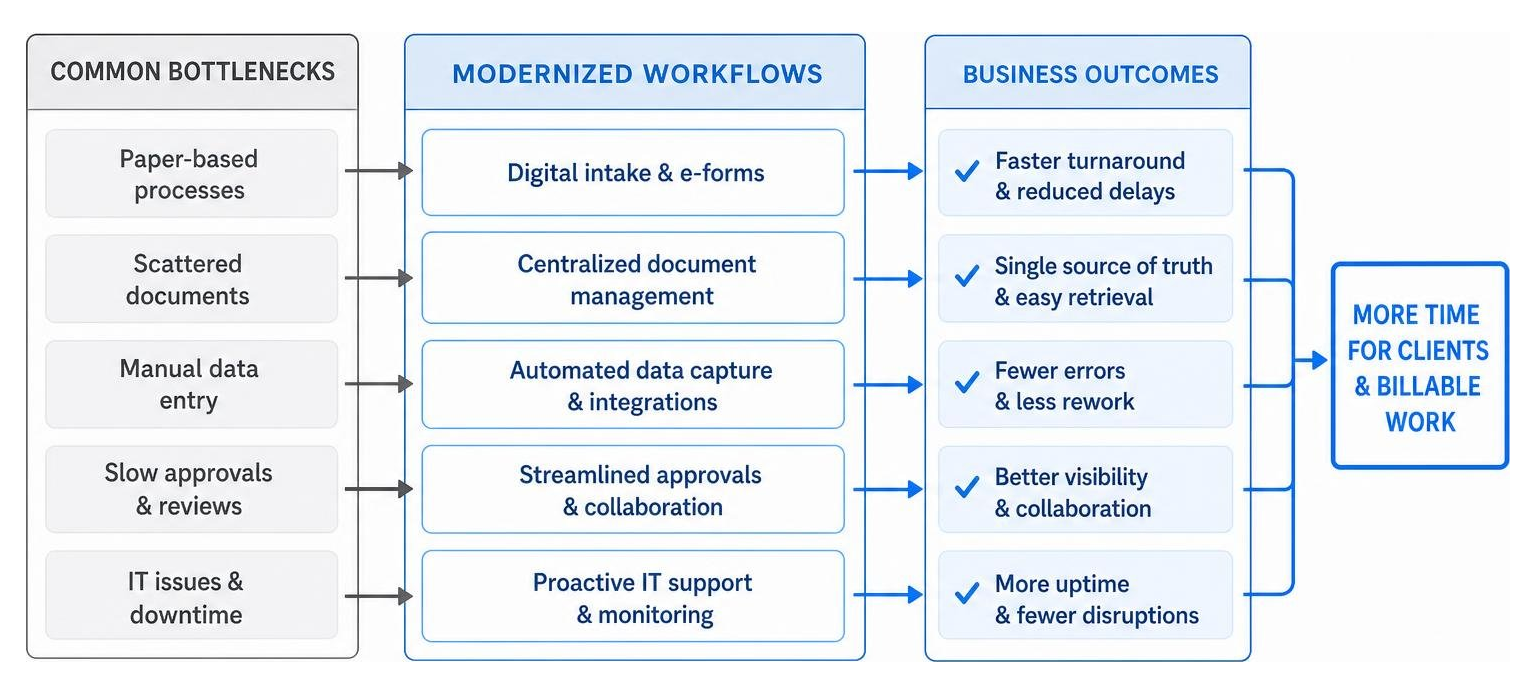
Modernizing legal operations relies on fast response times, smooth remote collaboration, and automated administrative tasks. Establishing a rapid it support response time ensures technical glitches are resolved immediately, keeping attorneys focused on client work.
Assessing Your Practice: Do You Need Managed Services or IT Consulting for Lawyers?
Law firm leaders often wonder whether they should hire an IT strategy consultant or partner with a managed service provider (MSP). The table below outlines how these specialized services support law firm growth:
Operational Scope Dedicated IT Consulting for Lawyers Managed Services Provider (MSP) Primary Focus High-level strategy, system migration, and tech roadmaps Day-to-day network monitoring, maintenance, and user support Core Responsibilities Software selection, practice analysis, and security audits it helpdesk support, hardware management, and routine updates Engagement Model Project-based or strategic retainer oversight Ongoing monthly fee with fixed service level agreements (SLAs) Ideal Operational Need Replacing legacy platforms or digitizing firm workflows Outsourcing daily helpdesk tasks and routine IT support
Combining strategic consulting with proactive managed it services gives law firms both long-term technology direction and fast local support.
Driving AI and Software Adoption with IT Consulting for Lawyers
Adopting legal technology involves more than purchasing software licenses—it requires firm-wide user adoption. Industry data shows that while legal AI tools are widely accessible, only 7% of legal teams have successfully deployed legal AI to achieve proven results, while 83% struggle to show measurable return on investment.
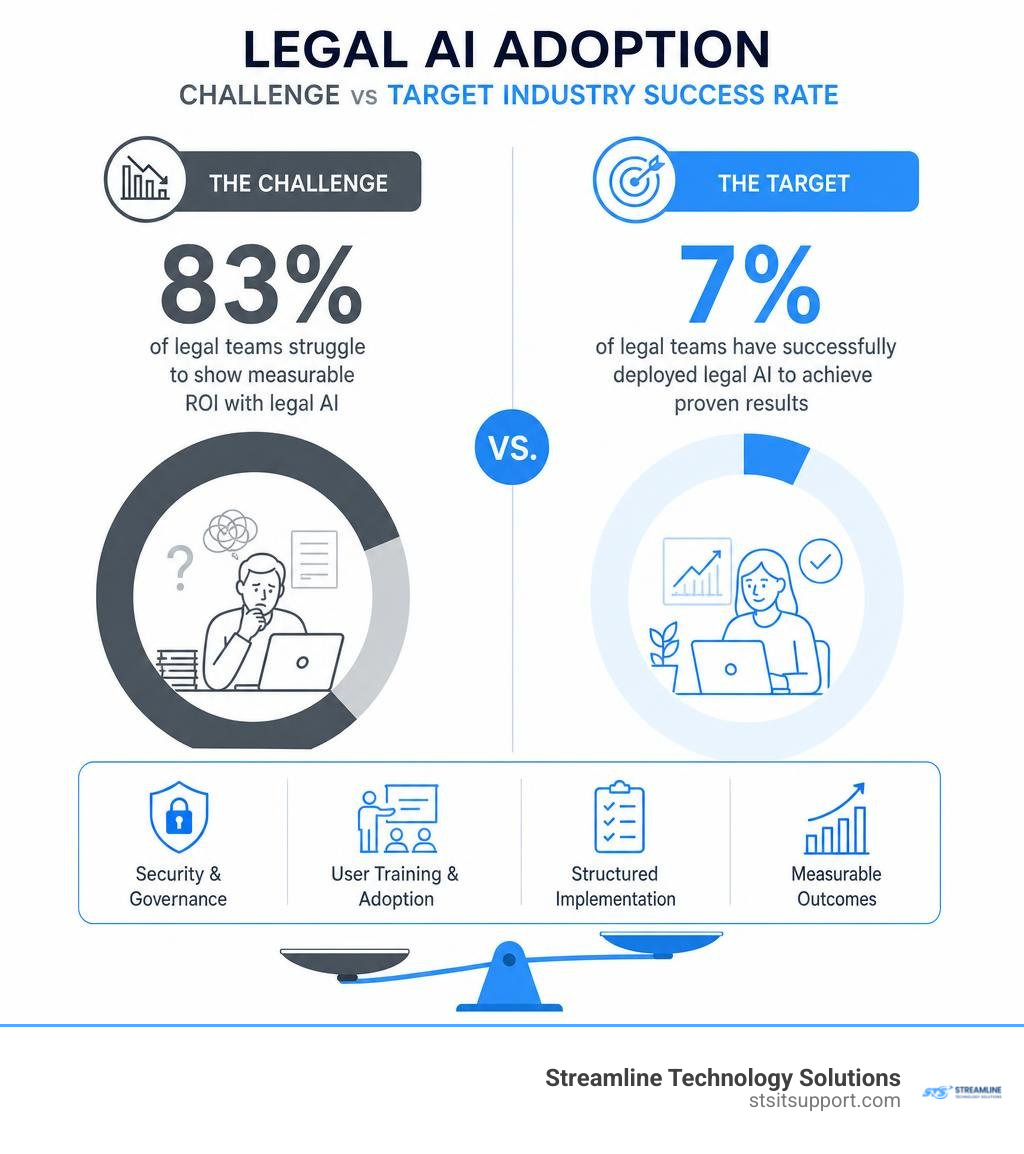
Successful AI and software implementation depends on structured training programs, detailed governance frameworks, and active change management.
Firms that combine tailored software platforms with specialized project management achieve fast operational gains. For instance, using AI-enabled legal workflows helped one team review 16,000 contracts in just 5 weeks, while another digitized 2,000 commercial lease agreements to save $589,000. Similarly, automating contract intake saved a medical equipment company 3 months of manual work and $30,000 in outside legal expenses.
Working with experienced it consulting for lawyers specialists ensures new technology investments deliver real operational improvements rather than shelfware.
Step-by-Step Guide to Implementing a Secure Legal Technology Roadmap

Building a modern legal technology setup requires a structured, step-by-step approach. Following a clear deployment roadmap helps your firm avoid security gaps, budget overruns, and unexpected operational downtime.
Step 1: Conduct a Comprehensive Legal IT Audit
Begin by evaluating your firm's technical infrastructure. Scheduling an expert it audit fort lauderdale provides full visibility into hardware age, software configurations, network stability, and security vulnerabilities.
The audit process involves three key actions:
Infrastructure Assessment: Inventory all servers, desktop devices, mobile equipment, firewalls, and third-party software applications.
Vulnerability Scanning: Scan networks and endpoints to locate unpatched software, weak passwords, missing backup routines, and unauthorized user access.
Workflow Gap Analysis: Interview attorneys and legal assistants to identify software bottlenecks, repetitive manual tasks, and communication delays.
The findings from this evaluation establish the roadmap for your technology upgrades.
Step 2: Establish Risk Governance and Conflict Mitigation
A modern legal IT environment must reinforce your firm's ethical duties regarding client data protection, privilege preservation, and conflict prevention.
Establish Data Governance Rules: Define strict user permissions, automated document retention schedules, and encrypted archiving processes.
Draft Incident Response Plans: Create clear step-by-step instructions for responding to potential data breaches, system outages, or physical office disruptions.
Automate Conflict Mitigation: Connect practice management systems with tools like Partners - MetaJure Knowledge Management to audit client file access and isolate sensitive matter data behind digital ethical walls.
Integrating ethics compliance directly into your technical architecture ensures client confidentiality is protected automatically.
Step 3: Execute Training and Firm-Wide Adoption Programs
Even advanced cloud software will fail to deliver value if attorneys and support staff revert to old manual habits. Driving firm-wide user adoption requires a structured, adult-learning curriculum.
Effective user adoption programs include:
Role-Based Workflows: Train attorneys, paralegals, and administrative assistants on the exact software workflows required for their specific daily responsibilities.
Desk-Side Education & Support: Provide one-on-one coaching to answer immediate technical questions and correct inefficient software usage patterns.
Continuing Legal Education (CLE) Integration: Host internal educational sessions that award CLE credits while training staff on data security, regulatory compliance, and cloud software features.
Standardized Practice Templates: Implement automated document templates, standard email filing rules, and automated workflow checklists across the firm.
Firms seeking to build strong online visibility can also coordinate digital initiatives through specialized marketing partners like Law Firm Marketing Experts once their core IT systems are secure.
Pairing strategic technology upgrades with structured team training protects client confidentiality and ensures your software investments deliver measurable productivity gains.
Frequently Asked Questions About Legal IT Infrastructure
What is the difference between an IT consultant and an MSP for law firms?
An IT consultant focuses on high-level technical strategy, legal software evaluation, cloud migration design, cybersecurity risk management, and vendor selection. A Managed Service Provider (MSP) delivers day-to-day operational support, including 24/7 network monitoring, helpdesk user assistance, hardware maintenance, and routine patch management. Many successful law firms engage both services to maintain strategic direction alongside reliable daily support.
Can law firms run high-security document management systems on Mac operating systems?
Yes. Modern cloud-based document management systems like iManage Cloud, NetDocuments, and Microsoft 365 offer native web interfaces and macOS desktop applications. Apple Mac workstations integrate securely into enterprise legal networks when managed with proper endpoint security policies and cloud identity controls.
How do cloud migrations protect law firms from client confidentiality breaches?
Cloud migrations protect client confidentiality by replacing vulnerable on-premise servers with enterprise datacenters protected by multi-layered encryption (both at rest and in transit), continuous automated security patches, real-time threat monitoring, and strict multi-factor access controls. Centralizing files in the cloud also prevents unauthorized copying of sensitive client documents to local hard drives.
Modernizing Your Legal Infrastructure with Confidence

Modernizing legal technology requires a balance between strict cybersecurity controls, clear user training, and predictable infrastructure costs. Upgrading aging legacy hardware to cloud document management and practice platforms protects client confidentiality while giving attorneys the flexibility to work securely from anywhere.
Partnering with an experienced provider of it consulting for lawyers transforms technology from an ongoing operational headache into a competitive business advantage. Whether your firm operates in Fort Lauderdale, Boca Raton, Coral Springs, Deerfield Beach, or Pompano Beach, our team delivers transparent pricing without hidden fees, direct accountability, and rapid local support.
Ready to secure your legal infrastructure, eliminate workflow bottlenecks, and modernize your firm's technology? Discover how Streamline Technology Solutions helps local practices grow by visiting https://stsitsupport.com to schedule your comprehensive legal technology discovery call.