Blog
Home / Blog

Salary and Sanity: The Onsite IT Support Technician Guide
What Is an Onsite IT Support Technician (And Why It Matters for Your Business)?
An onsite IT support technician is an IT professional who physically travels to your business location to diagnose and fix technical problems that cannot be resolved over the phone or through remote software tools.
Quick answer:
Question Answer What do they do? Install hardware, fix physical network issues, maintain servers, and support employees in person Who needs them? Any business with physical IT infrastructure — offices, clinics, retail stores, warehouses When is onsite support required? Broken hardware, faulty cabling, server failures, new equipment deployments Can remote support replace them? No — some issues must be handled in person Typical experience required 2–3 years for mid-level roles; 5–10 years to reach senior positions
Here is the hard truth most remote IT providers won't tell you: some IT problems simply cannot be fixed on a call.
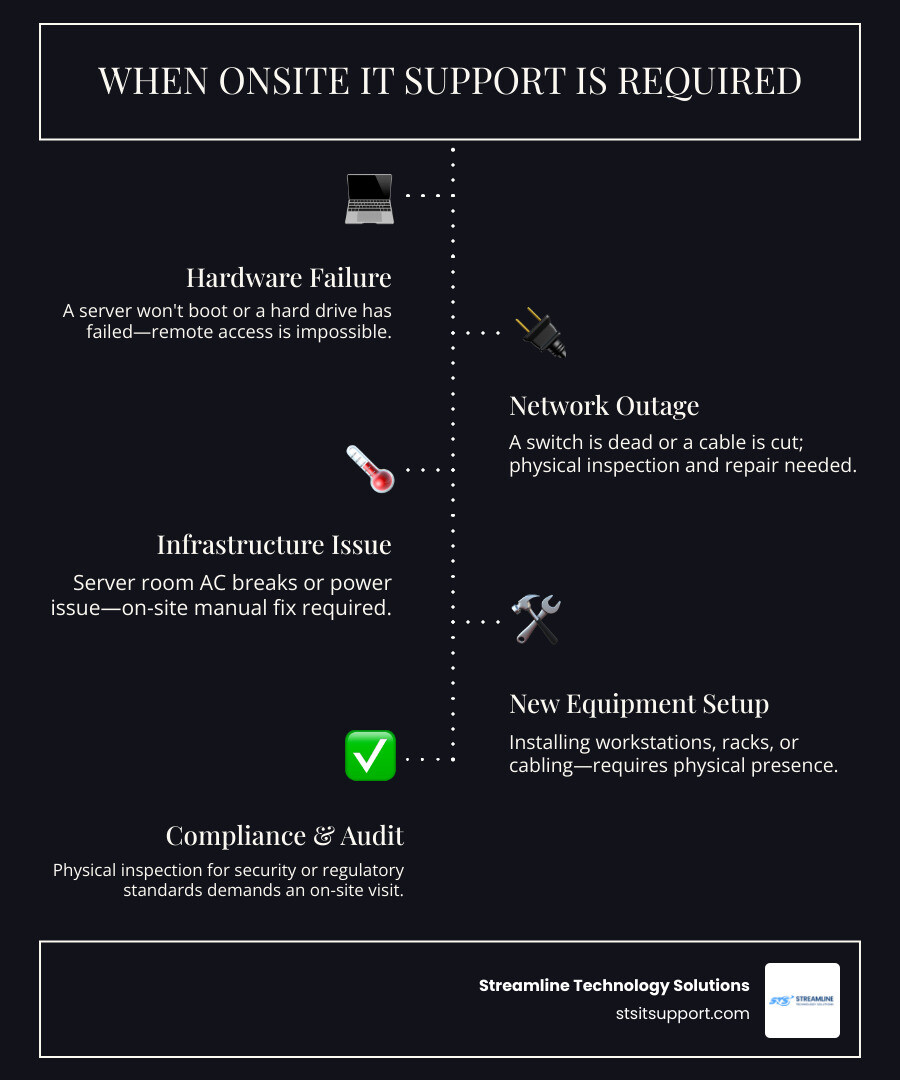
A dropped network cable, a failed hard drive, a server running hot in a closet with a broken AC unit — none of these can be resolved by someone sitting miles away on a remote dashboard. When your business goes down, you need someone who can physically show up, put their hands on the hardware, and fix it.
That gap between what remote support can do and what onsite support must do is exactly what this guide covers.
I'm Michael Gaigelas, and I've spent 20 years in the trenches of IT support — working hands-on with servers, Wi-Fi infrastructure, VoIP systems, cloud platforms, and managed IT services for businesses just like yours, including the kind of onsite IT support technician work that keeps South Florida companies running day to day. If you've ever been burned by a remote-only IT provider who couldn't solve your real-world hardware problems, this guide was written with you in mind.
What is an Onsite IT Support Technician and What Do They Do?
To put it simply, an onsite IT support technician is the physical boots on the ground for your company’s digital world. While a remote helpdesk is fantastic for resetting forgotten passwords or helping you configure an email signature, they are completely powerless when a network switch blows a capacitor or a critical workstation won't turn on.
This is where onsite it support becomes indispensable. These professionals bridge the gap between digital software configurations and physical hardware realities. They don't just stare at a screen; they interact with the physical environment where your technology lives.
When you partner with a provider of local it support, you are securing a resource who can drive over to your office, walk through your front doors, and directly diagnose the physical layer of your technology. Whether you operate a bustling medical facility in Boca Raton or a professional office in Coral Springs, having a technician physically present means that complex, multi-layered system failures are resolved with real-world precision rather than remote guesswork.
Key Responsibilities of an Onsite IT Support Technician
The daily checklist of a field technician is incredibly varied. They aren't just sitting in a cubicle waiting for things to break; they are actively managing, maintaining, and protecting your physical IT assets.
Here is what their core responsibilities look like in practice:
Hardware Installation and Lifecycle Management: From unboxing and configuring enterprise-grade desktops to mounting servers in a data rack, they handle the physical deployment of your technology assets.
Physical Troubleshooting and Diagnostics: When a computer won't boot, they physically open the chassis to test the power supply, swap out failed RAM, or replace a dead solid-state drive (SSD).
Server Room and Environmental Auditing: They conduct daily physical inspections of Main Equipment Rooms (MER) and Sub Equipment Rooms (SER). This includes checking that cooling systems are functioning, fire suppression setups are clear, and Uninterruptible Power Supplies (UPS) are charged and healthy.
Network Cable Management and Tracing: They trace, label, and clean up messy "spaghetti" cabling in your server closets, ensuring that patch panels and network switches are correctly mapped.
Asset Management and Compliant Disposal: They track hardware inventory and handle the secure decommissioning and physical destruction of retired hard drives to prevent data leaks.
Vendor Chaperoning: They supervise third-party utility or telecom installers to make sure no one accidentally unplugged your primary fiber line while working in the shared building riser closet.
These tasks require a unique blend of mechanical aptitude and deep technical knowledge. If you look at roles like the IT Onsite Technician | WorkVisaJobs UK job profile, you will see that field technicians must be highly adaptable, balancing structured ITIL service frameworks with the physical reality of managing complex hardware arrays in real-time.
Industries That Rely on Onsite IT Support
While almost any modern business needs technology to function, certain industries cannot survive on remote support alone. Their operations are too tied to physical hardware and strict compliance standards.
Healthcare and Laboratory Environments: Medical clinics and testing facilities rely heavily on specialized local hardware. Think of barcode scanners, local label printers, and diagnostic systems. If a label printer in a lab goes down, patient samples cannot be processed. A physical technician must be dispatched immediately to resolve the issue, as seen in real-world environments like the IT Service Technician - LabCorp - Lakeside, GA, US | Dice.com role.
Retail and Hospitality: Point-of-Sale (POS) registers, receipt printers, local credit card terminals, and inventory scanners are the lifeblood of retail. If a payment terminal stops communicating, a business loses money every minute.
Manufacturing and Warehousing: Industrial settings utilize physical barcode networks, ruggedized tablets, and shipping label systems. These environments are physically demanding and require rapid onsite intervention when hardware fails.
Financial Institutions: Banks and CPA firms often run legacy, highly secure proprietary hardware systems that lack remote access capabilities for security reasons. These systems require physical, hands-on maintenance to keep client data secure and compliant.
Onsite vs. Remote IT Support: Finding the Right Balance
Many business owners ask us: "Do I really need onsite support, or can my team get by with a remote helpdesk?"
The truth is, it isn't an either/or decision. The most efficient businesses use a hybrid model that blends both. Remote support is incredibly fast and cost-effective for software issues, while onsite support is the heavy artillery you need when the physical world pushes back.
Let's look at a quick comparison of what each model can actually accomplish:
Support Capability Remote Support Onsite IT Support Password Resets & MFA Setup ✅ Yes ✅ Yes (but overkill) Software & OS Patching ✅ Yes ✅ Yes Physical Hardware Swaps (RAM, SSDs) ❌ No ✅ Yes Troubleshooting Faulty Ethernet Outlets ❌ No ✅ Yes Mapping/Tracing Server Room Cables ❌ No ✅ Yes Setting Up Physical VoIP Phones & WAPs ❌ No ✅ Yes Recovering a Server with a Dead Motherboard ❌ No ✅ Yes Face-to-Face Employee Training ❌ No ✅ Yes
By combining a rapid-response it helpdesk remote support system with a local dispatch technician, you create a complete safety net. Remote teams can catch software anomalies early, and if the issue turns out to be a physical hardware failure, they can immediately escalate the ticket to an onsite specialist.
The Benefits of Onsite IT Support for Businesses
When you invest in physical support, you aren't just paying for someone to turn screws. You are buying operational insurance. Let's break down the core benefits of onsite it support for your business:
Dramatically Reduced Downtime: When your main network switch fails, your entire staff sits idle. A remote technician can only tell you, "Yep, it's offline." An onsite technician arrives with a replacement switch, racks it, patches the cables, and gets your business back online in a fraction of the time.
Personalized and Direct Communication: There is a massive psychological benefit to having a friendly, knowledgeable technician stand next to an employee and say, "I see the problem, and I'm going to fix it right now." It builds trust, reduces frustration, and allows for clear communication without confusing technical jargon.
Proactive Environmental Security: A remote technician cannot smell a burning power supply or notice that your server room AC unit is leaking water onto a backup drive. Onsite technicians perform physical inspections that save businesses thousands of dollars in preventable disaster recovery.
Tailored Support for Small Businesses: If you run a growing company, you likely don't have the budget for a full-time, in-house IT director. Utilizing outsourced it support services for small business gives you enterprise-grade expertise on-demand, without the massive overhead of permanent salaries and benefits.
Service-Level Agreements (SLAs) and Delivery Models
To make onsite support work for your budget, it is critical to understand how these services are delivered and measured.
The most common delivery models include:
The Managed Service Provider (MSP) Model: This is a fully managed, proactive partnership. For a flat monthly fee, an MSP monitors your network remotely and dispatches onsite technicians whenever physical intervention is needed.
The Hybrid Model: This model pairs your existing in-house IT staff with an external dispatch partner. Your internal team handles day-to-day software questions, while the outsourced partner is called in for major hardware rollouts, cabling projects, or emergency coverage.
Regardless of the model you choose, your partnership should always be governed by a clear Service-Level Agreement (SLA). An SLA is a legally binding commitment that defines exactly how quickly your provider must respond to issues.
When evaluating an it support response time, you should look for clear definitions of priority levels. For example, a "Priority 1" emergency (like a total network outage) should have a guaranteed onsite response time of 2 hours or less, while a "Priority 3" request (like setting up a new user workstation) might have a next-business-day window. Understanding how businesses ensure fast reliable it support response times is the key to holding your IT partner accountable and keeping your operations running smoothly.
Career Path, Certifications, and Physical Demands
Working as an onsite IT support technician is a highly dynamic career that requires a unique mix of physical strength, customer service skills, and deep analytical thinking. It is far from a desk job; it is a field-based role where no two days are ever the same.
How to Become an Onsite IT Support Technician
If you are looking to enter this field, you need a strong foundation of both hardware knowledge and network theory. Most mid-level onsite roles require 2 to 3 years of hands-on desktop support experience before you are sent to client sites alone.
Here is the typical roadmap to building the necessary skill set:
Earn Foundational Certifications: The gold standard for entry-level technicians is the CompTIA A+ certification, which proves you understand hardware components, operating systems, and basic troubleshooting. Follow this up with CompTIA Network+ or a vendor-specific credential like the Cisco CCNA to master networking fundamentals.
Master Core Systems: You must become highly proficient in managing Active Directory, configuring local VPNs, setting up wireless access points (WAPs), and navigating Remote Monitoring and Management (RMM) and Professional Services Automation (PSA) tools like ConnectWise.
Learn the Software Stack: Modern onsite specialists must be familiar with documentation platforms like IT Glue and backup solutions like Datto, as highlighted in the Onsite Specialist - Wichita, KS - AdamsBrown, LLC | Built In career profile.
Gain Field Experience: You can bridge the gap from a remote helpdesk role to a field role by volunteering for simple physical tasks like running network cables, swapping out backup power supplies, or setting up workstations for new office rollouts.
For those looking to advance quickly, global organizations like Hemmersbach show how structured growth works. In fact, 20% of Hemmersbach's profits go directly into social initiatives, including the Hemmersbach Rhino Force and Hemmersbach Kids' Family, proving that a career in IT can also connect to broader global impact. To see what a modern, customer-centric field role looks like, you can explore the IT Onsite Technician in Alabang Muntinlupa City | Hemmersbach Careers page.
Salary Expectations and Career Growth
The career path for onsite IT support specialists typically takes 5 to 10 years to progress from entry-level field work to senior engineering or IT management roles.
Let's look at how compensation and responsibilities evolve over time:
In terms of compensation, entry-level field technicians in the UK typically earn £20,000 to £28,000 annually, while mid-level field engineers move up to £30,000 to £45,000. Senior specialists, team leads, or specialized data center engineers can command salaries of £45,000 to £65,000 or more, depending on their specialized vendor certifications and leadership experience. In the US, salary trends follow a similar upward trajectory, with senior field specialists commanding premium rates due to the high demand for local hardware and network infrastructure expertise.
Frequently Asked Questions about Onsite IT Support
What are the physical demands of working as an onsite IT technician?
Onsite IT support is a highly active, physically demanding job. Technicians must be able to lift and carry up to 70 pounds (approximately 32 kg) of computer equipment, servers, and heavy UPS battery backups. The job also requires crawling under desks to trace wires, climbing ladders to mount wireless access points in ceilings, and standing or kneeling on hard floors for extended periods. Investing in high-quality ergonomic tool bags, comfortable safety boots, and protective knee pads is highly recommended for long-term physical wellness.
How does a hybrid IT support model work?
A hybrid model combines the speed of remote monitoring with the power of local physical dispatch. We monitor your servers, firewalls, and workstations 24/7 using remote software. If our system detects a software glitch, we patch it instantly from our office. If we detect a physical failure — like a hard drive dying in your server room — we immediately dispatch a local onsite IT support technician to your location with a replacement part in hand. This proactive approach catches issues before they cause massive business downtime.
Why can't all IT issues be solved remotely?
Remote support tools require two things to work: a functioning operating system and an active internet connection. If your computer’s motherboard fails, if your local network switch loses power, or if a construction crew accidentally cuts the physical fiber line outside your building, remote tools are completely useless. Physical disconnects, hardware burnouts, and server room environmental issues require a physical human being to diagnose and repair the physical layer of your technology.
Conclusion
At the end of the day, managing your company's technology is a balancing act between software and hardware, virtual systems and physical infrastructure. While the cloud has made our business lives easier, the physical machines that connect us to that cloud still live in the real world. When those physical systems fail, remote helpdesks simply cannot save the day.
If you run a business in Fort Lauderdale, Coral Springs, Boca Raton, Deerfield Beach, or Pompano Beach, you don't have to settle for remote-only support or deal with frustrating, slow response times.
At Streamline Technology Solutions, we provide comprehensive south florida it services designed specifically for local businesses. We pride ourselves on three core pillars:
Transparent Pricing: No hidden fees, no unexpected surcharges, and no confusing contracts. You always know exactly what you are paying for.
Fast Local Support: Our team is based right here in South Florida, meaning we can dispatch an experienced technician to your office in record time when an emergency strikes.
Direct Accountability: We don't hide behind automated ticketing systems. You get direct, human-to-human accountability from local experts who care about your business continuity.
Whether you need to secure your network, upgrade your office VoIP systems, or secure reliable managed it services fort lauderdale businesses trust, we are here to keep your business running smoothly.
Don't wait for a hardware emergency to find out if your IT support is up to the task. Get reliable IT support today and let us handle your technology so you can focus on growing your business.

How Can We Help?
Call us at (954) 787-3288 or fill out the form below.
Featured Posts
Salary and Sanity: The Onsite IT Support Technician Guide
What Is an Onsite IT Support Technician (And Why It Matters for Your Business)?
An onsite IT support technician is an IT professional who physically travels to your business location to diagnose and fix technical problems that cannot be resolved over the phone or through remote software tools.
Quick answer:
Question Answer What do they do? Install hardware, fix physical network issues, maintain servers, and support employees in person Who needs them? Any business with physical IT infrastructure — offices, clinics, retail stores, warehouses When is onsite support required? Broken hardware, faulty cabling, server failures, new equipment deployments Can remote support replace them? No — some issues must be handled in person Typical experience required 2–3 years for mid-level roles; 5–10 years to reach senior positions
Here is the hard truth most remote IT providers won't tell you: some IT problems simply cannot be fixed on a call.
A dropped network cable, a failed hard drive, a server running hot in a closet with a broken AC unit — none of these can be resolved by someone sitting miles away on a remote dashboard. When your business goes down, you need someone who can physically show up, put their hands on the hardware, and fix it.
That gap between what remote support can do and what onsite support must do is exactly what this guide covers.
I'm Michael Gaigelas, and I've spent 20 years in the trenches of IT support — working hands-on with servers, Wi-Fi infrastructure, VoIP systems, cloud platforms, and managed IT services for businesses just like yours, including the kind of onsite IT support technician work that keeps South Florida companies running day to day. If you've ever been burned by a remote-only IT provider who couldn't solve your real-world hardware problems, this guide was written with you in mind.
What is an Onsite IT Support Technician and What Do They Do?
To put it simply, an onsite IT support technician is the physical boots on the ground for your company’s digital world. While a remote helpdesk is fantastic for resetting forgotten passwords or helping you configure an email signature, they are completely powerless when a network switch blows a capacitor or a critical workstation won't turn on.
This is where onsite it support becomes indispensable. These professionals bridge the gap between digital software configurations and physical hardware realities. They don't just stare at a screen; they interact with the physical environment where your technology lives.
When you partner with a provider of local it support, you are securing a resource who can drive over to your office, walk through your front doors, and directly diagnose the physical layer of your technology. Whether you operate a bustling medical facility in Boca Raton or a professional office in Coral Springs, having a technician physically present means that complex, multi-layered system failures are resolved with real-world precision rather than remote guesswork.
Key Responsibilities of an Onsite IT Support Technician
The daily checklist of a field technician is incredibly varied. They aren't just sitting in a cubicle waiting for things to break; they are actively managing, maintaining, and protecting your physical IT assets.
Here is what their core responsibilities look like in practice:
Hardware Installation and Lifecycle Management: From unboxing and configuring enterprise-grade desktops to mounting servers in a data rack, they handle the physical deployment of your technology assets.
Physical Troubleshooting and Diagnostics: When a computer won't boot, they physically open the chassis to test the power supply, swap out failed RAM, or replace a dead solid-state drive (SSD).
Server Room and Environmental Auditing: They conduct daily physical inspections of Main Equipment Rooms (MER) and Sub Equipment Rooms (SER). This includes checking that cooling systems are functioning, fire suppression setups are clear, and Uninterruptible Power Supplies (UPS) are charged and healthy.
Network Cable Management and Tracing: They trace, label, and clean up messy "spaghetti" cabling in your server closets, ensuring that patch panels and network switches are correctly mapped.
Asset Management and Compliant Disposal: They track hardware inventory and handle the secure decommissioning and physical destruction of retired hard drives to prevent data leaks.
Vendor Chaperoning: They supervise third-party utility or telecom installers to make sure no one accidentally unplugged your primary fiber line while working in the shared building riser closet.
These tasks require a unique blend of mechanical aptitude and deep technical knowledge. If you look at roles like the IT Onsite Technician | WorkVisaJobs UK job profile, you will see that field technicians must be highly adaptable, balancing structured ITIL service frameworks with the physical reality of managing complex hardware arrays in real-time.
Industries That Rely on Onsite IT Support
While almost any modern business needs technology to function, certain industries cannot survive on remote support alone. Their operations are too tied to physical hardware and strict compliance standards.
Healthcare and Laboratory Environments: Medical clinics and testing facilities rely heavily on specialized local hardware. Think of barcode scanners, local label printers, and diagnostic systems. If a label printer in a lab goes down, patient samples cannot be processed. A physical technician must be dispatched immediately to resolve the issue, as seen in real-world environments like the IT Service Technician - LabCorp - Lakeside, GA, US | Dice.com role.
Retail and Hospitality: Point-of-Sale (POS) registers, receipt printers, local credit card terminals, and inventory scanners are the lifeblood of retail. If a payment terminal stops communicating, a business loses money every minute.
Manufacturing and Warehousing: Industrial settings utilize physical barcode networks, ruggedized tablets, and shipping label systems. These environments are physically demanding and require rapid onsite intervention when hardware fails.
Financial Institutions: Banks and CPA firms often run legacy, highly secure proprietary hardware systems that lack remote access capabilities for security reasons. These systems require physical, hands-on maintenance to keep client data secure and compliant.
Onsite vs. Remote IT Support: Finding the Right Balance
Many business owners ask us: "Do I really need onsite support, or can my team get by with a remote helpdesk?"
The truth is, it isn't an either/or decision. The most efficient businesses use a hybrid model that blends both. Remote support is incredibly fast and cost-effective for software issues, while onsite support is the heavy artillery you need when the physical world pushes back.
Let's look at a quick comparison of what each model can actually accomplish:
Support Capability Remote Support Onsite IT Support Password Resets & MFA Setup ✅ Yes ✅ Yes (but overkill) Software & OS Patching ✅ Yes ✅ Yes Physical Hardware Swaps (RAM, SSDs) ❌ No ✅ Yes Troubleshooting Faulty Ethernet Outlets ❌ No ✅ Yes Mapping/Tracing Server Room Cables ❌ No ✅ Yes Setting Up Physical VoIP Phones & WAPs ❌ No ✅ Yes Recovering a Server with a Dead Motherboard ❌ No ✅ Yes Face-to-Face Employee Training ❌ No ✅ Yes
By combining a rapid-response it helpdesk remote support system with a local dispatch technician, you create a complete safety net. Remote teams can catch software anomalies early, and if the issue turns out to be a physical hardware failure, they can immediately escalate the ticket to an onsite specialist.
The Benefits of Onsite IT Support for Businesses
When you invest in physical support, you aren't just paying for someone to turn screws. You are buying operational insurance. Let's break down the core benefits of onsite it support for your business:
Dramatically Reduced Downtime: When your main network switch fails, your entire staff sits idle. A remote technician can only tell you, "Yep, it's offline." An onsite technician arrives with a replacement switch, racks it, patches the cables, and gets your business back online in a fraction of the time.
Personalized and Direct Communication: There is a massive psychological benefit to having a friendly, knowledgeable technician stand next to an employee and say, "I see the problem, and I'm going to fix it right now." It builds trust, reduces frustration, and allows for clear communication without confusing technical jargon.
Proactive Environmental Security: A remote technician cannot smell a burning power supply or notice that your server room AC unit is leaking water onto a backup drive. Onsite technicians perform physical inspections that save businesses thousands of dollars in preventable disaster recovery.
Tailored Support for Small Businesses: If you run a growing company, you likely don't have the budget for a full-time, in-house IT director. Utilizing outsourced it support services for small business gives you enterprise-grade expertise on-demand, without the massive overhead of permanent salaries and benefits.
Service-Level Agreements (SLAs) and Delivery Models
To make onsite support work for your budget, it is critical to understand how these services are delivered and measured.
The most common delivery models include:
The Managed Service Provider (MSP) Model: This is a fully managed, proactive partnership. For a flat monthly fee, an MSP monitors your network remotely and dispatches onsite technicians whenever physical intervention is needed.
The Hybrid Model: This model pairs your existing in-house IT staff with an external dispatch partner. Your internal team handles day-to-day software questions, while the outsourced partner is called in for major hardware rollouts, cabling projects, or emergency coverage.
Regardless of the model you choose, your partnership should always be governed by a clear Service-Level Agreement (SLA). An SLA is a legally binding commitment that defines exactly how quickly your provider must respond to issues.
When evaluating an it support response time, you should look for clear definitions of priority levels. For example, a "Priority 1" emergency (like a total network outage) should have a guaranteed onsite response time of 2 hours or less, while a "Priority 3" request (like setting up a new user workstation) might have a next-business-day window. Understanding how businesses ensure fast reliable it support response times is the key to holding your IT partner accountable and keeping your operations running smoothly.
Career Path, Certifications, and Physical Demands
Working as an onsite IT support technician is a highly dynamic career that requires a unique mix of physical strength, customer service skills, and deep analytical thinking. It is far from a desk job; it is a field-based role where no two days are ever the same.
How to Become an Onsite IT Support Technician
If you are looking to enter this field, you need a strong foundation of both hardware knowledge and network theory. Most mid-level onsite roles require 2 to 3 years of hands-on desktop support experience before you are sent to client sites alone.
Here is the typical roadmap to building the necessary skill set:
Earn Foundational Certifications: The gold standard for entry-level technicians is the CompTIA A+ certification, which proves you understand hardware components, operating systems, and basic troubleshooting. Follow this up with CompTIA Network+ or a vendor-specific credential like the Cisco CCNA to master networking fundamentals.
Master Core Systems: You must become highly proficient in managing Active Directory, configuring local VPNs, setting up wireless access points (WAPs), and navigating Remote Monitoring and Management (RMM) and Professional Services Automation (PSA) tools like ConnectWise.
Learn the Software Stack: Modern onsite specialists must be familiar with documentation platforms like IT Glue and backup solutions like Datto, as highlighted in the Onsite Specialist - Wichita, KS - AdamsBrown, LLC | Built In career profile.
Gain Field Experience: You can bridge the gap from a remote helpdesk role to a field role by volunteering for simple physical tasks like running network cables, swapping out backup power supplies, or setting up workstations for new office rollouts.
For those looking to advance quickly, global organizations like Hemmersbach show how structured growth works. In fact, 20% of Hemmersbach's profits go directly into social initiatives, including the Hemmersbach Rhino Force and Hemmersbach Kids' Family, proving that a career in IT can also connect to broader global impact. To see what a modern, customer-centric field role looks like, you can explore the IT Onsite Technician in Alabang Muntinlupa City | Hemmersbach Careers page.
Salary Expectations and Career Growth
The career path for onsite IT support specialists typically takes 5 to 10 years to progress from entry-level field work to senior engineering or IT management roles.
Let's look at how compensation and responsibilities evolve over time:
In terms of compensation, entry-level field technicians in the UK typically earn £20,000 to £28,000 annually, while mid-level field engineers move up to £30,000 to £45,000. Senior specialists, team leads, or specialized data center engineers can command salaries of £45,000 to £65,000 or more, depending on their specialized vendor certifications and leadership experience. In the US, salary trends follow a similar upward trajectory, with senior field specialists commanding premium rates due to the high demand for local hardware and network infrastructure expertise.
Frequently Asked Questions about Onsite IT Support
What are the physical demands of working as an onsite IT technician?
Onsite IT support is a highly active, physically demanding job. Technicians must be able to lift and carry up to 70 pounds (approximately 32 kg) of computer equipment, servers, and heavy UPS battery backups. The job also requires crawling under desks to trace wires, climbing ladders to mount wireless access points in ceilings, and standing or kneeling on hard floors for extended periods. Investing in high-quality ergonomic tool bags, comfortable safety boots, and protective knee pads is highly recommended for long-term physical wellness.
How does a hybrid IT support model work?
A hybrid model combines the speed of remote monitoring with the power of local physical dispatch. We monitor your servers, firewalls, and workstations 24/7 using remote software. If our system detects a software glitch, we patch it instantly from our office. If we detect a physical failure — like a hard drive dying in your server room — we immediately dispatch a local onsite IT support technician to your location with a replacement part in hand. This proactive approach catches issues before they cause massive business downtime.
Why can't all IT issues be solved remotely?
Remote support tools require two things to work: a functioning operating system and an active internet connection. If your computer’s motherboard fails, if your local network switch loses power, or if a construction crew accidentally cuts the physical fiber line outside your building, remote tools are completely useless. Physical disconnects, hardware burnouts, and server room environmental issues require a physical human being to diagnose and repair the physical layer of your technology.
Conclusion
At the end of the day, managing your company's technology is a balancing act between software and hardware, virtual systems and physical infrastructure. While the cloud has made our business lives easier, the physical machines that connect us to that cloud still live in the real world. When those physical systems fail, remote helpdesks simply cannot save the day.
If you run a business in Fort Lauderdale, Coral Springs, Boca Raton, Deerfield Beach, or Pompano Beach, you don't have to settle for remote-only support or deal with frustrating, slow response times.
At Streamline Technology Solutions, we provide comprehensive south florida it services designed specifically for local businesses. We pride ourselves on three core pillars:
Transparent Pricing: No hidden fees, no unexpected surcharges, and no confusing contracts. You always know exactly what you are paying for.
Fast Local Support: Our team is based right here in South Florida, meaning we can dispatch an experienced technician to your office in record time when an emergency strikes.
Direct Accountability: We don't hide behind automated ticketing systems. You get direct, human-to-human accountability from local experts who care about your business continuity.
Whether you need to secure your network, upgrade your office VoIP systems, or secure reliable managed it services fort lauderdale businesses trust, we are here to keep your business running smoothly.
Don't wait for a hardware emergency to find out if your IT support is up to the task. Get reliable IT support today and let us handle your technology so you can focus on growing your business.