Blog
Home / Blog

The No-Panic Guide to Local Computer Repair in Miami
When Your Computer Breaks Down: Finding Reliable Local Computer Repair Near Me
Looking for fast, trustworthy computer repair nearby? Here's what you need to know right now:
What You Need Quick Answer Average repair cost $50–$150 for most common repairs Hourly rate $45–$90/hr (avg. $60/hr) Turnaround time 24 hours for most repairs; 1–3 days if parts are needed Common repairs Virus removal, screen replacement, data recovery, slow PC tune-up Repair or replace? Replace if repair cost exceeds 50% of a new device's price Before you hand it over Back up your data and log out of all accounts
Your computer just stopped working. Maybe it won't boot. Maybe it's crawling. Maybe the screen cracked and there's a deadline in two hours. Whatever happened, the clock is ticking — and the last thing you need is to waste time on a repair shop that overcharges, under-communicates, or makes the problem worse.
The frustrating reality is that the IT repair industry has its share of technicians who are quick to quote big numbers and slow to explain what they actually did. Finding someone you can trust — someone local, accountable, and fairly priced — makes all the difference, especially when your business depends on it.
This guide cuts through the noise and shows you exactly how to find the right help, what to expect to pay, and how to protect yourself before handing your device over to anyone.
I'm Michael Gaigelas, and with over 20 years of hands-on experience in IT support, business technology, servers, and managed IT services, I've helped countless South Florida businesses navigate exactly this kind of situation when searching for local computer repair near me. Whether it's a hardware failure or a software meltdown, this guide will walk you through every step so you can make a smart, confident decision.
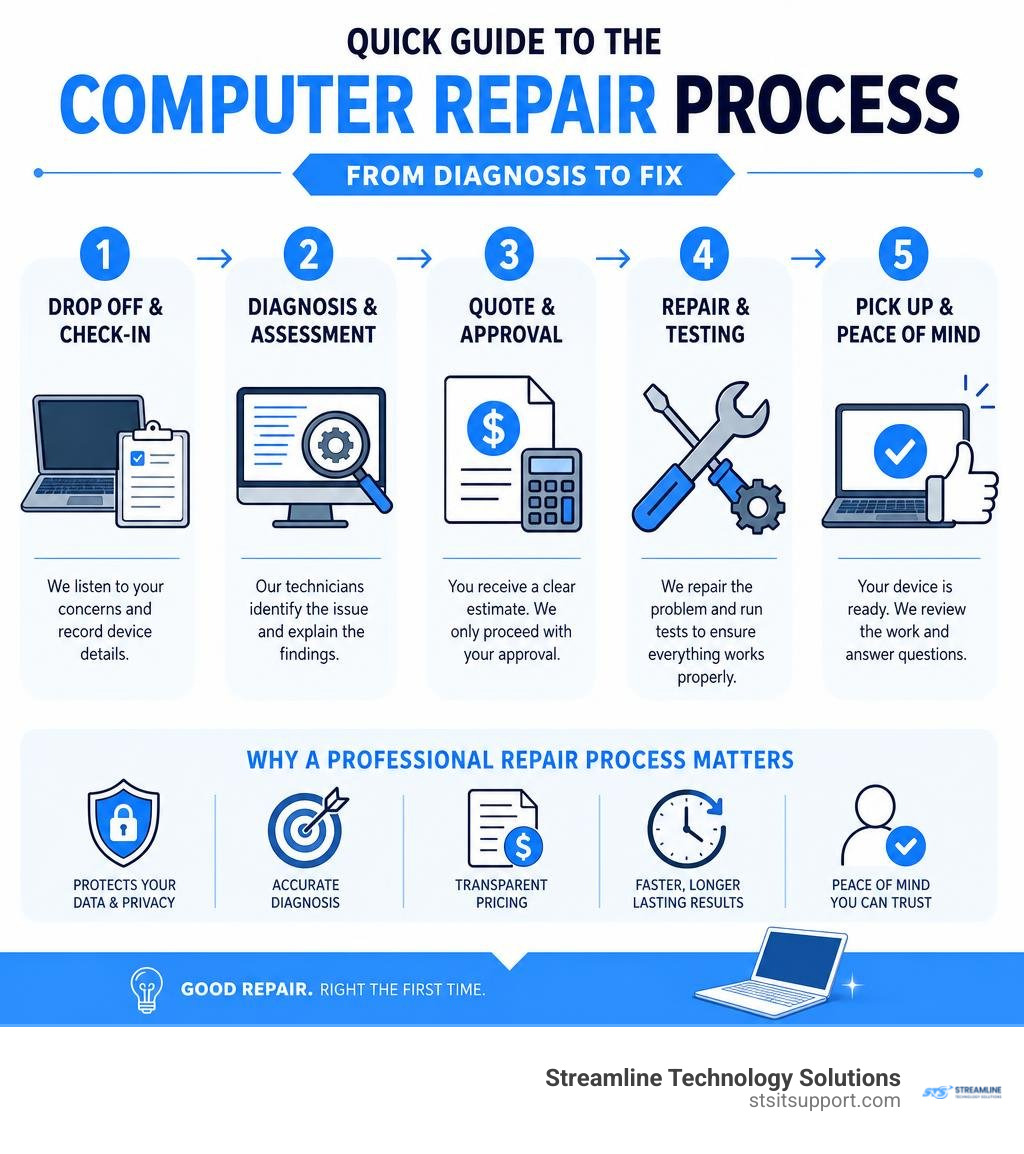
How to Find a Reliable Local Computer Repair Near Me
When your computer acts up, your first instinct is probably to pull out your phone and type local computer repair near me into your search bar. But once the search results load, how do you separate the certified pros from the "snake oil peddlers" who might overcharge you or fail to listen to your actual concerns?
Finding a reliable technician requires looking for specific trust signals. You want to make sure the person opening up your machine or accessing your operating system has the proper credentials, a solid reputation, and stands behind their work.

Evaluating Trustworthy Local Computer Repair Near Me Services
When evaluating a local repair service in South Florida, keep an eye out for these crucial trust signals:
Real Customer Feedback: Look for verified, high-star ratings with detailed written reviews. Pay attention to how the business responds to both positive and negative feedback. You can Read our customer reviews to see how transparent, local support makes a difference for South Florida businesses.
Clear Service Guarantees: A trustworthy shop should offer a "No Fix, No Fee" policy. If they cannot diagnose or repair your device, you shouldn't be left holding a massive bill.
Upfront Diagnostic Fees: Be wary of shops that hide their diagnostic costs. A reliable provider is upfront about whether they charge a flat fee for troubleshooting or offer free basic diagnostics.
Certified Engineers: Ask if their team consists of certified technicians or computer engineers. There is a massive difference between a hobbyist who "knows about computers" and a certified professional who understands complex hardware architectures and enterprise systems.
If you are looking for long-term tech stability, check out our guide on Local IT Support to learn how ongoing professional care keeps your systems running smoothly.
On-Site vs. Remote Troubleshooting Options
You don't always have to pack up your desktop or drive your laptop to a physical shop. Depending on the issue, you generally have two main paths:
Remote Diagnostics and Repair: If your computer boots up and can connect to the internet, many software issues, slow performance bottlenecks, and virus infections can be resolved remotely. A technician can securely log into your system to clean up malware, install drivers, or optimize your settings while you watch.
On-Site Support: For physical hardware failures, network setup, or when a computer simply won’t power on, a technician needs to physically examine the machine.
For businesses in Coral Springs, Boca Raton, Fort Lauderdale, Deerfield Beach, and Pompano Beach, having a technician come directly to your office is a game-changer. It minimizes business downtime and eliminates the risk of damaging your hardware during transport. To see how this works, read about the Benefits of Onsite IT Support or explore our dedicated Onsite IT Support services.
Common Computer Problems and Available Repair Services
Computers are incredibly complex, but the problems that plague them usually fall into a few predictable categories. Knowing what type of service you need helps you communicate more effectively with your technician and prevents you from paying for unnecessary fixes.

Hardware Repairs and Component Replacements
Hardware issues require physical intervention. Some of the most common hardware repairs include:
Cracked or Damaged Screens: Dropping a laptop is a sinking feeling. Screen replacements are common and, on average, cost around $320 depending on the model and whether it features a touchscreen.
Battery and Charging Port Repairs: If your laptop only works when plugged in, or if the charging port feels loose, a quick battery swap or port resoldering can give your device a second lease on life.
Keyboard and Hinge Replacements: Spilled coffee or physical wear and tear can cause keys to stick or screen hinges to snap. Replacing these components is highly cost-effective compared to buying a new machine.
SSD and RAM Upgrades: If your computer is running slowly, replacing an old mechanical hard drive with a solid-state drive (SSD) and adding more RAM can make an old computer run faster than it did when it was brand new.
Software Troubleshooting and Malware Removal
Not all computer issues are physical. Often, the culprit is lurking inside your operating system:
Virus and Spyware Cleanup: If your computer is plagued by pop-ups, fake antivirus scans, or ransomware, professional malware removal (which typically averages around $100) will safely eliminate the threats without destroying your files.
OS Reinstallation: When system files become deeply corrupted, resulting in a persistent Blue Screen of Death (BSOD), a clean reinstall of Windows or macOS is often the best way to restore stability.
System Optimization: Over time, junk files, startup programs, and background processes clog your system resources. A professional tune-up cleans out this bloatware to restore peak performance.
If your team is struggling with software glitches, our IT Helpdesk Remote Support can quickly get your systems back in alignment without any travel delays.
The Economics of IT: Repair vs. Replace Decisions
One of the most frequent questions we get is: "Is it actually worth fixing my computer, or should I just buy a new one?"
To make a smart financial decision, we use the 50% Rule. If the cost of the repair exceeds 50% of the price of a brand-new, comparable replacement machine, it is generally wiser to replace it.
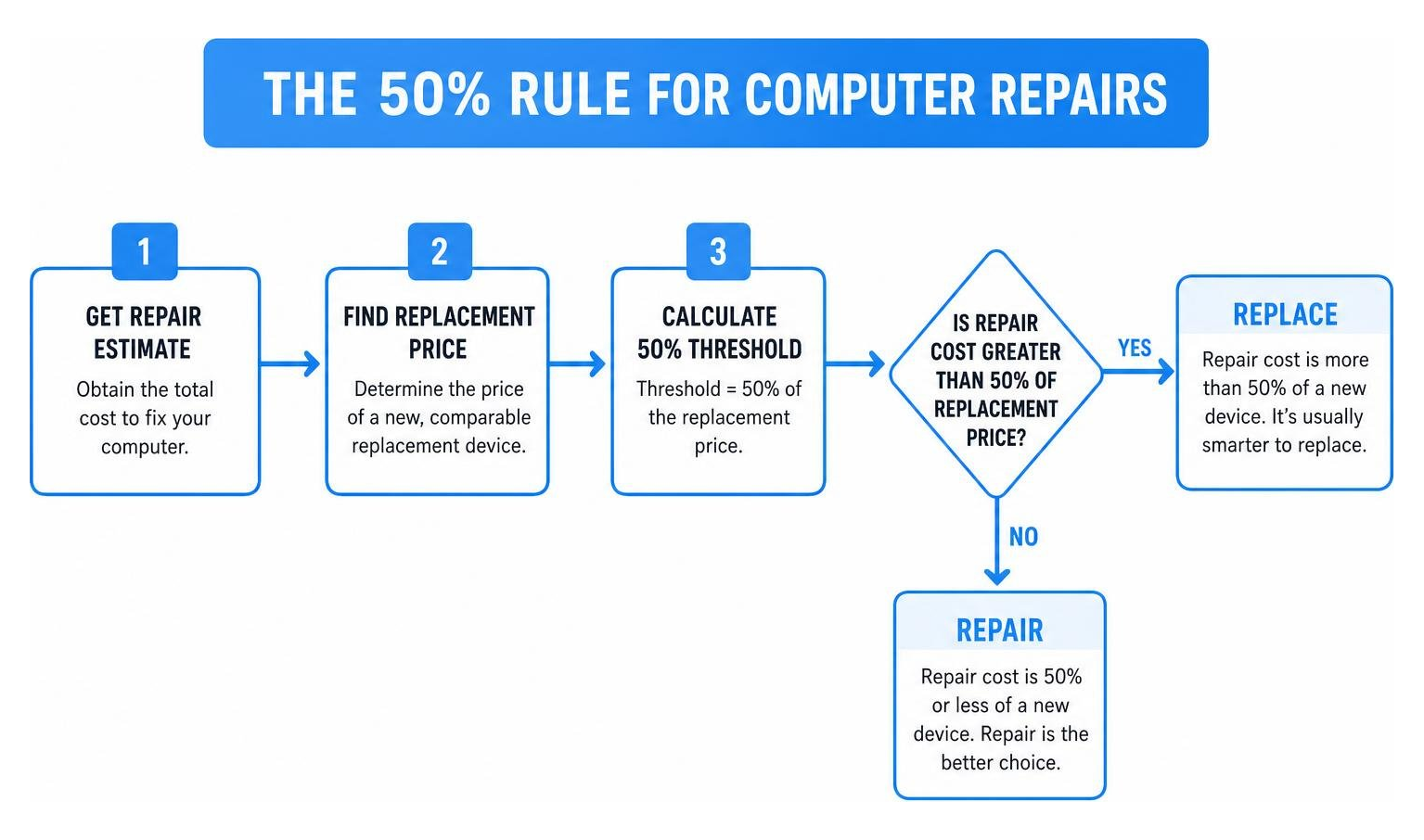
Repair vs. Replacement Cost Comparison
Repair Scenario Average Repair Cost Replacement Cost (New Device) Recommended Action Failing Hard Drive / SSD Upgrade $120 - $200 $600 - $1,000 Repair / Upgrade (Highly cost-effective) Cracked Laptop Screen $320 $700 - $1,200 Repair (If the laptop is under 3 years old) Failed Motherboard (Out of Warranty) $400 - $600 $800 Replace (Exceeds the 50% threshold) Severe Malware / OS Corruption $100 - $150 $600 - $1,000 Repair (Quick software fix)
For businesses looking to manage these costs predictably, exploring Affordable IT Support Packages can help keep all your hardware maintained and optimized without unexpected financial surprises.
Understanding Computer Lifespans and Upgrade Cycles
How long should your computer actually last? On average:
Desktop PCs last 3 to 8 years because their larger cases allow for better airflow (keeping components cool) and make it easy to swap out individual failing parts.
Laptops typically last 3 to 5 years (sometimes stretching to 7 with meticulous care) because their tightly packed internal components run hotter and are highly susceptible to physical wear and tear.
If your device is reaching the end of these lifespans and is suffering from major hardware failures, it is likely time to consider an upgrade rather than sinking more money into repairs.
Average Costs of Local Computer Repair Near Me
When searching for local computer repair near me, understanding the local market rates helps you avoid getting ripped off.
On average, computer repair technicians charge an hourly rate of $60, with standard industry rates ranging from $45 to $90 per hour.
Many shops will charge a flat rate for predictable services. For example, a standard virus removal service averages around $100, while a basic SSD upgrade or operating system reinstall typically starts around $70 to $150 plus the cost of parts. Always request a detailed, itemized estimate before authorizing any work.
Your Pre-Repair Checklist: What to Do Before Handing Over Your Device
Before you hand your computer over to any technician, you must take steps to protect your personal and business data. Technicians are professionals, but your data privacy is ultimately your responsibility.
Follow this quick checklist before your repair appointment:
Back Up Your Data: Never assume your files are safe during a repair. Back up your critical documents, photos, and business data to an external hard drive or a secure cloud storage provider like Microsoft OneDrive.
Protect Your Privacy: Erase or move highly sensitive personal or financial information from the device.
Log Out of Accounts: Log out of your web browsers, email clients, social media accounts, and banking portals to prevent unauthorized access.
Know Your Passwords: Make sure you know your primary login credentials so you can log back in once the machine is returned.
If you are a business owner and need help setting up secure backup protocols or managing employee device configurations, our IT Support Desk is always here to assist.
Frequently Asked Questions About Computer Repair
How long does a typical computer repair take?
Most simple repairs, software optimizations, and virus removals are completed within 24 hours. If your repair requires a replacement part that isn't kept in local stock, it typically takes 1 to 3 days for the parts to arrive and be installed.
Is it cheaper to replace a hard drive or buy a new computer?
It is almost always significantly cheaper to replace a hard drive or upgrade to an SSD than to buy a new computer. A solid-state drive upgrade can make an older, sluggish computer run up to ten times faster for a fraction of the cost of a new machine, while preserving your existing system setup.
Do I need an appointment for local computer repair?
While some shops accept walk-ins, scheduling an appointment is highly recommended to ensure a technician is immediately available to diagnose your machine. If you are facing a critical system failure and need immediate help, you can Schedule Appointment with us to get your repair prioritized.
Conclusion
A computer breakdown doesn't have to throw your entire week into chaos. By understanding what to look for in a trustworthy technician, knowing the average costs, and using the 50% rule to guide your repair decisions, you can navigate any technical hurdle with confidence.
When your business relies on technology, you cannot afford to wait days for a response or deal with technicians who don't understand your unique setup. South Florida businesses need a dedicated partner who is right down the road and ready to help.
At Streamline Technology Solutions, we provide fast, local IT services, VoIP systems, and hardware support to businesses throughout Coral Springs, Boca Raton, Fort Lauderdale, Deerfield Beach, and Pompano Beach. We believe in transparent pricing without hidden fees, fast local response times, and direct, human accountability.
Don't let a broken computer slow your business down. Get started with Streamline Technology Solutions today and let us keep your technology working seamlessly for you.

How Can We Help?
Call us at (954) 787-3288 or fill out the form below.
Featured Posts
The No-Panic Guide to Local Computer Repair in Miami
When Your Computer Breaks Down: Finding Reliable Local Computer Repair Near Me
Looking for fast, trustworthy computer repair nearby? Here's what you need to know right now:
What You Need Quick Answer Average repair cost $50–$150 for most common repairs Hourly rate $45–$90/hr (avg. $60/hr) Turnaround time 24 hours for most repairs; 1–3 days if parts are needed Common repairs Virus removal, screen replacement, data recovery, slow PC tune-up Repair or replace? Replace if repair cost exceeds 50% of a new device's price Before you hand it over Back up your data and log out of all accounts
Your computer just stopped working. Maybe it won't boot. Maybe it's crawling. Maybe the screen cracked and there's a deadline in two hours. Whatever happened, the clock is ticking — and the last thing you need is to waste time on a repair shop that overcharges, under-communicates, or makes the problem worse.
The frustrating reality is that the IT repair industry has its share of technicians who are quick to quote big numbers and slow to explain what they actually did. Finding someone you can trust — someone local, accountable, and fairly priced — makes all the difference, especially when your business depends on it.
This guide cuts through the noise and shows you exactly how to find the right help, what to expect to pay, and how to protect yourself before handing your device over to anyone.
I'm Michael Gaigelas, and with over 20 years of hands-on experience in IT support, business technology, servers, and managed IT services, I've helped countless South Florida businesses navigate exactly this kind of situation when searching for local computer repair near me. Whether it's a hardware failure or a software meltdown, this guide will walk you through every step so you can make a smart, confident decision.
How to Find a Reliable Local Computer Repair Near Me
When your computer acts up, your first instinct is probably to pull out your phone and type local computer repair near me into your search bar. But once the search results load, how do you separate the certified pros from the "snake oil peddlers" who might overcharge you or fail to listen to your actual concerns?
Finding a reliable technician requires looking for specific trust signals. You want to make sure the person opening up your machine or accessing your operating system has the proper credentials, a solid reputation, and stands behind their work.
Evaluating Trustworthy Local Computer Repair Near Me Services
When evaluating a local repair service in South Florida, keep an eye out for these crucial trust signals:
Real Customer Feedback: Look for verified, high-star ratings with detailed written reviews. Pay attention to how the business responds to both positive and negative feedback. You can Read our customer reviews to see how transparent, local support makes a difference for South Florida businesses.
Clear Service Guarantees: A trustworthy shop should offer a "No Fix, No Fee" policy. If they cannot diagnose or repair your device, you shouldn't be left holding a massive bill.
Upfront Diagnostic Fees: Be wary of shops that hide their diagnostic costs. A reliable provider is upfront about whether they charge a flat fee for troubleshooting or offer free basic diagnostics.
Certified Engineers: Ask if their team consists of certified technicians or computer engineers. There is a massive difference between a hobbyist who "knows about computers" and a certified professional who understands complex hardware architectures and enterprise systems.
If you are looking for long-term tech stability, check out our guide on Local IT Support to learn how ongoing professional care keeps your systems running smoothly.
On-Site vs. Remote Troubleshooting Options
You don't always have to pack up your desktop or drive your laptop to a physical shop. Depending on the issue, you generally have two main paths:
Remote Diagnostics and Repair: If your computer boots up and can connect to the internet, many software issues, slow performance bottlenecks, and virus infections can be resolved remotely. A technician can securely log into your system to clean up malware, install drivers, or optimize your settings while you watch.
On-Site Support: For physical hardware failures, network setup, or when a computer simply won’t power on, a technician needs to physically examine the machine.
For businesses in Coral Springs, Boca Raton, Fort Lauderdale, Deerfield Beach, and Pompano Beach, having a technician come directly to your office is a game-changer. It minimizes business downtime and eliminates the risk of damaging your hardware during transport. To see how this works, read about the Benefits of Onsite IT Support or explore our dedicated Onsite IT Support services.
Common Computer Problems and Available Repair Services
Computers are incredibly complex, but the problems that plague them usually fall into a few predictable categories. Knowing what type of service you need helps you communicate more effectively with your technician and prevents you from paying for unnecessary fixes.
Hardware Repairs and Component Replacements
Hardware issues require physical intervention. Some of the most common hardware repairs include:
Cracked or Damaged Screens: Dropping a laptop is a sinking feeling. Screen replacements are common and, on average, cost around $320 depending on the model and whether it features a touchscreen.
Battery and Charging Port Repairs: If your laptop only works when plugged in, or if the charging port feels loose, a quick battery swap or port resoldering can give your device a second lease on life.
Keyboard and Hinge Replacements: Spilled coffee or physical wear and tear can cause keys to stick or screen hinges to snap. Replacing these components is highly cost-effective compared to buying a new machine.
SSD and RAM Upgrades: If your computer is running slowly, replacing an old mechanical hard drive with a solid-state drive (SSD) and adding more RAM can make an old computer run faster than it did when it was brand new.
Software Troubleshooting and Malware Removal
Not all computer issues are physical. Often, the culprit is lurking inside your operating system:
Virus and Spyware Cleanup: If your computer is plagued by pop-ups, fake antivirus scans, or ransomware, professional malware removal (which typically averages around $100) will safely eliminate the threats without destroying your files.
OS Reinstallation: When system files become deeply corrupted, resulting in a persistent Blue Screen of Death (BSOD), a clean reinstall of Windows or macOS is often the best way to restore stability.
System Optimization: Over time, junk files, startup programs, and background processes clog your system resources. A professional tune-up cleans out this bloatware to restore peak performance.
If your team is struggling with software glitches, our IT Helpdesk Remote Support can quickly get your systems back in alignment without any travel delays.
The Economics of IT: Repair vs. Replace Decisions
One of the most frequent questions we get is: "Is it actually worth fixing my computer, or should I just buy a new one?"
To make a smart financial decision, we use the 50% Rule. If the cost of the repair exceeds 50% of the price of a brand-new, comparable replacement machine, it is generally wiser to replace it.
Repair vs. Replacement Cost Comparison
Repair Scenario Average Repair Cost Replacement Cost (New Device) Recommended Action Failing Hard Drive / SSD Upgrade $120 - $200 $600 - $1,000 Repair / Upgrade (Highly cost-effective) Cracked Laptop Screen $320 $700 - $1,200 Repair (If the laptop is under 3 years old) Failed Motherboard (Out of Warranty) $400 - $600 $800 Replace (Exceeds the 50% threshold) Severe Malware / OS Corruption $100 - $150 $600 - $1,000 Repair (Quick software fix)
For businesses looking to manage these costs predictably, exploring Affordable IT Support Packages can help keep all your hardware maintained and optimized without unexpected financial surprises.
Understanding Computer Lifespans and Upgrade Cycles
How long should your computer actually last? On average:
Desktop PCs last 3 to 8 years because their larger cases allow for better airflow (keeping components cool) and make it easy to swap out individual failing parts.
Laptops typically last 3 to 5 years (sometimes stretching to 7 with meticulous care) because their tightly packed internal components run hotter and are highly susceptible to physical wear and tear.
If your device is reaching the end of these lifespans and is suffering from major hardware failures, it is likely time to consider an upgrade rather than sinking more money into repairs.
Average Costs of Local Computer Repair Near Me
When searching for local computer repair near me, understanding the local market rates helps you avoid getting ripped off.
On average, computer repair technicians charge an hourly rate of $60, with standard industry rates ranging from $45 to $90 per hour.
Many shops will charge a flat rate for predictable services. For example, a standard virus removal service averages around $100, while a basic SSD upgrade or operating system reinstall typically starts around $70 to $150 plus the cost of parts. Always request a detailed, itemized estimate before authorizing any work.
Your Pre-Repair Checklist: What to Do Before Handing Over Your Device
Before you hand your computer over to any technician, you must take steps to protect your personal and business data. Technicians are professionals, but your data privacy is ultimately your responsibility.
Follow this quick checklist before your repair appointment:
Back Up Your Data: Never assume your files are safe during a repair. Back up your critical documents, photos, and business data to an external hard drive or a secure cloud storage provider like Microsoft OneDrive.
Protect Your Privacy: Erase or move highly sensitive personal or financial information from the device.
Log Out of Accounts: Log out of your web browsers, email clients, social media accounts, and banking portals to prevent unauthorized access.
Know Your Passwords: Make sure you know your primary login credentials so you can log back in once the machine is returned.
If you are a business owner and need help setting up secure backup protocols or managing employee device configurations, our IT Support Desk is always here to assist.
Frequently Asked Questions About Computer Repair
How long does a typical computer repair take?
Most simple repairs, software optimizations, and virus removals are completed within 24 hours. If your repair requires a replacement part that isn't kept in local stock, it typically takes 1 to 3 days for the parts to arrive and be installed.
Is it cheaper to replace a hard drive or buy a new computer?
It is almost always significantly cheaper to replace a hard drive or upgrade to an SSD than to buy a new computer. A solid-state drive upgrade can make an older, sluggish computer run up to ten times faster for a fraction of the cost of a new machine, while preserving your existing system setup.
Do I need an appointment for local computer repair?
While some shops accept walk-ins, scheduling an appointment is highly recommended to ensure a technician is immediately available to diagnose your machine. If you are facing a critical system failure and need immediate help, you can Schedule Appointment with us to get your repair prioritized.
Conclusion
A computer breakdown doesn't have to throw your entire week into chaos. By understanding what to look for in a trustworthy technician, knowing the average costs, and using the 50% rule to guide your repair decisions, you can navigate any technical hurdle with confidence.
When your business relies on technology, you cannot afford to wait days for a response or deal with technicians who don't understand your unique setup. South Florida businesses need a dedicated partner who is right down the road and ready to help.
At Streamline Technology Solutions, we provide fast, local IT services, VoIP systems, and hardware support to businesses throughout Coral Springs, Boca Raton, Fort Lauderdale, Deerfield Beach, and Pompano Beach. We believe in transparent pricing without hidden fees, fast local response times, and direct, human accountability.
Don't let a broken computer slow your business down. Get started with Streamline Technology Solutions today and let us keep your technology working seamlessly for you.