Blog
Home / Blog

How to Stop Your Law Firm's Tech from Overruling Your Productivity
When Technology Becomes the Biggest Threat to Your Law Practice
IT support for the legal sector is a specialized category of managed technology services designed to protect client confidentiality, maintain compliance, and keep attorneys billing — without interruption.
Here's what legal IT support covers at a glance:
Area What It Means for Your Firm Cybersecurity Protecting privileged client data from ransomware, phishing, and breaches Compliance Meeting ABA rules, HIPAA, FIPA, and state bar requirements Uptime & Availability Preventing downtime that kills billable hours Cloud & Remote Access Secure file access from courtrooms, home offices, and client sites Practice Software Support Managing tools like Clio, iManage, and NetDocuments Disaster Recovery Restoring operations fast when something goes wrong
Law firms face a reality that most other businesses don't. Nearly 30% have reported a data breach. Attorneys billing at $300–$400 per hour can lose $15,000–$20,000 in a single hour of firm-wide downtime. Technology inefficiency already costs partners more than 300 billable hours every year — that's over $100,000 in lost revenue per partner, before you even factor in a security incident.
And yet, most law firms are still running on the same reactive, break-fix IT model that leaves them exposed.
The legal profession runs on trust. Every missed deadline, every exposed client file, and every hour spent waiting on an unresponsive IT provider chips away at the foundation your practice is built on.
I'm Michael Gaigelas, and with 20 years of hands-on experience in IT support, managed services, cloud infrastructure, and cybersecurity, I've worked directly with professional services firms — including legal practices — to build technology environments that protect what matters most. In this guide, I'll walk you through everything you need to know about IT support for the legal sector so you can make smarter decisions for your firm.
Why General Tech Solutions Fail the Legal Sector
When a law firm hires a generalist IT provider, they are often treated like any other professional service business, such as a local retail shop or a marketing agency. But a dental office or a landscaping supplier doesn't carry the same ethical and legal burdens as a law practice.
Unmanaged systems in a law firm quickly lead to data sprawl. Case files are saved on local desktops, shared via personal Dropbox accounts, or sent through unencrypted personal emails. This creates a massive shadow IT problem where the firm's leadership has no idea where sensitive client data actually lives.
In the legal world, attorney-client privilege is not just a best practice; it is a strict legal mandate. General tech solutions fail because they don't design security around the ethical obligations of privileged communications. They set up simple shared drives without granular access controls, leaving highly sensitive corporate trade secrets, IP filings, or family law custody disputes visible to everyone in the office, from senior partners to the summer interns.
The High Cost of Downtime and Lost Billable Hours
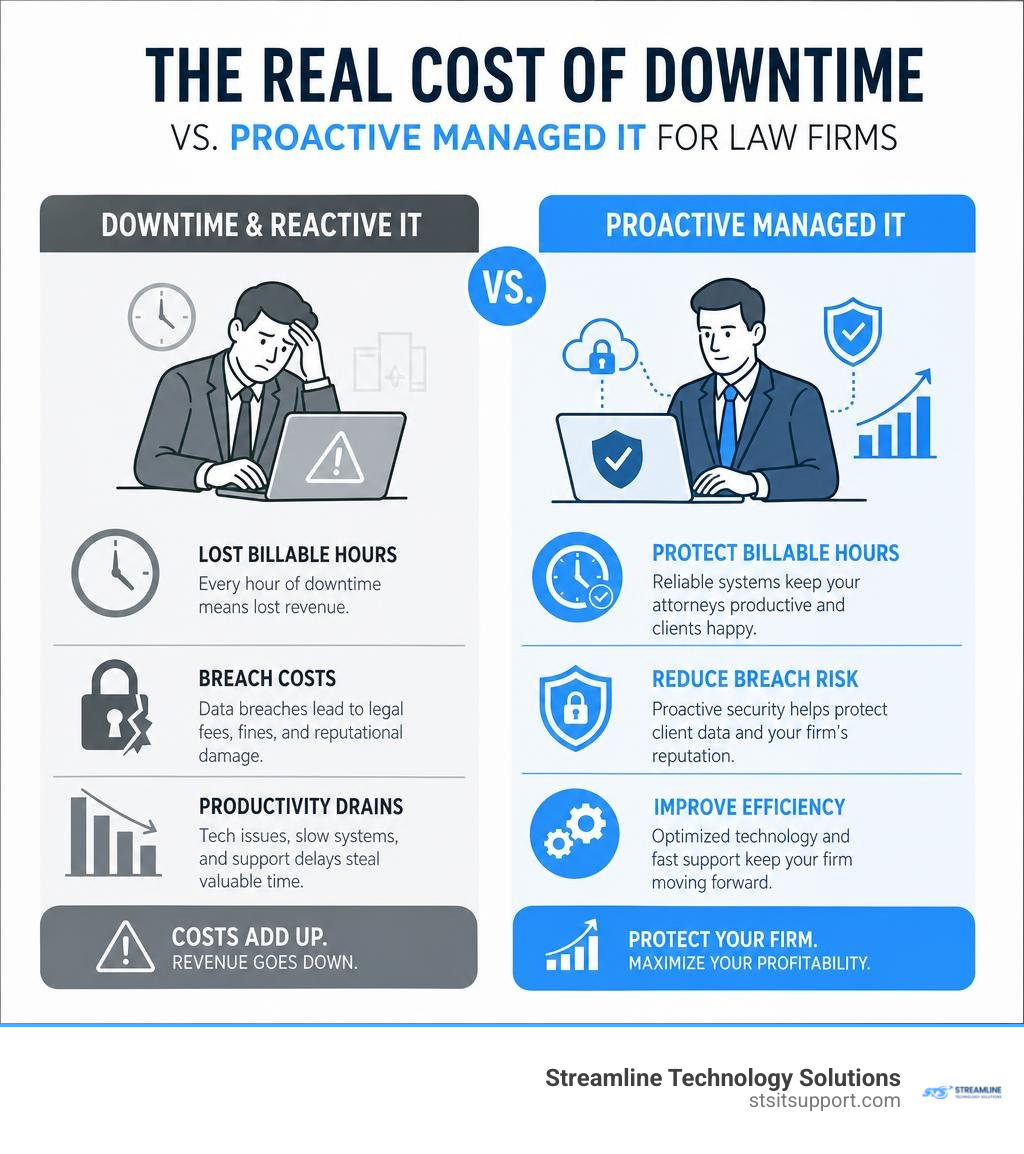
For most businesses, an hour of IT downtime is an annoyance. For a law firm, it is an unrecoverable financial disaster. Because attorneys sell their expertise by the hour, lost time cannot be manufactured later.
If your document management system crashes during trial preparation, or your network drops right before a critical court filing deadline, your revenue stops instantly. Let's look at the math:
The Hourly Loss: With attorneys billing at $300 to $400 per hour, a single hour of downtime costs a 50-person firm between $15,000 and $20,000 in lost billings.
The Inefficiency Tax: Even when systems aren't completely down, slow computers, clunky remote connections, and software glitches quietly eat away at productivity. Technology inefficiency costs partners an average of over 300 billable hours per year. That's $100,000+ in lost revenue per partner annually.
The Malpractice Risk: Courts consistently reject "technology failure" as a valid excuse for missed filing deadlines. If your server crashes and you miss a statute of limitations filing, malpractice insurance carriers may deny coverage, viewing the incident as preventable negligence rather than an unavoidable accident.
Ethical Obligations and Regulatory Compliance in Legal IT
Attorneys are held to a higher standard of data custody. Under ABA Model Rule 1.6(c), lawyers must make "reasonable efforts" to prevent the unauthorized access or disclosure of client information. Over 40 jurisdictions have also adopted technology competence mandates, requiring lawyers to understand the risks and benefits associated with relevant technology.
Furthermore, law firms must inherit and comply with the exact same industry regulations that bind their clients:
HIPAA Compliance: If you handle personal injury, medical malpractice, or workers' compensation cases, you are regularly receiving protected electronic health information (ePHI).
Florida Information Protection Act (FIPA): South Florida practices must comply with strict state-level data protection laws regarding personal information.
GDPR: If your firm handles corporate transactions or estate planning for clients with European connections, you fall under international data privacy rules.
To ensure your firm is meeting these standards, you should start with a comprehensive cybersecurity risk assessment to identify where your compliance gaps lie.
The Strategic Shift to Proactive IT Support for Legal Sector

To protect your reputation and your bottom line, your firm must move away from reactive IT. Waiting for a server to fail or a hacker to lock your files before calling for help is a recipe for operational ruin.
Instead, a modern law firm requires a strategic partnership built on proactive monitoring and 24/7 helpdesk availability. This ensures that software patches are applied overnight, storage limits are addressed before they cause system crashes, and security anomalies are blocked before they turn into full-blown breaches. For a complete look at how this model works, read our managed it support guide 2026.
Transitioning from Break-Fix to Managed IT Support for Legal Sector
The traditional "break-fix" model is fundamentally misaligned with your law firm's goals. Under a break-fix agreement, the IT provider only makes money when your technology fails. The longer your systems are broken, the more money they bill you.
Managed it support for legal sector flips this incentive. Under a managed services model, you pay a predictable, flat-rate monthly fee. The IT provider's job is to keep your systems running perfectly because downtime costs them time and resources.
Here is how the two approaches compare:
Feature Break-Fix IT Support Managed IT Support Incentive Alignment Provider profits when things break. Provider profits when things run smoothly. Cost Predictability Unpredictable, surprise hourly invoices. Flat, predictable monthly pricing. Maintenance Style Reactive (fix it after it fails). Proactive (prevent failures before they happen). Security Posture Minimal; patches are rarely applied consistently. Layered; 24/7 monitoring and active threat hunting. Downtime Impact Long resolution times; high revenue loss. Rapid resolution; minimal impact on billable hours.
For smaller growing practices, transitioning to this model is the most cost-effective way to secure enterprise-grade technology. You can learn more about how these services scale in our guide on it support services for small business.
Key SLA Components for Legal Workflows
When partnering with a managed service provider (MSP), your Service Level Agreement (SLA) must be tailored to the high-stakes environment of legal operations. A generic SLA that promises a "next business day" response is useless when you are in the middle of a trial or preparing for a closing.
Your legal SLA should explicitly define:
Response and Resolution Times: Look for providers offering rapid phone response times (ideally under two minutes for critical issues) and guaranteed resolution paths.
Recovery Time Objective (RTO): This is the maximum acceptable amount of time your firm can be offline after a disaster before it causes severe damage. Your IT partner should design a system that can restore your core operations in hours, not days.
Recovery Point Objective (RPO): This defines how much data you can afford to lose. For law firms, backups should occur multiple times a day so that, in a worst-case scenario, you only lose minutes of work rather than days of billable documentation.
Uptime Guarantees: Look for a standard 99.9% uptime SLA for your critical cloud environments and server infrastructure.
Defending the Firm: Cybersecurity and Data Protection
Law firms are prime targets for cybercriminals because they act as a "one-stop shop" for highly sensitive financial records, intellectual property, and personal data. Law firms face a staggering 40% annual breach rate—the highest of any professional services sector.
The average cost of a data breach in the legal sector is over $5 million in direct recovery expenses alone. Even a small, 6-attorney practice can face $2 million to $3 million in ransomware recovery costs. To defend your firm, you must implement specialized law firm cybersecurity services that assume an attack will be attempted and prepare accordingly.
Implementing a Layered Defense-in-Depth Security Framework
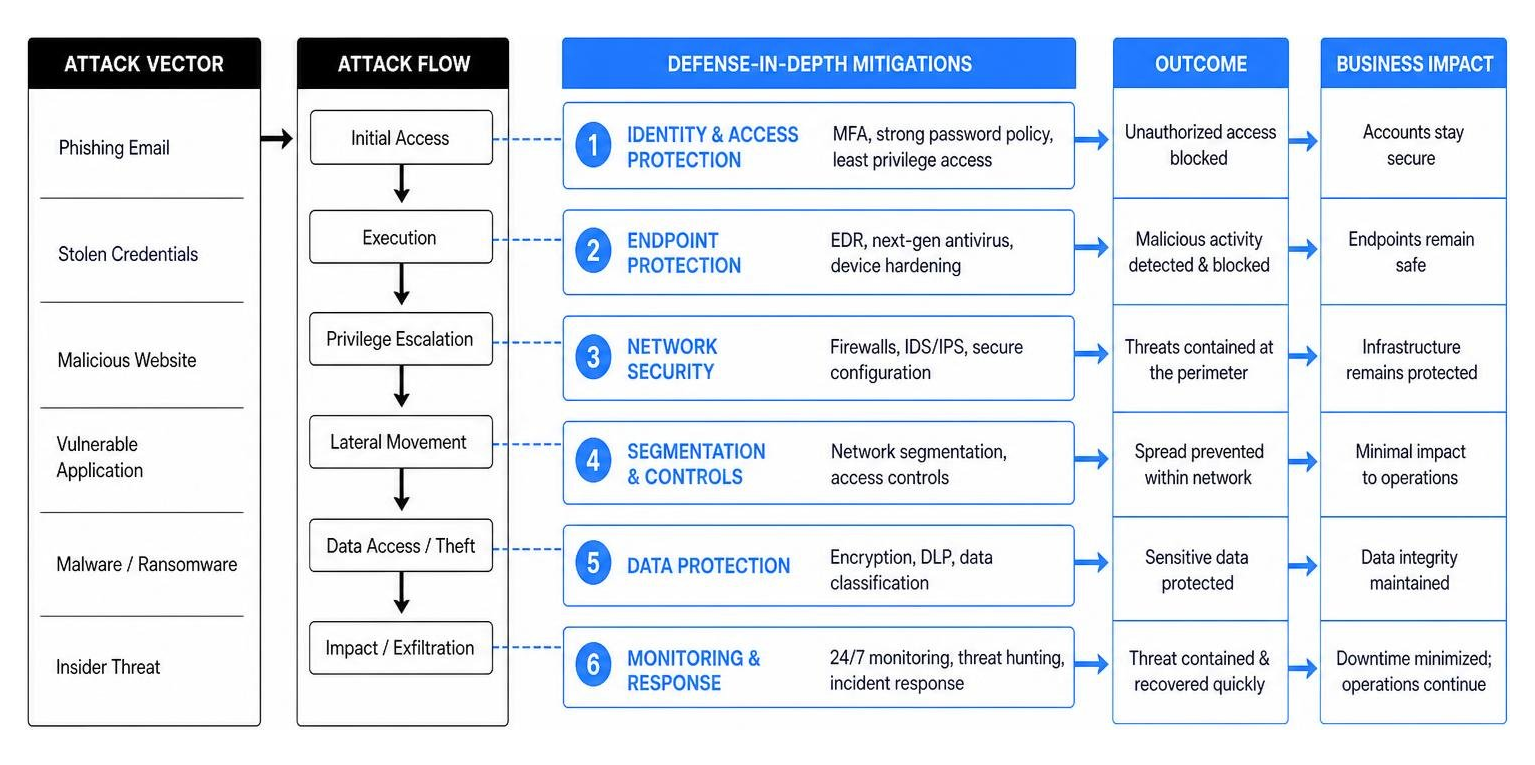
A single firewall is no longer enough to protect your client files. You need a defense-in-depth framework that places multiple security controls between cybercriminals and your data:
Multi-Factor Authentication (MFA): MFA must be enforced across every single user account, email inbox, and application. It is the single most effective way to block credential-based attacks.
Endpoint Detection and Response (EDR): Traditional antivirus software only looks for known viruses. Managed EDR uses behavioral AI to detect and isolate suspicious activity (like a laptop suddenly trying to encrypt thousands of files) in real time.
Data Encryption: All client records and privileged communications must be encrypted both at rest (on your servers or laptops) and in transit (when sent over the internet).
Dark Web Monitoring: This service continuously scans the dark web for compromised employee credentials, allowing you to force password resets before hackers can exploit them.
To find out where your current defenses stand, it is highly recommended to schedule an it audit fort lauderdale to identify and patch vulnerabilities before they are exploited.
Mitigating Human Risk Through Security Awareness Training
The most advanced cybersecurity tools in the world cannot stop a user from clicking a malicious link or falling for a social engineering scam. Cybercriminals frequently target law firms with Business Email Compromise (BEC) and wire transfer fraud.
For example, real estate and estate planning firms handle high-value transactions daily. Hackers will compromise an email account, monitor ongoing deals, and send a fraudulent email to a client or paralegal with "updated" wire instructions at the last second.
To mitigate this human risk:
Phishing Simulations: Run regular, unannounced phishing tests to train your staff to recognize suspicious emails.
Dual-Approval Workflows: Implement strict, non-negotiable dual-approval policies for all financial transactions. Never allow wire transfers to be authorized solely based on an email request; always require verbal verification via a trusted phone number.
Modernizing Legal Operations: Cloud, AI, and Practice Management
The legal sector has historically been slow to adapt to digital transformation, but the competitive landscape is shifting rapidly. Modern law firms are migrating away from outdated, on-premise physical servers to secure cloud environments.
By integrating specialized legal practice management software like Clio, Smokeball, or PracticePanther with robust document management systems like iManage or NetDocuments, firms can eliminate paper files, centralize their operations, and streamline workflows.
Leveraging AI and Automation Safely
Artificial Intelligence is transforming legal research, document review, and administrative tasks. Tools like Microsoft Copilot can analyze vast databases of case law, summarize lengthy depositions, and draft routine contract clauses in seconds.
However, using AI in a law practice requires extreme caution. Inputting confidential client data into public, free AI tools (like public versions of ChatGPT) violates attorney-client privilege because that data is absorbed into the public learning model.
To leverage AI safely, your firm must:
Use Enterprise-Grade AI: Deploy secure, private instances of AI tools (such as Microsoft Copilot within a secured Microsoft 365 tenant) that guarantee your data is never stored, shared, or used to train public models.
Establish an AI Acceptable Use Policy: Clearly define what types of documents and information your staff are permitted to process using AI tools.
Enabling Secure Remote Work and Hybrid Collaboration
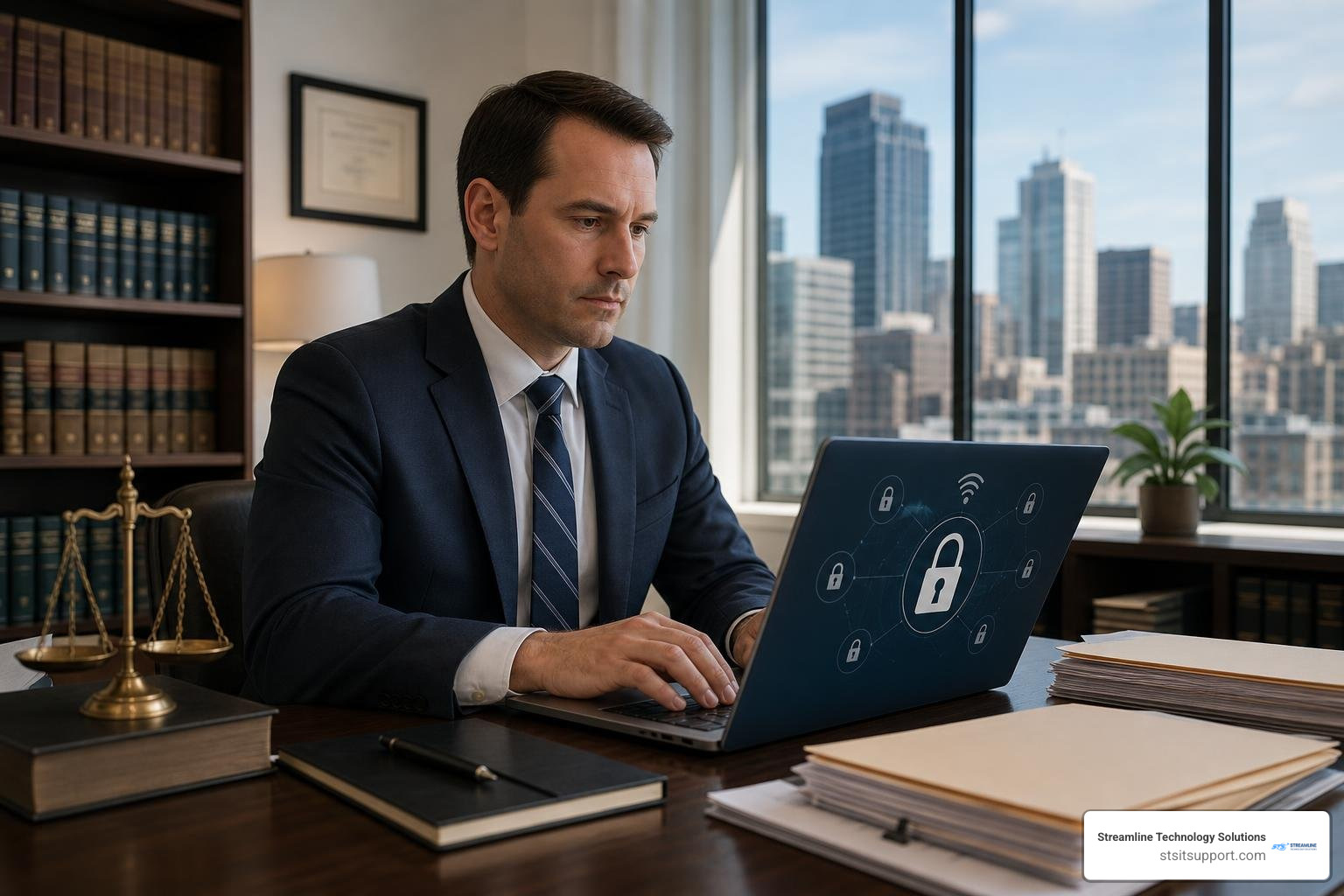
Attorneys are no longer chained to their desks. They need to access large case files, review discovery documents, and collaborate with colleagues directly from courtrooms, client offices, or home.
To enable secure remote work without exposing your firm to breaches:
Zero-Trust Network Access (ZTNA): Replace traditional, clunky VPNs with zero-trust access controls that verify the identity and security posture of every user and device trying to connect to your network.
Microsoft Windows 365: Utilize cloud-hosted virtual desktops. This allows attorneys to securely log into their full work environment from any device (even a personal iPad) without saving sensitive client files locally on an unmanaged machine.
Onsite and Remote Support: When remote systems fail, you need a partner who can provide fast remote troubleshooting and, when necessary, rapid onsite it support to resolve hardware issues immediately.
Selecting the Right Managed IT Partner for Your Practice
Choosing an IT provider is one of the most critical business decisions your partners will make. If you select a generalist provider, you will likely spend hours explaining legal software workflows, dealing with slow response times, and risking compliance violations.
For South Florida practices, you need a local partner who understands our specific regulatory and operating environment. Whether your firm is based in Coral Springs, Pompano Beach, or anywhere else in South Florida, you should look for a provider that offers:
Transparent Pricing: Avoid providers that hide extra fees for onboarding, software updates, or emergency support behind complex contracts.
Pod-Based Support: Ensure you are assigned a dedicated team of engineers who learn your specific environment deeply, rather than routing your tickets through a rotating pool of strangers.
Legal Application Expertise: Do not let an MSP learn on the job when it comes to your core practice software. They should have documented experience managing and integrating Clio, NetDocuments, and other legal tools.
To ensure your provider is delivering top-tier service, ask them how they align with it helpdesk best practices.
Evaluating Legal-Specific IT Support for Legal Sector Providers
When evaluating potential IT partners, ask for concrete evidence of their compliance readiness and support capabilities. They should be able to provide ready-to-present compliance packages for your insurance carriers and regulatory assessors.
If your firm already has an internal IT person or a small department, look for a provider that offers co-managed IT services. This allows your internal team to focus on high-value, firm-specific projects while the MSP handles helpdesk overflow, 24/7 security monitoring, and routine maintenance.
Make sure the provider you choose has a dedicated it helpdesk support team that is intimately familiar with legal workflows, court deadlines, and e-discovery timelines.
At Streamline Technology Solutions, we provide this exact level of security-first, high-performance IT management to legal practices across Fort Lauderdale, Boca Raton, Coral Springs, Deerfield Beach, and Pompano Beach.
Frequently Asked Questions about Legal IT Support
How much does managed IT support typically cost for a law firm?
Most small to mid-sized law firms with 5 to 30 employees pay between $100 and $300 per user per month for comprehensive, flat-rate managed IT and cybersecurity services. The exact cost depends on your security requirements, compliance needs (such as HIPAA or FIPA), and whether you require cloud hosting for legacy applications.
Does malpractice insurance cover technology failures or data breaches?
Generally, no. Standard malpractice insurance typically does not cover losses resulting from technology failures, ransomware payments, or data breaches. If your firm misses a critical court deadline due to an IT crash, or if client funds are stolen via wire transfer fraud, courts and insurers often view this as preventable negligence. You require specialized cyber liability insurance, which often mandates that you have documented IT security controls (like MFA and tested backups) in place to qualify for coverage.
How long does it take to transition to a new legal IT provider?
A professional onboarding transition typically takes 30 days. To prevent operational downtime, we utilize a parallel migration framework where we set up and secure your new IT environment in the background while your current system remains active. Once everything is tested and ready, we execute the final data migration during off-peak hours so your attorneys can log in and bill hours without interruption on day one.
Conclusion
Your law firm cannot afford to treat technology as a secondary concern. In an era of rising cyber threats, strict compliance mandates, and high operational costs, having reactive IT is a liability that directly threatens your client trust and your firm's profitability.
At Streamline Technology Solutions, we help South Florida law firms stop technology from overruling their productivity. We provide comprehensive, security-first IT support across Fort Lauderdale, Boca Raton, Coral Springs, Deerfield Beach, and Pompano Beach.
We stand apart by offering:
Transparent Pricing: No hidden fees, no surprise invoices, and no complex billing structures.
Fast Local Support: Onsite when you need us, and rapid remote resolution for everything else.
Direct Accountability: We take ownership of your technology so your partners can lead and your associates can bill.
If you are ready to secure your client data, eliminate downtime, and unlock your firm's full billable potential, we are here to help. Explore our managed it services fort lauderdale to see how we support local practices, or contact Streamline Technology Solutions today to schedule a consultation.

How Can We Help?
Call us at (954) 787-3288 or fill out the form below.
Featured Posts
How to Stop Your Law Firm's Tech from Overruling Your Productivity
When Technology Becomes the Biggest Threat to Your Law Practice
IT support for the legal sector is a specialized category of managed technology services designed to protect client confidentiality, maintain compliance, and keep attorneys billing — without interruption.
Here's what legal IT support covers at a glance:
Area What It Means for Your Firm Cybersecurity Protecting privileged client data from ransomware, phishing, and breaches Compliance Meeting ABA rules, HIPAA, FIPA, and state bar requirements Uptime & Availability Preventing downtime that kills billable hours Cloud & Remote Access Secure file access from courtrooms, home offices, and client sites Practice Software Support Managing tools like Clio, iManage, and NetDocuments Disaster Recovery Restoring operations fast when something goes wrong
Law firms face a reality that most other businesses don't. Nearly 30% have reported a data breach. Attorneys billing at $300–$400 per hour can lose $15,000–$20,000 in a single hour of firm-wide downtime. Technology inefficiency already costs partners more than 300 billable hours every year — that's over $100,000 in lost revenue per partner, before you even factor in a security incident.
And yet, most law firms are still running on the same reactive, break-fix IT model that leaves them exposed.
The legal profession runs on trust. Every missed deadline, every exposed client file, and every hour spent waiting on an unresponsive IT provider chips away at the foundation your practice is built on.
I'm Michael Gaigelas, and with 20 years of hands-on experience in IT support, managed services, cloud infrastructure, and cybersecurity, I've worked directly with professional services firms — including legal practices — to build technology environments that protect what matters most. In this guide, I'll walk you through everything you need to know about IT support for the legal sector so you can make smarter decisions for your firm.
Why General Tech Solutions Fail the Legal Sector
When a law firm hires a generalist IT provider, they are often treated like any other professional service business, such as a local retail shop or a marketing agency. But a dental office or a landscaping supplier doesn't carry the same ethical and legal burdens as a law practice.
Unmanaged systems in a law firm quickly lead to data sprawl. Case files are saved on local desktops, shared via personal Dropbox accounts, or sent through unencrypted personal emails. This creates a massive shadow IT problem where the firm's leadership has no idea where sensitive client data actually lives.
In the legal world, attorney-client privilege is not just a best practice; it is a strict legal mandate. General tech solutions fail because they don't design security around the ethical obligations of privileged communications. They set up simple shared drives without granular access controls, leaving highly sensitive corporate trade secrets, IP filings, or family law custody disputes visible to everyone in the office, from senior partners to the summer interns.
The High Cost of Downtime and Lost Billable Hours
For most businesses, an hour of IT downtime is an annoyance. For a law firm, it is an unrecoverable financial disaster. Because attorneys sell their expertise by the hour, lost time cannot be manufactured later.
If your document management system crashes during trial preparation, or your network drops right before a critical court filing deadline, your revenue stops instantly. Let's look at the math:
The Hourly Loss: With attorneys billing at $300 to $400 per hour, a single hour of downtime costs a 50-person firm between $15,000 and $20,000 in lost billings.
The Inefficiency Tax: Even when systems aren't completely down, slow computers, clunky remote connections, and software glitches quietly eat away at productivity. Technology inefficiency costs partners an average of over 300 billable hours per year. That's $100,000+ in lost revenue per partner annually.
The Malpractice Risk: Courts consistently reject "technology failure" as a valid excuse for missed filing deadlines. If your server crashes and you miss a statute of limitations filing, malpractice insurance carriers may deny coverage, viewing the incident as preventable negligence rather than an unavoidable accident.
Ethical Obligations and Regulatory Compliance in Legal IT
Attorneys are held to a higher standard of data custody. Under ABA Model Rule 1.6(c), lawyers must make "reasonable efforts" to prevent the unauthorized access or disclosure of client information. Over 40 jurisdictions have also adopted technology competence mandates, requiring lawyers to understand the risks and benefits associated with relevant technology.
Furthermore, law firms must inherit and comply with the exact same industry regulations that bind their clients:
HIPAA Compliance: If you handle personal injury, medical malpractice, or workers' compensation cases, you are regularly receiving protected electronic health information (ePHI).
Florida Information Protection Act (FIPA): South Florida practices must comply with strict state-level data protection laws regarding personal information.
GDPR: If your firm handles corporate transactions or estate planning for clients with European connections, you fall under international data privacy rules.
To ensure your firm is meeting these standards, you should start with a comprehensive cybersecurity risk assessment to identify where your compliance gaps lie.
The Strategic Shift to Proactive IT Support for Legal Sector
To protect your reputation and your bottom line, your firm must move away from reactive IT. Waiting for a server to fail or a hacker to lock your files before calling for help is a recipe for operational ruin.
Instead, a modern law firm requires a strategic partnership built on proactive monitoring and 24/7 helpdesk availability. This ensures that software patches are applied overnight, storage limits are addressed before they cause system crashes, and security anomalies are blocked before they turn into full-blown breaches. For a complete look at how this model works, read our managed it support guide 2026.
Transitioning from Break-Fix to Managed IT Support for Legal Sector
The traditional "break-fix" model is fundamentally misaligned with your law firm's goals. Under a break-fix agreement, the IT provider only makes money when your technology fails. The longer your systems are broken, the more money they bill you.
Managed it support for legal sector flips this incentive. Under a managed services model, you pay a predictable, flat-rate monthly fee. The IT provider's job is to keep your systems running perfectly because downtime costs them time and resources.
Here is how the two approaches compare:
Feature Break-Fix IT Support Managed IT Support Incentive Alignment Provider profits when things break. Provider profits when things run smoothly. Cost Predictability Unpredictable, surprise hourly invoices. Flat, predictable monthly pricing. Maintenance Style Reactive (fix it after it fails). Proactive (prevent failures before they happen). Security Posture Minimal; patches are rarely applied consistently. Layered; 24/7 monitoring and active threat hunting. Downtime Impact Long resolution times; high revenue loss. Rapid resolution; minimal impact on billable hours.
For smaller growing practices, transitioning to this model is the most cost-effective way to secure enterprise-grade technology. You can learn more about how these services scale in our guide on it support services for small business.
Key SLA Components for Legal Workflows
When partnering with a managed service provider (MSP), your Service Level Agreement (SLA) must be tailored to the high-stakes environment of legal operations. A generic SLA that promises a "next business day" response is useless when you are in the middle of a trial or preparing for a closing.
Your legal SLA should explicitly define:
Response and Resolution Times: Look for providers offering rapid phone response times (ideally under two minutes for critical issues) and guaranteed resolution paths.
Recovery Time Objective (RTO): This is the maximum acceptable amount of time your firm can be offline after a disaster before it causes severe damage. Your IT partner should design a system that can restore your core operations in hours, not days.
Recovery Point Objective (RPO): This defines how much data you can afford to lose. For law firms, backups should occur multiple times a day so that, in a worst-case scenario, you only lose minutes of work rather than days of billable documentation.
Uptime Guarantees: Look for a standard 99.9% uptime SLA for your critical cloud environments and server infrastructure.
Defending the Firm: Cybersecurity and Data Protection
Law firms are prime targets for cybercriminals because they act as a "one-stop shop" for highly sensitive financial records, intellectual property, and personal data. Law firms face a staggering 40% annual breach rate—the highest of any professional services sector.
The average cost of a data breach in the legal sector is over $5 million in direct recovery expenses alone. Even a small, 6-attorney practice can face $2 million to $3 million in ransomware recovery costs. To defend your firm, you must implement specialized law firm cybersecurity services that assume an attack will be attempted and prepare accordingly.
Implementing a Layered Defense-in-Depth Security Framework
A single firewall is no longer enough to protect your client files. You need a defense-in-depth framework that places multiple security controls between cybercriminals and your data:
Multi-Factor Authentication (MFA): MFA must be enforced across every single user account, email inbox, and application. It is the single most effective way to block credential-based attacks.
Endpoint Detection and Response (EDR): Traditional antivirus software only looks for known viruses. Managed EDR uses behavioral AI to detect and isolate suspicious activity (like a laptop suddenly trying to encrypt thousands of files) in real time.
Data Encryption: All client records and privileged communications must be encrypted both at rest (on your servers or laptops) and in transit (when sent over the internet).
Dark Web Monitoring: This service continuously scans the dark web for compromised employee credentials, allowing you to force password resets before hackers can exploit them.
To find out where your current defenses stand, it is highly recommended to schedule an it audit fort lauderdale to identify and patch vulnerabilities before they are exploited.
Mitigating Human Risk Through Security Awareness Training
The most advanced cybersecurity tools in the world cannot stop a user from clicking a malicious link or falling for a social engineering scam. Cybercriminals frequently target law firms with Business Email Compromise (BEC) and wire transfer fraud.
For example, real estate and estate planning firms handle high-value transactions daily. Hackers will compromise an email account, monitor ongoing deals, and send a fraudulent email to a client or paralegal with "updated" wire instructions at the last second.
To mitigate this human risk:
Phishing Simulations: Run regular, unannounced phishing tests to train your staff to recognize suspicious emails.
Dual-Approval Workflows: Implement strict, non-negotiable dual-approval policies for all financial transactions. Never allow wire transfers to be authorized solely based on an email request; always require verbal verification via a trusted phone number.
Modernizing Legal Operations: Cloud, AI, and Practice Management
The legal sector has historically been slow to adapt to digital transformation, but the competitive landscape is shifting rapidly. Modern law firms are migrating away from outdated, on-premise physical servers to secure cloud environments.
By integrating specialized legal practice management software like Clio, Smokeball, or PracticePanther with robust document management systems like iManage or NetDocuments, firms can eliminate paper files, centralize their operations, and streamline workflows.
Leveraging AI and Automation Safely
Artificial Intelligence is transforming legal research, document review, and administrative tasks. Tools like Microsoft Copilot can analyze vast databases of case law, summarize lengthy depositions, and draft routine contract clauses in seconds.
However, using AI in a law practice requires extreme caution. Inputting confidential client data into public, free AI tools (like public versions of ChatGPT) violates attorney-client privilege because that data is absorbed into the public learning model.
To leverage AI safely, your firm must:
Use Enterprise-Grade AI: Deploy secure, private instances of AI tools (such as Microsoft Copilot within a secured Microsoft 365 tenant) that guarantee your data is never stored, shared, or used to train public models.
Establish an AI Acceptable Use Policy: Clearly define what types of documents and information your staff are permitted to process using AI tools.
Enabling Secure Remote Work and Hybrid Collaboration
Attorneys are no longer chained to their desks. They need to access large case files, review discovery documents, and collaborate with colleagues directly from courtrooms, client offices, or home.
To enable secure remote work without exposing your firm to breaches:
Zero-Trust Network Access (ZTNA): Replace traditional, clunky VPNs with zero-trust access controls that verify the identity and security posture of every user and device trying to connect to your network.
Microsoft Windows 365: Utilize cloud-hosted virtual desktops. This allows attorneys to securely log into their full work environment from any device (even a personal iPad) without saving sensitive client files locally on an unmanaged machine.
Onsite and Remote Support: When remote systems fail, you need a partner who can provide fast remote troubleshooting and, when necessary, rapid onsite it support to resolve hardware issues immediately.
Selecting the Right Managed IT Partner for Your Practice
Choosing an IT provider is one of the most critical business decisions your partners will make. If you select a generalist provider, you will likely spend hours explaining legal software workflows, dealing with slow response times, and risking compliance violations.
For South Florida practices, you need a local partner who understands our specific regulatory and operating environment. Whether your firm is based in Coral Springs, Pompano Beach, or anywhere else in South Florida, you should look for a provider that offers:
Transparent Pricing: Avoid providers that hide extra fees for onboarding, software updates, or emergency support behind complex contracts.
Pod-Based Support: Ensure you are assigned a dedicated team of engineers who learn your specific environment deeply, rather than routing your tickets through a rotating pool of strangers.
Legal Application Expertise: Do not let an MSP learn on the job when it comes to your core practice software. They should have documented experience managing and integrating Clio, NetDocuments, and other legal tools.
To ensure your provider is delivering top-tier service, ask them how they align with it helpdesk best practices.
Evaluating Legal-Specific IT Support for Legal Sector Providers
When evaluating potential IT partners, ask for concrete evidence of their compliance readiness and support capabilities. They should be able to provide ready-to-present compliance packages for your insurance carriers and regulatory assessors.
If your firm already has an internal IT person or a small department, look for a provider that offers co-managed IT services. This allows your internal team to focus on high-value, firm-specific projects while the MSP handles helpdesk overflow, 24/7 security monitoring, and routine maintenance.
Make sure the provider you choose has a dedicated it helpdesk support team that is intimately familiar with legal workflows, court deadlines, and e-discovery timelines.
At Streamline Technology Solutions, we provide this exact level of security-first, high-performance IT management to legal practices across Fort Lauderdale, Boca Raton, Coral Springs, Deerfield Beach, and Pompano Beach.
Frequently Asked Questions about Legal IT Support
How much does managed IT support typically cost for a law firm?
Most small to mid-sized law firms with 5 to 30 employees pay between $100 and $300 per user per month for comprehensive, flat-rate managed IT and cybersecurity services. The exact cost depends on your security requirements, compliance needs (such as HIPAA or FIPA), and whether you require cloud hosting for legacy applications.
Does malpractice insurance cover technology failures or data breaches?
Generally, no. Standard malpractice insurance typically does not cover losses resulting from technology failures, ransomware payments, or data breaches. If your firm misses a critical court deadline due to an IT crash, or if client funds are stolen via wire transfer fraud, courts and insurers often view this as preventable negligence. You require specialized cyber liability insurance, which often mandates that you have documented IT security controls (like MFA and tested backups) in place to qualify for coverage.
How long does it take to transition to a new legal IT provider?
A professional onboarding transition typically takes 30 days. To prevent operational downtime, we utilize a parallel migration framework where we set up and secure your new IT environment in the background while your current system remains active. Once everything is tested and ready, we execute the final data migration during off-peak hours so your attorneys can log in and bill hours without interruption on day one.
Conclusion
Your law firm cannot afford to treat technology as a secondary concern. In an era of rising cyber threats, strict compliance mandates, and high operational costs, having reactive IT is a liability that directly threatens your client trust and your firm's profitability.
At Streamline Technology Solutions, we help South Florida law firms stop technology from overruling their productivity. We provide comprehensive, security-first IT support across Fort Lauderdale, Boca Raton, Coral Springs, Deerfield Beach, and Pompano Beach.
We stand apart by offering:
Transparent Pricing: No hidden fees, no surprise invoices, and no complex billing structures.
Fast Local Support: Onsite when you need us, and rapid remote resolution for everything else.
Direct Accountability: We take ownership of your technology so your partners can lead and your associates can bill.
If you are ready to secure your client data, eliminate downtime, and unlock your firm's full billable potential, we are here to help. Explore our managed it services fort lauderdale to see how we support local practices, or contact Streamline Technology Solutions today to schedule a consultation.