Blog
Home / Blog

Detailed Guide to Comparing Managed IT Services Providers
What Are Managed IT Services — and Why Does Your Business Need Them?
Managed IT services are a model of IT outsourcing where a third-party provider takes ongoing responsibility for monitoring, maintaining, and supporting your business technology — for a predictable monthly fee.
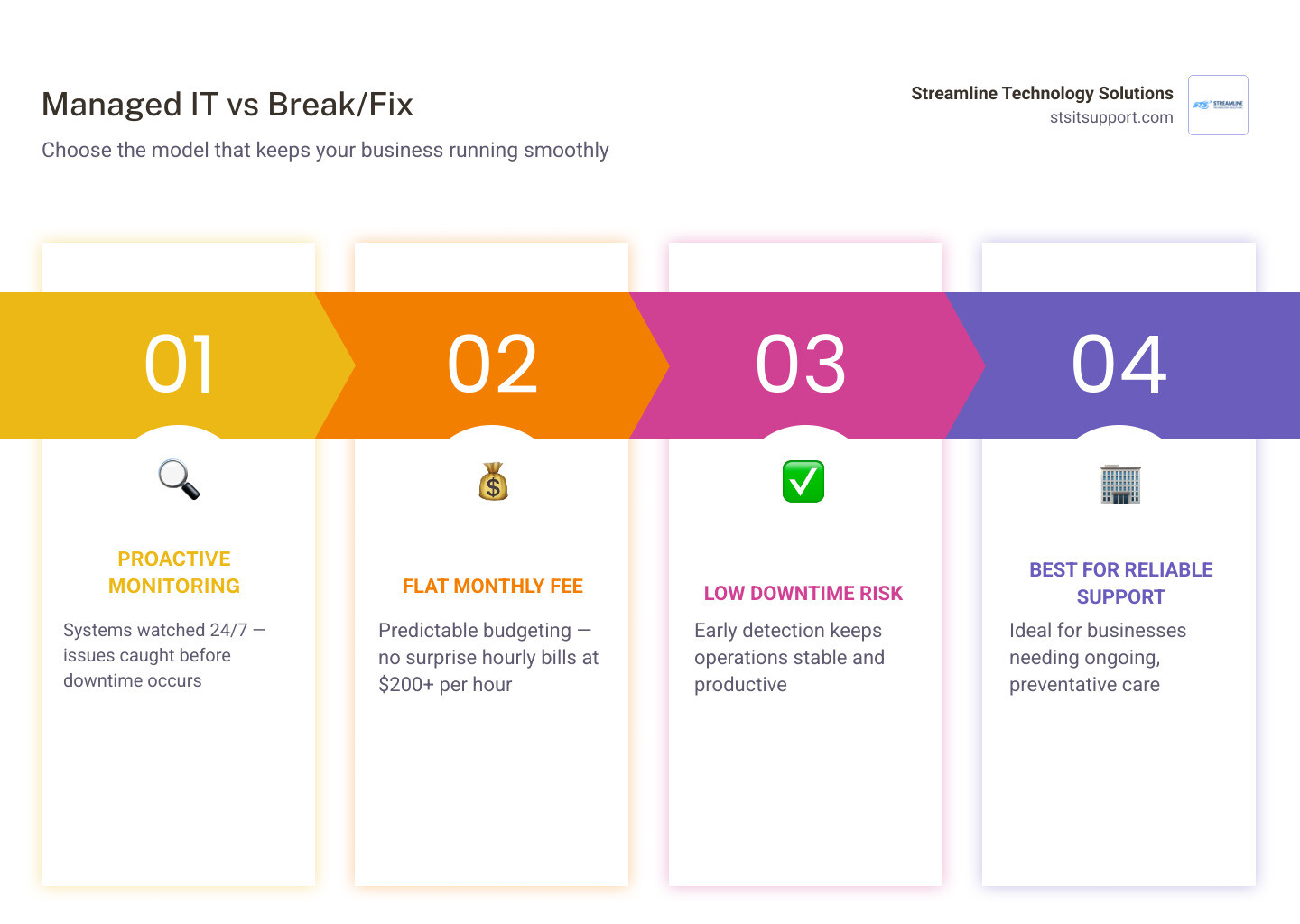
Here's a quick snapshot of what that means in practice:
Managed IT Services Break/Fix IT Support How it works Proactive monitoring and maintenance Reactive — fix problems after they happen Pricing Flat monthly subscription (per user or per device) Hourly rate (often $200+ per hour) Downtime risk Low — issues caught early High — you wait until something breaks Best for Businesses that need reliable, ongoing support Very small or occasional IT needs Budgeting Predictable Unpredictable
Instead of calling someone only when your server crashes or your email stops working, a managed service provider (MSP) watches over your systems around the clock — and ideally stops problems before you ever notice them.
For small business owners in South Florida, this distinction matters a lot. Surprise IT bills, hours of downtime, and slow responses from a remote provider you can barely reach — these are real, costly problems. Managed IT services are designed to eliminate exactly that.
I'm Michael Gaigelas, and I've spent 20 years working hands-on with managed IT services, cloud servers, VoIP, networking, and business technology for companies of all sizes. In this guide, I'll walk you through everything you need to know to compare providers and make a confident decision.
What Are Managed IT Services and How Do They Work?
To truly appreciate the value of managed IT services, it helps to understand how the technology landscape evolved. Back in the 1990s, the concept of outsourcing IT began to shift alongside the rise of Application Service Providers (ASPs). These early pioneers paved the way for subscription-based IT management. By 2006, the first foundational books on managed services were published by industry experts Karl Palachuk and Erick Simpson, formalizing a model that would change how businesses handle technology forever.
Today, instead of waiting for a disaster to strike, businesses partner with a Managed Service Provider (MSP) to maintain their systems proactively. It’s the difference between taking your car in for scheduled oil changes and waiting until the engine explodes on I-95.
Under a managed services model, the MSP installs lightweight, secure agent software on your servers, computers, and networking equipment. These tools allow the provider to monitor your system’s health, deploy software patches, and detect security threats in real-time. If a hard drive starts failing in your Coral Springs office at 2:00 AM, the MSP is alerted and can replace it before your staff logs in at 8:00 AM.
This proactive approach is detailed extensively in our Managed It Support Guide 2026, which outlines how modern companies are completely moving away from unpredictable, reactive IT support.
Core Offerings of Managed IT Services Providers
Not all MSPs offer the same menu of services, but a comprehensive provider should handle your entire technology stack. The core offerings typically include:
Help Desk Support: Unlimited remote and on-site assistance for everyday issues, from password resets to printer troubleshooting.
Proactive Network Monitoring: Keeping an eye on routers, switches, firewalls, and Wi-Fi access points to ensure maximum uptime.
VoIP Solutions: Modern, cloud-based phone systems that allow your team to make and receive calls from anywhere.
Hardware Procurement: Sourcing, configuring, and installing computers, servers, and network equipment so you don't have to guess what to buy.
When evaluating what you need, it's helpful to see how different packages are structured. For example, some regional providers offer tiered subscription plans—such as remote-only "Cloud Support," "Hybrid Support" with on-site visits, or "Enhanced Support" featuring 24/7 security monitoring. You can learn more about how these bundles are typically structured by looking at Managed Cloud IT Services Las Vegas & Henderson | IT Outsourcing .
How Managed IT Services Support Cloud Migration
Moving to the cloud isn't just a trend; it's a necessity for modern business agility. However, many small and medium-sized businesses (SMBs) struggle with cloud migration because they lack internal expertise. Interestingly, industry research indicates that the transition of SMBs to cloud computing is often hindered by a lack of cloud expertise within MSPs themselves, rather than client reluctance.
A highly skilled MSP bridges this gap by designing, executing, and managing your cloud strategy. Whether you are transitioning to Microsoft 365, migrating physical servers to Microsoft Azure, or setting up a secure hybrid cloud environment, your provider ensures the process is seamless and secure. This level of cloud management is a core pillar of modern It Support Services For Small Business, enabling local teams to collaborate safely from Boca Raton, Pompano Beach, or anywhere else in the world.
Key Benefits, Pricing Models, and SLAs for SMBs
For small and medium-sized businesses, trying to manage IT in-house is often a losing battle. Hiring a single full-time IT administrator can easily cost upwards of $70,000 to $90,000 per year, plus benefits—and that person still has to sleep, take vacations, and eventually face a problem they don't know how to solve.

By partnering with an MSP, you gain access to an entire team of certified professionals, advanced monitoring tools, and 24/7 coverage for a fraction of the cost of a single hire. This shift transforms your IT costs from unpredictable capital expenditures (CapEx) into stable, predictable operating expenses (OpEx). Beyond cost efficiency, the primary benefit is risk reduction. By preventing downtime, protecting client data, and ensuring your systems are constantly updated, you protect your bottom line. You can read more about how this impacts your day-to-day operations in our guide on It Support For Businesses.
MSP Pricing Models and Trends
How much does this all cost, and how are these services priced? The industry uses several pricing methodologies, and understanding them is key to choosing the right partner:
Cost-Plus Pricing: This is the most common model. Nearly three out of five (60%) managed services companies use cost-plus as their primary pricing model, where they calculate their internal cost to deliver the service and add a standard markup. While common, this model can sometimes fail to account for hidden delivery costs.
Market-Based Pricing: Pricing based on what competitors in the local area are charging. Nearly half of MSPs use this as their secondary pricing approach.
Value-Based Pricing: Pricing based on the overall value and risk reduction delivered to your business, rather than hours worked or individual tool costs.
Consumption-Based Pricing: You pay only for the exact amount of data, cloud storage, or active resources you use.
Outcome-Based Pricing: A highly specialized model where pricing is tied directly to achieved business results. Fewer than one in twenty companies (under 5%) have adopted outcome-based pricing as their primary model due to its complexity.
For most growing businesses, a flat-rate, per-user monthly subscription is the most transparent and predictable option. It aligns your goals with your MSP's goals: they want your network to run perfectly so they don't have to spend hours fixing it, and you get predictable billing. To see how these structures fit into a business budget, explore our resource on Affordable It Support Packages.
Service Level Agreements (SLAs) Explained
When you sign a contract with an MSP, the most important document in the agreement is the Service Level Agreement (SLA). The SLA is a formal commitment that defines exactly what services you will receive, how performance will be measured, and how quickly the provider must respond when something goes wrong.
A standard SLA should clearly define:
Response Time Goals: How quickly an engineer will acknowledge and begin working on your ticket based on severity (e.g., a critical server outage vs. a minor printer issue).
Uptime Guarantees: The percentage of time your critical systems must be operational (typically 99.9% or higher).
Service Scope: Exactly what devices, users, and software are covered under your flat monthly rate, leaving no room for surprise charges.
Industries That Benefit Most
While every modern business relies on technology, certain highly regulated industries benefit immensely from managed IT services:
Healthcare: Medical practices in Fort Lauderdale and Deerfield Beach must comply with strict HIPAA regulations to protect patient data. A specialized MSP provides the required data encryption, access controls, and audit logs.
Finance: CPA firms, financial advisors, and accounting offices handle sensitive financial records and must adhere to strict security standards.
Legal: Law firms require secure document management systems, secure remote access for attorneys, and strict compliance with client confidentiality standards.
Cybersecurity, Compliance, and Supply Chain Risks
As businesses have grown more reliant on their IT providers, cybercriminals have taken notice. Today, MSPs are highly attractive targets for hackers because they hold the keys to many different client networks.
By hacking into a single MSP, cybercriminals can execute a "supply chain attack" to distribute malware or ransomware to hundreds of downstream businesses simultaneously. This is not a theoretical threat:
The 2019 Shift: By 2019, attackers actively began targeting MSPs to spread ransomware, recognizing that compromising one provider allowed them to install ransomware across dozens of client systems.
The Kaseya VSA Attack (July 2021): In this notorious supply chain attack, the REvil criminal organization exploited a vulnerability in Kaseya's remote monitoring and management (RMM) software to compromise MSP customers, affecting up to 1,500 companies globally.
The DragonForce Attack (2025): The DragonForce ransomware group targeted an MSP, leveraging its RMM platform to bypass traditional defenses, steal sensitive client data, and encrypt downstream client systems.
These events highlight why choosing a highly secure, reliable partner is absolutely critical. Working with cheap, uncertified Managed It Support Companies that do not secure their own internal tools can expose your business to massive operational and reputational risks.
Protecting Your Business from MSP Vulnerabilities
To protect your business from supply chain risks, you must ensure your MSP practices what they preach. Ask potential providers how they secure their own systems. They should have robust internal security measures, including:
Security Operations Center (SOC) Monitoring: Continuous, 24/7 monitoring of both their systems and yours to spot anomalous behavior instantly.
Advanced Endpoint Protection: Moving beyond basic antivirus to Endpoint Detection and Response (EDR) tools that actively block zero-day threats.
Mandatory Multi-Factor Authentication (MFA): Requiring MFA on all internal MSP tools, especially Remote Monitoring and Management (RMM) platforms.
Strict Data Encryption: Ensuring all client data is encrypted both in transit and at rest.
How to Choose the Right Provider Near You
When searching for the right IT partner, geographic proximity and direct accountability are everything. If your server goes down in Fort Lauderdale, a remote-only help desk based halfway across the country cannot physically walk into your server room to fix it.
When evaluating providers, look for these key indicators of a quality partnership:
Fast Local Support: Ensure they have local, certified technicians who can get to your office quickly when hands-on help is required.
Transparent Pricing: Avoid providers that hide extra fees in the fine print or charge high hourly surcharges for standard maintenance.
Direct Accountability: You should have a dedicated account manager and clear escalation paths when you need answers fast.
If you are currently evaluating your options, search for trusted Managed It Services Providers Near Me to find local teams. For businesses operating in Broward County, looking specifically for Managed It Services Fort Lauderdale or Managed It Support Broward will help you connect with providers who understand the local business landscape and can deliver rapid, on-site support.
Frequently Asked Questions about Managed IT Support
What is the difference between remote-only and hybrid IT support?
Remote-only support (often called "Cloud Support") focuses entirely on managing cloud assets, software updates, and troubleshooting issues that can be resolved over the phone or via remote desktop tools. Hybrid IT support includes all remote services plus on-site visits to troubleshoot physical hardware, configure local network switches, set up Wi-Fi access points, and maintain physical servers.
How much do managed IT services typically cost?
Most MSPs charge a flat monthly fee based on a per-user or per-device pricing model. Per-user rates typically range from $100 to $200+ per month, depending on the level of cybersecurity monitoring and on-site support included. This flat monthly structure provides businesses with complete budget predictability, avoiding the high, unpredictable costs of on-demand hourly rates (which can easily run $225+ per hour for emergency support).
Why do cybercriminals target Managed Service Providers?
Cybercriminals target MSPs because they act as a single point of entry to multiple businesses. By compromising an MSP's administrative credentials or remote monitoring tools, hackers can deploy ransomware to hundreds of downstream client networks simultaneously, maximizing their leverage and financial gain.
Conclusion
Your technology should drive your business forward, not hold it back with constant downtime and unpredictable expenses. Choosing the right managed IT services provider is about finding a true partner who values transparency, security, and direct accountability as much as you do.
At Streamline Technology Solutions, we provide comprehensive IT support, VoIP systems, and hardware procurement tailored specifically for businesses in Coral Springs, Boca Raton, Fort Lauderdale, Pompano Beach, and Deerfield Beach. We believe in keeping IT simple: no hidden fees, fast local support, and direct accountability.
If you're ready to experience what hassle-free, secure IT support feels like, explore our It Services South Florida and It Services Fort Lauderdale pages, or visit us directly at https://stsitsupport.com to schedule a consultation with our local team today!

How Can We Help?
Call us at (954) 787-3288 or fill out the form below.
Featured Posts
Detailed Guide to Comparing Managed IT Services Providers
What Are Managed IT Services — and Why Does Your Business Need Them?
Managed IT services are a model of IT outsourcing where a third-party provider takes ongoing responsibility for monitoring, maintaining, and supporting your business technology — for a predictable monthly fee.
Here's a quick snapshot of what that means in practice:
Managed IT Services Break/Fix IT Support How it works Proactive monitoring and maintenance Reactive — fix problems after they happen Pricing Flat monthly subscription (per user or per device) Hourly rate (often $200+ per hour) Downtime risk Low — issues caught early High — you wait until something breaks Best for Businesses that need reliable, ongoing support Very small or occasional IT needs Budgeting Predictable Unpredictable
Instead of calling someone only when your server crashes or your email stops working, a managed service provider (MSP) watches over your systems around the clock — and ideally stops problems before you ever notice them.
For small business owners in South Florida, this distinction matters a lot. Surprise IT bills, hours of downtime, and slow responses from a remote provider you can barely reach — these are real, costly problems. Managed IT services are designed to eliminate exactly that.
I'm Michael Gaigelas, and I've spent 20 years working hands-on with managed IT services, cloud servers, VoIP, networking, and business technology for companies of all sizes. In this guide, I'll walk you through everything you need to know to compare providers and make a confident decision.
What Are Managed IT Services and How Do They Work?
To truly appreciate the value of managed IT services, it helps to understand how the technology landscape evolved. Back in the 1990s, the concept of outsourcing IT began to shift alongside the rise of Application Service Providers (ASPs). These early pioneers paved the way for subscription-based IT management. By 2006, the first foundational books on managed services were published by industry experts Karl Palachuk and Erick Simpson, formalizing a model that would change how businesses handle technology forever.
Today, instead of waiting for a disaster to strike, businesses partner with a Managed Service Provider (MSP) to maintain their systems proactively. It’s the difference between taking your car in for scheduled oil changes and waiting until the engine explodes on I-95.
Under a managed services model, the MSP installs lightweight, secure agent software on your servers, computers, and networking equipment. These tools allow the provider to monitor your system’s health, deploy software patches, and detect security threats in real-time. If a hard drive starts failing in your Coral Springs office at 2:00 AM, the MSP is alerted and can replace it before your staff logs in at 8:00 AM.
This proactive approach is detailed extensively in our Managed It Support Guide 2026, which outlines how modern companies are completely moving away from unpredictable, reactive IT support.
Core Offerings of Managed IT Services Providers
Not all MSPs offer the same menu of services, but a comprehensive provider should handle your entire technology stack. The core offerings typically include:
Help Desk Support: Unlimited remote and on-site assistance for everyday issues, from password resets to printer troubleshooting.
Proactive Network Monitoring: Keeping an eye on routers, switches, firewalls, and Wi-Fi access points to ensure maximum uptime.
VoIP Solutions: Modern, cloud-based phone systems that allow your team to make and receive calls from anywhere.
Hardware Procurement: Sourcing, configuring, and installing computers, servers, and network equipment so you don't have to guess what to buy.
When evaluating what you need, it's helpful to see how different packages are structured. For example, some regional providers offer tiered subscription plans—such as remote-only "Cloud Support," "Hybrid Support" with on-site visits, or "Enhanced Support" featuring 24/7 security monitoring. You can learn more about how these bundles are typically structured by looking at Managed Cloud IT Services Las Vegas & Henderson | IT Outsourcing .
How Managed IT Services Support Cloud Migration
Moving to the cloud isn't just a trend; it's a necessity for modern business agility. However, many small and medium-sized businesses (SMBs) struggle with cloud migration because they lack internal expertise. Interestingly, industry research indicates that the transition of SMBs to cloud computing is often hindered by a lack of cloud expertise within MSPs themselves, rather than client reluctance.
A highly skilled MSP bridges this gap by designing, executing, and managing your cloud strategy. Whether you are transitioning to Microsoft 365, migrating physical servers to Microsoft Azure, or setting up a secure hybrid cloud environment, your provider ensures the process is seamless and secure. This level of cloud management is a core pillar of modern It Support Services For Small Business, enabling local teams to collaborate safely from Boca Raton, Pompano Beach, or anywhere else in the world.
Key Benefits, Pricing Models, and SLAs for SMBs
For small and medium-sized businesses, trying to manage IT in-house is often a losing battle. Hiring a single full-time IT administrator can easily cost upwards of $70,000 to $90,000 per year, plus benefits—and that person still has to sleep, take vacations, and eventually face a problem they don't know how to solve.
By partnering with an MSP, you gain access to an entire team of certified professionals, advanced monitoring tools, and 24/7 coverage for a fraction of the cost of a single hire. This shift transforms your IT costs from unpredictable capital expenditures (CapEx) into stable, predictable operating expenses (OpEx). Beyond cost efficiency, the primary benefit is risk reduction. By preventing downtime, protecting client data, and ensuring your systems are constantly updated, you protect your bottom line. You can read more about how this impacts your day-to-day operations in our guide on It Support For Businesses.
MSP Pricing Models and Trends
How much does this all cost, and how are these services priced? The industry uses several pricing methodologies, and understanding them is key to choosing the right partner:
Cost-Plus Pricing: This is the most common model. Nearly three out of five (60%) managed services companies use cost-plus as their primary pricing model, where they calculate their internal cost to deliver the service and add a standard markup. While common, this model can sometimes fail to account for hidden delivery costs.
Market-Based Pricing: Pricing based on what competitors in the local area are charging. Nearly half of MSPs use this as their secondary pricing approach.
Value-Based Pricing: Pricing based on the overall value and risk reduction delivered to your business, rather than hours worked or individual tool costs.
Consumption-Based Pricing: You pay only for the exact amount of data, cloud storage, or active resources you use.
Outcome-Based Pricing: A highly specialized model where pricing is tied directly to achieved business results. Fewer than one in twenty companies (under 5%) have adopted outcome-based pricing as their primary model due to its complexity.
For most growing businesses, a flat-rate, per-user monthly subscription is the most transparent and predictable option. It aligns your goals with your MSP's goals: they want your network to run perfectly so they don't have to spend hours fixing it, and you get predictable billing. To see how these structures fit into a business budget, explore our resource on Affordable It Support Packages.
Service Level Agreements (SLAs) Explained
When you sign a contract with an MSP, the most important document in the agreement is the Service Level Agreement (SLA). The SLA is a formal commitment that defines exactly what services you will receive, how performance will be measured, and how quickly the provider must respond when something goes wrong.
A standard SLA should clearly define:
Response Time Goals: How quickly an engineer will acknowledge and begin working on your ticket based on severity (e.g., a critical server outage vs. a minor printer issue).
Uptime Guarantees: The percentage of time your critical systems must be operational (typically 99.9% or higher).
Service Scope: Exactly what devices, users, and software are covered under your flat monthly rate, leaving no room for surprise charges.
Industries That Benefit Most
While every modern business relies on technology, certain highly regulated industries benefit immensely from managed IT services:
Healthcare: Medical practices in Fort Lauderdale and Deerfield Beach must comply with strict HIPAA regulations to protect patient data. A specialized MSP provides the required data encryption, access controls, and audit logs.
Finance: CPA firms, financial advisors, and accounting offices handle sensitive financial records and must adhere to strict security standards.
Legal: Law firms require secure document management systems, secure remote access for attorneys, and strict compliance with client confidentiality standards.
Cybersecurity, Compliance, and Supply Chain Risks
As businesses have grown more reliant on their IT providers, cybercriminals have taken notice. Today, MSPs are highly attractive targets for hackers because they hold the keys to many different client networks.
By hacking into a single MSP, cybercriminals can execute a "supply chain attack" to distribute malware or ransomware to hundreds of downstream businesses simultaneously. This is not a theoretical threat:
The 2019 Shift: By 2019, attackers actively began targeting MSPs to spread ransomware, recognizing that compromising one provider allowed them to install ransomware across dozens of client systems.
The Kaseya VSA Attack (July 2021): In this notorious supply chain attack, the REvil criminal organization exploited a vulnerability in Kaseya's remote monitoring and management (RMM) software to compromise MSP customers, affecting up to 1,500 companies globally.
The DragonForce Attack (2025): The DragonForce ransomware group targeted an MSP, leveraging its RMM platform to bypass traditional defenses, steal sensitive client data, and encrypt downstream client systems.
These events highlight why choosing a highly secure, reliable partner is absolutely critical. Working with cheap, uncertified Managed It Support Companies that do not secure their own internal tools can expose your business to massive operational and reputational risks.
Protecting Your Business from MSP Vulnerabilities
To protect your business from supply chain risks, you must ensure your MSP practices what they preach. Ask potential providers how they secure their own systems. They should have robust internal security measures, including:
Security Operations Center (SOC) Monitoring: Continuous, 24/7 monitoring of both their systems and yours to spot anomalous behavior instantly.
Advanced Endpoint Protection: Moving beyond basic antivirus to Endpoint Detection and Response (EDR) tools that actively block zero-day threats.
Mandatory Multi-Factor Authentication (MFA): Requiring MFA on all internal MSP tools, especially Remote Monitoring and Management (RMM) platforms.
Strict Data Encryption: Ensuring all client data is encrypted both in transit and at rest.
How to Choose the Right Provider Near You
When searching for the right IT partner, geographic proximity and direct accountability are everything. If your server goes down in Fort Lauderdale, a remote-only help desk based halfway across the country cannot physically walk into your server room to fix it.
When evaluating providers, look for these key indicators of a quality partnership:
Fast Local Support: Ensure they have local, certified technicians who can get to your office quickly when hands-on help is required.
Transparent Pricing: Avoid providers that hide extra fees in the fine print or charge high hourly surcharges for standard maintenance.
Direct Accountability: You should have a dedicated account manager and clear escalation paths when you need answers fast.
If you are currently evaluating your options, search for trusted Managed It Services Providers Near Me to find local teams. For businesses operating in Broward County, looking specifically for Managed It Services Fort Lauderdale or Managed It Support Broward will help you connect with providers who understand the local business landscape and can deliver rapid, on-site support.
Frequently Asked Questions about Managed IT Support
What is the difference between remote-only and hybrid IT support?
Remote-only support (often called "Cloud Support") focuses entirely on managing cloud assets, software updates, and troubleshooting issues that can be resolved over the phone or via remote desktop tools. Hybrid IT support includes all remote services plus on-site visits to troubleshoot physical hardware, configure local network switches, set up Wi-Fi access points, and maintain physical servers.
How much do managed IT services typically cost?
Most MSPs charge a flat monthly fee based on a per-user or per-device pricing model. Per-user rates typically range from $100 to $200+ per month, depending on the level of cybersecurity monitoring and on-site support included. This flat monthly structure provides businesses with complete budget predictability, avoiding the high, unpredictable costs of on-demand hourly rates (which can easily run $225+ per hour for emergency support).
Why do cybercriminals target Managed Service Providers?
Cybercriminals target MSPs because they act as a single point of entry to multiple businesses. By compromising an MSP's administrative credentials or remote monitoring tools, hackers can deploy ransomware to hundreds of downstream client networks simultaneously, maximizing their leverage and financial gain.
Conclusion
Your technology should drive your business forward, not hold it back with constant downtime and unpredictable expenses. Choosing the right managed IT services provider is about finding a true partner who values transparency, security, and direct accountability as much as you do.
At Streamline Technology Solutions, we provide comprehensive IT support, VoIP systems, and hardware procurement tailored specifically for businesses in Coral Springs, Boca Raton, Fort Lauderdale, Pompano Beach, and Deerfield Beach. We believe in keeping IT simple: no hidden fees, fast local support, and direct accountability.
If you're ready to experience what hassle-free, secure IT support feels like, explore our It Services South Florida and It Services Fort Lauderdale pages, or visit us directly at https://stsitsupport.com to schedule a consultation with our local team today!