Essential Service Desk Tools You Should Be Using
The Service Desk Tools List Every IT Leader Needs in 2026
A solid service desk tools list is the foundation of fast, organized, and compliant IT support — especially if you're operating in a regulated industry like healthcare, defense, or finance.
Here are the top service desk tools used by IT teams in 2026:
Tool Best For Starting Price Freshservice Small to mid-sized IT teams $19/agent/month Jira Service Management Enterprise and DevOps teams Custom Zendesk Omnichannel customer support $55/user/month ManageEngine ServiceDesk Plus Asset management + ITSM Custom Zoho Desk Social media & multichannel support $14/agent/month SolarWinds Service Desk Flexible ITIL-based support $39/user/month Freshdesk Multichannel small business support $15/user/month SysAid Automation-heavy IT teams Custom HappyFox Workflow automation Custom ServiceNow Large enterprise ITSM Custom
Tickets pile up fast. Support requests come in from email, chat, phone, and social media — all at once. Without the right tools, things fall through the cracks, response times suffer, and in regulated industries, that can mean compliance risk, not just unhappy users.
Companies using help desk platforms resolve tickets 23% faster on average than those without. And with 80% of consumers willing to pay more for better support, the stakes are real.
The good news? There are purpose-built tools for every team size, budget, and compliance requirement. This guide breaks them down clearly so you can make a fast, confident decision.
I'm Michael Gaigelas II, and I've spent years helping organizations in healthcare, defense, and finance navigate complex IT environments — including evaluating and deploying solutions from every category on this service desk tools list. My work at Compliance Cybersecurity Solutions focuses on aligning IT support infrastructure with frameworks like CMMC 2.0, HIPAA, and ISO 27001, so you get efficiency and compliance without the guesswork.
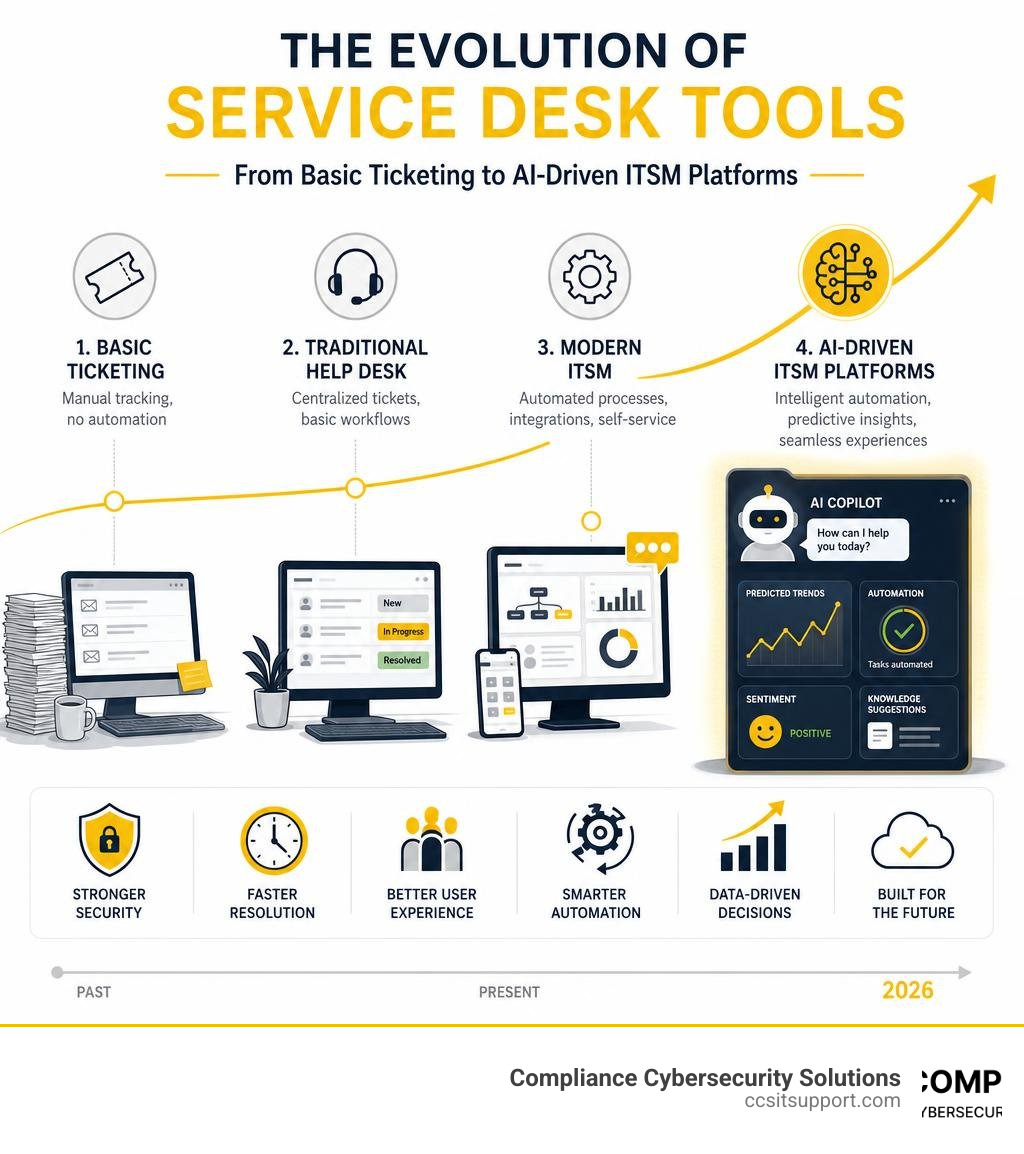
Key Features to Look For in Modern Support Software
Selecting a platform from an endless service desk tools list can feel like ordering from a 20-page diner menu. To keep your team efficient and your systems secure, you need to focus on a few non-negotiable core features.
First and foremost is SLA (Service Level Agreement) management. Your software must allow you to define, track, and enforce response and resolution times based on ticket priority. If a critical server goes down, the system should automatically escalate the issue, alerting the right technicians before a breach of contract or compliance violation occurs.
Next is a robust automation engine. Modern platforms use rule-based workflows to handle repetitive tasks like ticket routing, category tagging, and status updates. Instead of an IT manager manually assigning every incoming email, the system parses the request and routes it to the correct department instantly.
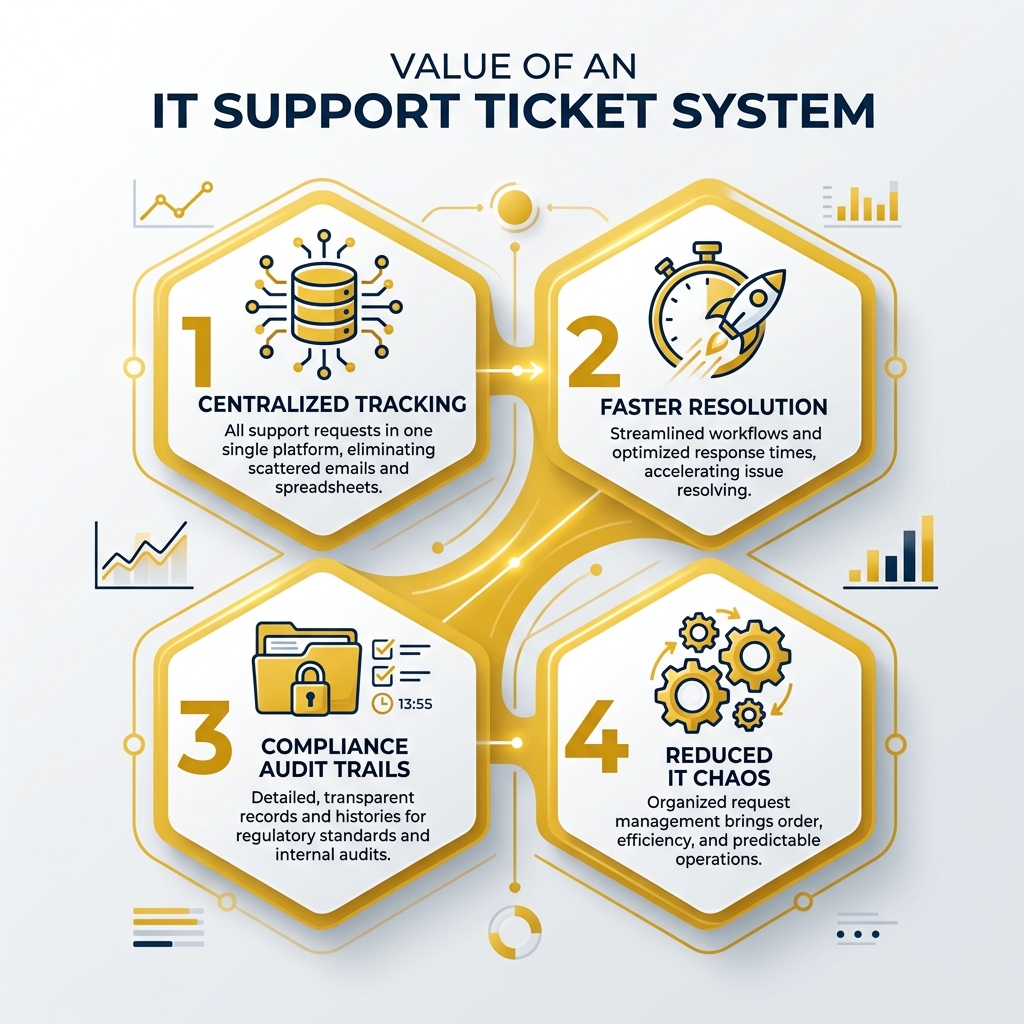
To see how these workflows function in action, look at how a modern IT Support Ticket System structures its queues.

A comprehensive knowledge base and self-service portal are also critical. By giving users a searchable library of troubleshooting guides, common fixes, and policy documents, you empower them to solve basic issues on their own. This direct form of ticket deflection keeps your queue manageable.
Finally, deep integration capabilities are essential. Your support tool shouldn't live on an island. It needs to connect with your existing identity management systems, communication tools, and security platforms to provide a unified operational view.
AI-Driven Efficiency and Automation
By June 2026, artificial intelligence is no longer a futuristic luxury; it is the engine driving modern IT support. In fact, 70% of organizations believe AI will significantly improve their customer service and IT operations.
In everyday operations, AI-driven efficiency manifests in three major ways:
Automated Troubleshooting: AI agents can perform endpoint-level diagnostics the moment a ticket is submitted. For example, if a user reports a slow computer, the system can automatically check CPU usage, disk space, and memory health, and even run a basic disk cleanup before a human technician ever opens the ticket.
Ticket Summarization: Long, messy email chains are parsed instantly. When a technician takes over an ongoing issue, the AI provides a concise bulleted summary of the problem, previous attempts at resolution, and the user's current status.
Response Suggestions: Based on historical ticket resolutions and your internal knowledge base, the software suggests accurate, pre-drafted replies to technicians, cutting down response times significantly.
These tools reduce cognitive fatigue for your staff, allowing them to focus on complex systems engineering and security architecture rather than resetting passwords all day.
Omnichannel Support Capabilities
Your users and customers expect support where they already work. A modern platform must offer true omnichannel support, seamlessly consolidating inquiries from:
Email: Converting direct messages and shared inbox emails into structured tickets.
Live Chat: Offering real-time web chat for immediate troubleshooting.
Social Media: Monitoring and responding to direct messages and public posts.
Phone Inquiries: Integrating with VoIP systems to log calls, attach call recordings, and generate tickets automatically.
An omnichannel approach does not mean your agents have to monitor five different browser tabs. Instead, it pulls every conversation into a single, unified inbox. An agent can reply to a chat, follow up via email, and schedule a phone call—all within the same ticket interface. This ensures a seamless customer experience, keeping history intact and eliminating the frustration of asking users to repeat their issues.
Categorizing Your Service Desk Tools List for 2026
To find the right fit, it helps to group the options on your service desk tools list into distinct functional categories. Different tools are designed for different missions. Some excel at external customer support, while others are built to manage internal corporate networks and physical hardware assets.
To explore how these systems are reviewed and ranked by actual IT professionals, you can check out the comprehensive Best Service Desk Software 2026 - Reviews | Goodfirms directory.
Selecting the right category depends on whether you are managing customer relationships, internal employee requests, or complex IT infrastructure. If you are looking to optimize internal workflows, understanding the mechanics of an IT Service Desk Ticketing System is a great place to start.
Core Software Types in a Service Desk Tools List
When evaluating software, you will generally run into three core categories:
IT Service Management (ITSM) Platforms: Built around the ITIL (Information Technology Infrastructure Library) framework. These tools manage incidents, service requests, system changes, and problem management. They are designed for internal IT departments that need to maintain corporate infrastructure and manage system changes safely.
Customer Service Help Desks: Optimized for external communication. These prioritize omnichannel routing, speed, customer satisfaction (CSAT) tracking, and CRM integrations.
Unified RMM and Service Desks: These combine Remote Monitoring and Management (RMM) with ticketing. They allow technicians to view device health, push software patches, and resolve tickets within a single dashboard.
For a detailed look at how these platforms stack up in terms of request fulfillment and operational workflows, review the Best Service Requests Software | 2026 Verified Rankings.
How to Evaluate a Service Desk Tools List for Your Business
When evaluating these tools, do not just look at the feature list. Consider these operational realities:
Pricing Models: Are you paying per agent, per asset, or per ticket? Per-agent pricing is standard, but if you have a high volume of end-users and a small IT team, make sure you aren't penalized with hidden fees for self-service portals.
Cost vs. Value: A cheap tool that lacks automated routing may cost you more in manual labor. Conversely, an expensive enterprise platform with features you will never use is a waste of resources.
Team Size and Technical Maturity: If you do not have a dedicated IT administrator to configure and maintain your ticketing system, look for intuitive, low-code or no-code platforms that work right out of the box.
Integration Capabilities: Ensure the tool integrates natively with your existing identity providers (like Microsoft Entra ID or Okta), communication channels (like Slack or Teams), and line-of-business applications.
Cloud vs. On-Premise vs. Hybrid Deployment Models
How your service desk is deployed impacts your security posture, maintenance costs, and operational flexibility.
Feature Cloud-Based (SaaS) On-Premise Hybrid Upfront Cost Low (Subscription) High (Hardware & Licenses) Moderate Maintenance Handled by vendor Handled by internal IT Shared responsibility Data Control Shared Absolute Segmented Scalability Instant Requires hardware upgrades Flexible Remote Access Native and seamless Requires VPN/Secure Gateway Configurable Compliance Alignment Dependent on vendor audits Fully controlled internally Highly customizable
Cloud-Based Solutions
SaaS (Software as a Service) platforms are the most popular choice for modern businesses. Because they are hosted by the vendor, they require virtually no local infrastructure. Updates are pushed automatically, security patches are applied in real time, and your team can access the console securely from anywhere in the world. For small to mid-sized organizations, this significantly reduces the burden on internal IT staff.
On-Premise and Hybrid Infrastructure
For organizations with highly stringent data sovereignty requirements—such as defense contractors handling Controlled Unclassified Information (CUI) or healthcare networks managing sensitive patient records—on-premise or hybrid models remain highly relevant.
On-premise deployment gives you absolute control over where your data lives, how it is encrypted, and who can access it. However, this control comes with high upfront hardware costs and the ongoing responsibility of patching, backing up, and securing the server environment.
A hybrid model offers a middle ground, allowing you to use a cloud-based interface for standard ticketing while keeping sensitive asset databases and customer records hosted securely on your local, firewalled servers.
Overcoming Implementation Challenges in Regulated Industries
Deploying a new service desk tool is rarely just a technical challenge; it is a people and process challenge. Common hurdles include messy data migration (importing duplicate or outdated records), user resistance to new interfaces, and a lack of structured training.
To navigate these challenges successfully, organizations must implement structured change management. This means setting up clear workflows, defining roles early, and piloting the software with a small group of power users before rolling it out company-wide.
For a deeper dive into managing these operational shifts, read our guide on IT Service Desk Management.
Security and Compliance Considerations
If you operate in healthcare, finance, or defense, your service desk is a primary compliance boundary. It handles user credentials, system vulnerabilities, and sensitive personal data. When selecting and configuring your tool, keep these compliance pillars in mind:
HIPAA Compliance: If you are handling Protected Health Information (PHI) within support tickets, your vendor must sign a Business Associate Agreement (BAA). Additionally, the system must support audit logs, automatic logouts, and end-to-end encryption.
CMMC Alignment: Defense contractors must ensure their service desk environment aligns with NIST SP 800-171 and CMMC 2.0 requirements. This includes multi-factor authentication (MFA), strict access controls, and hosting data on government-compliant cloud environments (like AWS GovCloud or Azure Government) if handling CUI.
Layered Security: Your service desk must integrate with your broader cybersecurity stack, including threat detection, endpoint security, and access management tools.
Data Encryption: Ensure that data is encrypted both in transit (using TLS 1.3) and at rest (using AES-256) to protect against unauthorized interception.
Frequently Asked Questions
What is the difference between help desk and service desk software?
While the terms are often used interchangeably, they serve different strategic purposes. A help desk is traditionally tactical, focusing on rapid incident resolution—fixing what is broken (e.g., resetting a password or troubleshooting a printer).
A service desk is broader and strategic, built around the ITIL framework. It manages not just immediate incidents, but also service requests, system changes, asset lifecycles, and configuration management. It acts as the single point of contact connecting IT operations directly to broader business processes.
How do self-service portals reduce ticket volume?
Self-service portals reduce ticket volume through "ticket deflection." When a user starts typing a request (e.g., "how to connect to the VPN"), the portal uses natural language processing to suggest relevant articles from your knowledge base immediately.
If the user finds their answer, they close the window without ever submitting a ticket. This empowers users, provides instant answers, increases customer satisfaction, and keeps your support queue clear for complex issues that require human intervention.
How do service desk tools integrate with CRMs and communication platforms?
Modern service desk tools use open APIs and pre-built integrations to connect with your tech stack. For example, a Slack or Microsoft Teams integration allows users to submit tickets directly from a chat window, and lets technicians update ticket statuses without leaving their primary communication tool.
CRM synchronization ensures that when a customer submits a support ticket, your agents can immediately view their account history, subscription level, and recent interactions, providing highly personalized and context-aware support.
To learn more about how these integrations streamline everyday business operations, explore our comprehensive IT Service Desk Services.
Conclusion
Building the right service desk tools list and implementing the chosen platform is a major step toward operational excellence. But for organizations in regulated industries, managing the tool, keeping up with updates, and ensuring continuous compliance can quickly become a full-time job that distracts from your core business.
That is where we come in. At Compliance Cybersecurity Solutions, based in Fort Lauderdale, Florida, we provide specialized IT support, secure helpdesk operations, and compliance alignment for businesses in healthcare, defense, and finance. We don't just give you a ticketing system; we align your entire IT infrastructure with frameworks like HIPAA and CMMC using strict policy management, layered security, and advanced threat detection.
If you are ready to offload the burden of support while hardening your security posture, explore our IT Service Desk Outsourcing options.
Let us handle the complexity of modern IT support and compliance for you. Secure your regulated IT environment with Compliance Cybersecurity Solutions today.

How Can We Help?
Call us at (954) 368-0648 or fill out the form below.
Featured Posts
Essential Service Desk Tools You Should Be Using
The Service Desk Tools List Every IT Leader Needs in 2026
A solid service desk tools list is the foundation of fast, organized, and compliant IT support — especially if you're operating in a regulated industry like healthcare, defense, or finance.
Here are the top service desk tools used by IT teams in 2026:
Tool Best For Starting Price Freshservice Small to mid-sized IT teams $19/agent/month Jira Service Management Enterprise and DevOps teams Custom Zendesk Omnichannel customer support $55/user/month ManageEngine ServiceDesk Plus Asset management + ITSM Custom Zoho Desk Social media & multichannel support $14/agent/month SolarWinds Service Desk Flexible ITIL-based support $39/user/month Freshdesk Multichannel small business support $15/user/month SysAid Automation-heavy IT teams Custom HappyFox Workflow automation Custom ServiceNow Large enterprise ITSM Custom
Tickets pile up fast. Support requests come in from email, chat, phone, and social media — all at once. Without the right tools, things fall through the cracks, response times suffer, and in regulated industries, that can mean compliance risk, not just unhappy users.
Companies using help desk platforms resolve tickets 23% faster on average than those without. And with 80% of consumers willing to pay more for better support, the stakes are real.
The good news? There are purpose-built tools for every team size, budget, and compliance requirement. This guide breaks them down clearly so you can make a fast, confident decision.
I'm Michael Gaigelas II, and I've spent years helping organizations in healthcare, defense, and finance navigate complex IT environments — including evaluating and deploying solutions from every category on this service desk tools list. My work at Compliance Cybersecurity Solutions focuses on aligning IT support infrastructure with frameworks like CMMC 2.0, HIPAA, and ISO 27001, so you get efficiency and compliance without the guesswork.
Key Features to Look For in Modern Support Software
Selecting a platform from an endless service desk tools list can feel like ordering from a 20-page diner menu. To keep your team efficient and your systems secure, you need to focus on a few non-negotiable core features.
First and foremost is SLA (Service Level Agreement) management. Your software must allow you to define, track, and enforce response and resolution times based on ticket priority. If a critical server goes down, the system should automatically escalate the issue, alerting the right technicians before a breach of contract or compliance violation occurs.
Next is a robust automation engine. Modern platforms use rule-based workflows to handle repetitive tasks like ticket routing, category tagging, and status updates. Instead of an IT manager manually assigning every incoming email, the system parses the request and routes it to the correct department instantly.
To see how these workflows function in action, look at how a modern IT Support Ticket System structures its queues.
A comprehensive knowledge base and self-service portal are also critical. By giving users a searchable library of troubleshooting guides, common fixes, and policy documents, you empower them to solve basic issues on their own. This direct form of ticket deflection keeps your queue manageable.
Finally, deep integration capabilities are essential. Your support tool shouldn't live on an island. It needs to connect with your existing identity management systems, communication tools, and security platforms to provide a unified operational view.
AI-Driven Efficiency and Automation
By June 2026, artificial intelligence is no longer a futuristic luxury; it is the engine driving modern IT support. In fact, 70% of organizations believe AI will significantly improve their customer service and IT operations.
In everyday operations, AI-driven efficiency manifests in three major ways:
Automated Troubleshooting: AI agents can perform endpoint-level diagnostics the moment a ticket is submitted. For example, if a user reports a slow computer, the system can automatically check CPU usage, disk space, and memory health, and even run a basic disk cleanup before a human technician ever opens the ticket.
Ticket Summarization: Long, messy email chains are parsed instantly. When a technician takes over an ongoing issue, the AI provides a concise bulleted summary of the problem, previous attempts at resolution, and the user's current status.
Response Suggestions: Based on historical ticket resolutions and your internal knowledge base, the software suggests accurate, pre-drafted replies to technicians, cutting down response times significantly.
These tools reduce cognitive fatigue for your staff, allowing them to focus on complex systems engineering and security architecture rather than resetting passwords all day.
Omnichannel Support Capabilities
Your users and customers expect support where they already work. A modern platform must offer true omnichannel support, seamlessly consolidating inquiries from:
Email: Converting direct messages and shared inbox emails into structured tickets.
Live Chat: Offering real-time web chat for immediate troubleshooting.
Social Media: Monitoring and responding to direct messages and public posts.
Phone Inquiries: Integrating with VoIP systems to log calls, attach call recordings, and generate tickets automatically.
An omnichannel approach does not mean your agents have to monitor five different browser tabs. Instead, it pulls every conversation into a single, unified inbox. An agent can reply to a chat, follow up via email, and schedule a phone call—all within the same ticket interface. This ensures a seamless customer experience, keeping history intact and eliminating the frustration of asking users to repeat their issues.
Categorizing Your Service Desk Tools List for 2026
To find the right fit, it helps to group the options on your service desk tools list into distinct functional categories. Different tools are designed for different missions. Some excel at external customer support, while others are built to manage internal corporate networks and physical hardware assets.
To explore how these systems are reviewed and ranked by actual IT professionals, you can check out the comprehensive Best Service Desk Software 2026 - Reviews | Goodfirms directory.
Selecting the right category depends on whether you are managing customer relationships, internal employee requests, or complex IT infrastructure. If you are looking to optimize internal workflows, understanding the mechanics of an IT Service Desk Ticketing System is a great place to start.
Core Software Types in a Service Desk Tools List
When evaluating software, you will generally run into three core categories:
IT Service Management (ITSM) Platforms: Built around the ITIL (Information Technology Infrastructure Library) framework. These tools manage incidents, service requests, system changes, and problem management. They are designed for internal IT departments that need to maintain corporate infrastructure and manage system changes safely.
Customer Service Help Desks: Optimized for external communication. These prioritize omnichannel routing, speed, customer satisfaction (CSAT) tracking, and CRM integrations.
Unified RMM and Service Desks: These combine Remote Monitoring and Management (RMM) with ticketing. They allow technicians to view device health, push software patches, and resolve tickets within a single dashboard.
For a detailed look at how these platforms stack up in terms of request fulfillment and operational workflows, review the Best Service Requests Software | 2026 Verified Rankings.
How to Evaluate a Service Desk Tools List for Your Business
When evaluating these tools, do not just look at the feature list. Consider these operational realities:
Pricing Models: Are you paying per agent, per asset, or per ticket? Per-agent pricing is standard, but if you have a high volume of end-users and a small IT team, make sure you aren't penalized with hidden fees for self-service portals.
Cost vs. Value: A cheap tool that lacks automated routing may cost you more in manual labor. Conversely, an expensive enterprise platform with features you will never use is a waste of resources.
Team Size and Technical Maturity: If you do not have a dedicated IT administrator to configure and maintain your ticketing system, look for intuitive, low-code or no-code platforms that work right out of the box.
Integration Capabilities: Ensure the tool integrates natively with your existing identity providers (like Microsoft Entra ID or Okta), communication channels (like Slack or Teams), and line-of-business applications.
Cloud vs. On-Premise vs. Hybrid Deployment Models
How your service desk is deployed impacts your security posture, maintenance costs, and operational flexibility.
Feature Cloud-Based (SaaS) On-Premise Hybrid Upfront Cost Low (Subscription) High (Hardware & Licenses) Moderate Maintenance Handled by vendor Handled by internal IT Shared responsibility Data Control Shared Absolute Segmented Scalability Instant Requires hardware upgrades Flexible Remote Access Native and seamless Requires VPN/Secure Gateway Configurable Compliance Alignment Dependent on vendor audits Fully controlled internally Highly customizable
Cloud-Based Solutions
SaaS (Software as a Service) platforms are the most popular choice for modern businesses. Because they are hosted by the vendor, they require virtually no local infrastructure. Updates are pushed automatically, security patches are applied in real time, and your team can access the console securely from anywhere in the world. For small to mid-sized organizations, this significantly reduces the burden on internal IT staff.
On-Premise and Hybrid Infrastructure
For organizations with highly stringent data sovereignty requirements—such as defense contractors handling Controlled Unclassified Information (CUI) or healthcare networks managing sensitive patient records—on-premise or hybrid models remain highly relevant.
On-premise deployment gives you absolute control over where your data lives, how it is encrypted, and who can access it. However, this control comes with high upfront hardware costs and the ongoing responsibility of patching, backing up, and securing the server environment.
A hybrid model offers a middle ground, allowing you to use a cloud-based interface for standard ticketing while keeping sensitive asset databases and customer records hosted securely on your local, firewalled servers.
Overcoming Implementation Challenges in Regulated Industries
Deploying a new service desk tool is rarely just a technical challenge; it is a people and process challenge. Common hurdles include messy data migration (importing duplicate or outdated records), user resistance to new interfaces, and a lack of structured training.
To navigate these challenges successfully, organizations must implement structured change management. This means setting up clear workflows, defining roles early, and piloting the software with a small group of power users before rolling it out company-wide.
For a deeper dive into managing these operational shifts, read our guide on IT Service Desk Management.
Security and Compliance Considerations
If you operate in healthcare, finance, or defense, your service desk is a primary compliance boundary. It handles user credentials, system vulnerabilities, and sensitive personal data. When selecting and configuring your tool, keep these compliance pillars in mind:
HIPAA Compliance: If you are handling Protected Health Information (PHI) within support tickets, your vendor must sign a Business Associate Agreement (BAA). Additionally, the system must support audit logs, automatic logouts, and end-to-end encryption.
CMMC Alignment: Defense contractors must ensure their service desk environment aligns with NIST SP 800-171 and CMMC 2.0 requirements. This includes multi-factor authentication (MFA), strict access controls, and hosting data on government-compliant cloud environments (like AWS GovCloud or Azure Government) if handling CUI.
Layered Security: Your service desk must integrate with your broader cybersecurity stack, including threat detection, endpoint security, and access management tools.
Data Encryption: Ensure that data is encrypted both in transit (using TLS 1.3) and at rest (using AES-256) to protect against unauthorized interception.
Frequently Asked Questions
What is the difference between help desk and service desk software?
While the terms are often used interchangeably, they serve different strategic purposes. A help desk is traditionally tactical, focusing on rapid incident resolution—fixing what is broken (e.g., resetting a password or troubleshooting a printer).
A service desk is broader and strategic, built around the ITIL framework. It manages not just immediate incidents, but also service requests, system changes, asset lifecycles, and configuration management. It acts as the single point of contact connecting IT operations directly to broader business processes.
How do self-service portals reduce ticket volume?
Self-service portals reduce ticket volume through "ticket deflection." When a user starts typing a request (e.g., "how to connect to the VPN"), the portal uses natural language processing to suggest relevant articles from your knowledge base immediately.
If the user finds their answer, they close the window without ever submitting a ticket. This empowers users, provides instant answers, increases customer satisfaction, and keeps your support queue clear for complex issues that require human intervention.
How do service desk tools integrate with CRMs and communication platforms?
Modern service desk tools use open APIs and pre-built integrations to connect with your tech stack. For example, a Slack or Microsoft Teams integration allows users to submit tickets directly from a chat window, and lets technicians update ticket statuses without leaving their primary communication tool.
CRM synchronization ensures that when a customer submits a support ticket, your agents can immediately view their account history, subscription level, and recent interactions, providing highly personalized and context-aware support.
To learn more about how these integrations streamline everyday business operations, explore our comprehensive IT Service Desk Services.
Conclusion
Building the right service desk tools list and implementing the chosen platform is a major step toward operational excellence. But for organizations in regulated industries, managing the tool, keeping up with updates, and ensuring continuous compliance can quickly become a full-time job that distracts from your core business.
That is where we come in. At Compliance Cybersecurity Solutions, based in Fort Lauderdale, Florida, we provide specialized IT support, secure helpdesk operations, and compliance alignment for businesses in healthcare, defense, and finance. We don't just give you a ticketing system; we align your entire IT infrastructure with frameworks like HIPAA and CMMC using strict policy management, layered security, and advanced threat detection.
If you are ready to offload the burden of support while hardening your security posture, explore our IT Service Desk Outsourcing options.
Let us handle the complexity of modern IT support and compliance for you. Secure your regulated IT environment with Compliance Cybersecurity Solutions today.