Why Waiting for IT Support is Costing You More Than Just Time
Every Minute Your IT Team Goes Silent Is Costing You Money
IT support response time is one of the most important metrics for any business that depends on technology — which, in 2024, is basically every business.
Here's a quick answer if that's what you need:
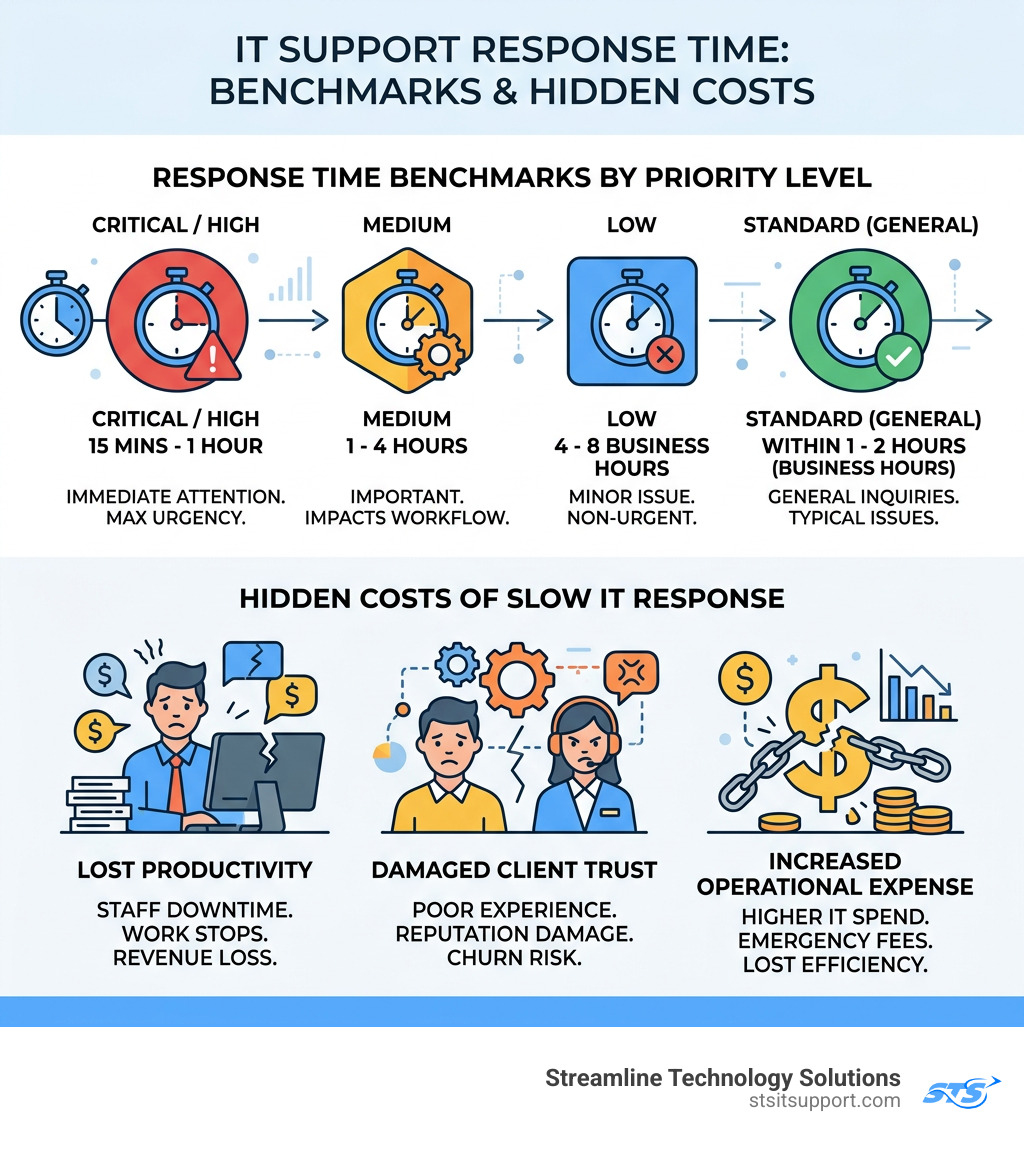
Priority Level Typical Response Time Critical / High 15 minutes to 1 hour Medium 1 to 4 hours Low 4 to 8 business hours Standard (general) Within 1 to 2 hours during business hours
Response time = how long it takes a technician to start working on your issue after you report it. This is not the same as how long it takes to fix it.
These benchmarks matter because slow responses don't just frustrate employees — they stall operations, damage customer relationships, and quietly drain revenue while you wait on hold.
Think about it this way: if your email goes down at 9 a.m. and no one picks up your ticket until noon, that's three hours of your team working around a broken system. Or not working at all.
For South Florida small businesses especially, where every hour of downtime hits the bottom line directly, an unresponsive IT provider isn't just inconvenient — it's a liability.
I'm Michael Gaigelas, and with over 20 years of hands-on experience in IT support, managed services, cloud infrastructure, and business technology, I've seen how poorly managed IT support response times can quietly erode a company's productivity and trust. Let's break down exactly what these metrics mean, what good looks like, and how to make sure you're getting the responsiveness your business deserves.
Understanding IT Support Response Time vs. Resolution Time
One of the most common points of confusion we see in South Florida businesses—from Boca Raton to Fort Lauderdale—is the difference between a "response" and a "resolution." If you don't know the difference, you might sign a contract that looks great on paper but leaves your team stranded when a server goes dark.

The "First Sip" Analogy
Think of it like ordering a drink at a busy restaurant.
Response Time: This is the time it takes for the server to acknowledge you, take your order, and tell you they are starting on it. In IT, the clock stops when a qualified technician actively begins working on your ticket.
Resolution Time: This is the time it takes for that drink to actually land on your table. In IT, this is the total duration from the moment you submitted the ticket until the issue is fully fixed and verified.
Why Triage Isn't Always a "Response"
Some providers use automated "triage" systems or dispatchers who send a canned email saying, "We received your request." While that’s nice, it isn't a true it support response time metric. A meaningful response happens when an engineer engages with the problem.
Industry leaders often use a tiered approach to tracking these metrics to ensure transparency:
Metric What it Measures Why it Matters First Response Initial acknowledgment by a human. Confirms you aren't shouting into a void. Response Time Engineer starts active troubleshooting. This is when the "bleeding" starts to stop. Resolution Time Issue is fully resolved/closed. Total impact on your business productivity.
For a deeper dive into these definitions, you can check out this resource on Response Time VS. Resolution Time Explained.
Why Rapid Response is Critical for Business Bottom Lines
In the business hubs of Coral Springs and Deerfield Beach, competition is fierce. If your systems are down, you aren't just losing time; you're losing ground.
Revenue Protection and Reputation
When a customer calls your office in Pompano Beach and can't get through because the VoIP system is glitching, they don't think, "Oh, their IT team must be busy." They think, "This company is unprofessional." Rapid it support response time ensures that minor glitches don't turn into reputation-killing outages.
Employee Morale
Nothing kills office morale faster than "tech rage." When an employee is ready to work but is blocked by a spinning blue circle, their stress levels skyrocket. Consistent, fast support shows your team that their time is valued.
Maximizing Impact
According to industry insights on maximizing impact with protection level agreements, businesses that prioritize fast response times see significantly higher customer loyalty and retention. If you want to see how we structure our own support to keep local businesses running, visit our Support Center.
Industry Benchmarks and SLA Tiers
A Service Level Agreement (SLA) is the heartbeat of your IT relationship. It defines the "rules of engagement." In South Florida, we typically see three main tiers of onsite and remote support.
Typical IT Support Response Time Benchmarks by Priority
Not all IT issues are created equal. A printer jam in the breakroom shouldn't get the same urgency as a ransomware attack.
Critical Impact (Priority 1): Your entire office is down. The benchmark here is 15 minutes to 1 hour. Top-tier providers aim for the 15-minute mark.
Medium Priority (Priority 2): A department is slowed down, but the business is still functioning. The goal is usually 1 to 4 hours.
Low Priority (Priority 3): A single user has a minor question or needs a software update. A 4 to 8-hour window (or NBD) is standard.
Common SLA Tiers and When to Use Them
24x7x1hr: This means 24/7 coverage with a 1-hour onsite response. This is essential for mission-critical industries like healthcare or financial services where every second of uptime is vital.
8x5xNBD: Support during standard business hours (8 a.m. to 5 p.m.) with "Next Business Day" onsite service. This is cost-effective for smaller offices in Boca Raton that can handle a bit of lag on non-essential hardware.
10x5xNBD: A slight upgrade for growing businesses that operate slightly longer hours and need a balance between cost and availability.
You can learn more about how we maintain these high standards at Streamline Technology Solutions on our About Us page.
How to Measure and Improve Support Performance
You can't manage what you don't measure. If you feel like your IT support is slow, you need data to back it up.
Tools to Track Your IT Support Response Time Effectively
Modern ticketing systems (like Zendesk or Freshservice) are the gold standard. They track:
Mean Time to Respond (MTTR): The average time it takes to acknowledge a ticket.
SLA Compliance Rate: The percentage of tickets that were responded to within the agreed-upon timeframe.
Customer Feedback: Post-ticket surveys are vital. A 10-minute response time is useless if the technician was rude or unhelpful. You can see what our clients think of our performance by reading our reviews.
Strategies for Improving Support Speed
If your internal or current external team is struggling, consider these strategies:
Standardized Intake: Use a portal that requires users to provide details (error codes, screenshots, urgency) upfront. This prevents the "back-and-forth" email chain that eats up hours.
Automation: Use automated workflows for simple tasks like password resets.
Knowledge Base: Empower your team to solve minor issues themselves with a documented library of fixes.
Proactive Monitoring: The best it support response time is the one that happens before you even know there’s a problem. Proactive tools can alert technicians to a failing hard drive at 2 a.m., allowing them to fix it before your staff arrives at 8 a.m.
Interested in seeing how your current setup stacks up? You can use our appointment calendar to book a quick IT audit.
Warning Signs of Poor IT Support Performance
How do you know if it's time to move on? Look for these red flags:
The "Blame Game": When your IT provider blames your internet service provider, and the ISP blames your hardware, but no one actually fixes the problem.
Inconsistent Handling: Sometimes they respond in 10 minutes; other times it takes two days for the same issue.
Lack of Visibility: You have no idea how many tickets are open or what the status of your "Priority 1" issue is.
Recurring Issues: You find yourself calling about the same "fixed" printer every Tuesday morning.
Outdated SLAs: If your contract hasn't been updated since 2018, it likely doesn't account for the remote work and cloud security needs of a 2024 business.
Frequently Asked Questions about IT Support
What is a "good" response time for critical issues?
For a critical, "business-down" event, you should expect a response within 15 to 30 minutes. If your provider takes longer than an hour to even acknowledge a total system failure, your business continuity is at risk.
Can businesses negotiate their SLA response times?
Absolutely. An SLA is a contract. If your business in Fort Lauderdale operates on a 24/7 schedule, you shouldn't settle for an 8x5 support plan. Negotiate for shorter windows on the issues that hurt your revenue the most.
How does remote support impact response speed?
Remote support is almost always faster. Statistics show that roughly 95% of IT issues can be resolved remotely. By using remote desktop tools, a technician in Deerfield Beach can "jump" onto a computer in Boca Raton instantly, bypassing the South Florida traffic and reducing it support response time from hours to minutes.
Conclusion
At the end of the day, your IT support should be an invisible engine that keeps your business moving forward, not an anchor that holds you back. In South Florida, where business moves fast, you need a partner who values your time as much as you do.
At Streamline Technology Solutions, we pride ourselves on providing the businesses of Coral Springs, Boca Raton, Fort Lauderdale, Deerfield Beach, and Pompano Beach with more than just technical fixes. We offer transparent pricing, fast local support, and direct accountability. We don't hide behind complex jargon or hidden fees—we just get the job done.
If you’re tired of waiting and ready for a more responsive IT experience, we’re here to help.
Schedule an appointment today for a consultation.
Or, if you have a current issue, visit our Support Center to see how we can get you back on track.
Don't let slow IT be the reason your business stalls. Let's get your technology streamlined.

How Can We Help?
Call us at (954) 368-0648 or fill out the form below.
Featured Posts
Why Waiting for IT Support is Costing You More Than Just Time
Every Minute Your IT Team Goes Silent Is Costing You Money
IT support response time is one of the most important metrics for any business that depends on technology — which, in 2024, is basically every business.
Here's a quick answer if that's what you need:
Priority Level Typical Response Time Critical / High 15 minutes to 1 hour Medium 1 to 4 hours Low 4 to 8 business hours Standard (general) Within 1 to 2 hours during business hours
Response time = how long it takes a technician to start working on your issue after you report it. This is not the same as how long it takes to fix it.
These benchmarks matter because slow responses don't just frustrate employees — they stall operations, damage customer relationships, and quietly drain revenue while you wait on hold.
Think about it this way: if your email goes down at 9 a.m. and no one picks up your ticket until noon, that's three hours of your team working around a broken system. Or not working at all.
For South Florida small businesses especially, where every hour of downtime hits the bottom line directly, an unresponsive IT provider isn't just inconvenient — it's a liability.
I'm Michael Gaigelas, and with over 20 years of hands-on experience in IT support, managed services, cloud infrastructure, and business technology, I've seen how poorly managed IT support response times can quietly erode a company's productivity and trust. Let's break down exactly what these metrics mean, what good looks like, and how to make sure you're getting the responsiveness your business deserves.
Understanding IT Support Response Time vs. Resolution Time
One of the most common points of confusion we see in South Florida businesses—from Boca Raton to Fort Lauderdale—is the difference between a "response" and a "resolution." If you don't know the difference, you might sign a contract that looks great on paper but leaves your team stranded when a server goes dark.
The "First Sip" Analogy
Think of it like ordering a drink at a busy restaurant.
Response Time: This is the time it takes for the server to acknowledge you, take your order, and tell you they are starting on it. In IT, the clock stops when a qualified technician actively begins working on your ticket.
Resolution Time: This is the time it takes for that drink to actually land on your table. In IT, this is the total duration from the moment you submitted the ticket until the issue is fully fixed and verified.
Why Triage Isn't Always a "Response"
Some providers use automated "triage" systems or dispatchers who send a canned email saying, "We received your request." While that’s nice, it isn't a true it support response time metric. A meaningful response happens when an engineer engages with the problem.
Industry leaders often use a tiered approach to tracking these metrics to ensure transparency:
Metric What it Measures Why it Matters First Response Initial acknowledgment by a human. Confirms you aren't shouting into a void. Response Time Engineer starts active troubleshooting. This is when the "bleeding" starts to stop. Resolution Time Issue is fully resolved/closed. Total impact on your business productivity.
For a deeper dive into these definitions, you can check out this resource on Response Time VS. Resolution Time Explained.
Why Rapid Response is Critical for Business Bottom Lines
In the business hubs of Coral Springs and Deerfield Beach, competition is fierce. If your systems are down, you aren't just losing time; you're losing ground.
Revenue Protection and Reputation
When a customer calls your office in Pompano Beach and can't get through because the VoIP system is glitching, they don't think, "Oh, their IT team must be busy." They think, "This company is unprofessional." Rapid it support response time ensures that minor glitches don't turn into reputation-killing outages.
Employee Morale
Nothing kills office morale faster than "tech rage." When an employee is ready to work but is blocked by a spinning blue circle, their stress levels skyrocket. Consistent, fast support shows your team that their time is valued.
Maximizing Impact
According to industry insights on maximizing impact with protection level agreements, businesses that prioritize fast response times see significantly higher customer loyalty and retention. If you want to see how we structure our own support to keep local businesses running, visit our Support Center.
Industry Benchmarks and SLA Tiers
A Service Level Agreement (SLA) is the heartbeat of your IT relationship. It defines the "rules of engagement." In South Florida, we typically see three main tiers of onsite and remote support.
Typical IT Support Response Time Benchmarks by Priority
Not all IT issues are created equal. A printer jam in the breakroom shouldn't get the same urgency as a ransomware attack.
Critical Impact (Priority 1): Your entire office is down. The benchmark here is 15 minutes to 1 hour. Top-tier providers aim for the 15-minute mark.
Medium Priority (Priority 2): A department is slowed down, but the business is still functioning. The goal is usually 1 to 4 hours.
Low Priority (Priority 3): A single user has a minor question or needs a software update. A 4 to 8-hour window (or NBD) is standard.
Common SLA Tiers and When to Use Them
24x7x1hr: This means 24/7 coverage with a 1-hour onsite response. This is essential for mission-critical industries like healthcare or financial services where every second of uptime is vital.
8x5xNBD: Support during standard business hours (8 a.m. to 5 p.m.) with "Next Business Day" onsite service. This is cost-effective for smaller offices in Boca Raton that can handle a bit of lag on non-essential hardware.
10x5xNBD: A slight upgrade for growing businesses that operate slightly longer hours and need a balance between cost and availability.
You can learn more about how we maintain these high standards at Streamline Technology Solutions on our About Us page.
How to Measure and Improve Support Performance
You can't manage what you don't measure. If you feel like your IT support is slow, you need data to back it up.
Tools to Track Your IT Support Response Time Effectively
Modern ticketing systems (like Zendesk or Freshservice) are the gold standard. They track:
Mean Time to Respond (MTTR): The average time it takes to acknowledge a ticket.
SLA Compliance Rate: The percentage of tickets that were responded to within the agreed-upon timeframe.
Customer Feedback: Post-ticket surveys are vital. A 10-minute response time is useless if the technician was rude or unhelpful. You can see what our clients think of our performance by reading our reviews.
Strategies for Improving Support Speed
If your internal or current external team is struggling, consider these strategies:
Standardized Intake: Use a portal that requires users to provide details (error codes, screenshots, urgency) upfront. This prevents the "back-and-forth" email chain that eats up hours.
Automation: Use automated workflows for simple tasks like password resets.
Knowledge Base: Empower your team to solve minor issues themselves with a documented library of fixes.
Proactive Monitoring: The best it support response time is the one that happens before you even know there’s a problem. Proactive tools can alert technicians to a failing hard drive at 2 a.m., allowing them to fix it before your staff arrives at 8 a.m.
Interested in seeing how your current setup stacks up? You can use our appointment calendar to book a quick IT audit.
Warning Signs of Poor IT Support Performance
How do you know if it's time to move on? Look for these red flags:
The "Blame Game": When your IT provider blames your internet service provider, and the ISP blames your hardware, but no one actually fixes the problem.
Inconsistent Handling: Sometimes they respond in 10 minutes; other times it takes two days for the same issue.
Lack of Visibility: You have no idea how many tickets are open or what the status of your "Priority 1" issue is.
Recurring Issues: You find yourself calling about the same "fixed" printer every Tuesday morning.
Outdated SLAs: If your contract hasn't been updated since 2018, it likely doesn't account for the remote work and cloud security needs of a 2024 business.
Frequently Asked Questions about IT Support
What is a "good" response time for critical issues?
For a critical, "business-down" event, you should expect a response within 15 to 30 minutes. If your provider takes longer than an hour to even acknowledge a total system failure, your business continuity is at risk.
Can businesses negotiate their SLA response times?
Absolutely. An SLA is a contract. If your business in Fort Lauderdale operates on a 24/7 schedule, you shouldn't settle for an 8x5 support plan. Negotiate for shorter windows on the issues that hurt your revenue the most.
How does remote support impact response speed?
Remote support is almost always faster. Statistics show that roughly 95% of IT issues can be resolved remotely. By using remote desktop tools, a technician in Deerfield Beach can "jump" onto a computer in Boca Raton instantly, bypassing the South Florida traffic and reducing it support response time from hours to minutes.
Conclusion
At the end of the day, your IT support should be an invisible engine that keeps your business moving forward, not an anchor that holds you back. In South Florida, where business moves fast, you need a partner who values your time as much as you do.
At Streamline Technology Solutions, we pride ourselves on providing the businesses of Coral Springs, Boca Raton, Fort Lauderdale, Deerfield Beach, and Pompano Beach with more than just technical fixes. We offer transparent pricing, fast local support, and direct accountability. We don't hide behind complex jargon or hidden fees—we just get the job done.
If you’re tired of waiting and ready for a more responsive IT experience, we’re here to help.
Schedule an appointment today for a consultation.
Or, if you have a current issue, visit our Support Center to see how we can get you back on track.
Don't let slow IT be the reason your business stalls. Let's get your technology streamlined.