Stop Paying for Problems with These Free IT Ticket Tools
Why a Free IT Ticket System Might Be All You Need Right Now
Free IT ticket tools have come a long way. You no longer need to spend hundreds of dollars a month just to stop support requests from falling through the cracks.
Here are the best free IT ticketing systems available right now:
Tool Free Users Best For Spiceworks Unlimited IT teams, asset tracking Freshdesk Up to 2 agents Small businesses Zoho Desk Up to 3 agents Startups Jira Service Management Up to 10 users Dev and IT teams osTicket Unlimited Self-hosted, open source Raiseaticket Unlimited Cloud-based, zero cost HubSpot Service Hub Unlimited CRM-connected support
Managing IT issues without a ticketing system is like trying to fix a network outage from a sticky note. Requests get lost. Staff gets blamed. Customers get frustrated. Sound familiar?
For small businesses in South Florida especially, surprise fees and unresponsive support are already a headache. Paying extra for basic help desk software just adds insult to injury.
The good news? Several solid platforms offer genuinely free plans - not just free trials - with real features like automation, SLA management, and multi-channel support.
I'm Michael Gaigelas, and with 20 years in IT support, managed services, and cloud infrastructure, I've helped countless businesses set up and evaluate free IT ticket systems that actually work without draining budgets. In the sections below, I'll walk you through exactly what to look for and which tools are worth your time.
Key Features to Look for in Help Desk Software
When we look for a free IT ticket solution, it’s easy to get distracted by flashy "AI" promises or complex interfaces. However, for a small business in Boca Raton or Coral Springs, the goal is efficiency. You need a tool that organizes the chaos, not one that adds to it.
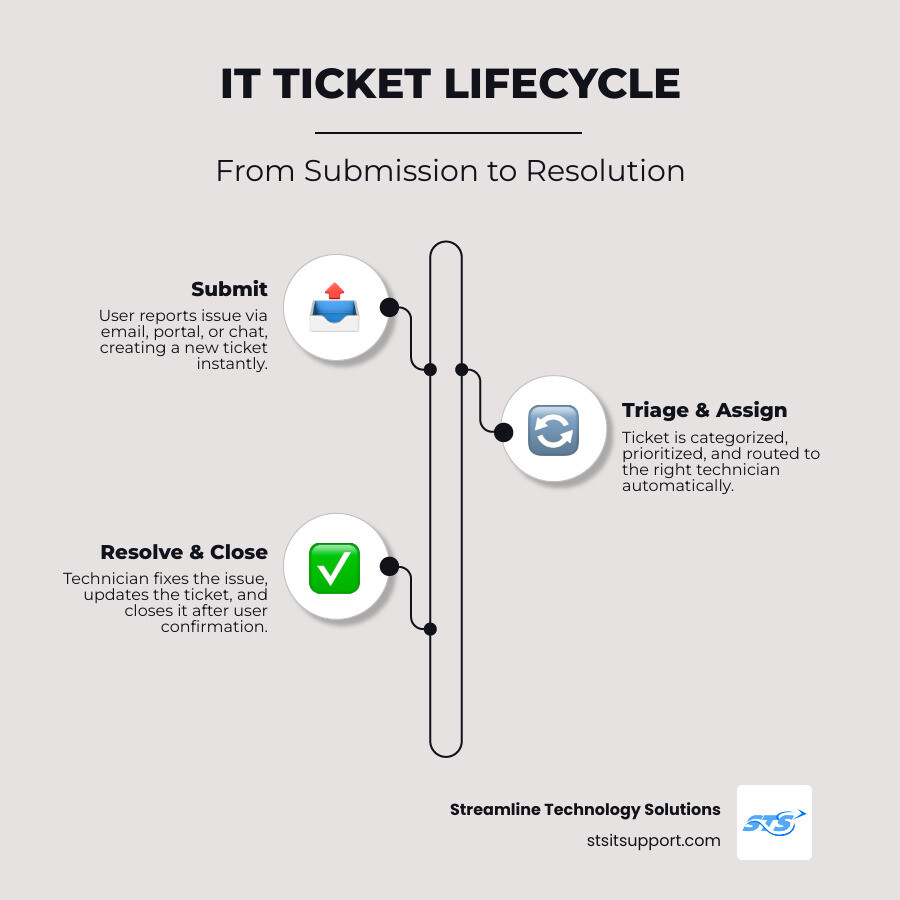
A quality system should act as a central hub for all your communication. Instead of checking three different email accounts and a Slack channel, everything should flow into one dashboard. This ensures that no request is left behind and every technician knows exactly what is on their plate.
Here are the non-negotiable features you should prioritize:
SLA Management: A Service Level Agreement (SLA) is essentially a timer on a ticket. It ensures that urgent issues—like a server going down in a Fort Lauderdale office—are prioritized over low-priority requests like a font change. Even free tools like Raiseaticket allow you to define unique SLAs based on your business hours.
Multi-Channel Support: Your team shouldn't be limited to just one way of receiving help. Look for tools that support email, web forms, and even live chat. This "omnichannel" approach unifies all inquiries into a single interface, giving your agents the context they need to resolve issues quickly.
Knowledge Base: This is a game-changer for reducing ticket volume. By creating a library of "How-To" articles and FAQs, you empower your users to solve simple problems themselves. Research shows that a well-maintained knowledge base can significantly decrease the number of repetitive tickets your team has to handle.
Intuitive Dashboard: You don't want to spend weeks training your staff. The interface should provide a clear view of agent availability, ticket status, and priority levels at a glance.
If you are just getting started, we recommend checking out this Setup Guide to see how simple the configuration process can be for modern cloud-hosted systems.
Essential Automations for a Free IT Ticket
Automation is the secret sauce that makes a free IT ticket system feel like a premium one. Without it, your technicians spend more time "moving" tickets than actually fixing problems. When we consult on IT projects for our local clients, we always emphasize that the best software is the one that does the boring stuff for you.
Key automations to look for include:
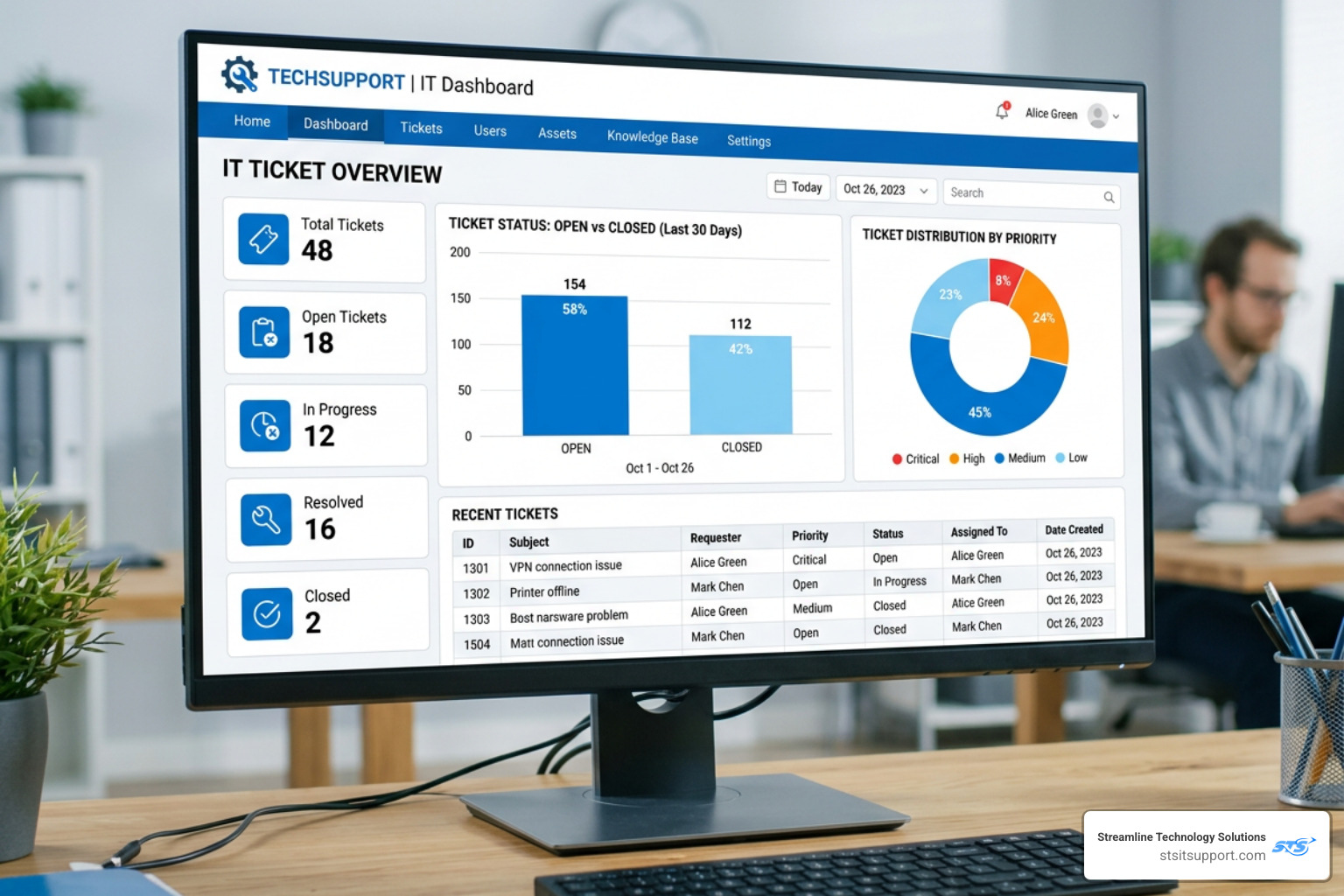
Ticket Routing: Automatically sending a "printer issue" to the hardware specialist and a "password reset" to the general help desk. This prevents bottlenecks and ensures the right person sees the ticket immediately.
Email-to-Ticket Conversion: This is perhaps the most important automation. It takes an incoming email and automatically turns it into a structured ticket with a tracking number. No more "I never saw that email" excuses.
Canned Responses: For common questions, your team can use pre-written templates. This saves hours of typing the same instructions over and over again, allowing your staff to focus on more complex troubleshooting.
Automatic Notifications: Keeping the user in the loop is vital. Automated alerts can tell a user when their ticket has been received, assigned, or resolved.
Best Cloud-Based Tools for a Free IT Ticket
Cloud-based systems are generally the best choice for small to medium-sized businesses in South Florida. They require no server maintenance, are accessible from anywhere (perfect for remote work in Pompano Beach), and usually offer the most modern user interfaces.
Zoho Desk
Zoho Desk is a powerhouse for small teams. Its free plan supports up to 3 agents and includes email ticketing, a private knowledge base, and multilingual support. It’s particularly great for startups because it offers "contextual views," which show a customer's entire interaction history alongside the current ticket.
Jira Service Management
Atlassian’s Jira is the gold standard for IT and development teams. The free plan is incredibly generous, allowing up to 10 users. It includes 100 automations per month and 2 GB of storage. It’s a bit more complex to set up, but if you need a system that follows ITIL standards, this is it. Interestingly, 40% of Atlassian's customers were using Jira for service requests before Jira Service Desk was even officially created in 2013!
Freshdesk
Freshdesk is known for being extremely user-friendly. Their free tier (often called the "Free" or "Sprout" plan) supports up to 2 agents and includes ticket merging, canned responses, and basic reporting. It’s an ideal "first step" for a business moving away from a shared Gmail inbox.
HubSpot Service Hub
If your business already uses HubSpot for marketing or sales, their Service Hub is a natural fit. The free version includes a shared inbox, live chat, and basic reporting dashboards. It’s excellent for maintaining a single "source of truth" for all customer data.
Raiseaticket
Unlike many competitors that limit agent counts to force an upgrade, Raiseaticket offers a 100% free cloud helpdesk with unlimited tickets and agents. It’s GDPR compliant and includes features usually reserved for paid tiers, such as SLA management and real-time notifications via Slack or Microsoft Teams.
Feature Zoho Desk Jira Service Mgt Freshdesk HubSpot Raiseaticket User Limit 3 Agents 10 Users 2 Agents Unlimited Unlimited SLA Support Basic Yes Basic Limited Yes Knowledge Base Private Yes Private No Yes Automations 2 Macros 100/mo Basic Limited Workflow-based
Scalability Limits of a Free IT Ticket
While these tools are fantastic, we have to be honest: "free" always comes with a ceiling. As your South Florida business grows, you might hit these walls:
User Caps: Most platforms (except Spiceworks or Raiseaticket) will limit you to 2 or 3 agents. If your team grows to 5 or 10 people, you’ll likely need to start paying per user.
Limited Analytics: Free plans usually give you basic "tickets closed" data. If you need deep insights into agent performance or complex trend reporting, you'll often find those features locked behind a paywall.
Storage Restrictions: 2 GB of storage (like in Jira's free plan) can fill up surprisingly fast if your users are attaching large log files, screenshots, or videos to their tickets.
Security and Compliance: While most free tools offer basic security like 2FA, advanced features like IP whitelisting or HIPAA compliance often require a premium subscription.
Open-Source vs. Cloud-Based Ticketing Systems
For some IT managers in Deerfield Beach or Fort Lauderdale, the "cloud" isn't the answer. They want total control over their data and the ability to customize every line of code. This is where open-source systems shine.
osTicket
osTicket is the most popular open-source free IT ticket software. It’s completely free to download and install on your own server. It supports unlimited users and tickets and offers features like agent collision avoidance (so two people don't work on the same ticket) and custom fields. However, you are responsible for the hosting, security, and updates.
Znuny (and OTRS)
Znuny is a fork of the famous OTRS system. It is a highly professional, ITIL-ready ticketing platform. It’s incredibly flexible but has a steep learning curve. It’s best suited for organizations with dedicated Linux administrators who can manage the backend.
KIX
KIX is another open-source option that focuses on ITSM (IT Service Management) and field service. It’s great for companies that need to track physical assets alongside their tickets. They offer both a cloud version and an on-premise version for those who want to keep their data on their own servers.
Comparison at a Glance:
Cloud-Based: Easy setup, no maintenance, but limited by the provider's rules and user caps.
Open-Source: Unlimited freedom and users, but requires technical skill to host and maintain. If you're looking for an Agent Guide to see how these workflows differ, many open-source communities provide extensive documentation.
Frequently Asked Questions about Free Ticketing
Is free IT ticketing software secure for small businesses?
Generally, yes. Most reputable cloud providers like Zoho or Freshworks use industry-standard encryption and offer two-factor authentication (2FA). However, free plans may lack advanced audit logs or single sign-on (SSO) capabilities. If you are in a highly regulated industry (like healthcare or finance in Boca Raton), you must verify that the free tier meets your specific compliance needs.
Can free systems handle high ticket volumes?
Most free systems can handle thousands of tickets without breaking a sweat. The limitation isn't usually the volume of tickets, but the number of people available to work on them. If you have 500 tickets a week but only 2 free agent seats, your response times will suffer regardless of the software's capacity.
When should a team upgrade to a paid plan?
You should consider upgrading when:
You exceed the agent limit and your team is sharing logins (which is a security risk!).
You need advanced automation to handle complex workflows.
You require integrations with premium tools like Salesforce or advanced Jira plugins.
You need detailed analytics to justify IT spend to stakeholders.
Conclusion
Choosing a free IT ticket system is a smart way to professionalize your support without adding a new monthly bill. Whether you choose a cloud-powered tool like Zoho Desk or a robust open-source option like osTicket, the goal remains the same: better communication and faster resolutions.
At Streamline Technology Solutions, we believe in helping South Florida businesses find the right balance between cost and performance. We know that IT can be frustrating, which is why we offer transparent pricing without hidden fees and fast local support for companies in Coral Springs, Boca Raton, and beyond.
If you find that managing your own ticketing system is taking too much time away from your core business, we’re here to help. From Resources to full managed support, our team provides the direct accountability you need to stay productive.
Ready to stop fighting your tech and start growing your business? Get started with professional IT support today.

How Can We Help?
Call us at (954) 368-0648 or fill out the form below.
Featured Posts
Stop Paying for Problems with These Free IT Ticket Tools
Why a Free IT Ticket System Might Be All You Need Right Now
Free IT ticket tools have come a long way. You no longer need to spend hundreds of dollars a month just to stop support requests from falling through the cracks.
Here are the best free IT ticketing systems available right now:
Tool Free Users Best For Spiceworks Unlimited IT teams, asset tracking Freshdesk Up to 2 agents Small businesses Zoho Desk Up to 3 agents Startups Jira Service Management Up to 10 users Dev and IT teams osTicket Unlimited Self-hosted, open source Raiseaticket Unlimited Cloud-based, zero cost HubSpot Service Hub Unlimited CRM-connected support
Managing IT issues without a ticketing system is like trying to fix a network outage from a sticky note. Requests get lost. Staff gets blamed. Customers get frustrated. Sound familiar?
For small businesses in South Florida especially, surprise fees and unresponsive support are already a headache. Paying extra for basic help desk software just adds insult to injury.
The good news? Several solid platforms offer genuinely free plans - not just free trials - with real features like automation, SLA management, and multi-channel support.
I'm Michael Gaigelas, and with 20 years in IT support, managed services, and cloud infrastructure, I've helped countless businesses set up and evaluate free IT ticket systems that actually work without draining budgets. In the sections below, I'll walk you through exactly what to look for and which tools are worth your time.
Key Features to Look for in Help Desk Software
When we look for a free IT ticket solution, it’s easy to get distracted by flashy "AI" promises or complex interfaces. However, for a small business in Boca Raton or Coral Springs, the goal is efficiency. You need a tool that organizes the chaos, not one that adds to it.
A quality system should act as a central hub for all your communication. Instead of checking three different email accounts and a Slack channel, everything should flow into one dashboard. This ensures that no request is left behind and every technician knows exactly what is on their plate.
Here are the non-negotiable features you should prioritize:
SLA Management: A Service Level Agreement (SLA) is essentially a timer on a ticket. It ensures that urgent issues—like a server going down in a Fort Lauderdale office—are prioritized over low-priority requests like a font change. Even free tools like Raiseaticket allow you to define unique SLAs based on your business hours.
Multi-Channel Support: Your team shouldn't be limited to just one way of receiving help. Look for tools that support email, web forms, and even live chat. This "omnichannel" approach unifies all inquiries into a single interface, giving your agents the context they need to resolve issues quickly.
Knowledge Base: This is a game-changer for reducing ticket volume. By creating a library of "How-To" articles and FAQs, you empower your users to solve simple problems themselves. Research shows that a well-maintained knowledge base can significantly decrease the number of repetitive tickets your team has to handle.
Intuitive Dashboard: You don't want to spend weeks training your staff. The interface should provide a clear view of agent availability, ticket status, and priority levels at a glance.
If you are just getting started, we recommend checking out this Setup Guide to see how simple the configuration process can be for modern cloud-hosted systems.
Essential Automations for a Free IT Ticket
Automation is the secret sauce that makes a free IT ticket system feel like a premium one. Without it, your technicians spend more time "moving" tickets than actually fixing problems. When we consult on IT projects for our local clients, we always emphasize that the best software is the one that does the boring stuff for you.
Key automations to look for include:
Ticket Routing: Automatically sending a "printer issue" to the hardware specialist and a "password reset" to the general help desk. This prevents bottlenecks and ensures the right person sees the ticket immediately.
Email-to-Ticket Conversion: This is perhaps the most important automation. It takes an incoming email and automatically turns it into a structured ticket with a tracking number. No more "I never saw that email" excuses.
Canned Responses: For common questions, your team can use pre-written templates. This saves hours of typing the same instructions over and over again, allowing your staff to focus on more complex troubleshooting.
Automatic Notifications: Keeping the user in the loop is vital. Automated alerts can tell a user when their ticket has been received, assigned, or resolved.
Best Cloud-Based Tools for a Free IT Ticket
Cloud-based systems are generally the best choice for small to medium-sized businesses in South Florida. They require no server maintenance, are accessible from anywhere (perfect for remote work in Pompano Beach), and usually offer the most modern user interfaces.
Zoho Desk
Zoho Desk is a powerhouse for small teams. Its free plan supports up to 3 agents and includes email ticketing, a private knowledge base, and multilingual support. It’s particularly great for startups because it offers "contextual views," which show a customer's entire interaction history alongside the current ticket.
Jira Service Management
Atlassian’s Jira is the gold standard for IT and development teams. The free plan is incredibly generous, allowing up to 10 users. It includes 100 automations per month and 2 GB of storage. It’s a bit more complex to set up, but if you need a system that follows ITIL standards, this is it. Interestingly, 40% of Atlassian's customers were using Jira for service requests before Jira Service Desk was even officially created in 2013!
Freshdesk
Freshdesk is known for being extremely user-friendly. Their free tier (often called the "Free" or "Sprout" plan) supports up to 2 agents and includes ticket merging, canned responses, and basic reporting. It’s an ideal "first step" for a business moving away from a shared Gmail inbox.
HubSpot Service Hub
If your business already uses HubSpot for marketing or sales, their Service Hub is a natural fit. The free version includes a shared inbox, live chat, and basic reporting dashboards. It’s excellent for maintaining a single "source of truth" for all customer data.
Raiseaticket
Unlike many competitors that limit agent counts to force an upgrade, Raiseaticket offers a 100% free cloud helpdesk with unlimited tickets and agents. It’s GDPR compliant and includes features usually reserved for paid tiers, such as SLA management and real-time notifications via Slack or Microsoft Teams.
Feature Zoho Desk Jira Service Mgt Freshdesk HubSpot Raiseaticket User Limit 3 Agents 10 Users 2 Agents Unlimited Unlimited SLA Support Basic Yes Basic Limited Yes Knowledge Base Private Yes Private No Yes Automations 2 Macros 100/mo Basic Limited Workflow-based
Scalability Limits of a Free IT Ticket
While these tools are fantastic, we have to be honest: "free" always comes with a ceiling. As your South Florida business grows, you might hit these walls:
User Caps: Most platforms (except Spiceworks or Raiseaticket) will limit you to 2 or 3 agents. If your team grows to 5 or 10 people, you’ll likely need to start paying per user.
Limited Analytics: Free plans usually give you basic "tickets closed" data. If you need deep insights into agent performance or complex trend reporting, you'll often find those features locked behind a paywall.
Storage Restrictions: 2 GB of storage (like in Jira's free plan) can fill up surprisingly fast if your users are attaching large log files, screenshots, or videos to their tickets.
Security and Compliance: While most free tools offer basic security like 2FA, advanced features like IP whitelisting or HIPAA compliance often require a premium subscription.
Open-Source vs. Cloud-Based Ticketing Systems
For some IT managers in Deerfield Beach or Fort Lauderdale, the "cloud" isn't the answer. They want total control over their data and the ability to customize every line of code. This is where open-source systems shine.
osTicket
osTicket is the most popular open-source free IT ticket software. It’s completely free to download and install on your own server. It supports unlimited users and tickets and offers features like agent collision avoidance (so two people don't work on the same ticket) and custom fields. However, you are responsible for the hosting, security, and updates.
Znuny (and OTRS)
Znuny is a fork of the famous OTRS system. It is a highly professional, ITIL-ready ticketing platform. It’s incredibly flexible but has a steep learning curve. It’s best suited for organizations with dedicated Linux administrators who can manage the backend.
KIX
KIX is another open-source option that focuses on ITSM (IT Service Management) and field service. It’s great for companies that need to track physical assets alongside their tickets. They offer both a cloud version and an on-premise version for those who want to keep their data on their own servers.
Comparison at a Glance:
Cloud-Based: Easy setup, no maintenance, but limited by the provider's rules and user caps.
Open-Source: Unlimited freedom and users, but requires technical skill to host and maintain. If you're looking for an Agent Guide to see how these workflows differ, many open-source communities provide extensive documentation.
Frequently Asked Questions about Free Ticketing
Is free IT ticketing software secure for small businesses?
Generally, yes. Most reputable cloud providers like Zoho or Freshworks use industry-standard encryption and offer two-factor authentication (2FA). However, free plans may lack advanced audit logs or single sign-on (SSO) capabilities. If you are in a highly regulated industry (like healthcare or finance in Boca Raton), you must verify that the free tier meets your specific compliance needs.
Can free systems handle high ticket volumes?
Most free systems can handle thousands of tickets without breaking a sweat. The limitation isn't usually the volume of tickets, but the number of people available to work on them. If you have 500 tickets a week but only 2 free agent seats, your response times will suffer regardless of the software's capacity.
When should a team upgrade to a paid plan?
You should consider upgrading when:
You exceed the agent limit and your team is sharing logins (which is a security risk!).
You need advanced automation to handle complex workflows.
You require integrations with premium tools like Salesforce or advanced Jira plugins.
You need detailed analytics to justify IT spend to stakeholders.
Conclusion
Choosing a free IT ticket system is a smart way to professionalize your support without adding a new monthly bill. Whether you choose a cloud-powered tool like Zoho Desk or a robust open-source option like osTicket, the goal remains the same: better communication and faster resolutions.
At Streamline Technology Solutions, we believe in helping South Florida businesses find the right balance between cost and performance. We know that IT can be frustrating, which is why we offer transparent pricing without hidden fees and fast local support for companies in Coral Springs, Boca Raton, and beyond.
If you find that managing your own ticketing system is taking too much time away from your core business, we’re here to help. From Resources to full managed support, our team provides the direct accountability you need to stay productive.
Ready to stop fighting your tech and start growing your business? Get started with professional IT support today.