The No-Nonsense Guide to Onsite IT Support
What Is Onsite IT Support? (And Why It Still Matters in 2026)
Onsite IT support is when a trained technician comes to your physical location to fix, install, or maintain your technology — in person.
Here's the quick answer:
Onsite IT Support What it is Hands-on tech help at your business location What it covers Hardware repairs, cabling, network setup, server work, equipment installs When you need it When a problem can't be fixed remotely — a dead server, bad cable, failed switch Who it's for Businesses of any size that rely on physical IT infrastructure Key benefit Fixes root causes, not just symptoms — less repeat downtime
Remote support is fast and convenient. But some problems simply can't be solved over a screen. A technician can't replace a failed hard drive from across town. They can't rewire a network closet through a Zoom call. And they definitely can't tell you that your server isn't booting because it's not plugged in.
That gap — between what remote support can do and what your business actually needs — is exactly where onsite IT support steps in.
For South Florida small business owners who've dealt with unresponsive providers, surprise fees, and downtime that nobody seems to own, the value of having a real technician show up fast and fix things properly is hard to overstate. According to industry data from ITIC, enterprise-level downtime can cost anywhere from $100,000 to $300,000 per hour depending on the sector — and smaller businesses aren't immune to that pain.
I'm Michael Gaigelas, and I've spent 20 years working in onsite IT support, managed services, cloud infrastructure, and business networking. In this guide, I'll walk you through everything you need to know to make smart decisions about onsite IT support for your business.
Defining Onsite IT Support vs. Remote Solutions

While the tech world often pushes a "cloud-first" or "remote-only" narrative, the reality of business in April 2026 is that we still live in a physical world. Remote IT support is excellent for software glitches, password resets, and configuration changes. It uses remote desktop software to allow an agent to control your screen from a distant help desk.
However, onsite it support is the "boots on the ground" component of your IT strategy. It involves physical intervention. If a network switch has fried its motherboard or a squirrel has decided your exterior fiber line looks like a snack, no amount of remote clicking will fix the problem.
At our Support Center, we see the distinction clearly every day. Remote support manages the logic of your systems; onsite support manages the physicality of them.
When Remote Support Isn't Enough
Remote support has its limits. You generally need a technician to walk through your door in Coral Springs or Fort Lauderdale when you encounter:
Physical Connectivity Issues: If the internet is down because of a snapped cable or a failed router, a remote tech can't even "get in" to see what’s wrong.
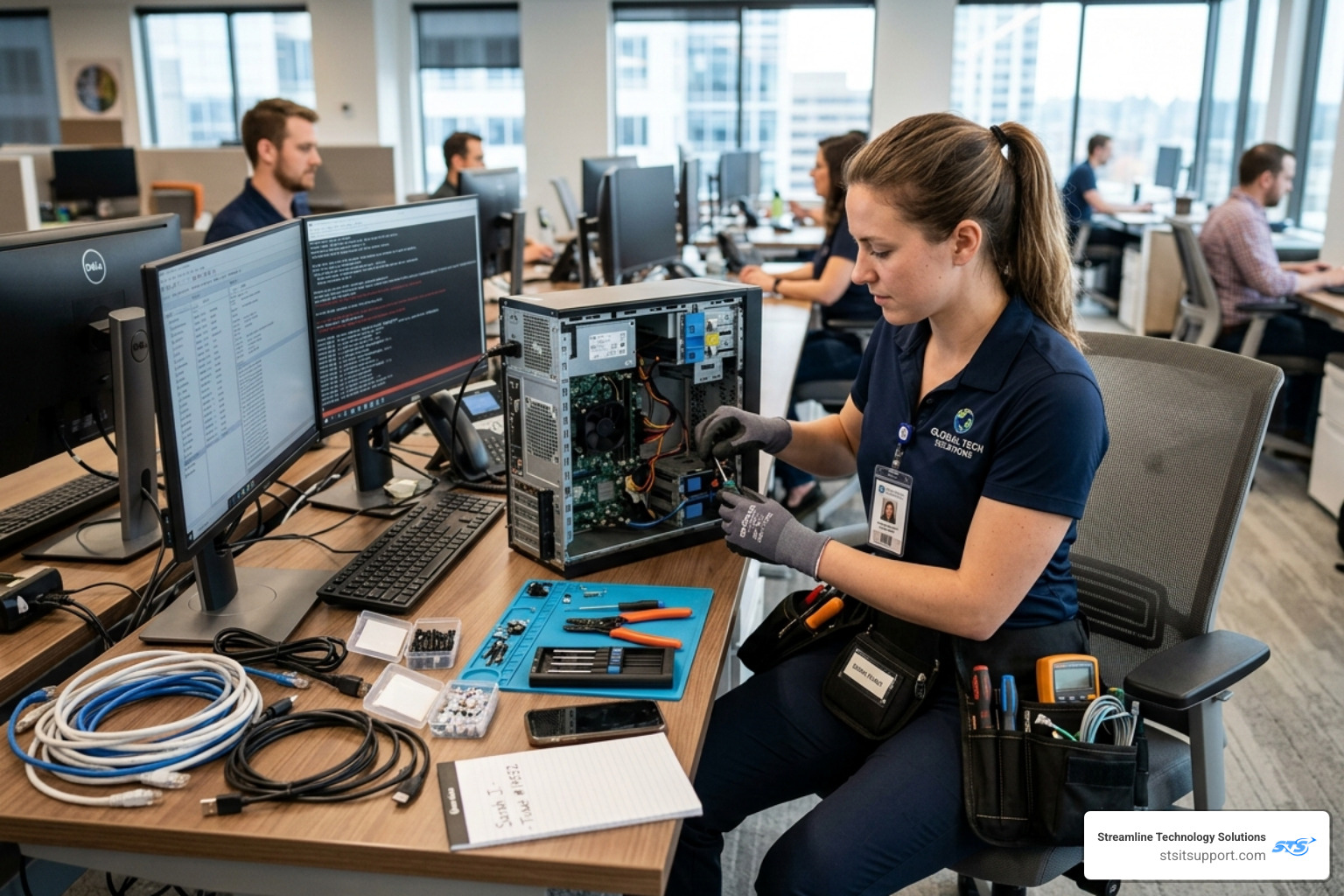
Hardware Failure: Replacing a power supply, adding RAM to a server, or swapping out a dead hard drive requires hands.
Power Issues: UPS (Uninterruptible Power Supply) failures or tripped breakers in the server room require a physical check.
Localized Technical Assistance: Sometimes, a user just needs someone to stand next to them and show them how to use a new piece of hardware.
If you are located in Boca Raton or Deerfield Beach, check our Areas We Serve page to see how quickly we can get a technician to your specific neighborhood.
The Role of Onsite IT Support in Modern Infrastructure
Modern IT isn't just computers on desks. It's an intricately integrated system of structured cabling, AV equipment, security cameras, and IoT devices. Onsite it support plays a vital role in:
Structured Cabling: Ensuring your "spaghetti" of wires is organized, labeled, and certified for high-speed data.
Server Room Maintenance: Physical cleaning, thermal imaging to check for hotspots, and cable management.
Workstation Refreshes: When it’s time to replace 20 old PCs with new units, having a team onsite ensures the transition happens in hours, not days.
For larger infrastructure changes, we often categorize these as IT Projects, which require careful onsite planning and execution.
Key Benefits of Having Boots on the Ground

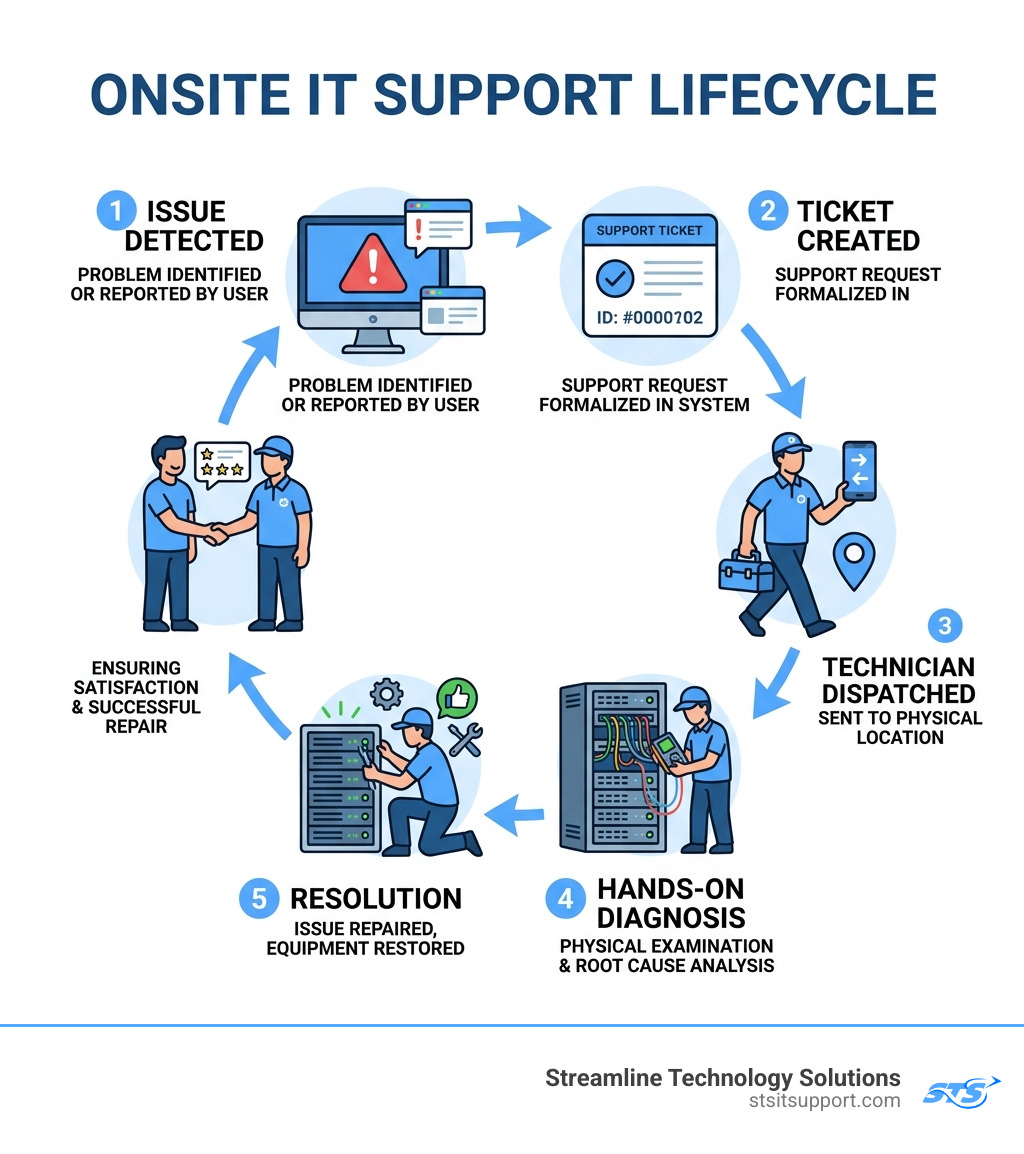
The most immediate benefit of onsite it support is the reduction of "finger-pointing." When a technician is physically present, they take ownership of the environment. They can see the blinking red light on the server that a remote agent might miss.
Reduced Downtime: Statistics show that onsite intervention can reduce network-related downtime by up to 60%. Instead of a back-and-forth email chain with a remote help desk, a tech finds the root cause—like a loose connector—and fixes it instantly.
Security and Compliance: Standards like HIPAA or PCI DSS often require physical audits of where data is stored. A technician can ensure your server rack is physically locked and that access controls are working as intended.
User Training: There is a "human" element to IT. In-person support allows for "drive-by" training, where a tech can show an employee a shortcut or a better way to use their software while they are onsite for a repair.
Our clients often mention in their Reviews that having a familiar face show up at their office in Pompano Beach provides a level of peace of mind that a voice on the phone simply can't match.
Maximizing ROI with Onsite IT Support
How do you calculate the return on investment for someone coming to your office? It’s not just about the cost of the visit; it’s about the cost of the alternative.
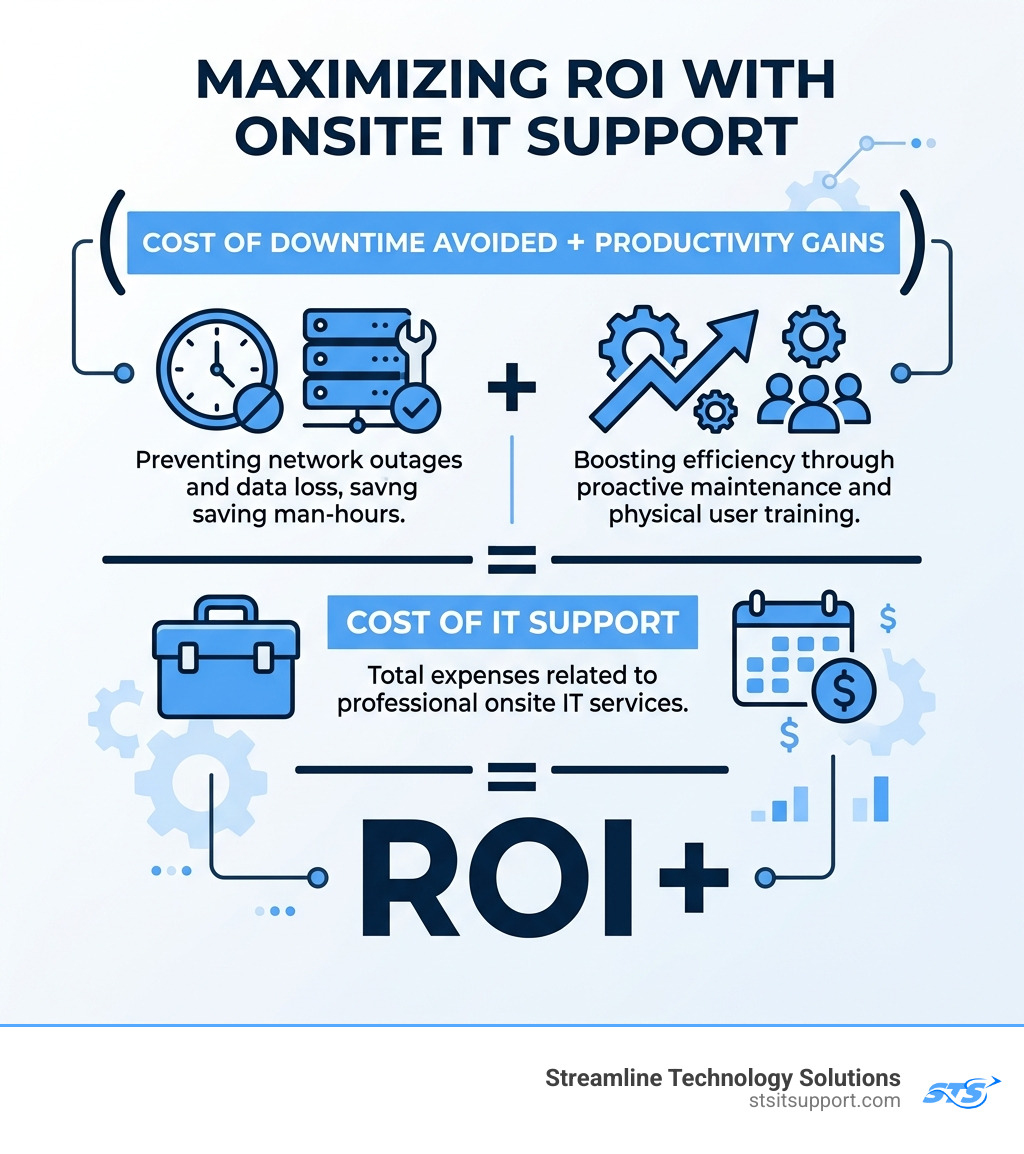
Downtime Costs: If your team of 20 people in Ft. Lauderdale is sitting idle for three hours because the network is down, you’ve lost 60 man-hours of productivity. Preventing just one of these outages a year often pays for the entire support contract.
Asset Management: Onsite techs perform physical "health checks." They might notice a server fan making a strange noise or a battery backup swelling. Replacing these before they fail is significantly cheaper than an emergency recovery.
Strategic Planning: A tech who sees your office layout can give better advice on Wi-Fi dead zones or where to place new hardware than someone looking at a network map from a thousand miles away.
Critical Tasks Requiring Physical Intervention
There is a specific category of work in the IT world known as IMAC: Install, Move, Add, Change. These are the bread and butter of onsite it support.
Install: Setting up new servers, firewalls, or workstations.
Move: Relocating an office or even just moving a department to a different floor. This involves rerunning cables and ensuring connectivity in the new space.
Add: Adding new peripheral devices like network printers, scanners, or VoIP phones.
Change: Upgrading existing hardware components.
Beyond IMAC, site surveys are critical. Before we start any major work, we walk the floor. We look at power supplies, existing cabling pathways, and physical security. This prevents expensive "surprises" halfway through a project.
All of these tasks are governed by our Service Level Agreements (SLAs), which you can learn more about at our Support Center.
Hardware Installation and Emergency Repairs
When a server fails at 2:00 PM on a Friday, it’s a business-critical emergency. In these moments, onsite it support is the only solution.
Server Failure: Diagnosing a motherboard vs. a power supply issue.
Faulty Cabling: Using specialized tools to find a break in a line hidden behind a wall.
Rapid Response: For urgent issues, we aim for a 30-60 minute response time for businesses in our South Florida service area.
Implementing a Hybrid IT Support Model
In 2026, the most effective way to manage technology is the Hybrid IT Support Model. This isn't an "either/or" choice between remote and onsite; it's a "both/and" strategy.
The Remote Layer: 24/7 proactive monitoring. We use software to "watch" your servers and workstations. If a hard drive starts showing errors (using SMART analysis), we know about it before the computer even crashes.
The Onsite Layer: When the monitoring software flags a physical issue, or when a project requires "hands," we dispatch a local technician.
This model is highly scalable. You don't need to pay for a full-time IT person to sit in your office in Coral Springs. Instead, you get the efficiency of a 24/7 help desk combined with the power of a local team that can be at your door when it matters. Learn more About Us and how we've refined this model over the years.
Frequently Asked Questions about Onsite IT
What response times should I expect from an onsite provider?
Your SLA should clearly define response times based on priority.
Critical (Business Down): You should expect a technician on-site within 30-60 minutes for urgent, business-critical issues if you are within the provider's core service area.
High Priority: Same-day service.
Standard Requests: Next business day or scheduled visits.
Which industries benefit most from onsite IT services?
While every business needs tech, some are "onsite-heavy":
Manufacturing: Requires physical maintenance of shop-floor computers and ruggedized networking.
Healthcare: Needs strict physical security compliance and immediate hardware fixes for patient-facing systems.
Logistics & Warehousing: Large physical footprints require extensive Wi-Fi mesh networks and handheld device support.
Professional Services: Law firms and accounting offices in Boca Raton or Fort Lauderdale often have high-density server needs and require "white-glove" in-person service.
How do I choose the right onsite IT support partner?
Don't just go with the lowest bidder. Look for:
Certified Technicians: Ensure they hold industry-standard certifications like CompTIA A+, Network+, or Microsoft credentials.
Local Coverage: If their "local" office is three counties away, they won't meet their 60-minute emergency SLA.
Transparent Pricing: Avoid "trip fees" or hidden "emergency surcharges." You should know exactly what you are paying for.
Direct Accountability: You want a partner who owns the problem until it is solved, not one that passes you between different departments.
Conclusion
At Streamline Technology Solutions, we believe that IT should be a tool for growth, not a source of stress. By focusing on the South Florida business community—from Coral Springs to Pompano Beach—we provide the fast, local, and accountable onsite it support that modern companies require.
We don't hide behind tickets or automated bots. We show up, we fix the root cause, and we make sure your team is empowered to do their best work. Whether you need an emergency repair, a full office relocation, or a proactive hybrid support plan, we are your "boots on the ground."
Ready to experience IT support that actually shows up?
Visit us at https://stsitsupport.com to learn how we can protect your business from downtime and help you scale with confidence.

How Can We Help?
Call us at (954) 368-0648 or fill out the form below.
Featured Posts
The No-Nonsense Guide to Onsite IT Support
What Is Onsite IT Support? (And Why It Still Matters in 2026)
Onsite IT support is when a trained technician comes to your physical location to fix, install, or maintain your technology — in person.
Here's the quick answer:
Onsite IT Support What it is Hands-on tech help at your business location What it covers Hardware repairs, cabling, network setup, server work, equipment installs When you need it When a problem can't be fixed remotely — a dead server, bad cable, failed switch Who it's for Businesses of any size that rely on physical IT infrastructure Key benefit Fixes root causes, not just symptoms — less repeat downtime
Remote support is fast and convenient. But some problems simply can't be solved over a screen. A technician can't replace a failed hard drive from across town. They can't rewire a network closet through a Zoom call. And they definitely can't tell you that your server isn't booting because it's not plugged in.
That gap — between what remote support can do and what your business actually needs — is exactly where onsite IT support steps in.
For South Florida small business owners who've dealt with unresponsive providers, surprise fees, and downtime that nobody seems to own, the value of having a real technician show up fast and fix things properly is hard to overstate. According to industry data from ITIC, enterprise-level downtime can cost anywhere from $100,000 to $300,000 per hour depending on the sector — and smaller businesses aren't immune to that pain.
I'm Michael Gaigelas, and I've spent 20 years working in onsite IT support, managed services, cloud infrastructure, and business networking. In this guide, I'll walk you through everything you need to know to make smart decisions about onsite IT support for your business.
Defining Onsite IT Support vs. Remote Solutions
While the tech world often pushes a "cloud-first" or "remote-only" narrative, the reality of business in April 2026 is that we still live in a physical world. Remote IT support is excellent for software glitches, password resets, and configuration changes. It uses remote desktop software to allow an agent to control your screen from a distant help desk.
However, onsite it support is the "boots on the ground" component of your IT strategy. It involves physical intervention. If a network switch has fried its motherboard or a squirrel has decided your exterior fiber line looks like a snack, no amount of remote clicking will fix the problem.
At our Support Center, we see the distinction clearly every day. Remote support manages the logic of your systems; onsite support manages the physicality of them.
When Remote Support Isn't Enough
Remote support has its limits. You generally need a technician to walk through your door in Coral Springs or Fort Lauderdale when you encounter:
Physical Connectivity Issues: If the internet is down because of a snapped cable or a failed router, a remote tech can't even "get in" to see what’s wrong.
Hardware Failure: Replacing a power supply, adding RAM to a server, or swapping out a dead hard drive requires hands.
Power Issues: UPS (Uninterruptible Power Supply) failures or tripped breakers in the server room require a physical check.
Localized Technical Assistance: Sometimes, a user just needs someone to stand next to them and show them how to use a new piece of hardware.
If you are located in Boca Raton or Deerfield Beach, check our Areas We Serve page to see how quickly we can get a technician to your specific neighborhood.
The Role of Onsite IT Support in Modern Infrastructure
Modern IT isn't just computers on desks. It's an intricately integrated system of structured cabling, AV equipment, security cameras, and IoT devices. Onsite it support plays a vital role in:
Structured Cabling: Ensuring your "spaghetti" of wires is organized, labeled, and certified for high-speed data.
Server Room Maintenance: Physical cleaning, thermal imaging to check for hotspots, and cable management.
Workstation Refreshes: When it’s time to replace 20 old PCs with new units, having a team onsite ensures the transition happens in hours, not days.
For larger infrastructure changes, we often categorize these as IT Projects, which require careful onsite planning and execution.
Key Benefits of Having Boots on the Ground
The most immediate benefit of onsite it support is the reduction of "finger-pointing." When a technician is physically present, they take ownership of the environment. They can see the blinking red light on the server that a remote agent might miss.
Reduced Downtime: Statistics show that onsite intervention can reduce network-related downtime by up to 60%. Instead of a back-and-forth email chain with a remote help desk, a tech finds the root cause—like a loose connector—and fixes it instantly.
Security and Compliance: Standards like HIPAA or PCI DSS often require physical audits of where data is stored. A technician can ensure your server rack is physically locked and that access controls are working as intended.
User Training: There is a "human" element to IT. In-person support allows for "drive-by" training, where a tech can show an employee a shortcut or a better way to use their software while they are onsite for a repair.
Our clients often mention in their Reviews that having a familiar face show up at their office in Pompano Beach provides a level of peace of mind that a voice on the phone simply can't match.
Maximizing ROI with Onsite IT Support
How do you calculate the return on investment for someone coming to your office? It’s not just about the cost of the visit; it’s about the cost of the alternative.
Downtime Costs: If your team of 20 people in Ft. Lauderdale is sitting idle for three hours because the network is down, you’ve lost 60 man-hours of productivity. Preventing just one of these outages a year often pays for the entire support contract.
Asset Management: Onsite techs perform physical "health checks." They might notice a server fan making a strange noise or a battery backup swelling. Replacing these before they fail is significantly cheaper than an emergency recovery.
Strategic Planning: A tech who sees your office layout can give better advice on Wi-Fi dead zones or where to place new hardware than someone looking at a network map from a thousand miles away.
Critical Tasks Requiring Physical Intervention
There is a specific category of work in the IT world known as IMAC: Install, Move, Add, Change. These are the bread and butter of onsite it support.
Install: Setting up new servers, firewalls, or workstations.
Move: Relocating an office or even just moving a department to a different floor. This involves rerunning cables and ensuring connectivity in the new space.
Add: Adding new peripheral devices like network printers, scanners, or VoIP phones.
Change: Upgrading existing hardware components.
Beyond IMAC, site surveys are critical. Before we start any major work, we walk the floor. We look at power supplies, existing cabling pathways, and physical security. This prevents expensive "surprises" halfway through a project.
All of these tasks are governed by our Service Level Agreements (SLAs), which you can learn more about at our Support Center.
Hardware Installation and Emergency Repairs
When a server fails at 2:00 PM on a Friday, it’s a business-critical emergency. In these moments, onsite it support is the only solution.
Server Failure: Diagnosing a motherboard vs. a power supply issue.
Faulty Cabling: Using specialized tools to find a break in a line hidden behind a wall.
Rapid Response: For urgent issues, we aim for a 30-60 minute response time for businesses in our South Florida service area.
Implementing a Hybrid IT Support Model
In 2026, the most effective way to manage technology is the Hybrid IT Support Model. This isn't an "either/or" choice between remote and onsite; it's a "both/and" strategy.
The Remote Layer: 24/7 proactive monitoring. We use software to "watch" your servers and workstations. If a hard drive starts showing errors (using SMART analysis), we know about it before the computer even crashes.
The Onsite Layer: When the monitoring software flags a physical issue, or when a project requires "hands," we dispatch a local technician.
This model is highly scalable. You don't need to pay for a full-time IT person to sit in your office in Coral Springs. Instead, you get the efficiency of a 24/7 help desk combined with the power of a local team that can be at your door when it matters. Learn more About Us and how we've refined this model over the years.
Frequently Asked Questions about Onsite IT
What response times should I expect from an onsite provider?
Your SLA should clearly define response times based on priority.
Critical (Business Down): You should expect a technician on-site within 30-60 minutes for urgent, business-critical issues if you are within the provider's core service area.
High Priority: Same-day service.
Standard Requests: Next business day or scheduled visits.
Which industries benefit most from onsite IT services?
While every business needs tech, some are "onsite-heavy":
Manufacturing: Requires physical maintenance of shop-floor computers and ruggedized networking.
Healthcare: Needs strict physical security compliance and immediate hardware fixes for patient-facing systems.
Logistics & Warehousing: Large physical footprints require extensive Wi-Fi mesh networks and handheld device support.
Professional Services: Law firms and accounting offices in Boca Raton or Fort Lauderdale often have high-density server needs and require "white-glove" in-person service.
How do I choose the right onsite IT support partner?
Don't just go with the lowest bidder. Look for:
Certified Technicians: Ensure they hold industry-standard certifications like CompTIA A+, Network+, or Microsoft credentials.
Local Coverage: If their "local" office is three counties away, they won't meet their 60-minute emergency SLA.
Transparent Pricing: Avoid "trip fees" or hidden "emergency surcharges." You should know exactly what you are paying for.
Direct Accountability: You want a partner who owns the problem until it is solved, not one that passes you between different departments.
Conclusion
At Streamline Technology Solutions, we believe that IT should be a tool for growth, not a source of stress. By focusing on the South Florida business community—from Coral Springs to Pompano Beach—we provide the fast, local, and accountable onsite it support that modern companies require.
We don't hide behind tickets or automated bots. We show up, we fix the root cause, and we make sure your team is empowered to do their best work. Whether you need an emergency repair, a full office relocation, or a proactive hybrid support plan, we are your "boots on the ground."
Ready to experience IT support that actually shows up?
Visit us at https://stsitsupport.com to learn how we can protect your business from downtime and help you scale with confidence.